Wednesday, October 12, 2016

What are you doing to me Microsoft?

imageI have three computers running Windows 10, or should I say just one is running.the other two are unusable. Unfortunately that includes a new HP Spectre which I bought specifically to be able to run windows 10 when my experience trying to upgrade a Toshiba laptop proved a disaster (it now happily runs Linux).

My new computer, started to crash with that blue screen something is wrong and then it told me the PIN login was disabled (for security reasons) and now I can’t even get the login prompt at all. I do have recover media on USB …. BUT I have to ne able to login to get to it.

My HP desktop PC just goes to sleep (with little spinners running if I’m lucky) frequently and without warning.

I strongly suspect the cause is the recent (but late) update to Windows 10 anniversary edition!

My faith in Microsoft is extremely dented and I can see a lot of users in the various windows forums are equally as distressed by similar isuues. It was a serious mistake agreeing that I would accept all Windows 10 updates.

I’m not looking forward to having to do clean Windows 10 Installs and then reloading my software. First I need to figure out how to get access back into my well loved HP Spectre.

Tuesday, October 11, 2016

Two more HDDs downed in my Backups

To add to my woes with the exploding DNG files, I discovered that two of my hard drives used for my photo backups and archives had died! The first an older Western Digital taken from a retired imagecomputer (it may have been about 4 years old) just refused to be read. it was spinning and sounded normal but would just not load up its directory or any files. Unfortunately it is the only backup hard disk of all my early photos. I do have CD/DVD copies of most and all are on a separate copy on my archive hard drive currently connected to my network. Thus I theoretically have 2 copies (no longer three). I tried using a couple of recovery programs that have worked for me before but I only got a few snippets of binary gibberish. I tried reformatting the disk which took forever and wrote a few files, again taking for ever. However once I unmounted and remounted it nothing again. So this drive is TRUELY DEAD (fifth western digital to fail me). The portable style seagate (about 3 years old) is unfortunately holding backup of my recent photos and there is no DVD backup set. It was intended to be my off-site copy but I just hadn’t got around to that. However I can read what is on it, I just can not write any new files although there is plenty of space. Does not seem to be a security/ownership thing. So I’m risking it with one archive and backups on my travelling hard drives for files not already written to it. I’m also doing DVD backs of recent files as well as an interim step.


Looks like I’m up for two more off-site back up drives.


The lesson I’ve (re-) learned

  1. You need to take you backup drives (or any media) out occasionally and exercise them to check their health.
  2. Don’t expect HHD drives to last.

Sunday, October 09, 2016

PhotoProject :: Seeing by Moving Sideway

This is another photo project inspired by Freeman Patterson’s book Photography and the Art of Seeing. This time I’m doing my thinking sideways deliberately breaking a rule.


Rule : For slow shitter speeds (less than 1/60 sec) secure your camera on a tripod.

Sideways: Why not see what happens if I move the camera!

_MG_9137I have had a homemade string monopod for sometime now. Its really easy to operate, I just  screw in the connector to the tripod socket, let the cord dangle to the ground, then step on it and pull the camera up a little till the chord is tight.  On my recent trip to Canada although i had taken a travel tripod I mainly used this simple homemade device to stabiles my photos, because it is fast to set up and simply rolls up so it is always in my camera bag. It is also teriffic for macro work in the field where you can arc into the best position to focus and keep the camera stable.

IMGP5004_HDRMy idea was the photograph some flowers from above with the camera swinging back and forth. Really easy to do I set the camera to a very slow shutter (1/8 sec) low ISO (100 ASA) and higher Fstop because it was daytime. Then I set the camera time for a delay, and my canon has the ability to then take a number of photos about 2 seconds apart. I stood on my front deck and dangled my camera over the flowers below and like a apprentice puppeteer, tried to swing the camera back and forth then let it spiral down. Ten shots is not many but that's all I took. AND I was amazed with what I had shot. There are only 2 photos here (and certainly I enhanced them in Nik’s software) but more than half the photos were pretty decent.

_MG_9131-002 _MG_9133-Edit

As Freeman warns this approach may be a bit formulaic and should be used with constraint BUT moving the camera can work really well.

Saturday, October 08, 2016

PhotoProject :: Mad Dogs & Englishmen

Summer, Time for the Sunnies,Lens Pen & Polarizing filterAt last we are getting some sunny weather down here in Australia (it has been an unusually wet and overcast spring so far).i So it is now time to break out the polarizing filter, one of my favourite landscape accessories, The Australian Sun can be really strong and Harsh light and generally the illumination of the sky much stronger than the land (or beach) to typically a photo in the middle of the day will have a bleached out sky, instead of the intense blue it actually appears to our eyes.

Just like polaroid sunglasses the polarizing filter oriented in the correct way can cut back the intensity of the sky and glare and deliver a nice sunny photo with a blue sky. My polarising filter is an older style and it also acts like a 2stop neutral density filter. Compare the photo on the left, taken with my polarizing lens, and the photo on the right normal exposure without a polaroid lens.

With Polarizing FilterWithout Polarizing Filter

There are a lot of purist that might say you should only take landscapes in the golden hours, and never in the harsh midday Australian sun. But I say slap on some sunscreen, sunnies (sunglasses) and a polarizing filter and take a few photos if you want.Especially if the family are enjoying that day at the beach or in the park.

Sun, sand & beach can be a challenge to keep your camera and lens clean so put a blower brush (to blow off any sand or particles) in you camera bag and perhaps a lens pens (or microfiber cloth).

Wednesday, October 05, 2016

Experiments in sketching and recording sketching photographically

2016-10-05_21-36-05_HDRI have previously played around with a web camera to record myself sketching, but sketching is an ultra slow process compared with normal video. So I got as far as figuring a time lapse approach would be better but lost interest trying to do that with the webcam software.

Today I figured I’d try again using my Canon EOS on my homemade copy stand tethered to the computer. I have previously mainly tethered via lightroom, but using the EOS utility from canon has way more controls, including a nifty live view and a system to use a small square controlled by a mouse for focus (not unlike taping a touch screen on my phone to focus on a specific part of the screen.) I was impressed with the results and definitely have a new documentation toy to play with.

#279 IMG_0063_Tonal_Sketching

Tuesday, October 04, 2016

DNG and the Month of Living Dangerously

Well i’m glad September is over, I can reset the dial of my beloved Pentax back to RAW/PEF not RAW/DNG. This story began several months ago when I installed the new version of OnOne 10.5, and suddenly I started having problems with OnOne Browse not display RAW files. Initially it wasn’t every RAW file but as I tried reinstalling the update and specifically once I had installed version 10.5.1 I was not able to view any .pef (the Pentax native RAW file) other than for a fleeting moment when the file was first viewed. Also .tif files and .cr2 first would intermittently disappear. This made trying to use OnOne software standalone tedious and frustrating. My continued request for support were just answered with trite rubbish about updating drivers and re-installing the software. I got frustrated and stopped using OnOne for a long time.


I got used to using Aftershot Pro mainly for my initial review and perhaps quick processing in the field. Then loading up lightroom back home and finishing images. For a few photos I wanted to do extra post processing I used the plug-ins linked to either OnOne Enhance, OnOne Effects or Nik’s Software.There is really nothing wrong with Aftershot Pro, in fact despite OnOne’s claims to have the fastest RAW rendering I suspect aftershot might be faster. However I quiet liked being able to flag just the images I wanted to further post process and load only those into lightroom or just finish them in the other OnOne modules, as I had been able to in version 10.0.1.  This was ok and seldom more than two steps. usinf aftershot, then lightroom and then a plg-in was three and meant having to generate an intermediate exchange file. Then I remember that my Pentax is one of the very few cameras that can capture DNG files in camera. I had previously looked at using that format but the files where substantially bigger so I couldn’t see any benefit. However if I avoided the intermediate copies I felt I could still be ahead in terms of spaced consumed so I bravely decided to only take DNG files during September.

Where did all the space go?


In september I created 1420 photo files. Most RAW plus jpeg pairs and most of them RAW DNG with a few .cr2 files. They took up a whopping 85 GB (excluding any .tiff post processing versions)
compared with 3710 files taking up only 40gb for my  month long candian month long trip earlier.

Exploding DNG  Grenades

The first hint of an issue had showed up before September but I assumed it was an isolated accident. Occasionally, and I still can not figure out why or which piece of software is to blame, some of the DNG files will suddenly double in size. Typically it is my better shot that I am interested in. Then sometimes they double in size again. as an example most DNG file from the camera are around 23 MB each, then when they first explode they will reach around 54MB then the second explosion will see them at 120mb plus. It is only when I try to view one of these exploded files that the havoc begins. image_thumb2Aftershot nicely reports it has stopped working, and trying to restart it report that it shut down unexpectedly and is set to read that directory again but it nicely reports it is stopping again, and so on. Lightroom seems to disappear for a while and eventually just doesn’t acknowledge that these bigger DNG files exist. OnOne browser however goes into suspended animation and my computer totally locks up. If I kill the process, restart the computer OnOne will refuse toit refuses to restart.


I eventually worked out if I renamed the last directory I had used before such crashes I could restart the misbehaving software. However if I tried to re-access that directory with OnOne browse, it was back to sleep, and crashes again. Lightroom just kept ignoring the big files after long contemplation and aftershot was ok unless I tried to look more closely at those files. Picasa would still view these files but took a long time to load them, perhaps understandably because they were large. These problems occurred on both my new HP Spectre laptop and my HP desktop, but less so on tests on an old Toshiba laptop.


I soon came to the conclusion that these exploded DNG files were not good, possibly corrupted some how. Which left me with a risk, if I tried to view these files before I had a backup I could loose the RAW version (since I take RAW and jpeg I would at least still have the jpeg version). Unfortunately I realised this AFTER I lost a couple of rather nice photos. I do nothave decent DNG version of these now.


As the month progressed this just became a bigger and more frequent problem and I am no closer to knowing why. I just have a mass of DGN files I am reluctant to even veiw.

Toxic Tiffs

When I am working with plug-ins like OnOne or Nik’s software I had adopted the idea of using .tiff files which give me more colour bit depth and preserve the illumination dynamic range compared with Jpeg and are way smaller than using the .png format (photoshop file format). Again occasionally to start with these .tiff files derived from DNG files began to refuse to load. I could work on the file to begin with, but once i quit the plug-in concerned the file would not open. Worst once this occurred within a session all other tiff files I tried to access would suffer the same fate. Exiting the software and starting a new session sometimes fixed the problem till I hit another toxic .tiff. the file sized does not seem to be altered in the case of the .tif files, so there is no easyway to figure out which fie will or won’t open. So opening any .tif file has a risk!

At this stage I also started to suspect a photo/dng targeting virus or malware, but I can not findany reports of such a beast and my virus and malware scans do not report any problems,

So I have stopped recording in DNG for four days now and guess what? no problems for two days!


Is the problem in the Pentax version of DNG, or is it in the software, or even combination of software I’m trying to use?


The fact that the new apple IPhone 7 will save optionally save in DNG format could see others finding similar problems. I’ll let the do the debugging. I’ve had enough for now no more DNG for me!

Monday, October 03, 2016

ArtInspired :: More Update Stress

20161003_123139My computers are finally all getting the anniversary update to windows 10 and it is not going well. All have had to special shut downs and updates. Even this brand new HP Spectre PC has progressively become very flaky when I put it to sleep. It then had to go through the blue screen of “almost” death and then load up the Automatic Repair dialogue, also a blue screen. So far I have just done the restart but I’m very close to doing a totally clean reset. So instead of panicking I created a deep dream style image using lucid on my android phone to express my frustration of waiting for the next crash.

Waiting for the next crash

And guess what, I haven’t seen the crash since.

Friday, September 30, 2016

PhotoProject :: Seeing by thinking sideways

The lighting was not so perfect this afternoon, so I had decided to try another seeing exercise from Freeman Patterson. This time I’m looking at the idea of thinking sideways, looking at something familiar, but not normally photographed. However thee trick here s to think of a reason you don’t take the photo and instead look for something to become a photo. Freeman’s suggest trying to break a rule, like not photography into the sun or avoiding balanced and cantered compositions. On the way to my favourite spots on the far side of jells park lake to capture the setting or late afternoon I have to walk along bush tracks. I have seldom photographed them so next I look to break a rule of too.

On my way out I turned and looking back towards the sun (and yes damn there is sun flare). I also took a bracketed set of exposures so I could play with the tonal aspects. I then processed HDR versions in two different applications (firstly on the right using Aftershot HDR merge and secondly of the left Nik’s HDR Efex Pro 2)

IMGP4470 -1EVIMGP4471 +0EVIMGP4472 +1EV

IMGP4470_1_2_Aftershot HDR Manual SlidersIMGP4470_HDR_Efex soft landscape

I treated the Aftershot Pro merge as I normally do (without  using a presets) and adjusting the tonal sliders myself to match the scene I remember. The HDR Efex software is still a bit new to me so I choose to use their Soft Landscape preset.

On the way back further back along the track the sun broke through the clouds for a few moments and Looking Straight Back down the track, with the classic composition you are supposed to avoid. I took another bracketed set of photos. However the cross lighting and shadows in the distance do attract the eye and make the composition appear more interesting. Again I created two HDR versions.

IMGP4490 -1EVIMGP4491 +0EVIMGP4492 +1EV

IMGP4490_1_2_Aftershot HDR Manual SlidersIMGP4490_HDR_Efex soft landscape

Of these images I do like the bottom left one, it has stronger contrast (because I created it that way) and perhaps fits more closely with what I remember of the lighting at the time. I’m glad I spent some time thinking sideways and looked at these tracks a fresh.

Thursday, September 29, 2016

The Clone Selfie


This is a preliminary test for my entry into the National Portrait Gallery's Digital Portraiture Award 2016.

This is a video of a set of tripod selfies taken in front of one of my art works (the Holocene Mass Extinction). They have been processed through google’s deep dream generator trained on a number of Archibald prize finalist’s paintings.


The self portraits remain in essence images of me but they borrow, approximate and draw on other artist’s mark making via appropriation from artificially intelligent neural networks.

Monday, September 26, 2016

Tonally adjusting your monitor is important.

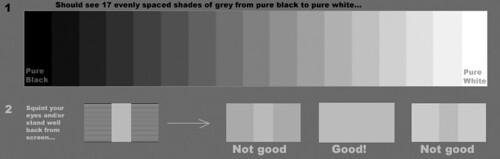
Quick monitor check test pattern

I noticed that the new photofriday included a monitor adjustment. I also found this older article on flickr central, which goes into a far bit more detail about doing the tonal adjustment for you computer monitor and its just as relevant today.

It is not me that benefits from you doing this, it is you that benefits. You will be able the better appreciate the effort good photographers have undertake to capture well balanced and rich tonal ranges.

If you are serious about looking at photos on-line check out the test strip above (it shoud show 17 shades of grey plus black and white. Commonly it is the strips at either end that might look the same. Dive into the post to see what needs to be adjusted

Sunday, September 18, 2016

ArtInspired :: Fun with Deep Style

I must admit I liked the Henri Rousseau Style images from my photos using google’s deep dream generator. So I decided to have a bit of fun using half a dozen famous Australian Landscape Painters.

IMGP3410_HDR_Suburban_BushIMGP3413_HDR_Dandenong Creek

Can you guess whose style I am using to render my two photos (above)? (answers in comments)

Suburban_Bush styled on McCubbinDandenong Creek styled on McCubbin

Suburban_Bush styled on HeysenDandenong Creek styled on Heysen

Suburban_Bush styled on Aurthur BoydDandenong Creek styled on Aurthr Boyd

Suburban_Bush styled on DrysdaleDandenong Creek styled on Drysdale

Suburban_Bush styled on Fred WilliamsDandenong Creek styled on Fred Williams

Suburban_Bush styled on WhiteleyDandenong Creek styled on Whiteley

Saturday, September 17, 2016

PhotoProject :: Surreally into the Night

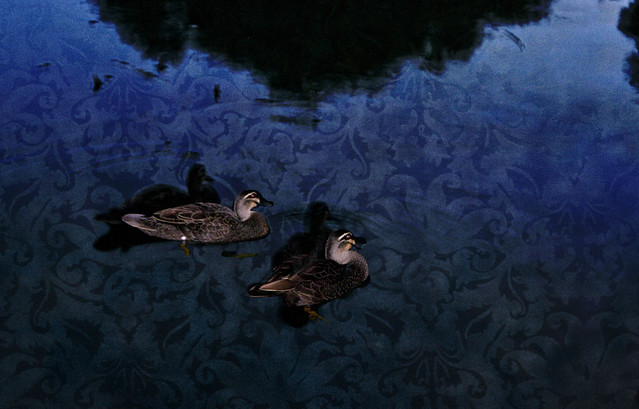
I have been interested for sometime in multi-exposure and superimposing subjects across time. This image is not a multi-exposure in camera instead it combined two photos taken only a short interval apart. It was just on dusk and there two ducks where lazily swimming by. I already had though of the idea of using flash and non-flash for the multiple images so I grabbed my camera and two a couple of photos, trying to keep the ducks in the center of the frame.

IMGP3596IMGP3597

Back home I put the two images together but it was quiet boring because light water in the normal exposure cancelled the dark water  in the flash photo (it a boring blue/grey)and the ducks where cut in half because they did overlap. So I had the idea of using a luminosity mask in OnOne 10. First I used a dark brocade textures layer and replaced the lighter values in the photo (the water) and kept the darks (the ducks and shadows). Next I overlayed the flash image and using an inverted luminosity mask let the blend bring the modified original photo and texture into the dark background. A slight crop, leaving the illuminated duck swimming on a surreal surface, with their available light selves becoming living shadows,

#261 IMGP3597 Surreally into the night

Friday, September 16, 2016

An Update at PhotoFriday

I’ve been submitting photos to the weekly PhotoFriday challenges somewhat routinely for a long time, and I normally post the photos here in this blog. I liked their site but it has been significantly upgraded (specifically you can see the images directly without having to click through. It is much more Instagram like and easy to contribute to. It may take me a while to get used to but I’m willing to keep contributing and that means signing up and perhaps not posting the photos here (just their background story if and when they have one)

image

The one thing that instantly grabbed my attention was the monitor calibration. Something I wish more people would do. However I also know that colour calibration is a big issue (way beyond those devices that supposedly do it for you) and the ambient lighting has a lot more influence on the colours you see. Further it may not always address the tonal accuracy either. I know that it is the tonal aspects (brightness and contrast) that most folk stumble with and either have super contrasty, very dark or extra light monitors and they have got used to it. This sometimes means all the tonal effort a photographer has gone to, often gets lost on the viewers. PhotoFriday’s calibartion screen will probably get you to a much better place to appreciate the tonality of good photo. If you see subtle targets in the black and white circles in the test above you probably ok but if either the black or white shapes is just a single circle you need to do the calibration. Remember to follow the instructions (eg dims the room lights)

Try it its free!