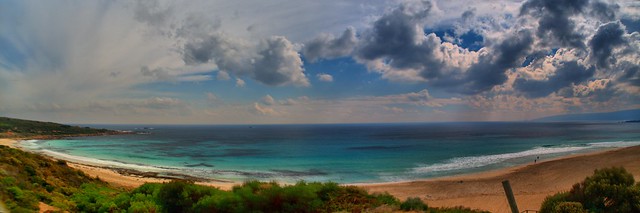
Showing posts with label autostitch. Show all posts

Wednesday, June 07, 2017

Shooting Big (aka Wide) Landscapes but not Wideangle

I am always had a loved of wide panoramic views. This have been even exaggerated as I travel around on my endless summer project. Australia looks better in wide view. However I am not a fan of the distorted view that extra wide angle lenses give. For example you can get the horizon horizontal and straight if you have it in the center of the photo when you take the exposure, but lifting the horizon up or down will result in a curves horizon in the final image. In a forest the tress on the edge of the photo will bend in. Building will get smaller towards the edges and very triangular above you. These are all features that can be used creatively, its just I don’t really like them and therefore don’t own a specific wide angle lens. (my Tamron 18-200mm zoom give me a decent width to play with)

Photo series used

I still like the wider view, so what do I do. I have always (even going back to film days) just taken a series of overlapping photos and cut and pasted them together. Now with digital tools I use software rather than scissors and glue. There are plenty of tools to do this but I like Microsoft’s ICE and Autostitch the best. They actually have a different look, closer to what you see with two eyes and head movement scanning across the scene rather than classic single point perspective. I’m certain that David Hockney noticed this well before me, in his joiners, grand canyon and bigger picture projects (all made with multiple images/panels) and specifically he does mention the limitation of cameras in his collaborative book Secret Knowledge: Rediscovering the Lost Techniques of the Old Masters with Charles Falco, There are now also lots of smartphone apps that will stitch panoramas on the go using the phones camera, they also show this wider perspective rather than the wide angle distortion of a wide angle lens and single image.

As Stitched by Autostitch (with ghosting)

However because the photos are taken in sequence (with inevitable time gaps between) they are prone to a few issues. First and most common issue is someone or something moves (like the man in the 5th. 6th. & 7th. frames), The stitching program will then produced “ghosting” (HDR set also suffer the same issue) in any areas of overlap across the areas of the movement in time. This can be a hassle to fix, and I often don’t or only fix the most obvious ghost. In this case I used OnOne Enhance’s magic (a context sensitive) eraser on the ghost in front of the moving man’s face and the whitish ghost of his hoodie. Some programs give you the option of masking out things not to be stitched (it can be a lot of work with limited success). Another common problem is the difficulty of hand holding and maintaining a level to the sequence as you turn. Wobbles can also lead to ghosting and sometimes bending of the horizon or failing to be able to stitch. This sequence was hand held and I was on a slippery wet rock and it was windy so despite my best efforts the last few frames are a little out of register, and you can see the resulting ghost in the timber slats on the side of the bridge. I decided not to attempt to modify them.
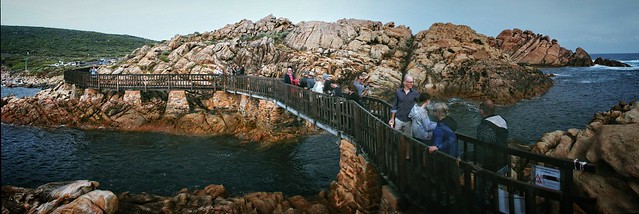
Photographer crush on Fisherman's Bridge at Canal Rocks The important outcome is the modified wider view does the magnificent curved walkway justice  (It is just a bridge to allow rock fisherman to safely fish in the canal but it is a wonderful construction)

Saturday, June 03, 2017

A superwide panorama in HDR

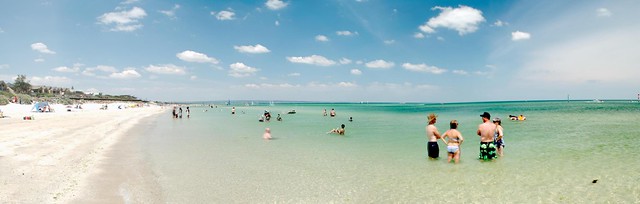
Smith's Beach HDR Panorama
There were 18 photos used in this panorama. Six portrait mode image seys taken as 3 exposure bracked photos used to create HDR images which where then stitched together in Autostitch.

Tuesday, February 28, 2017

When more becomes too many

As I walked through the forest I just took almost exclusively bracketed sets of images. Not only for a single scene but also for every image in a panoramics series, the number of images quickly multiplies.

I already take Raw & Jpeg, then 3 brackets means 6 images when I press the shutter. Next I might  take 5 overlapping photos to cover the full range of the very tall trees. And I’m up to 30 images just to get. A single final photo.  I took around 20 such multi-image panoramas and wow over 600 photos on my hard drive. 30 images to make just 1 vertarama

Just looking through that number of images becomes a challenge. It makes a couple of minutes (mainly waiting) to create the HDR image (using default preset/setting). Longer if I want to tweak any settings.Intermediate step of producing individual HDR tonemapped imagesThis steps also creates another larger .Tiff file (I’m creating 16bit tiffs to get maximum dynamic range and colour info). Next the autostitch can be as fast as a few minutes for a small preview but that quickly becomes about 20minutes (again mostly waiting) if I want a large (almost full size, ie as large as assembling to component images). Even though my little HP spectre only has limited disc capacity and slightly lower speed (i5 versus i7 processor) than my desktop. memeory is the same and the HP has an SSD drive which makes everything, even lightroom, look snappier. Suddenly I realise I’m spending half and hour on each separate HDR/panorama. That’s going to be 10 hours if I want to process all images. Worst the photos and sub-stages would take up about 17 gigabytes! This is turning into a nightmare.

Ok that’s just too much. So I’ve opted to do some preview stitching to a small image size (1400 pixels wide) from the EV=0 exposures to judge the desirability to go to more complete processing. Cutting the task down to just 4 big images at the moment. The first image below I spent over half an hour setting is not one of those I wanted to keep! Such is life.

Trial Vertarama using Autostitch with no straightening

Friday, January 20, 2017

A Pleasant Surprise

Lower Tarwin Evening I was out taking some photos of hay bales across the road (in HDR) but the sun was getting a bit low, so I walked up onto the levee and took a series of Bracketed photos that encompassed a wide panorama out towards the river mouth. I didn't bother processing the HDR that night because I was more interested in the hay bales (wrongly). When I finally got around to creating the HDR series I was taken with the delicacies of the low angle light.

Monday, July 04, 2016

What Gum is that?

The gruff widower Holland has two possessions he cherishes above all others: his sprawling property of eucalyptus trees and his ravishingly beautiful daughter, Ellen.

When Ellen turns nineteen Holland makes an announcement: she may marry only the man who can correctly name the species of each of the hundreds of gum trees on his property.


Ellen is uninterested in the many suitors who arrive from around the world, until one afternoon she chances on a strange, handsome young man resting under a Coolibah tree….


… The plot of Eucalyptus a novel by Murray Bail

I thought I needed to brush up on my identification of the local eucalypts (gum trees to us aussies) as a preliminary to the Jell’s Park Photowalk, and it a lot harder than you might think.


#185 Vertarama of a Gum Tree

This vertarama (a vertical panorama) is built from 5 photos using Autostitch, from straight ahead to almost vertical over head, which leads to the curved expansion at the top. I think this is a Yarra River Gum, which only grows in central/southern Victoria, and is recognized  as "in a highly precarious position and one of the most threatened of the eucalypt species". Pryor (1981). I should have included a person to show the size of this tree (probably over 30m). The pines behind it  would normally be considered tall. The CSIRO is building a guide called EUCLID , that supposedly is Identifying eucalypts made easy, I could not find it online but they are nearing 900 species now. And it isn’t so simple, the classification depends on type or bark, leaf shape, flowering, seed shape and density, branching habit and season of observation, just to mention some of parameters. The only true way to identify the Yarra River Gum, according to Dr Tree from Otway Greening, “If you're really keen to identify a yarra gum, grab some leaves and boil them in water for two minutes. If it is a yarra, a volatile oil called benzaldehyde will be given off by the process. And according to Simmons (1986) it smells of a cross between bitter almonds and fish oil!” Needless to say I haven’t done that.

Saturday, May 07, 2016

Tuesday, April 12, 2016

Panorama Overload

Three Siters from Echo Point at 18mmThe wide vista here in the Blue mountains are much wider than my widest lens (18mm on crop sensor). Which has never been a serious problem as I just take an overlapping photos and then stitch them later.
This is all well and good until you spend most of the day taking overlapping Images. Then you automatically have a lot of homework and after a decent day working tracks and climbing stairs, its not surprising I fell asleep a few times waiting for the big stitches to be finished, The one below is made from 22 images (hand held) and generated a massive 16,040 By 7,381 pixelsEcho Point PanoramaThis is not the only issue if you have a long stream of similar photos on your film strip or _IGP4307thumbnail grid. It might be difficult to find the start and finish of any series. A neat way to figure out where sequences begin and end is to use photographic punctuation, take a picture of your hand (with fingers out – “take five”) or some close up such as rock texture or flower. These are easy to pick up and it is easier to isolate a set of photos to be stitched. pano15-Edit copyAnother organizational assistance can be gained by using the colour patches to help identity those photos that are part of a sequence versus single images. I use Green to flag potential overlapping images (to be stitched in a panorama) and Yellow to flag bracketed sets which I may late choose to process via HDR. I used to always put images to be stitched in a separate lightroom collection, but with lightroom used less and problems transferring collections I have switched over to using the metadata tag ~AS (for Autostitch).Hargreave's Lookout PanoramaA final tool to help keep your photostream (film strip or thumbnail grid) neat is to use stacking. This is a feature that lets group together similar images and just show one typical image (the analogy is you have collapsed the photos into a stack of images one top of the another. Stacking has wider application to avoid clutter in your photos but is an ideal way to group images to be stitched and just display one photo. You can click on the top of the stack to expand it into the included photos. At the moment I only know of Lightroom and AfterShot Pro offering stacking. Lightroom can even be set up to automatically to stack photos that are taken less than a certain time apart
Leaura Cascades Panorama

Monday, March 14, 2016

A Beautiful Dark Sky

looking south & checking space weatherI was down at Venus Bay, and one long held desire I hold  is to be able to photograph an Aurora (the Aurora Australis) from there. The crescent moon was setting so I guessed we would have wonderful dark skies but checking the space weather indicated any activity was well south. Oh well the sun spot activity is fairly strong I’ll just have to keep waiting.

What I did find was a really beautiful sky full of stars, and a perfect opportunity to go for a really large image covering a lot of the milky way.As stitched pano from Autostitch I only had one camera (my Canon EOS 1100D) with me and my widest length lens was the EPS 18-55mm IS macro (which is a great kit lens but not so good at focusing in the dark). So I cranked up the focal length to 18ml, opened up the aperture to f4 and ISO 6400 but I still needed the full 30 second than the canon allows its maximum exposure time. The Images are fairly noise (a consequence of the high ISO but lightroom’s detail tools bough this under control without blurring the stars (too much). The next challenge was stitching the images which where essentially a two by two grid. Often stitching star panorama challenges most conventional stitching software but Autostitch did an excellent job. I had given it about 40-50% overlap on the images. However it does leave a ragged edge, so I decided to “hide” this not by cropping back tighter instead I added a sloppy edge from OnOne 10 effects borders.


_MG_1231-2  _MG_1230-2_MG_1228-2  _MG_1229-2

20160314_milkyway_vertarama

This is a big view of the sky from the eastern Horizon to straight above. Taken with only an 18mm lens (on a crop sensor style DSLR)

Thursday, February 18, 2016

Look Up

Looking upPower lines vertaramagum tree vertarama

Sometimes the best thing to photograph requires looking up. Using a multi-stitch approach can nicely ground your subject, often at the cost of distorted perspective, This type of image and has been given the constructed name of a Vertarama. As seen on keep my tracks gps doodle walk

Saturday, November 28, 2015

Updating OnOne & having fun

Towards Sunset

 Bottom Deck Panorama

After Sunset

top deck sunset big pano 1I have been experimenting with the new OnOne10, its fast!.My perspective is it is most of the great tools rearranged and set up so they can be used standalone not only as an add-in (to lightroom). There By-line “photo editing made simple” is very appropriate. I’ve also had much fun using browse & layers rather than lightroom and then passing files to other applications which are simple to set up. Unfortunately I haven’t figured out how to send multiple photos into Autostitch. However the simplicity of the file export means they can easily be sent somewhere autostitch can pick them up.

Sunday, August 09, 2015

The not so dark side of “almost auto”HDR

I must admit I haven’t upgraded up to lightroom 6 or decided to buy into their rental/subscriptrion (just not my personal choice) but I did test it out and in particular I was interested in the much hyped HDR & Pano features. If you are looking for a comprehensive HDR tool kit this is not really for you. It just performs the maths of extracting the maximum dynamic range out of the image, and more particularly it works with RAW files (so it has no trouble creating 16 and 32 bit colour renderings). It only have limited tone mapping but passes that task onto the already very good lightroom tools. It is almost the one-click fix I’m not keen on but it is relatively easy to set up and worked fine for me. panoApparently it has to be run individually for each set (I couldn’t find a way to batch it) but there is less fiddling than most other HDR tool sets. Speed was ok but picturenaut and aftershot 2’s HDR are faster. It did handle hand-held bracketed sets well, without obvious ghosting. It avoided dirty skies and the haloing around the sun can be forgiven.

In this case I took 9 images, that meant three HDR sessions. I wanted to then try the panorama but alas the new lightroom pano feature wouldn’t play on these HDR images. Probably because I rotated the camera slightly between shots. So the final stitching was carried out in Autostitch.

Palm Cove HDR pano

IMGP0064Whilst this probably looks “over baked” to many, it does satisfy my desire to take photos in the style I might paint. To prove that aspect, here is a small sketch I had just finished while sitting on the now empty chair, before I got up and took this bracketed set of photos contre jour.

Wednesday, July 15, 2015

Monday, June 22, 2015

PhotoProject :: a joiner collage, stitched pano, sketch & HDR

Phone photos made into a joiner collage using picasa


My first day in FNQ (Far North Queensland)
was nice and warm and I had a great coffee with a very late lunch at a wonderful cafe with a great view, so much so I have recorded it in 4 ways,


Multi panel pano bprepared in autostitchMy Watercolour SketchHDR prepared in Aftershot finished in perfect effects