Showing posts with label masking. Show all posts

Friday, October 09, 2015

PhotoProject :: Tinkering with Luminosity Masks

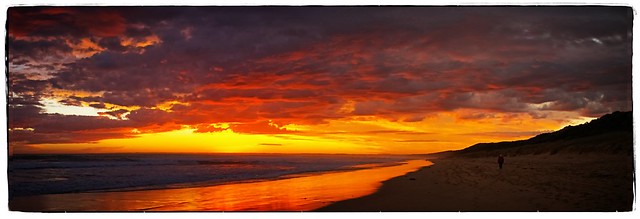
Multi-image stitched panorama VB beach sunset 06

This is a multi-image stitched panorama, that I have played around with luminosity masks. Firstly with an inverted mask to lift the shadows a little and improve clarity(while protecting the sky), Then a second layer with a straight luminosity mask to add a glow to the sky.

All in the cause of recreating the feeling of being there.

Wednesday, July 15, 2015

Monday, July 28, 2014

ThePatch :: Celebration/Musical Instrument

Queue the samba drums, Timbalada, Daniela Mercury and/or Olodum, that’s my idea of celebration music. Well a good excuse to get out the bongle drums and another party shirt. It was a dull day and the light fading but It did let me experiment with a few options to try and capture the rhythm of the carnival.
Composite image using Perfect Photo Multi-Exposure using Picasa Collage Talk about Stop motion
Ok none of these get close to the atmosphere of the real thing, but I’m not in Brazil I’m in Oz. AND Hopefully the light will be better tomorrow when I can work on finding a better composition. in the meantime …

I know this clip is a little on the long side but if you enjoy drum music it is worthwhile (and you will recognise that Paul Simon used them and their rhythms in his obvious child.)

imageSo the new plan too many hands!is to try the composite motion again by perhaps more front on and playing the bongos in the more conventional sitting position, so more hand action can be captured. So I found a sunny spot, turned up the burst mode to max and only captured jpeg, Set up the tripod and delay, then pressed the shutter, quickly in position. Now I have 355 images pretty much the same from which to find half a dozen hand positions and learn how to do multiple masking bug techniques in Perfect Layers, ok I have bitten off more than I can chew, So I’ve settled on using just a few hands, less is more,  in my final submission.
Tuesday, January 28, 2014

Lightroom has found a friend

I took up the offer to download perfect effects 8, its was for a limited time. However i didn’t write about it during the offer because the stand alone version always froze in browse mode and in fact hung my computer everytime (so fully I could start task manager so I had to turn off the computer and restart it to get going again). This was a bit disappointing because I have a couple of OnOne presets (some are free to download)  and they are a cut above the rest. Even so I wasn’t about to recommend the free perfect effect 8 download, till I could find out more and possibly get it working.

At the moment I suspect the problem related to the version of drivers for the graphic cards I have on Windows PC (you need at least 256MB of dedicated VRAM and a video card driver that is OpenGL2 compliant, I found this looking in the manual, there is a downloadable pdf) and elsewhere on the web this “freezing” is not just for me and in fact wide spread. Strangely this topic is missing from the OnOne’s Knowledge base and specifically the Perfect Effect 8’s FAQ section. Also I haven’t yet had a reply to my more direct email requests.

perfect effect 8 screen as used via lightroom

The good news is providing you also installed the lightroom plug in, you will discover that perfect effects brings you two really significant features into you lightroom world. They are masking and layering, which normally require round tripping into photoshop (which many of us lightroom users don’t have). You have to look past the one filter one effect approach and start playing with the masking brush, masking bug and layer, particularly the blending controls. Whilst the capabilities of these features in perfect effects is not as extensive as those in the full perfect photo suite, I’m sure they will open up some amazing possibilities for those who have been using just lightroom alone.