Showing posts with label flickr. Show all posts

Tuesday, February 20, 2024

Happy Birthday Flickr

Today marks the eve of Flickr's 20th anniversary, a milestone that brings back memories of its inception in 2004.  They have a nice article about their significant moments and time-line on their blog

Reflecting on my journey with Flickr, I recall how I initially turned to it as a platform to upload and share photos for this blog, which started out as "things they forgot to tell you about digital photography". It was a time when the concept of cloud storage and HTML image links felt groundbreaking. Moreover, Flickr's community features, such as groups and commenting, added depth to the experience, fostering connections among photographers worldwide. Introducing their "interestingness" algorithm brought exposure to countless talented individuals, while Flickr’s commitment to Creative Commons licensing set a standard that others struggled to match.
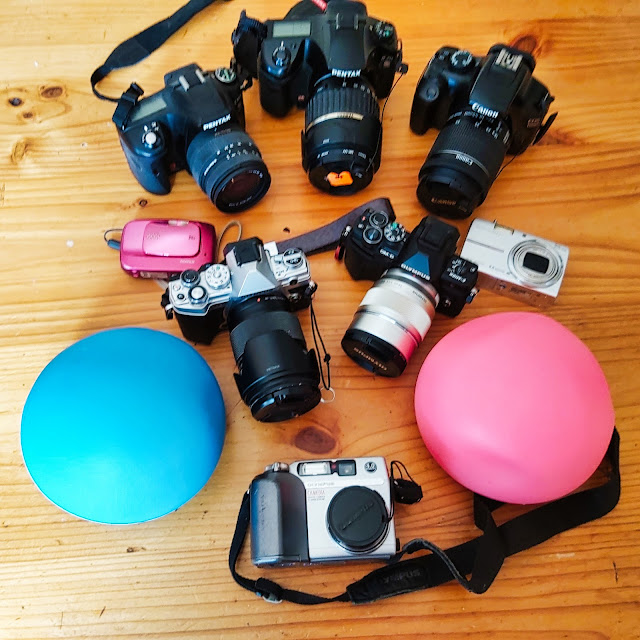

For me, Flickr and digital photography have been intertwined since I acquired my first privately owned digital camera in 2003. Over the past two decades, I've amassed a collection of cameras, each holding its own story. It's been a little embarrassing laying out the number of cameras and estimating the money spent! While I no longer use most of them, I cherish the memories and photographs those cameras enabled. Most are still operational, though finding the right memory card for my original Olympus Camedia or a battery charger for an early rechargeable, may prove challenging.

As a consulting geologist, I purchased a Canon Rebel DSLR for video capabilities which has served me well for filming professional videos over the years. I still use that Canon today with a tethered setup to photograph my art on a copy stand. Over time I had invested in two Pentax digital SLRs as megapixels increased into the 12-16MP range, though I seldom use those models now., there were and still are great cameras just a bit heavy.

The two sleek Olympus mirrorless cameras have re-ignited the joy, fun and passion for capturing moments. Despite the evolution of technology, these cameras continue to serve me well, each with its unique capabilities and charm.

As we celebrate Flickr's anniversary, I can't help but acknowledge how my own photography journey has evolved alongside it. While changes of ownership, lockdowns and changes to Flickr's account limitations have impacted my activity, I remain loyal to the platform, eagerly anticipating events like the upcoming worldwide photo walk in Jells Park.

To Flickr, I extend my heartfelt gratitude for two decades of inspiration and community. Here's to many more years of creativity and connection in the digital realm. Cheers from down under


Friday, September 17, 2021

Even more Interuptions

Social Media in general has become a obessed with interupting you amd keeping your attention (primarily so they can sell more "eyeballs" to advertisers). The time you spend can be worthwhile occassionally but not when you mindlessly have to scroll through hundereds of images, video or headlines. This is primarily a waste of your time yet the notification bell keeps tinging.Some phone let you change the tune but it does take a lot of self control not to pick up your phone or open a new browser window. It is made more complex when you have had enough and want to uninstall, it mostly has to be done individually by notification service by app or service, and it was easy to unsubcribe from say theei newsletter but the notifications where then defaulted back on. My current feeling is less than 1% of these notification actually need my attention so I now inore then all, and often missed phone calls!

Notificitaion * 99% => Interuptions

One respite was flickr it had a beautiful recent activity page which (automatically) curated a selection of your friends and those you followed and was the landing place when you logged in. There was no need for the endless scroll just to find something worthwhile to view and study for a while, not swipe up of down to get over it to the next 2 second glimpse in a length search.

Well that was until now ... ...

"Now that most of the Flickr community has had the chance to experience the new Notification Center, it's almost time to close the book on the Recent Activity page."

Flickr do offer a range of decent setting for notfications so it is worth visiting that page now and pruning back the default notification setting before they become to annoying.


Thursday, May 28, 2020

Lessons in Learning Video

149/366 making video can be a challenge 

Whilst our newer cameras, and especially smartphones, are great at video. It is a large step from still photography, especially in the time taken (or maybe I think of it as time wasted) on editing the video. Streaming techniques that capture everything, mistakes and all, have a strong appeal compared with filming the clip, saving it to SD card transferring it to the computer for editing. Editing the clips together and rendering the final "cut". Time evaporates. This little clip was one take with minimal editing and just adding some music. I see it as a bit of a big step forward for me. 

My investigations so far have reinforced the need to get as much right in camera as possible and minimize the need for editing. This reminds me a lot of the film days and using slide film, which was very unforgiving of exposure and other mistakes. With the results that you were much more careful when taking the photo.

Friday, May 24, 2019

Panda-monium

The site maintenance shutdown for flick has been well advertised and even has a little good panda contest for the likes of me (free users or peraps a gift for a friend). This is probably the finals steps of the migration of services off the Yahoo’s servers, but seems to have taken a day longer than anticipated. The new owners and the flicker team seem to have put a have put a lot in place to make sure this is a seamless transition, including a Known Issues page They warn a few features might take a little longer to bring back on-line. However its return to be up online again has not gone so well for me. I can not upload my photos either with the newer photo uploader.

Or the Old Manual Photo uploader


This hiatus has punched a whole in my 365 project (post a photo on flickr each day this year) for a second day, but I’m not panicking, I’m patient and I’m sure they will figure it out in time, I also realise PRO member will get higher support, Here is a link to the current status of the scheduled maintence, why not take the opportunity to go out and take a few more photos, perhaps enter their good panda contest.

ALL FIXED I’m able to upload again  GOOD PANDA

Wednesday, April 10, 2019

Flickr & Pixsy

Flickr partners with Pixsy to fight image theft

Flickr has teamed up with Pixsy to help protect images on Flickr. Pixsy is a service that will scan your photos. then using reverse image search and some Ai as well will periodically review and report on any other locations around the web your image is being used. Some are legit but other can require take down notices and possibly seeking damages or payment for licencing images (these are more legally complex and really focussed on US based copyright registration).BTW pixsy does get paid unless you do.

I think something like this is well overdue and will add some teeth to Flickr’s licencing (its the only social media outlet I know that still display the licencing details with the detail photo display). There are still  creative commons options as well as full copyright. Importantly Pixsy can send legally binding takedown notices.

If you are new to flickr you might find it wise to turn off the download options to discourage “inadvertent steeling” of your photos . Alternatively you may also wish to change your privacy for Friends &/or Family.

This Pixsy service is only being offered to FlickrPro subscribers, and really does value add if you want to use flickr as a place to share your work to a wider audience but are worried about image theft. I’m going to stay with my free account because I already signed up to a free versions of pixsy monitoring connected to my flickr account quite a while ago and you can still independently do this but there are limits.

Thursday, March 14, 2019

More Than A Few Cracks

I’m actually not certain that they are related but the three Internet social media services I spend a bit of time on have all shown periods of very flaky response if not just plain not allowing anything to be updates. These are flickr (a couple of days ago) Gmail & blogger (yesterday) and Instagram (today). Seems a bit of a coincidence to me.

I’ll cut flickr some slack as I know they are transferring from Yahoo hardware to SmugMug facilities, not a simple task, I’d rather not see the Bad Panda Screen. An explanation would have been nicer. Assuming they know the cause.

I see Gizmodo Australia Is reporting that gmail was down (again) yesterday. They do reference a quote from a google source that “The Problem with Gmail should be resolved” then a bit of an apology in the ame message (which amounts to nothing so I haven’t included in the quote here). No explanation of what is going on, which unfortunately is what I have come to expect from google.

Now Instagram is a bit more complex because the android and Windows 10 apps just serve up cached info (ie old data) as if it is current. Its only when I try to upload of go somewhere I haven’t recent been (eg look at a persons profile/photofeed that I see a problem &/or the” Can’t update feed” message. However the browser/web interface seems to be working albeit slowly? Looking at reported problems there seems to be a bit of meltdown going on


I’m not going to panic I’m happy to “look away” from the screens, turn off the computer, put the phone down and pick up a pencil and go sketching. Given that all these services are “free” should we complain? Yes we should, perhaps by posting a blog post like this or a tweet or whatever, perhaps its even time to consider leaving these services!


Thanks to IconTexto for the very appropriate Social Media icons and DownDector.com.au for the Instagram outage graph.

Wednesday, March 13, 2019

My $10 Photobook arrives

My discount Snapfish photobook arrive in the mail yesterday. I have prepared and ordered photobooks via Snapfish before so I was confident it would be good and in fact it was great. Mainly because it forced me to documented in a physical way something that had up to then only existed in the virtual world.

This little book is mainly based on images that became popular (lots of views and favorites) via flickr’s Explore feature. There are a lot of purist and armchair warrior's that criticise this interestingness based logarithmic selection feature, that‘s ok they are entitled to, providing they explain their reasons (which few do). However I feel a little pride in having photos selected (sometimes I don’t understand the appeal of a specific image) so having them in a physical format is even more satisfying.


The real important observation for me, there is no longer any reason why you can’t take some of your photographs, particular those ones your are proud of and crate a personal photobook. Giving them a more permanent place to exist, because on the glutted stream of social media “photographs” they will soon be forgotten and lost. If your worried about cost. Prepare then now (particularly select the collection of photos to use and the rough layout) and then just wait for a decent discount offer.

Saturday, March 09, 2019

Now they tell me!

Flickr had indicated last November that they would not be deleting any photos previously licence under Creative Commons. Since most of my photos were That would mean I could leave the old flickr account active and nothing few images would be deleted. However the implied overriding conditions for free accounts was that I would not be able to upload any new images. Perhaps to get around this I just needed o create a new flickr account and start a fresh, but that seemed like trying to game the system to me.

My use of flickr was never to acts as an on-line photo storage instead I just wanted to use it to share photos and participate in the various photo-concentric communities so It was an easy decision for me to cull my flickr photostream.

Howvever recent posts in the flickr blog suggests maybe I interpreted things wrongly I will perhaps be able to upload new creative commons files into a free account over and above the 1000 photo limit. Such is life.

Friday, March 08, 2019

Interestingly I’d forgotten about Scout

Last weekend snapfish had a good discount on making photobooks. I’ve been using the small 20 by 20cm size as suitable to pull together small collections that are personally meaningful (eg a series of a previous 365 project). The culling of my flickr photo was still fresh in my mind so I figured it was time to prepare a book about my more popular photos on flickr (not necessarily my favourites) Most of them had been in Explore, flickr’s very useful way to display the top 500 photos on any day using an algorithm they call “Interestingness”. From my perspective the difficulty was know what has or has not been included (other than lots of views and likes). Anyway I went to prepare the booklet and realized I had culled a lot of the photos, probably about 15) that had made it into Explore (oh well such is life) they weren’t so interesting to me. I was able to prepare most of the book in record time directly downloading photos to snapfish from flickr albums with pnly a few uploads from my archive. I called the book “Confessions of a flickr freeloader” (since I have always had a free account and the book is being printed right now.

After all that was finished I realised I should have used Scout from BigHugeLABS, which will pull out your photos that have been included in scout and produce a poster (like the one below) with accompanying links to those images. Its really neat, or might have been.

1. #5/365 The Big Decision looms, 2. More Recycling, 3. INKtober Sulphur Crested Cockatoo, 4. Towards the old Exhibition Building, 5. Before sunset, 6. Inspired by Max Dupain's Iconic Sunbaker photo, 7. Day 1 :: Finishing Up, 8. Photographer crush on Fisherman's Bridge at Canal Rocks, 9. Flinder's Bay rock pool, 10. #338 Last light, 11. #330 Am I Spending Too Much Time On Instagram, 12. Autostitch panorama sunset II, 13. #106_IGP4642-Australia Rock II, 14. _IGP2361_2_3_norfolk_gaol_gate, 15. waiting for the comet, 16. Always look on the bright side..., 17. 27-mar_04, 18. P5233079

Saturday, January 12, 2019

My Social Media slow down …. almost a break

Now my oldest photo on flickr
taken in 2005
I was able to reduce my flickr photostream by close to three quarters quickly but the last few hundred photo took me longer to select and delete. Not so much about Views or Comment or Favs, most had plenty of those, it was more about what I wanted  to represent me (which is actually a bit of a chaotic mess at the best of times). Looking through my entire collection highlighted how I had changed (and hopefully developed as a photographer), not that my early photo were bad some are in fact really good (& taken with a 4megapixel camera). I could see changes and improvement with each new camera, interwoven with different bits of software I started to use and some experimentation with new methods. In particular one thing stood out some of my favourite photos, they were all the ones that were hard to get. Fleeting moments of light, extreme long exposures, experiments in colour, taking subjects and techniques that are often considered too hard or methods I had worked out for myself.

My plans is to now take my time to reduce the photostream by a further 200, while still uploading daily (ie to add one I need to also delete one). This is slow project and may take a long time. A photostream of 800 is my goal.

An unexpected flow-on has been losing interest in other social media (eg Instagram, Twitter, Tumblr and even this blog), Suddenly they look more like shouting into the wind. Which I always suspected they were. I’m sure i will continue to keep using them (particularly Instagram and blogger) but it is also fine to have a break and wander in the light more, take better photos and enjoy life!

Wednesday, January 09, 2019

Flickr Lock-out Day has arrived

imageI fell short a few hundred photo when I did my first pass on the great flickr clean up. So I figured I had a good opportunity to find out what would happen on the 8th. Well nothing happened yesterday because in Australia we are a day ahead of the USA. However today when I logged into fickr I got a very obvious notification in RED. the Lock-out has begun.
No need to panic. I’ve had a break from deleting photo so I’ll have to return to the task a fresh, before I can upload.
A significant side benefit of this project is I have reacquainted myself with a lot of my earlier work (which was actually better than I expected) and I have been able to review what was popular. One thing I did notice was the effect of better post processing, firstly when lightroom reached version 3 and the tonal adjustment made editing RAW photos amazing. Then Nik software (still great) and On1 Photo and recently auroraHDR. Flickr has three different measures, View (just how many people stopped and looked), Favs (photo others liked a bit like the heart in instagram) & Comments (self explanatory). I’m more likely to keep those with more favs and comments but less than 200-ish views seems to be the “sweet spot” on those photos that have gone unnoticed and can be deleted.

Monday, January 07, 2019

Preserving Albums, Collections & Organization as you move digital photos

In the process of downloading my files from flickr I’m reminded of the unexpected issue most folk find when trying to transfer a lot of files between different photo managers. Things like EXIF and key words can be embedded in the files (in the case of Jpeg and Tiff, also DNG but not other RAW formats) and sidecar files (eg .xml can also carry this data with photos as they are transferred between packages. Unfortunately the organization features such as Albums (or Collections in Lightroom) are not transfered and/or not compatible between packages.

image

There is a simple solutions I have written about before. It is using special key words to identify the albums. I use names beginning with the tilde key ~ and write that into the keywords (or tags in flickr jargon). In most software you need to enable writing back of the keywords into the embedded data and/or writing the sidecar file beside each file. When you load into the new software it will read in these keywords and you can selective filter on a given ~keyword then do whatever is required to create the new album or collection.

Very simple really.

Sunday, January 06, 2019

Selectively Deleting Photos on Flickr? :: The obvious next question

What a task deleting 3,500 photos one at a time is a big task. Even if I allow one minute for each delete (which includes moving through my photo stream, wait for the edit icon and then selecting delete takes time and is very repetitive) it will take over 58 hours. Blimey! I wont be doing that in one hit. At say 2 hours, which could be do-able, that’s almost a month (29days). Ouch!

Surely their is a quicker way, and in fact their are two decent alternatives. The first I wrote about back in 2016, when several social media service where spruiking massive photo storage for free, “one place for all your photos, free on-line backup. It worried me then enough warn my readers don’t use these services as your only backup and also to investigate how to recover and download those photos stored on-line. Both flickr and google do offer ways to get your photos but you have to do a bit of investigation to work out how (see my post with link above)

Using Camera Roll, to select, download & delete

imageThe Camera Roll is a fairly recent development by YAHOO/Flickr standards, and it allows you to see a chronological “list” (can be date taken or date uploaded) of thumbnails of your photos. On the left hand side is the hierarchy of years and s you click on a given year you cam work through the months and days (from youngest to oldest. Its a really fast way to find photos if you know roughly the dates.

The magic happens when you select one or more of the photos. You get the same little icon tool set you get on the full single photo display from your photostream, but at the bottom of your screen Only now it works on all the photos you have selected. The Thumbnails of the selected are displayed in a film strip style view just above the icon and you can use your mouse of the arrow keys to scroll through the film strip thumbnails, which also show a tick in front of the image. click on the tick will deselect the image from the selected set.

You can change privacy, edit, share or add the selected photos to an album, but the two tools useful now are on the right hand side (at the bottom of the screen). First if you want (or more particularly if you need to) download a copy of the photos before deleting it click on the download item. This starts a background process where by the selected items are all written to a Zip file. The link to that location from which that zip file can be downloaded is then emailed to you, So You need to wit a few moments to get the email (generally It arrives within a minute or so but time required probably depends on how many photos and how busy the flickr server is. To be safe I download this zip file and check it before O go onto delete the selcted photos, which are still selected in my film strip at the bottom of the camera roll view.

This process may seem overly complex but it is probably based on sound privacy advice This process will stop others scraping your photos using this facility, because the email link is only sent to you. I have found about 3 minutes is the average time for this round about trip. So the next question is how many photos to add to each selected group. So far I have found 30-60 photos works well and I try to keep them in logical groups, months or trip, or family events. At an average of 50 per group, downloading and deleting 3,500photo become roughly 70 sessions or say the  minutes each (ie approx 210 minutes) or roughly 3 hours 30minutes, which is now not so daunting (eg 1 hour a day for three days.

If you just want to delete files and not download them first you can power through the deleting process using select all on the dates ad deleting month long or longer batches. Be careful deleting files is permanent.

Using Organize, to tag and delete

imageAnother alternative that is considerable more flexible but might require a little more work is to your the Organize tools. Firstly you need to select the files you want to delete. You can do this is small manageable batches, use the addimage tags option from the menu at the top of the screen. I use a the very specific tag [DEL] to avoid confusion with anything else mentioning delete. This key word is then added to all the photos selected. Next you use the advances search option at the bottom of this display (just above the film strip). Select tag only and enter the [DEL] code in the search box. You will see the photos again in the film strip and thus have a second chance to deselect items you might have included by accident. Next using select all under the search dialogue, which outlines all the photos selected so you can easily drag them up on to the batch organize work place. Finally under the edit menu option at the top of the screen the last item on the drop down menu is delete.

This approach may take longer but it does let you interact with the photos and see them in larger format, compared with just thumbnails in the camera roll view. Also you get a second chance to review what you are about to delete.


So now all I need to do is Do It.

Saturday, January 05, 2019

The great flickr lock-out looms

Staying with a free account is not such a hard decisionI’ve been away from the “real” internet for the past week (and it feels good), no junk email or time wasting distractions (yes that’s you YouTube). I wasn’t totally off-line because I had my mobile phone, which of cause has several apps that access the internet (eg Instgram and Flickr, both of which I did use).

Somehow this meant that I missed the rescheduling of the date flickr would start locking out uploads to free account users with more than 1000 photos. I currently have 4,384 so I will have to delete 3,500 photo in the next couple of days and I don’t think that’s going to happen. I have more important things to do right now.

Wouldn’t it be easier to just spend the AUD$84 each year to avoid this hassle?

Well No. I’ve always had a free account and that allowed me to interact with other photographers and special interest groups. I have never really wanted to use flickr as a photo backup or archiving facility. True flickr has several good organizational features and I did use it for a while as a way to share photos into my blog. Yet to me it is the community aspects of flickr that make it worthwhile. Sadly spending money on the PRO account really doesn’t enhance that community at all.

Also important I’m retired and thus have a very fixed and probably diminishing cashflow so I need to avoid  unnecessary commitments  to ongoing costs. Finally I’d rather have fun taking photos and I’m happy to reduce my on-line photos to less than 1000, you never know it might increase the quality of the collection. I’m really not complaining I’ll wear it I just don’t want to fret over extra expenditure.

Wednesday, November 21, 2018

What a Difference

Last week I posted this photo on both Flickr & Instagram. It was related to last week being National Recycle Week (in Australia) and I had been gardening

PB170003_2


The viewing/favourite stats for the post couldn’t be more different! This morning Flickr shows 9,259 views, 59 faves & 6 comments. Whereas Instagram only has a single like.


imageimage

So what is going on? Is it the square crops or number of followers (on flickr I have 208 on Instagram 140). Has flickr been watching my honest assessments of them in this blog recently and taken pity on me? No. Actually its easy to explain, the photo was included in Explore flickr’s special page/gallery selected based on a photo’s interestingness score, flickr’s own measure of what might constitute a popular photos. There are lots of complaint that getting included had become very competitive with many attempts to “game” inclusion. Mainly flickr has done a good job moderating and it is a good place to find decent photo although I have seem many recent complaints that it is just lots of “wee birdies” which might in part be true. The reality is extra exposure becomes self fulfilling, to go viral people must first be looking.

I have had several of my photo and a couple of drawings included in Explore over the years and seen the sudden rise in views and favourites, a nice jolt for my self-confidence. However I don’t go chasing being included.  Mostly I agree with the photos selected but this one has surprised me. It was a pretty rough and ready set up on an out door table my hand pushing the shutter button still covered in dirt, every thing except the tomato seedling went straight in the composite bin. Just a momentary opportunity.

Monday, November 19, 2018

Way too many subscriptions

I feel myself getting slowly painted into a corner. Many of the software tools I would like to use or upgrade are now only available via subscription. For a retired old guy that would have to come out monthly from a very tight budget, so I would have to sacrifice some other expenditure, some more important living expense just to use something I probably have already purchased or use for free. I do understand that software is generally licenced (ie you don’t own it) but most used to come with a licence for perpetuity. You might get bug fixes and minor update but significant upgrade would need to be purchase (upgrade usually being attractively riced compared with new purchases).

On the weekend photowalk I discussed this dilemma with others and one decent suggestion was to try and combine them (eg Going Pro on Flickr list discounts for Adobe Create cloud (and Blurb)) So I set about investigating going pro and my early recollection of an early join up in November seems to have evaporated (along with specific figure of the actual cost, which I remember, because I noted it down) of ~$6/month of USD$49.98 per year (the full price not the discounted one). It does mention 15% Discount Creative Cloud, but checking the Adobe site claims such a discount has expired. OK! Not encouraging.

Then I started looking in the Flickr Help forum for details, firstly see Don MacAskill thread, which is links to other threads. The thread is closed implying that direct feedback is not welcome. I started to read the Grandfather Pro pricing thread and There are many alarmed (aka Angry) folk, part of which was an unfortunately worded email to those on the $25/year deal, which seem to imply the new price was $50/year for the result of this year and then $100 in 2019. It really was saying they will have to pay the $50/year from now on of $100 for two years, but ouch!

None of this has convinced me to pay annual subscriptions, I’m going to stay away for any such deals and I am now certain I will have to stitch with a free account (and will have to reduce my number of photos posted)

Sunday, November 11, 2018

Creative Commons and another sting in a free flickr tail

imageI have been a fan of the Creative Commons style licencing for a long time and use the creative commons licence on most of my flickr posts. I learnt very early that most people ignore these so I am also careful not to post of Flickr or any social media photos that I want to sell or otherwise don’t want copied. My licence is for Attribution (the figure in a circle graphic) which means its free to use if you attribute me as its creator, it is also NonCommercial (the dollar sign with a strike through in the second circle) and Share Alike (the anticlockwise circular arrow in the third circle) which means it can be shared but must not be altered.

51075027_53736347ca_oFor example the 5 fingered hand was posted on flickr over a decade ago, it is of course a crude photo manipulation and a bit o fun to create.  If you do a reverse image search in google images  or tin eye you with find hundreds of uses of this image. Clearly only one (my flickr post) is attributed to me. It has been used on the cover or an Indian Rap record (commercial) and is recognizable in many modification (ie. not share alike). All these are violations of the creative commons licence.  Looking at the stats it has had 2688 views but only 1 fave and no comments. Which makes me concluded that a large proportion of the Flickr viewers paid little regard to flickr’s licencing and probably no real effort has been applied by flickr or the creative commons group to enforce such licences.

On the up side, there are several example of people who obviously have read the licence on other photos of mine and reached out to me wanting to share this photos on blogs, book covers, and tourist information (I have allowed most and all attributed me as the photographer). So the creative commons licence system can work but requires people to acknowledge the creative commons licence. Unfortunately in my experience they are a very small minority. 

Is the answer legal enforcement (I doubt it), shaming the thieves (“feeding the trolls” doesn’t work on the internet because it just gives them more hits) or Education (yes I believe thats the only way.) Unfortunately way to many creative people who want to truly share and collaboratively work with other are being taken advantage of. This is a big #FAIL for Flickr and pretty well all social media, So guys don’t put your head in the sand, start educating.

So I am very sceptical of the latest post on Flickr’s blog about not deleting creative commons images. I certainly acknowledge that allowing creative commons licencing is a great thing (for example google used to in the picasa web album days but no longer do in google photos) and it is the best way to correctly share images (something I am not against and in fact I encourage), Also having the licence details clearly visible as logos and easily access the find out what the means (vis the Some rights reserved v link , which means there is no excuse for those incorrectly reusing the photos. It all sounds nice but in practise I can’t see evidence of any enforcement of attempt to educate. For me I only see this as a kind of pale grey-mail to get me to pay yearly for a pro account. I have more than the thousand photos allowed under creative commons licences photo and if flickr won’t deleted them I would get looked out of posting any more photos. Specifically I see this as not share any extra photos. Such is Life

Sadly it probably means good bye most of my creative common photos I will have to delete you if I want to stay active on flickr and I apologise to any legitimate uses if that causes distress (just contact me and I am sure you can legal still use of any of my image). However I am now even more resolved not to pay an annual fee to just share my work with others (at least not on flickr). Also don’t expect to see my best work on Flickr any more.

Sorry Don MacAskill if I have misinterpreted your intensions. A lot of others are likely to do the same.

Friday, November 02, 2018

The Sting in the Tail for Free Flickr Accounts

Part of the Banner Meesage on flickr todayDespite the rhetoric from Don MacAskill and others when SmugMug bought Flickr from Oath, today they announce a couple of big changes. Suggesting “This newly-independent community can shape the future of Photography itself”, whatever that means. The cost  of the Pro Account remains the same USD$50, with the same basic features (Ad-free,Unlimited Storage & More Detailed Stats). Its actually it’s still comparable with Smug Mug’s Basic account USD$3.99 (~USD48 annually). There are a couple more things offered like a 50% discount on a smug mug Portfolio, and promise of increased resolution and expanded Colour space, and 10min video rather than 5mins The various and proposed offerings for Pro (paid) membership do offer various advantages compared with the free account but not enough to excite me. At the moment I’m not likely to commit to an ongoing fee for the service, as I’m retired, I have to carefully mange my cashflows and I’m not wishing to use flickr as cloud backup/storage.

imageThe sting in the tail is the proposed changes for the free accounts, and I am a long time free account members. From February next year free accounts (currently unlimited number up to 1TB disk space, but you get ads) will be limited to 1,000 photos. 1000 photos at even one a day is over 3 years worth of posts.  C’est La vie.

I lived with Yahoos limit of 200 photos for free accounts for several years. That was you could only see the last 200 of your photos, However if you posted your photos to groups or had “official” links your photo could still be displayed (in other words the photo still existed on the platform). From what I understand the new limit will be enacted differently. Once you reach the 1000 limit you will be blocked from uploading. Also, and more significantly, if you have more than 1000 images stored Flickr will deleted the excess starting with the oldest! They will be gone forever from flickr. I expect this to be very unpopular, and lead to some ill informed rants. So get ready for the social media backlash! Not sure if deleting old photo once I reach the limit will free up space to  let me add new ones (I can’t currently find any specific reference to this).

I’m hopeful I will be able to remain using Flickr as a place to show my recent photos, but with a bit of extra work on my behalf (ie deleting other photos to give me space). Which in theory gives me the opportunity to curate my collection and improve the quality.

So the ride could get a little bumpy but I’m prepared to hang in there.

UPDATE Don MacAskil has posted on the flickr blog a fairly detail explanation of why free flickr accounts will be limited and the background behind the choice of the 1000 photo limit. Aslo of interest there is a well reasoned article by Thomas Hawk on PetaPixel on Why Flickr limiting free users to 1000 photos is a smart move.

Monday, June 11, 2018

Three Weeks On …the cloud photo archive splits into two


My cloud photo archiving experiment is continuing but only one of the original contenders, OneDrive, has survived and still running well. I was looking at a way to automated the update process to it and I have gone back to a very “manu-matic” (part manual, part automatic) method utilizing the powers of PhotoMechanic. There is a story behind that choice so I might explain that now.

Example of Photomechanic's Contact Sheet

A real advantage of the OneDrive approach is being able to control the sharing of specific photos with others in a secure (email private perma-link) connection (Dropbox also does this well). Google on the other hand isn’t secured (their idea of secure is just to have complicated file names, but that file name does have a permanent url, which is always publically accessible) AND I’m sure their approach will soon be, if not already being hacked. This private share feature would make such a service a good place for a family photo resource, that is only shared with the “trusted” family members.

This then got me thinking about making the family photos archive separately, and the more I think of it the better this strategy becomes. The difficulty is how to separate out the photos and more importantly the family just wants one or a few good photos not everything. The solution is good rating and culling. Damn, more work! This can be done with lightroom, On1, Aftershot Pro, Darktable using star & colour tab ratings. Providing I have this software automatically writes out. xmp sidecar files, I can make and change these rating at any time. These programs all monitor the .xmp rankings (Pick flag are an exception which none of the software seems to want to exchange, and I don’t use them anyway)  As I am reviewing or processing my photos I consciously mark those photos with the purple colour tab (pressing <Alt>5 in most software, but not lightroom). However I like to recheck my ratings and colours using PhotoMechanic’s contact sheet display view perhaps once a week, I review each days contact sheet (PhotoMechanics Term for the folder/thumbnail view) and I can then filter to see only one star and above rated. I can also check the colour tags and metadata updates if required. and recheck the ratings (eg change * to ** etc.). Next I remove the purple tagged family photos (they will go into a separate archive (see below) and finally I “save as” the selected group to my OneDrive folder on my computer. I am only saving finished jpeg files and have adopted the practice of resizing the photos to 2400 pixels on the longest dimension and jpeg quality to high. This approach to reduces the file size but in future being able to print approx 10” by 8”.  Finally it wpould be possible still be able to upscale because I have not utilized the .jpeg lossy compression to reduce size.

Example of Photomechanic's Save As dialogue

There was a secondary benefit from reaching back to a manu-matic step, after uploading my better photos into the cloud archive, without family photos included. I could switch the filtering to only include family photos (the purple colour tag and 2 starts of greater) and upload those to my trials of a private flickr family group and revised dropbox family folder. More is likely to unfold with this second type of cloud archive, so say tuned for updated.

Monday, June 04, 2018

Two Weeks On … only one and a half left in the cloud archive race


My photo archiving experiment is really just reduced to microsoft’s OneDrive, which is functioning without any hiccups although I haven’t yet managed to fully automate it, because I don’t want a to create “google style vacuum cleaner suck-in everything” What I am considering building is a synchronization script that takes only the final jpeg version of stared photos and also incorporates the identification (If not removal) of duplicates, copying them into an appropriate OneDrive Directory/Folder on my main Desktop Computer, I expect y=to have to initiate this script/process.  From there OneDrive features take over and do the synch into the cloud completely automatically and in the background (ie no fuss or further actions required)

Photo place holders in OneDrive after the photo is archived to the cloudA niffty feature(aka magic) in the new version on OneDrive (under windows 10) is the free up space option on OneDive directories. At very regular intervals the OneDrive checked and any new files synched to the OneDrive cloud. Any items in a folder or subfolder marked as free up space gets removed and represented by a set of place holders. Just clicking on that icon or filename (givens the message available on line) and can instigate its immediate down load. Its very seamless but does free up the need for a lot of local diskspace. Perhaps it would have be nice to have just thumbnails of photo in the place holder files but hat sort of review/search  can be oust as easily done in the cloud version on OneDrive Photo Archive.

I suggested in last week’s post I was considering Flickr and I have been, and I’m including here because it is free up to 1TB of storage. Which is a lot if you are only storing snapshot sized (4” by 6” or 2400 pixel on the longest side) jpeg images, Which I think would be ideal for a family photo archive. The biggest concern here is privacy.

We don't mine our customers' photos for information to sell to the highest bidder, or to turn into targeted advertising campaigns.

…Don McAskill (Owner Smug Mug)

Smug Mug recently bought Flickr from Oath who bought it from Yahoo.While their photo sharing and storage is not free, but they have been suggesting things at flickr might be much the same in the near future (which seems to include free accounts and the 1TB limit). So I’m encouraged to try out a small scale and very private Family Archive Photo Cloud based on around flickr. I wont be sharing anything here (ie public) other than it has been very easy to step up and use. Also I’m sure that even if I had to move in future to the basic level of Smug Mug subscription USD$3.99 per month (that's the discount if you pay annually, ~$50/year) I might have built a good resource for the wider family that will justify the outlay.