Showing posts with label upload. Show all posts

Friday, May 24, 2019

Panda-monium

The site maintenance shutdown for flick has been well advertised and even has a little good panda contest for the likes of me (free users or peraps a gift for a friend). This is probably the finals steps of the migration of services off the Yahoo’s servers, but seems to have taken a day longer than anticipated. The new owners and the flicker team seem to have put a have put a lot in place to make sure this is a seamless transition, including a Known Issues page They warn a few features might take a little longer to bring back on-line. However its return to be up online again has not gone so well for me. I can not upload my photos either with the newer photo uploader.

Or the Old Manual Photo uploader


This hiatus has punched a whole in my 365 project (post a photo on flickr each day this year) for a second day, but I’m not panicking, I’m patient and I’m sure they will figure it out in time, I also realise PRO member will get higher support, Here is a link to the current status of the scheduled maintence, why not take the opportunity to go out and take a few more photos, perhaps enter their good panda contest.

ALL FIXED I’m able to upload again  GOOD PANDA

Friday, June 15, 2018

Camera to Instargam via WiFi

I needed a break from the angst of my microsoft upgrade frustrations and the Melbourne weather was being itself and changing dramatically everyf ew minutes and going from decent rain to glimpses of sunshine, perfect for seeing a rainbow. So I had my new Olympus OM-D M10iii and the great little pancake EZ lens all ready to capture its first rainbow. Well that never happened!

A real weather mix #janesweather

A post shared by norm hanson (@normhansonphoto) on

What really  happened was that towards dusk there was a very brief few seconds where the sun broke through the clouds and the clouds turned beautifully but subtly colour. I just had time to grab my camera and take a few photos and then the colour was gone. Back to more grey clouds and darkness soon set in.  Nice

Then I turned on the Wifi in the camera (a really well thought out implementation) which makes the cameras a private Hot Spot. Started the Olympus Ol.share app on my phone, selected the best photo, downloaded it to the phone and clicked the share to instagram feed. I was straight into instagram and able to upload the above image within a couple of minutes of it being taken. Also I am constantly amazed at how good the Olympus jpeg files are straight from the camera (ie there is no post processing of filters applied just the cropping to a square within instagram.)

Wednesday, March 09, 2016

Gritting of teeth … bummer flickr

imageIn two week from now if you have a free account with flickr that wonderful little auto uploader will stop working. Yes seriously!

Flickr will be making some changes to their pro account, well continuing to be able to use the auto uploadr is the only difference I can see. There are other benefits to getting a PRO account but they come with an annual subscription. To encourage people to join up as a pro they are offering a 30% discount (I assume just for this year).

I had just reached the conclusion that flickr was the right place to share my personal interest images (as opposed to google photos) and had set up a directory and subdirectories to be matching albums in which I merely had to copy to those directories and by magic they would nicely arrive at flickr a short time later. Nice as this feature is I don't appreciate being “cloud-mailed” into purchasing a pro account.
,, yet another disappointment, but not a deal breaker.

Saturday, September 19, 2015

What of that race?

It only seems like a short while ago but it was back in April & May, both flickr and google where re-inventing themselves as the place to store all your photos.  So in June I frivolously started a race to let them do what they wanted (just on my phone). It began simple enough but Google Photos kept administering self-inflicted injuries in the form of upgrades. Too many of them. Mostly that just meant I had to restart the autobackup (or turn off of the upload features to tone down the bandwidth usage). However I now notice the Google Photos logo has gone (I do realize that google have been updating logos and typography) and been replaced by the little green android robot with an obscure title that it is an android app. The underlying app is still google photos but with a screen that is at least a fortnight old and nothing showing for the current phone gallery (it looks like its in hibernation). My original concern that this race might end in tears was perhaps a bit prophetic. I trust you, my readers, have not put all your eggs in the google camp.


For the record the clear winners are Dropbox (which wasn't even supposed to be in the race) and Flickr.

Thursday, July 16, 2015

An even better Flickr Publishing Service

imageI should not have lamented loosing a nice automated publishing to flickr service via lightroom, because I actually had something better already within the new Flickr Uploadr. Previously I harshly criticised this as yet another file vacuum cleaner. However it was very easy to transform this into a useful publishing service.

After downloading the new Flickr Uploadr, I firstly deselected all the standard directories that were set up. This will avoid the vacuum cleaner effect trying to upload all your photos and graphics. I am running a network of computers so I only wanted to set this up in one place and so on a network drive located on my desktop computer but shared with all my computers on the LAN. This directory should have a unique but easy to remember name. Once created the next step is to add this directory to the Flickr Uploadr list, by clicking on the plus sign at the bottom of imagethe upload to cloud window. Once this is defined and the flickr uploadr is running then any file copied to this directory will then be automatically uploaded to flickr. I can copy photos there from any computer on my network. Once uploaded these photos can be deleted without risk of changing or deleting the file uploaded.

The only downside I’ve found so far is uploading in this fashion only loads the file as private. So you will need to log into flickr later and change the viewing setting (ie click on the lock icon) if you want the photo to be displayed publically (which is probably why you want it loaded anyway.

Monday, May 05, 2014

Off-site but not really backup

I have been using Google+ AutoBackup for a while now on two separate laptops, and it does work. It voraciously whips away any new images loaded onto those computers into the cloud somewhere. This is perfect when you have good net access but can be a real pain when travelling and only having intermittent access to the net (or worse still using roaming data on a mobile device, could be very expensive if you want to try it, I haven’t). So here are my luke-warm impressions of it’s Pros & Cons.


Private unless Shared Thumbs up

The uploaded photos are definitely private unless you chose to share them. This is a really important feature. Thus a lot of hysteria, conspiracy theories and suspicion about Google’s motives in providing this service (and there must already be a lot of server space crammed with photos, so it is a serious commitment) are not well founded. In theory Google do make it “easy” for you to share within a controlled manner, but that really only applies to the Google+ environment and sharing with those who have Google accounts. I’m not yet convinced by the discussions that this a secret plan to get Picasa users off their PC and onto the net. But it is definitely a way to move photographic traffic into Google (and away from Instagram & flickr).


Photo Organization Thumbs down

This was mentioned a lot last year but I cannot actually see any reference to improved photo management in the meagre on-line documentation of Google+ Photo now. The uploaded photos are organized by date, and that’s about it. Worse you have to scroll down to see the older ones. I haven’t been able to find a filter or search mechanism that uses embedded metadata for example. You can move the individual photos into albums, which are easier to search & manage and there is a limited list of other ways (see panel on right) to view your growing clump of photos, which is accessed
This is brings me to the idea of Highlights. I was actually looking forward to this feeling it might have become a lot like Everpix’s idea of Highlights, selecting only a few of the better images, but to me Google+ highlights tends to show almost every photo and not be very selective. Checking the very terse document I found
Find your best photos & videos using the highlights tab of your Google+ photos. Your Highlights will leave out duplicates, blurry images, or photos with poor exposures, making it easier to find the photos that are most meaningful to you.
Ok does that mean the google+ algorithm thinks I’m a near perfect photographer? Nothing blurry or poorly exposed (I take plenty of those, often deliberately) many of them are highlighted! I guess what I was hoping for was something a fraction more atheistic but I should have known better.


The Auto Everything Effect Thumbs down

One aspect of Google+ photos that has puzzles me is the obsession with auto-everything and corresponding lack of controls to do those things smack of the “trust us we know what we are doing” you don’t! Yes there are some basic editing features and they are good and the so-called creative filters (as in the one-click variety) with some limited controls. However these leave me feeling unsatisfied, without encouraging me to fiddle on-line I prefer to return to Lightroom, After Shot Pro. or Picasa. Yes I have AutoAwesome’s turned on and occasionally look at them but other than the few better HDR efforts I’m kind of mostly underwhelmed, but not enough to turn AutoAwesome off.


Timing Thumbs down

What gets uploaded is everything (photos and videos) from the directories you nominate Including and media devices. They get uploaded immediately if the Google+ Autobackup is running as a background process. This means you will not get a chance to add keywords into the metadata before they are uploaded. Not that Google+ Photos displays or even make use of this extra user metadata at the moments. It probably won’t even give you time to cull the duds. You can pause the backup process and restart it at will but when you start up the computer if seems to always start up hungry to upload. I would have preferred a sticky toggle here.


Size matters Thumbs upThumbs down

Google  Auto Backup settingsWhilst you can upload full size jpegs and RAW files to Google photos easily and Google+ Autobackup does handle them I suspect this would quickly become expensive in terms of both storage and bandwidth to access that storage.
Any image who’s longest dimension is less than 2048 pixels is stored free (ie it doesn’t come off your 5GB space allowance) and this is a big deal for anyone who takes a lot of DSLR photos. In the Autobackup setting you can select standard size to do this. I haven’t been able to work out if the autobackup process only uploads a resized image but I assume it does. So there are possibly second reason to just select standard size it will save you bandwidth, If your photos are just intended for display on the web this 2048 file size is plenty big enough, but it isn’t a true backup anymore.

My conclusion is that this service is really designed like mobile apps on phones and tablets (they have the Google+ app and instant upload) as a way to bring activities from your PC onto Google web services and specifically into the Google+ photo world. Whilst I see some benefits in using it, I’m not excited by its implementation. I would rather better documentation, more “real” sharing options and more control of what is and isn’t uploaded. Picasa on the PC already offers much better photo management, decent basic editing functionality and can share into the Google+ photo world anyway. So Google+ Autobackup is not going to get me to stop using Picasa locally. Does it replace my backup, definitely not! Will I keep Google+ Autobackup running in background? At least in the short term yes, hey it’s free, but not when I’m travelling.

Being Hard on Card Readers

Whilst my Toshiba laptops do have build card readers I have always preferred to use external USB readers, because they are easier and not a fiddly to use. However when I prepare my earlier post I realized I had managed to break two card readers since the photo flow photo was taken last year. So I have been on the hunt for a simpler SD card reader with no rotate out connectors or short cables. Those two conditions rule our a large percentage of the USB card reader market. I’m now trying out a small USB key sized reader, no moving parts just a cap to remove. Fits in my SD card wallet. Fingers crossed what its life span might be?

Thursday, April 03, 2014

When to clear your SD card

I have been using SD cards for a long while and have had little trouble (except for one card where the connectors peeled off the card in the camera, damaging the reader, I don’t use the cheap brands anymore), I have misplaced a few cards and deliberately dissected an old one. They have all given me good service and I have migrated to using the fastest ones I mainly still use 4Gb & 8Gb (giga bytes) in size (that's plenty of shots). I generally use Picasa to unload the cards on a computer and  I have always been happy to let Picasa delete the photos off the card (it does seem to do some form of verification after loading the files before it deletes anything from the card.) I have used lightroom (way too slow for me) and photo mechanic a few times with similar settings, and no problemsFullscreen capture 4042014 104258 AMOne of my fastest cards has started to “forget” to deleted the previous uploaded photos. Which is not a real problems in picasa I just make sure I have the exclude duplicates button checked. Anything I have already loaded show up with a red cross on a white circle. So I have my little 1-2-3 checklist for any picasa import. 1. Excluded Duplicated, 2 – Delete only copied photos 3 – Import all. Works fine and it is now just a habit.

The majority of on-line sites and experts seem to recommend that you never clear your card till after you are sure the files are uploaded and safely backed up to a second place. Seemed overkill to me because as long as you have not taken new photographs you can usually recover deleted files from your card with suitable recovery tools. You should always review what you have just uploaded, and that will highlight if anything is missing. I know some people have months worth of photos on large capacity cards, which could make it hard to spot missing images. I prefer to off-load my cards as soon a practical (ie each day, or session).

The pesky little undelete was easily solved by deleting the files on my card on the camera before any new sessions. On my Pentax I just need to press the delete button twice, and then Ok to confirm when looking at any image, to delete all the photos on the card. On the Canon its a bit more complex because you have to delete the pictures individually, so there I have chosen to reformat the card. All easy enough. Then I discover on two occasions that the card was locked, the little plastic tab has moved down. That was the cause of the “forgotten” to delete issues the card was being pushed down a little as I inserted it in the card reader. So I have retired that card from active service.

This weeks digital story podcast, has an interesting segment on how digital memory cards work and it reminded me of this. Derrick’s suggestion is to reformat the card to suit the camera and I had actually noticed that I felt my Canon was getting a little sluggish in burst mode but after I had reformatted the card it did appear faster, So I think his advice is good. If you swap cameras it may pay you to reformat the card so the directory structure suits it.

So my suggestion here is not to slavishly follow my workflow or anyone else’s, but figure out what is safe and works for you, and make it a habit to follow those steps, not a chore.

Saturday, July 27, 2013

Photobucket has been updated too

I must admit I haven't used Photobucket in a while, it seemed to be keeping place with changes in other on-line services like google+,flickr & tumbler but I kind of backslide into just using blogger and flickr for my blog posts. It was once my first choice to add photos into my blogger posts! Ok that was almost a decade ago. I actually liked their idea of stories, but never got around to creating any. Anyway the display of photo and the uploads have had some significant updates, see the video below.


If you are new to storing your photos and videos on the web, and want a safe place to share a few (not everything) then a photobucket free account is a good place to start. Photobucket is a solid well thought out service, that has been around a fair while now and gives you one place to upload, edit, organise, share and print your digital photos, with the addition of an active community as well, albeit largely teenagers these days.

Wednesday, November 14, 2012

No Photos!! Windows Live & Blogger no longer good friends

I was surprised to get this message when I tried to upload a blogger post I had prepared in windows live (as I often do), The error number 500 and description as an Internal server error didn't make a lot of sense and  I just found dead ends searching on Google & Bing but notice a few others have noted similar problems, particularly when loading pictures. So I tried uploading a windows live post with and without an image and clearly the error relates to loading images (mine are loaded via picasa web).

So does anyone have an explanation? Is it problems/changes in picasa web (ie google+ification of the place) or is something broken in windows live writter?

Using the blogger,com web tools to upload pictures is a viable work around for now. But....

Thursday, September 29, 2011

What might Google+ mean for your Photos?

I know I wrote earlier, back in July,  about rumours that picasa web might be rebranded as google photo as it is bought into Google+.Then I kind of ignored the Google+ phenomena, but a few day ago I noticed my name, with a plus in front of it, at the top of the black menu bar in Gmail. If you have a gmail account I am sure you will see an secret invite like this has appeared in your account now that Google+ has good live. Clicking on that took be inside the new worlds of Google+. Actually at first look it is a relatively plain looking hybrid of twitter like posts (only longer) and something like flickr or tumblr. Iimage have never seen the appeal in facebook so I will not make any comparisons to it. The three obvious enhancement are Photos (which is actually picasa web, viewed differently) Circles (a way to identify different grouping with your friend, family & colleagues and a very logical way to control your sharing with them) and Hangouts (a kind of private video/chat).

If you already have picasa, your will have a picasa web albums (and a lot of free photo space in the clouds) if you don’t it will be set up one for you. The only thing is it looks a bit different, lighter and some how cleaner in Google+ and now it has a special sub album for your phone photos.
The good news is when you upload from your phone, the photos are not shared with anyone, You have to explicitly choose to share anything. Be warned though sharing is easy.
imageYou can make and share your own Circles so it also acts a bit like groups in flickr. Photographers have found this feature and already created a very bright and active community. To join in the vibe just offer to follow (a special type of circle where you read the public post of others without sending your post to them) a couple of photographers and just watch there posts.
The fact that sharing photos is so easy and their presence does liven up a very plain layout is probably why photographers have take so quickly to Google+ and why they quickly attract so many followers
There are also Hangouts these are small group video/chat conferences (usually about a specific theme, again watch out for some of the photographic hangouts. I haven’t really played with these much yet so no comment.

image
The main interaction with others in Google+ is view your Stream which is at the simplest level like a long twitter message and can be up to something like a full blog post. Pictures and links are super easy to add in. The whole thing is packaged around your Google Profile.


All of this you have probably already read somewhere, so here is a little extra I think was always design to be there but has been overtaken in the Hype. Google+ was designed with mobile devices in mind (not as an add on). The real sticking power for google+ may very well lie in the Google+ apps. Suddenly all those photos on your phone can be esily & instantly uploaded to your private photo album in the clouds and only shared with whom ever you want if you want. No more cables or card swapping. So forget the social network who-ha, at the very least Google+ is a very slick private smart cameraphone photo album that is free. (ok you must pay for network access but if you use WiFi that can be dirt cheap) and gives you good controls over whom and how your share those photos with others.
This short video probably will not help you find your way in Google+ but it will give a bit of insight into all the jargon above and why it was designed the way it is.

So where are the ads in Google+? I haven’t seen any yet.

Monday, November 20, 2006

Strike three, "Blog This" from flickr requires resetting

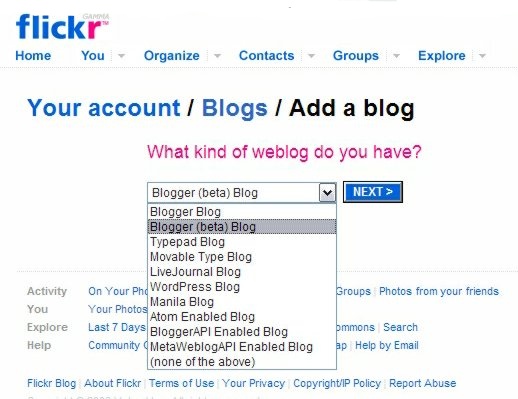
Hmmm..... the blogger beta is not such a good idea... the "blog this" button from flickr doesn't work with blogger beta either.... well it does give you a half decent warning and link to change your blog setting.

The trouble is, you to have to delete the old blog setting and add a new one (there is no way to change your blog so I guess most folk will realise this is necessary eventually. It did take me a while to figure out)


As part of that process (if you have not already done it) you must grant flickr access to your google account so flickr can may make posts on your behalf. If you are worried about this sort of thing it will pay you to read the learn more link.

Tuesday, November 14, 2006

Goodbye Hello

Seems I'm a late try out going over to blogger beta (which I like by the way), BUT now I have just discovered that bloggerbot in hello can not log into the new blogger beta.

Not such a big deal, I seldom used hello anymore to upload photos to blogger (I used the direct upload most, followed by links from flickr or photobucket). It was just that I was going to do some screen captures and multiple images in one blog, something bloggerbot could do easily. WELL NOT ANY MORE because hello doesn't want to talk with blogger beta. This is a bit strange since picasa and blogger are both google products now. I know I''ll go and look on the google groups forum on the topic, YEAP lots of folk have discovered this already. HANGON you can not add to the post because it is more than 60 days old! Ok I might be late but I did want at least say goodbye to hello


You can easily remove hello from you picasa world using the tools/configure buttons.. option from picasa's main menu