Showing posts with label smart phone. Show all posts

Wednesday, July 26, 2017

A Photo Worth Taking

A photo worth Taking
Sometimes there will be beautiful light and you don't have you camera, but you will have your phone. This was taken with my new HTC Uplay smartphone and its basic camera app in panorama mode. I’m certainly rethinking the need to carry a second camera body in my travels.

Sunday, November 27, 2016

Thinking Outside the Frame

#330 Am I Spending Too Much Time On Instagram
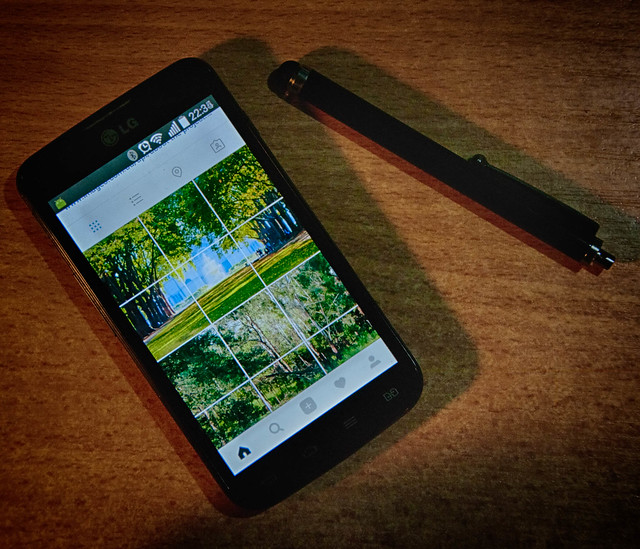
This photo was almost an after-though, since I hadn’t taken a daily photo to post on flickr. I did take a couple of others but came back to this one as it summarized where I had “misspent” by photographic energy. You see I’ve become a little hooked on the idea of making the 3 column grid view in Instagram work as a secret place to display bigger images. In a strange twist this humble image made it onto explorer and there have been 1000s views over night. The real hero is actually over on Instagram @oz_endless_summer, and is meant to be promoting my photo project next year.

I first got the idea looking at making a photo of water lilies into a more painterly image. I knew Monet created a few large painting that needed to be displayed together. So it was not a big step to split my panoramic view up into 3 square images. I probably really confused my followers but slowly I can see they are starting to look at my grid view.

I have since found that there are a few others doing similar multi-panel posts and even found a tool called Instagrid that will do the splitting. However its a bit tedious to use because Instagram doesn't let 3rd party apps upload images so the individual panes still have to be manually uploaded via an official Instagram supplied app. Anyway I’m having a bit of creative fun

Saturday, September 19, 2015

What of that race?

It only seems like a short while ago but it was back in April & May, both flickr and google where re-inventing themselves as the place to store all your photos.  So in June I frivolously started a race to let them do what they wanted (just on my phone). It began simple enough but Google Photos kept administering self-inflicted injuries in the form of upgrades. Too many of them. Mostly that just meant I had to restart the autobackup (or turn off of the upload features to tone down the bandwidth usage). However I now notice the Google Photos logo has gone (I do realize that google have been updating logos and typography) and been replaced by the little green android robot with an obscure title that it is an android app. The underlying app is still google photos but with a screen that is at least a fortnight old and nothing showing for the current phone gallery (it looks like its in hibernation). My original concern that this race might end in tears was perhaps a bit prophetic. I trust you, my readers, have not put all your eggs in the google camp.


For the record the clear winners are Dropbox (which wasn't even supposed to be in the race) and Flickr.

Saturday, May 09, 2015

SmartPhones :: My Android Workspace

My LG lock screenI’ve only had my LG phone a short time but I already like it a lot. The nicest feature for making sure my camera is always at hand, are a couple of LG specific features, the first is called knock on, and it simply is a light double tap gesture on the phone screen to wake the phone up. Then on the lock screen you can set 4 app icons ready to go at the bottom of the screen, the camera app is on the bottom right. So to start the camera is just a third tap on this camera app, with a swipe up gesture. If you know morse codes its like tapping out IT (dot dot wait dash). Viola the camera app is up and ready to go. Compared with finding the power switch, turning on the phone unlocking it if necessary then the finding the camera app and eventually starting it. This is fast and natural.

I’ve seen plenty of reviews that claim the camera in this LG phone is ordinary and maybe it is but the IPS screen is really amazing, strong colours and contrast (while you’re inside!) which LG describe as beautiful colour reproduction and viewing clarity. Outside the screen suffers lot from glare and you have to manually increase the screen brightness (which can be a challenge when you can’t make out the screen). I can’t figure out why they haven’t made screen brightness automatically adjustable according to ambient light. (Other than the fully bright screen setting does eat battery life!). I soon learned you can adjust the brightness (even blinded by the light) by a swipe down gesture at the top of the screen (which brings down to notification draw and then taping again bit lower, on the screen brightness slider, and swiping all the way to the right).  K in morse code (dash dot dash).

Oh back to the real issue here, how have I setup my digital photography work space. Its actually still a work in progress but here are the basics. I have set up a whole app panel to hold camera and photo related apps. My current setup is shown below.

My LG photography app panel

I have a few old favourites which came over from my HTC wildfire, the first serious photo editor I used routinely was Photoshop Express, ok it relatively basic but it does the basics well enough and recent version allows connection to a creative cloud account, if you have one. This was largely overshadows but Autodesk’s Pixlr, which quickly became my preferred on phone photo editor. It is on of those free apps that has in app purchase options (I normally don’t like them) but they are tolerable and for other autodesk modules/tools. HDR Camera+ app is the one paid app from the wildfire and was really my favourite camera there, its had limited editing functionality (specifically tone mapping options). Finally Dropbox is a wonderfully reliable facility, I just have  it working behind the scenes and synching up my photos whenever my phone connected to WiFi (ie doesn't waste my data limit on my phone) I have sister apps on all my desktop computers so recent phone photos can be accessed there (no wires or able or separate steps required.

With the new phone and upgrade to android version, I’ve reload the official flickr app. Where the old app was clunky the new version is really much nicer and does allow a seamless upload to flickr (but I have turned off the automatic upload). Flickr is quiet enough for me I’m not interested in instagram.

The real gem I discovered was Snapseed (which was incompatible with the Wildfire) and I just managed to download it the day version 2 was released. It really is a very elegant app and a great photo editor for a touchphone. I was familiar with snapseed as the photo editor for google+ photos but the phone app is in many ways nicer to use. However now for the downside. I did originally have google+ app on the wildfire but it was a resource hog so I removed it and I don’t use google+ itself as a social network place much anyway. The LG approach has been to integrate many of the google tools as standalone apps (such as GMail, Photos, Hangouts) and this initially struck me as a great approach. Whilst the LG (google) Photos app lets you access the albums on the net, but it started acting like google auto backup vacuuming up and uploading any images on your phone (so I turned that off). A real downside of this integration has been the overwhelming of the default LG gallery app with photos (not just albums) from the every increasing google+ photo mess. Haven’t figured out how to turn this off. Lightroom mobile is only on trial and I must admit I am not excited by it. 

So now my phone’s photo collection is in close connection with google+ photo, flickr and I am still trying out Carousel (the original download on the wildfire was not reliable) as a connection to the rest of the world. It is basically a gallery app for dropbox, I’m even starting to favour it over the LG gallery app, particular for sharing with other services like twitter and SMS. I also like the everpix like Flashbacks.

I have previously posted about my alternate camera apps.

getting up close and personal with a rockFinally I also have autodesk’s Sketchbook. its not really a photo tool although you can edit photos (eg circle important parts, draw arrows etc.) I bought a cheap stylus and I find I use this app a lot as a graphics notebook, quick diagram maker, and good party trick (I sketch quick cartoonish portraits of folk)

My SmartPhone workspace is humble compared with the computer power available elsewhere but it is remarkably capable of getting decent photos and images out onto the wider net, into my albums on computers and into reports. When I started this blog over a decade ago If you’d have hinted at this power in my pocket I would have been sceptical.

PhotoFriday :: In search of detail

IMGP9038

For PhotoFriday‘s topic Detail

Wednesday, April 15, 2015

Enough of the sharing already

I’m in the process of swapping from and old HTC android phone (still on version 2.2) to a newish LG android phone (running 4.4) The transition has been very straightforward, You just go to the My Apps section of google play, from my computer, change the device (the number is the same as I just swapped the SIM over) and tick the apps you want (there are a few duds in the my apps list and a few to much sharing, & why black & white?I haven’t used much). So whenever I’m on WiFi I get the apps downloaded (a couple at a time).

Unfortunately I hadn’t anticipated that a number of the apps would be updated (for compatibility with android 4.4) and that entailed turning on the default settings, which on most of my camera related tools involved “free” upload and on-line storage. Suddenly every time I took a picture I would get a copy sent to google+ autobackup, Carousel/Dropbox, flickr, adobe and a few others. Most of which I didn’t know about. Worse google has restarted its auto awesome blooper campaign, sending me enhanced version of photo I didn’t really want rather than the ones I would have preferred and the occasional humorous miscalculation. Where’s the off switch on autoawesome again?

Ok it was easy to turn all the auto-uploads off (except the dropbox, which only uploads when I have a WiFi connection). Fortunately all the uploads where set to “private” (ie not automatically shared). Still it is a timely warning to check those “this app requires access to” settings, particularly around the Photo/Video/Media files  and Camera item(s) and what internal settings are defaults in those apps.

Sunday, January 04, 2015

Weather …or not?

The weather appflickr are probably sailing close to the wind on sharing their vast photo collection, yet again! This time it is being handled more sensitively. I received an invite to join a new project they have called the weather project. The basic idea is pretty sound, via a free smartphone app called Yahoo7 Weather, you will be able to see flickr photos of your location showing current conditions, supposedly backed by "the most accurate forecasts" (aka the weather channel with temperatures in Fahrenheit), Now this is an opt-in situation whereby joining the group you can expect to have your images shared, provided that are selected as suitable, by “a team of trained Yahoo Weather photo editors". This is clearly a better way to handle the public sharing of photos. So I say cautiously, congratulations flickr.

The first drawback for me is I can’t install this app on my older android phone, not such a big deal because I already have a weather app that accesses the local bureau of meteorology (even when I’m travelling) and it works fine (and the temperatures are in Celsius. However before joining the group I want to make sure I understood the conditions of use. There is a quite comprehensive FAQ section which did deal with my primary concerns, which where conditions of submitting, who “owns” the photos and attribution. It is also clear that flickr, or yahoo, will not be making any payment for images used. Fair enough,

What constitues a picture of weather?
BUT and its a big issue for me, they don’t mention licencing, and specifically anything about creative commons usage.They do acknowledge that the photo are your works not theirs, but they want you to share them freely, unrestrictedly freely! After the fuss over their wall art I expected flickr to be more upfront about licencing.

The condition include that the photo is yours, your original work. Again fair enough. The clause "You also hereby waive the benefits of any provision of law known as Moral Rights or Droit Moral" does concern me but I'll have to research what it means in Australia, since we do have a similar rights in law, COPYRIGHT AMENDMENT (MORAL RIGHTS) ACT 2000 

I do intend to join the group and very carefully watch how they handle attribution, I don’t expect a lot of traffic from their phone apps, but will be happy if any photo I share are considered worthwhile, since I am very unlikely to share my best ones into a group with rules like the clause above!

Tuesday, June 03, 2014

ThePatch :: Marketing to the Unconsumer


I didn’t want my submission to this weeks the patch theme Marketing/Product to be overly commercialized and haven’t Amazon claimed the patent on product against backlit white background anyway? My sentiments don’t lie in the “must have” marketing side anyway. I had contemplated doing a faux ad for my home brew. After three weeks in Saudi Arabia a beer is a welcome sight. Alas having been away a lot there was no new home brew to enjoy, and +Stephen Anthony had already used the concept very well. The TV, Magazines and Newspapers seem to be full of ads for the latest smartphones or telecom plans, so I though about that and decides to make an ad not to buy one, instead stick with your old nokia.

IMGP2159-HDR (1)My plan was to use a close up yet dark HDR image, which was ok but some stains on the blank screen were distracting so I decided to have the screen lit, which had the advantage the keyboard also lights up. It didn’t take me long to figure that a google search page would be perfect (nokia had such apps way before their phone could even do the internet!). I then experimented with light and a simple eveready torch and longish exposure gave the perfect vignette to create a retro grunge effect (no fancy instagram filters downloaded or required).

My first Attempt at Remain RetroMy nokia is well loved and very well travelled and has been to the back of the Himalayas, deep into the Amzon, the Andes and all over Africa, even Europe. In a lot of places the GSM signal just wasn’t there or not strong enough but the tiny camera still worked. I actually did succumb and upgraded to an Android phone long ago, but I still pack the nokia as the cheapest and most reliable phone on foreign soil is to buy a prepaid SIM card (at the airport when you arrive).

Thursday, January 02, 2014

… … Looking Forward

Looking into a crystal ball used to be a common past time at the new year. Rapid Technological change was always a key aspect of these predictions, yet this year the changes in photography might not be gleaming new toys you can pick up.

  1. We’ll do better without you, the move to on-line storage and display has been a wealth of Auto-fix facilities. Even your humble photo processing service in the local shopping mall probably uses an “enhance” filter. A lot of this is gimmickry and little more Google's AutoAwesomethat increased contrast and colour saturation. Some are based on science, particularly from the field of medical imaging and some have come down from fancy photoshop plug-ins. Corels inclusion of Perfectly Clear and Niks Software’s Snap Seed (now Google’s Auto Awesome) are good examples of what can be achieved. However if you are a creative you might need to fight this trend, at least recognise it.
  2. Better user interface on cameras (particularly smartphones). In todays world cameras might have a few mechanical and optical functioning bit bits (particularly the bigger DSLR) but at their centre is now a lot of electronics. They are essentially specific purpose computers and as such are programmable. Some existing cannon camera can already have their firmware updated (see magic lantern). However it is in the smartphone camera arena that the changes are most evident. There are hundreds of camera apps, unfortunately many are trival (and specifically the zanny filers I could do without). Yet there is light. There probably is no need to link alvin simpler controlsnew cameras back to the three traditional exposure controls, which relate back to the sensitivity of the film, or a diaphragm style aperture control. Even the time taken for the exposure. A simpler set of sliders on a touch screen that corrected over exposure, maybe focus (by just touching the screen where you want it in focus), a slider for depth of field and maybe a drop down set of buttons for specific modes like fast action close up all on the phones touch screen (or on the back of the camera) and the changes can been seen on the screen straight away, This doesn’t sound like much but I bet that would become a popular camera app or even an actual camera.
  3. I suspect this will be the year of the photobook, Ok the term has changed a lot some time ago, not so long ago actually serious photographers had exhibitions and very occasionally a publisher might hang the expense and produce a wonderful book of photos, usually with accompanying text but a alvin photobookrecognised write, Now the photobook can easily be self published. There are some quiet amazing limited edition photobooks being created today by semi-professionals and gifted amateurs These books have reached a price, mainly due to the technology of the production aspects and old fashion competition where it is can be cheaper to prepare a photobook full of say a hundred or so 5 by 8cm sized snaps of a recent overseas trip compared with getting those snaps printed out individually. The difference is it will probably take some time and energy to create the book and possibly your family will slink away when they see you get the book out, In between there is a place where you can be creative and publish what is important to you. The movement to photobooks is also present in the ebook area where photobooks are starting to gain traction mainly due to the larger screen on IPads and Android tablets. 2014 is a good year to consider creating your first photobook, just start small (in $20-$25 range)

Friday, November 22, 2013

More Street Art


Posted by Picasa
Richmond is probably most famous for its hard edge street art (aka graffiti covered in tags), but I found this sculpture wall and reflective space on the very busy corner of Bridge & Punt Rd.

Yet another example of a Smartphone photo taken and synced via dropbox before I even got home (no Instagram involved)