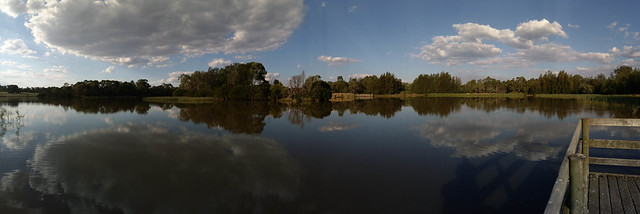
I am always had a loved of wide panoramic views. This have been even exaggerated as I travel around on my endless summer project. Australia looks better in wide view. However I am not a fan of the distorted view that extra wide angle lenses give. For example you can get the horizon horizontal and straight if you have it in the center of the photo when you take the exposure, but lifting the horizon up or down will result in a curves horizon in the final image. In a forest the tress on the edge of the photo will bend in. Building will get smaller towards the edges and very triangular above you. These are all features that can be used creatively, its just I don’t really like them and therefore don’t own a specific wide angle lens. (my Tamron 18-200mm zoom give me a decent width to play with)

I still like the wider view, so what do I do. I have always (even going back to film days) just taken a series of overlapping photos and cut and pasted them together. Now with digital tools I use software rather than scissors and glue. There are plenty of tools to do this but I like Microsoft’s ICE and Autostitch the best. They actually have a different look, closer to what you see with two eyes and head movement scanning across the scene rather than classic single point perspective. I’m certain that David Hockney noticed this well before me, in his joiners, grand canyon and bigger picture projects (all made with multiple images/panels) and specifically he does mention the limitation of cameras in his collaborative book Secret Knowledge: Rediscovering the Lost Techniques of the Old Masters with Charles Falco, There are now also lots of smartphone apps that will stitch panoramas on the go using the phones camera, they also show this wider perspective rather than the wide angle distortion of a wide angle lens and single image.

However because the photos are taken in sequence (with inevitable time gaps between) they are prone to a few issues. First and most common issue is someone or something moves (like the man in the 5th. 6th. & 7th. frames), The stitching program will then produced “ghosting” (HDR set also suffer the same issue) in any areas of overlap across the areas of the movement in time. This can be a hassle to fix, and I often don’t or only fix the most obvious ghost. In this case I used OnOne Enhance’s magic (a context sensitive) eraser on the ghost in front of the moving man’s face and the whitish ghost of his hoodie. Some programs give you the option of masking out things not to be stitched (it can be a lot of work with limited success). Another common problem is the difficulty of hand holding and maintaining a level to the sequence as you turn. Wobbles can also lead to ghosting and sometimes bending of the horizon or failing to be able to stitch. This sequence was hand held and I was on a slippery wet rock and it was windy so despite my best efforts the last few frames are a little out of register, and you can see the resulting ghost in the timber slats on the side of the bridge. I decided not to attempt to modify them.
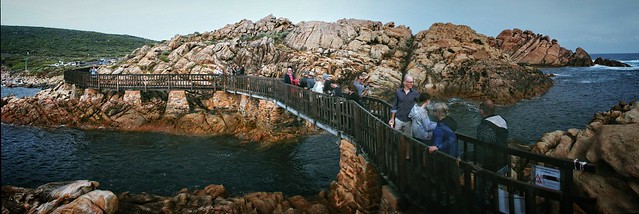 The important outcome is the modified wider view does the magnificent curved walkway justice (It is just a bridge to allow rock fisherman to safely fish in the canal but it is a wonderful construction)