Showing posts with label monitor. Show all posts

Wednesday, May 17, 2023

Some Frustration along the way

The computer system in my studio has developed over time. Computers have come and gone, devices have been added and taken away or died, interfaces changed, and monitors of different sizes swapped in and out. The use of an older Bravia LCD TV wall mounted was a game changer at the time. Allowing me to redesign my work table to suit both sitting-down art-making, and/or standing at my easel (now my favourite way to work). However, this ad hoc approach meant I had a plethora of cables, power, video, audio and lots of tangled USB cables. Some actually go nowhere and are no longer used. It was a mess.

As it was playing up the old Bravia TV had apparently modified the graphic card drivers or reset something deep in the operating system. So on first attempts, I couldn’t get the repurposed TV replacement to work at all. A fair bit of time was wasted not knowing what was wrong, Attaching the computer to other monitors showed that the screen only worked when connected to the older style VGA cable but not to HDMI. Well very inconsistently on HDMI. So I dug out a very old flat-screen monitor I hadn't used for years. This gave me two screens and let me waste a lot of time checking the graphics card setting, updating drivers, swapping cables and also fiddling with the settings on the TV. Eventually, I got it going reliably.


Now to simplify that wiring….

Tuesday, May 16, 2023

Oh no….


My large screen TV used as a monitor in my studio was a great friend. It worked well as a sit-down position, or moving around with a wireless keyboard, but it was also wonderful for standup work (eg painting at my easel), It had a reasonable built-in sound so I avoided speakers on the table. It did what I wanted without getting in the way.

Unfortunately, it became terminally ill and I have had to pull the studio apart to find an alternative (at a reasonable price) …   Uggh, all those wires.....

Monday, September 26, 2016

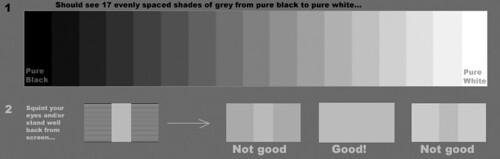
Tonally adjusting your monitor is important.

Quick monitor check test pattern

I noticed that the new photofriday included a monitor adjustment. I also found this older article on flickr central, which goes into a far bit more detail about doing the tonal adjustment for you computer monitor and its just as relevant today.

It is not me that benefits from you doing this, it is you that benefits. You will be able the better appreciate the effort good photographers have undertake to capture well balanced and rich tonal ranges.

If you are serious about looking at photos on-line check out the test strip above (it shoud show 17 shades of grey plus black and white. Commonly it is the strips at either end that might look the same. Dive into the post to see what needs to be adjusted

Friday, September 16, 2016

An Update at PhotoFriday

I’ve been submitting photos to the weekly PhotoFriday challenges somewhat routinely for a long time, and I normally post the photos here in this blog. I liked their site but it has been significantly upgraded (specifically you can see the images directly without having to click through. It is much more Instagram like and easy to contribute to. It may take me a while to get used to but I’m willing to keep contributing and that means signing up and perhaps not posting the photos here (just their background story if and when they have one)

image

The one thing that instantly grabbed my attention was the monitor calibration. Something I wish more people would do. However I also know that colour calibration is a big issue (way beyond those devices that supposedly do it for you) and the ambient lighting has a lot more influence on the colours you see. Further it may not always address the tonal accuracy either. I know that it is the tonal aspects (brightness and contrast) that most folk stumble with and either have super contrasty, very dark or extra light monitors and they have got used to it. This sometimes means all the tonal effort a photographer has gone to, often gets lost on the viewers. PhotoFriday’s calibartion screen will probably get you to a much better place to appreciate the tonality of good photo. If you see subtle targets in the black and white circles in the test above you probably ok but if either the black or white shapes is just a single circle you need to do the calibration. Remember to follow the instructions (eg dims the room lights)

Try it its free!