Monday, May 09, 2016

Google Takeout

Back a few weeks ago when I posted about being able to download your photos from flickr & google, because I am a little wary of the “One place for all your photos claims”. I struggled to find a decent way to bulk download photos from google photos. Well there is a way to bulk download everything from google, via there take out service.This is a feature where you can download ALL the data stored in various google service. You must log in with your goggle account and can then select the data set you want, in the case of photos they are downloaded in zip format. If you read the learn more link you can download to google drive or drop box of even via email.

Having such a data “take out” facility makes me a less apprehensive about storing things on google services.

Sunday, May 08, 2016

Right Place, Right Time … now where is the camera?

I was visiting the New Eastland and there was a lot of special entrainment in each of the mall. These performers dressed in complete black where standing like statues and then moving in an elaborate synchronized dance. Wonderfully creative photo opportunity, but where was my DSLR?

Black Statues come to life

However most of us always have a smartphone in our pocket. So I pulled out my LG Android and suddenly there was a crowd all filming on their smart phones, making it a little difficult to get in the prime position for the best composition. So please excuse the clutter and people in the backgrounds.

The Dance  The Dance  The Dance

I have the flickr app on my phone so it also loads the phone capture up to flickr, as private, once I have WiFi connection. Which is a nice feature however when I went to straighten the images in aviary (ie within flickr) I was surprised to find there was no small adjustment rotation, aka straightening tool). These may not be wonderful photos but the are great figure gesture sketch reference photos.

gesture sketchgesture sketchgesture sketch

The moral of the story is, don’t miss a good photo opportunity, if you don’t have your regular camera hand use your camera phone.

Saturday, May 07, 2016

Right Place, Almost Right Time & Not Quite Right Tools

Can you see the pelican?As I was taking the dusk HDR set for the post below, I noticed a pelican in the last frame gulping down something at a great rate. It was fishing, and very successfully, so I quickly changed over to my telephoto lens. However the pelican was in the shadow and the light was failing, and the pelican moving so much it just became a white blur. I opened up the f-stop and cranked the ISO higher so I still had a exposure time of 1/60th second, but hand holding a long (lens 300mm) is a challenge. Back button focus (which usually helps when trying to pan on moving birds in flight at dusk) didn’t help, mainly because it was difficult to follow the pelicans movement (eg panning). How I wished I was closer (I could have walk around the lake but the pelican may have move on and I would be looking into the light) or had my tripod with me, or that it all happened a little earlier in better light. So I had to do the best I could (and accept that I would not get a perfect photo) just enjoy the moment, use my memory as inspiration and the blurry photos just as reference.

some on the blurry pelican fishing photos

This is a prefect example of my constant message that “Being in the right place at the right time is difficult but being there with the right tools is more important to creativityA dreamscape angel hair interpreation of the pelican fishing

PhotoFriday :: Dusk

#127 Jells Park Lake Sunset

HDR Stitched Panorama of Jell Park Lake at Dusk

For PhotoFriday‘s topic Dusk

Friday, May 06, 2016

Squabbling Cockatoos

_IGP5306

Stop it Windows 10 …before you go blind

I’m not sure why but I am getting an even uneasier feeling about an operating system that can update itself with asking me first. imageToday when I woke my my new spectre 2x from sleep mode I got the warning about the program wuapihost.exe (apparently a windows 10 program being blocked by the fire wall).

This is all a bit suspect, Microsoft security blocking a Microsoft program?

Looking at the microsoft community forums, shows there are a lot of “me too”s, but just jibberish and the typical “reboot” answer. Should I live dangerously? No the firewall block stays put.

Thursday, May 05, 2016

Pink Rain

Shared this photo from the Flickr app on my phone! Take a look: https://flic.kr/p/FQchZc

Wednesday, May 04, 2016

HTTPS comes to this blog …at last

imageAt a time when google are ”hindering” access (just a warning message at the moment) to non secured sites, they seemed to be ignoring their own, such as blogspot and google photo. However yesterday google made it official that blogspot domain sites are now HTTPS secure. At last!


What does that mean? HTTPS stands for Hyper Text Transfer Protocol Secure. It means that all traffic between the website and your browser is encrypted (and can not be seen by intervening software and “man in the middle” sniffers). It protects everyone but mostly you and your browsing. Usually you will see a little padlock icon in your browser address bar or browser status bar is indicate this added security and encryption to the website is active.

Saturday, April 30, 2016

Look after those SD cards

SD cards have become ubiquitous with digital cameras and microSD cards with smart phones. They are relatively cheap and generally robust. However they can be damaged and can very occasionally fail. My experience up till last week was that failure does happen but was very unlikely. I had one bad experience several years ago where a card came apart in my camera and jammed the card socket. With patients, a magnifying glass, a torch and the tweezers from a swiss army knife I did get all the pieces of plastic and gold foil contacts out of the card slot and no damaged was done. Luckily!

Example corrupt RAW fileAnother card last year just gave errors on two test photos when I loaded them. Picasa loaded in the photos ok but Lightroom reported corrupt RAW files. Surprising the paired jpegs were fine. At first I suspected the camera but I took some more photos using an older SD card and no problems. This was a cheaper brand card and I could see no obvious damage. I just  reformatted the card in my camera, and it worked fine. But I did buy a replacement card the next day. It is serving out its retirement in a relative’s photo frame and apparently enjoying life and behaving.

Problem with Write Protection Lock sliderTwo days in a row this week I had two cards develop problems with the little plastic slider on the side that provides write protection. I don’t normally touch this slider. The first problem was I managed to push the slider up inside the card and on top the contacts. I felt the card being blocked when I inserted into into the card reader. I could read the photos the card stuck again as I tried to removed it from the reader. I carefully applied more pressure and the card came out. Close inspection showed the slider had moved and was jammed (see picture above). The SD was immediately thrown out. Unfortunately the next day, same camera another same brand SD card, read the photos ok but when I put it back in the camera it reported the write protection lock was on and when I checked the card the write protect tab was missing. I carefully checked both the camera slot and card reader but that little bit of plastic was totally missing. Another card for the bin. Three new cards from a different manufacturer purchased.

By this stage I was worried either the camera or the card reader was damaging the cards. So an intensive investigation of cards and cameras and card readers followed, including testing the write protection sliders. No problems found and I breathed a long sigh of relief.

So What might have causes the failures?

Then I realised I had changed how I was using the cards on my recent trips. I was using a new card each day and not clearing it off. After being loaded I would put it back in an elasticized pocket in the camera bag. There were only three such pockets and six cards so there was doubling up and I remember a few cards slipped out and floated around in a mesh compartment which also house a few other accessories. I now suspect that is where the little plastic slide switches got damaged.

So I have gone back to my old practice of re-using the same card in the same camera and clearing off the photos after they are loaded. Only a singe SD card is stored in each pocket, as spares in the field. Old Style SD Card PackAny other spare cards are kept in those older little slide boxes, that SD cards used to come in before that where just bubble packed. They are robust but kept back at base with my backup USB drive, not floating around in my camera bag.

Before I try the rotating card process again I’m need to find a suitable protective wallet for the cards and take better care of them.

Friday, April 29, 2016

Introducing another Mistressess

angle nikMy photo software harem keeps expanding, despite all the advice to choose just one package, This monogamy is actually good advice because the major packages do have their own little foibles, and cross incompatibility, or just straight out refusing to play nicely with each other. What seems even worse is it is yet another bit of well loved software that google are abandoning. My latest addition, and she is an angel, is Nik’s software add-ins for such programs as lightroom and Adobe photoshots elements. With the re-instatement of lightroom on my HP spectre. mainly because she is behaving and is now fast, I am finding these wonderful little tools easy to evoke and bringing a little more welcome power when I am post processing RAW files.

The black and white conversion of Nik’s Silver Effect Pro is really well loved and many keen black and white devotes have long sung its praises. However it is the colour tools I am learning to love, The reproduction of old film formats can be easily set up with Analog Efex Pro, The slide film effects work in the gorgeous colours that well exposed slides could reproduce much better than any lightroom presets I have seen. The real jewel for me is Viveza, which brings advanced color control. One of the magical tools shared across the modules is control points. which is almost like a mixture of layers and luminosity masks, only it is a method of local selection of those parts of the photo with similar tone, texture and colour, once selected all the sliders from the module can be individually changed. My preference is to use this feature sparingly and it is at its most beautiful when adjusting just one colour as the center of interest or to highlight a subject. The other bit of magic is the slider called structure. It will take an entire image or just a control point selection from highly detailed to very smoothed. Its a little like the clarity slider in lightroom on steroids and across all tones not just the mid-tones. I actually prefer the dynamic contrast filter in OnOne effects because that can be separated in short, mid and long ranges textures. Like colour in Viveza this also works best when only bring in extra detail to a few carefully selected control points,

Google are now offering the entire NIK suite for free download. If you don’t already have them and  have lightroom (or photoshop elements) and process RAW files then definitely go and get the free downloads. If nothing else just learn to use control points and fall in love with the structure slider, I’m sure you will find this collection of angels brings some beauty and inspiration back into your post processing.

PS She is well behaved.

Wednesday, April 27, 2016

Yet another Google favourite stumbles

It seems to have been at least two week since the last dissapointment with google. perhaps a recent record (actaully it was only 7 days I had to turn off the thumbnails in popular post on thr righthamd column of this blog) Ok it just seemed longer. Today I am woking in my studio which does use an old computer which is still running vista (and running a little slow but doesn’t give me the heartaches of the theoretically upgaded windows 10 machines). Its slow and stately, never misbehaves and fine for what I need.

bad googleHowever today I got the message that google will not be supporting chrome on Vista. This is a pity because using chrome across a range of computers and opeating systems was nice. What do I expect for free, obviously the confidence I once had in google is now almost none.

My only solution is to keep using the software tools google once brilliantly championed but now has lost interest in and hope there as no legacy, compatibilty or upgrade consequences to come.

Tuesday, April 26, 2016

My First 3D Picture

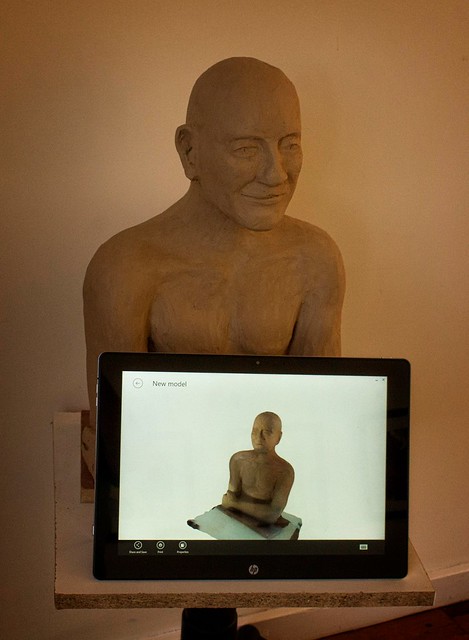
I do like trying out new things, and since my new computer comes with an Intel “Real Sense” 3D camera I though I should try it out. Trouble is the Camera app that comes with Windows 10 is not 3D aware. A little looking around and I found itSeez3D, which can make 3D scans of people (it must start by recognize a face). Most importantly there was a Windows 10 app that recognises the Intel real sense, that I could download. There is also an IOS app (for iPads with R200 cameras)

_#117_MG_6930-My_First_3D_Photo

The standard windows app is free, but there is also a business version (for commercial use). However the only interesting extra feature I saw was being able to print your 3D models. Unfortunately I see being able to make small 3D plastic “selfies” as a toy application rather than something I would need at the moment. You can do the 3D render locally on the tablet, this took me less than a minute but was pretty crude or once you have an account with itSeez3D (Simple enough but it took a while and a verification email step), you can upload to the cloud (that took a few minutes) and have a much more detail (final) model produced on the cloud (I had to wait about 10 minutes). The result was really impressive you can interactively rotate and scale your 3D photo/model on the screen. For me the next step is figuring out how I can use the 3D models to create unique art. That’s going to take some time, which I have, but I do like the potential of  technology and will be looking for a way to scan non humanoid objects soon and perhaps then make some virtually amazing sculptures.

I then went looking for a way to embed a 3D viewer in this blog posts.Try out Sketchfab below, click on the 3D arrow to manipulate the image. Unfortunately the 3D view highlights a couple of places I didn’t get adequate coverage. However for a first attempt I’m pleased.

My Clay Sculpture by imageo on Sketchfab

Monday, April 25, 2016

PhotoFriday :: Bold

IMGP8858

Beach towels drying in the sun on a windy day through a glass wall.


For PhotoFriday‘s topic Bold

Sunday, April 24, 2016

Are we really Shadowless?

Today I visited a new exhibition at mga on Australian Exotica, which presents the views some contemporary Australian photographers that is a different and erotic place. On the way back to the car park I walked the path on the right below and loved the shadows. However compare that with the photo of typical open forest (below left) I had taken earlier a short distance away. Different style of shadows but not really exotica.

Typical Australia Open Forest European Style Garden

“The trees  [in NSW] nearly all belong to one family, and mostly have their leaves placed in a vertical, instead of as in Europe, in a nearly horizontal position: the foliage is scanty, and of a peculiar pale green tint, without any gloss. Hence the woods appear light and shadowless: this, although a loss of comfort to the traveller under the scorching rays of summer…”

…Charles Darwin (notes on trip from Sydney to Bathurst 1836, From Chapter 19, The Voyage of the Beagle)

Friday, April 22, 2016

Free WiFi is great ….but slow …& other self inflicted woes

Waiting for my flight & uploading to flickrI’m sitting at Brisbane airport waiting for a delayed flight, and I thought it would be a great time to upload my best three photos from today. Ok there is free WiFi and it was simple enough to get connected BUT as I  was trying to upload to flickr via the web interface, I came to realise that after 10 minutes I had uploaded less than 10% of the files (an estimate looking at the progress bar). There is a good chance that the whole thing will abort because the three files won’t upload before my flight is ready to load. Do I abort and try individually? … or some other anxiety inducing worry. No the first rule of travel is go with the flow. The free WiFi is slow, so I’ll just wait and see what happens. Nothing is really being lost if I wait till I get home.
Upload time outSo the answer to that wait, is the flickr upload ground to a halt. Time to stop worrying and perhaps have a coffee.  Damn the flight is delayed further. Perhaps I’ll restart. …slowly slowly two of the three images get loaded over the next half hour wait. Now the incoming flight has arrived and passengers disembarking. The public service announcement indicates there is a problem and some passengers have to embark via the rear door and that means going out on the tarmac. It’s sure to be me, no big deal so I go to check my boarding pass on my phone (I’m just trying this for the first time).
2016-04-22-23-48-57Bugger the flight has closed off (and theoretically departed) so my boarding pass is no longer valid, and all I can see on my screen is I no longer have a boarding pass. So I join the queue of people with the same problem infront of a very stressed ground staff at the gate. After talking on her radio for a while, she says we’ll have to go to service desk. So the queue moves over there and eventually I get a printed boarding pass. The plane still is waiting to load and a massive queue is waiting to board but still to board via the air bridge and when the boarding actually starts only myself and two other guys walk over to the stairs to the tarmac, our boarding pass is checked and we stroll to the back of the plane. climb the portable stairs and get seated, everyone else is slowly getting through the air bridge crush and the the narrow corridor between the seats and other passengers arranging the luggage, it take a further 20 minutes to load everyone. Why weren’t they listening to all the announcements? Ah that’s right they where listen to their iPods, or watching video of their iPads or just talking on their phones, and probably their frequent flyer apps didn’t notify them because notify is turned off!
The morale of this story is perhaps we expect the always connected and on-line world to be there, work and look after our interests. However we shouldn’t stress when they don’t, just be prepared to go back to the old methods that work (ie Perhaps just wait to get home to upload, use a printed boarding pass, listen to the announcement)
PS: I was writing this as the events unfolded and I was able to update a draft of the text to blogger via my Open Live writer app, but it got hung up trying to upload the images I had capture on my phone & PC to Google Photos (low bandwidth issues same as flickr uploads mentioned above). So I had to be patient uploading this blog post as well.

Wednesday, April 20, 2016

Almost Black & White…

The differences between the approach of most photographers and artists can almost be summarised as a difference between black and white.

your cup is always being filledToday I listened to a great podcast,  TWIP Family ep 49.5: Trey Ratcliff On Becoming an Artist. If you haven’t already listened the discussion between Jenny Stein & Trey is really natural, full of inspiration and worth listening too. One of the topics is about analogy that your cup is always being filled (with creativity and inspiration) we just need to be able to get to appreciate the good stuff inside the cup. That analogy of a glass half full or half empty is perfect for this post.

I need to begin at looking how tonality is represented in each medium. An easy way to understand tonality is just to desaturate an image to remove all colour. I’m using the basic tonal range names from lightroom. Black, Shadow, Mid Tone, Highlights, White.

 Desaturated Photo

When taking the photo I have to make sure that the highlights don’t get blown out. I begin at the whites. It is easier to find at least some detail in the blacks and shadows, but post processing the image, whereas once the whites are blown out that’s it, nothing can be recovered (even from a RAW file). If I can make sure that the other tonal zones are well represented I will probably have a well exposed image.

My tonal sketch

When starting to sketch the same subject I’m using a well known artist trick of drawing a series of 5 boxes (some artist use 4 boxes, other prefer 7 grey tones) and use the pencil to stipple a set of graded grey tones. and I have matched them to the lightroom names. I’m sketching directly from the simple still life by observation not copying a photo by the way. The key difference is I begin with the darker tones. I personally start by blocking in the mid tones and  then move to the darkest tones (lightroom’s shadows & blacks) and then finally back towards the highlights, leaving parts of the paper to be the whites. My darker tone marks thus define what is consider highlights and whites. They hold the composition of my image together.

#111_MG_3850-sketching II

While photographers generally exposure for the highlights, artist will generally study the shadows and sketch these shadows to define the composition.

Sorry Folks I’m Turning off Picture in Popular Post Side Bar

image Google’s taunting of me continues. Today I notice that the popular post summaries over on the right hand side bar have at last started to displaying flickr images but now they overflow the screen. The effect of truncated images is really distracting. I hope this is not a ploy to bring me back to google photos. So I’m going to turn off displaying image thumbnails in the popular post in my side bar for now, Which sort of defeats the purpose on a photography oriented blog.

I have actually had some good feed back about the idea of a popular post summary, probably because my blog rambles all over the place. You can still follow topics by clicking on the green labels (blogger’s version of tags) at the bottom of the blog post. Alternatively there is a label cloud still on the righthand side bar.

At the moment, although I can easily find my most popular posts, I can not find an alternative way for a reader to find popular recent posts (other than the blogger popular posts tool). So Sorry folks no pictures in Popular post (for the moment)

Tuesday, April 19, 2016

Don’t Panic :: But…

I definitely don’t want to create a panic, so I need to careful in what I am warning here. The past few months have seen several disappointing announcements from those offering “free” photo storage on social media services. The ”One place for all your photos” was a claim that worried me from the start. Social media services are definitely not the only place to store your photos. You can use them to share selected photos but trusting them with the only copy is very dangerous. They have already shown that they change their minds, sell the business and/or possibly will even shut up shop.
So before the crying and gnashing of teeth stage. If you don’t have copies elsewhere it is time to make sure you do. Backup those on-line photos now
image

Bulk Downloading from Flickr

No so long ago you would have had to do it one photo at a time or better still one album at a time (look for the download arrow icon). Now with this the new camera roll feature it is even easier. You can just select all (which does select all your photos, so definitely don’t press delete, the red rubbish bin on the left hand side) on each grouping the the camera roll. You can then move onto the next grouping and press select all again, which add the new set to the selection bar at the bottom of the screen. Normally the camera roll is order by date (either taken of uploaded) and this is a good way to structure your downloads, say my month or by year. However remember if you have uploaded a lot of images it can take a fair while to download a really large collection and it might be wise to break the downloads into logical groups. If you are more interested in organizing your collection by theme you can consider using the magic view to help you select batches of images to download in thematic groupings (there may be a few miss-classifications).
image

Bulk Downloading from Google Photos

Despite the promises about recognizing how much work people have put into saving and organizing their photos in picasa. Google have been quiet about how to save any on-line uploads from Picasa into picasa web albums. The picas web photos  are still on-line but now they are in Google Photos. However finding where to download them is no longer as simple as finding the download to Picasa button. Both the the individual and album views have three vertically arranged dots in the upper right corner, which signify more options. Clicking on these dots brings up an action sub-menu which contains the download feature. It the case of albums  it is a download all. I haven’t found a way to selectively bulk download. If you are using auto-backup the photos will be grouped by date (each date will be its own album)
image    image
Remember :: It is the right time to  Backup those on-line photos now

PS (May 2016) I have discovered you can bulk download everything using google's takeout service

Monday, April 18, 2016

Computer-aided distractions

imageYou just have to walk around any city to see how many people are totally distracted by their personal electronic devices (phones. iPads or watches). Well here is another distraction, CaptionBot, from Microsoft’s cognitive services, its and AI driven softwareBOT that attempts to describe the contents of your photos. Because you can rate its performance, it is probably using you to help train it to recognize objects with a higher precision.

My tests didn’t go so well … no 5 stars for captionBOT