Showing posts with label dreamscope. Show all posts

Wednesday, April 05, 2017

#AIart Shoot Out

I was certainly an early follower of the developments in the deep dream style art filters, which use neural networks to recognize and amplify aspects of any photographic images. I must admit I like the potential of the forward seeking neural networks that can replicate line work and other mark making characteristics of the training image. I  chose to this called Deep Dream Style, and starting giving such creations the  hashtag #AIart (which seems to have caught on on Instagram). My prediction that these might become over used Art Filters is probably also an astute observation, there is certainly a plethora of such apps. Fortunately most are based around famous artist and great art, Even Adobe is joining the crowd offering researching a AI style filter that can “copy” the look from another photo. I still think these filters can be used creatively rather than as “look at me” plagiarism so obvious in social media today.

Testing my new phone camera contre-jour

This photo was just an experiment, the first photo I took with my new HTC U Play mobile phone. I was trying out the AutoHDR feature and it handled the difficult strong lights and shadows well. Its just afternoon tea, aka Coffee & fresh figs. It is an interesting enough composition so I thought I would try the image across a variety of current #AIart tools (google deep dream style, on computer, Dremscopeapp & Prisma on phone)

google deep dream styleDreamscopeappPrisma

Which rendering do you like best?

Thursday, August 04, 2016

ArtInspired :: Toronto Heat Wave

Toronto has been damn hot the past week, This is a collage of 4 similar images I put through dreamscope. A kind of cubist collage

Monday, July 04, 2016

ArtInspired :: Seeing a photo via a painter’s eyes

“I see things in terms of paint, all else is irrelevant.”

… Fred Williams

Following on from my experiments with textures, I went and had a relook at the Fred William’s works currently on display at the NGV Ian Potter Centre (there are currently 5 but they are spread around, One in the Luminous Australian Watercolour exhibit, two in the 20th Century Australian Gallery and my two favourites in the Joseph Brown Collection).

Fred’s landscape inspired abstracts work so well at a large scale, at a distance they are compellingly interesting, very characteristic of the bush areas he used as inspiration, particularly in colour and textures. Close up they are very confidently painted splodges and squiggles on a rich ground, essentially abstract.


I have deliberately begun with two simple images of the scrub and gumtree truck taken in Jells Park plus and image of the same place taken without a lens and deliberately under exposed.

_IGP7027 original photo_IGP7025-original photo_IGP7028 Photo taken with lens removed

tree0001 copy


These form my “sketches”, to which I added another simple sketch of some line work. It is important that these are the way I might make marks. However it is not a realistic sketch more an exploration of composition and line. After the success of using dreamscope and layering back into the work I again generated a couple of deep dream interpretations of the photos above. Firstly just using some of the standard filters provided.


Using the dreamscope sketch filter Len-Less image using the dreamscope Picasso filter (he obvioulsy avoided dark hgreens)

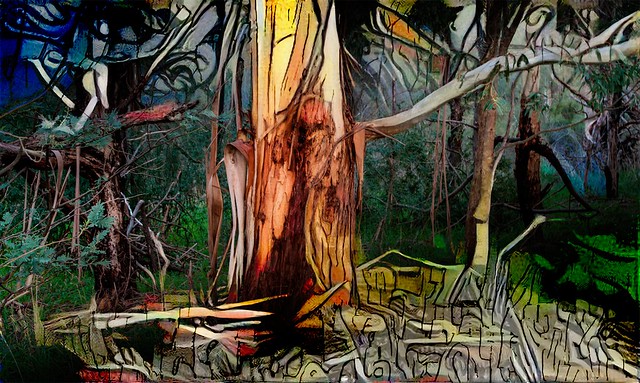
The magic started to happen when I used my line work sketch as a custom filter. So the deep dream process in dreamscope was looking for the style of lines I might have used and emphasising them.

Using my line work as dreamscope filter Using my line work as dreamscope filter

I’m still not sure how to tackle his rich selectively coloured backgrounds. In Enchanted Forest 1, (below) I tried using the the len-less image after it was interpreted via a Picasso filter, Its certainly a colourful result, but perhaps too colourful and not really characteristic of the Jell Park scrub but I trust you find still a pleasing interpretation.

_IGP7027 Enchanted Forest 1

I noticed that the sketch dreamscape of the tree truck did have the limited range of colours I was after, perhaps a bit more vivid than Fred’s treatment, yet his colours are undeniably rich. So I have used that image to bleed through the background and a descent into my line work style at the bottom of the image.  Enchanted Forest 2 (below)#184_IGP7025-Enchanted Forest 2

Friday, June 24, 2016

Artinspired :: from Photo into Mark Making

_IGP6426 Original PhotoI am very inspired by the works of Fred Williams, at the obvious level they are very abstract, yet at the same time they capture both the colours and textures of the Australian Bush. more particularly the bush around here. That's not surprising as Fred used to regularly spend one a day a week in the bush painting and sketching what he saw. Today I am beginning with a “non-bending marco” taken of the truck of a gum tree in jells park. A couple of limbs have “dropped’ and left large gashes where the gum is leaking out. Parts of the bare truck can be seen as well as the corky rough bark normally around the base of the tree. Its a pretty ordinary subject to photograph.

Fred’s work often has two levels a rich colour ground, and then an almost calligraphic decoration of texture, squiggles and lines that are a kind of shorthand to describe the terrain, the trees and other aspects of the landscape. So I have decided to create two separate dreamcope images. One that captures the colours in a rough fashion. I tried a few filets including a couple of my own and ended up using two stacked filters, one after the other. First a watercolour then a sketch filter. There are not conventional parametric filters that adjust a given slider like exposure of saturation. The deep dream process takes the image and builds a neural network like matrix and iterate through looking for parts of the image that have the same characteristics as the filer. In this case I was looking to enhance the colours, and colour harmony (ie not just pumping up vibrance of saturations) Then I created a separate layer that focuses on the lines and textures, for this I used the money filter, which I have used before and it definitely searches out the strong design elements, shapes and textures.

coloured background Line work

The final step is to combine them, and I must admit I liked the way you could still see the three layers, fully exposed in different parts of the image on my previous art inspired piece, the autumn leaves on the ground. In this case I used OnOne 10 layers again but used soft light blend mode for all layers, to let each layer bleed through but I also used simple gradational filter to start with the original photo at the top that fades into the strong line work and with the background coming through and dominating the bottom.

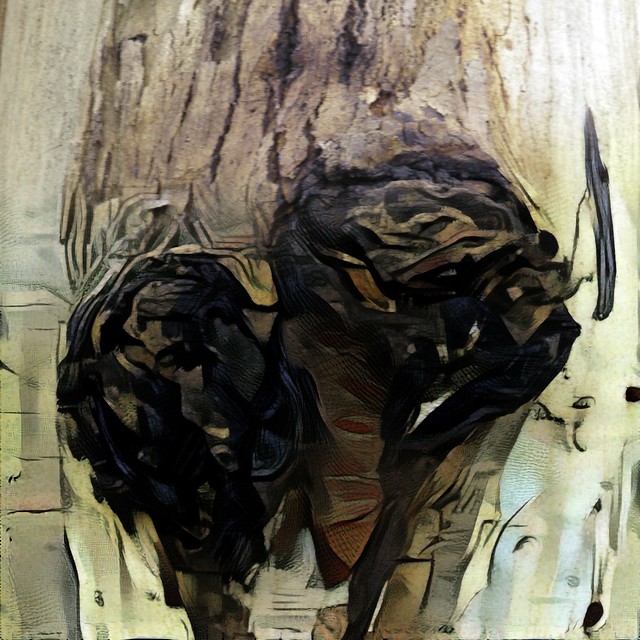
Gum Bark Texture II

Reality transforms to abstract.

Wednesday, May 18, 2016

Time for a coffee & creative ideas

Its later in the afternoon and not a daily photo taken yet. So I was finishing a coffee and contemplating what to do. I had an idea to try a series of my self looking at the camera and painting as if it was a self portrait, perhaps to make into a time series collage. So I set up my canon on my tripod and set it to take a series of images. I finished my coffee and then played with the brush.

A blurry series that should have been rejected

However it was one of those session where nothing worked as planned. Just as the cameras started firing the sun came out, brilliantly, casting unfortunate shadows. Collage of dreamscope images of me finishing coffeeThe camera was still manually focused, and everything turned out  blurry. There where many other problems especially that I had other more urgent duties to attend to, so I didn’t get a chance to repeat the photos. All I had was 12 terrible exposures, normally they would be deleted BUT I often tell people to keep a few rejects to experiment on. These were terrible and thus perfect for an experiment. My first thoughts was to try some simple dreamscope transforms and build the collage, but the three initial images of me finishing my coffee told the best story. Yet the simple transforms didn’t exactly look creative enough.

I decided to build three layers, The painting ground I made by leaving the image blurry by increased luminance and saturation. Next I made a simple stipple pattern and used it back in dreamscope as my custom filter, and created some line work. Then I recreated the the final patterned overall with the watercolour cartoon filter. I finally I experimented with OnOne Layers and different blend modes to give a composite image, that was once a rejected photograph.

#139 Coffee Drinker & Yellow Vase

Wednesday, February 24, 2016

Stacked filters in Dreamscope

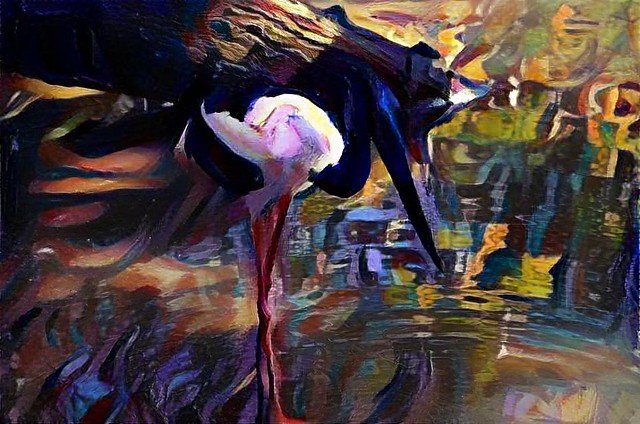
Dreamscope represenation of a black necked crane
Example of "stacked filters" in dreamscope. A custom filter based on my photo of a peacock's head as a custom filter to enhance the rich blues and greens followed by a purple shade filter. In other words I'm trying to move towards what might be an artist's interpretation of the right colour palette to suit this image, if they were painting this scene.

Wednesday, February 03, 2016

Under Foot

Having had some fun with the eye theme using modified photos (in that case using dreamscope filters) I got inspired to return to the Fred Williams stylistic approach. This time I want a simple subject (in the landscape) without an horizon and detail that comes form and is characteristic of the landscape itself but is perhaps somewhat abstract. Sounds easy?

GroundCover-001GroundCover-002GroundCover-003

The Main Dreamscope screenThe lack of a strong horizon made me think of looking down. Most people don’t take much notice of what’s under their feet, so it got me inspired  that “under foot” might be a perfect theme for the next few daily photos. The subject is then obvious also, my feet.


Hope you like such images inspired by art, but created photographically. Watch this space for more.

Moss Covered Granite Feet?

Monday, February 01, 2016

Letting myself have a more creative eye

Show me the money

I have been thinking more about what I might do creatively than about the themes of my daily photos. This week’s Friday photo is about eyes and the subject is very predictable. My eye is already in lots of photos so I was trying to think outside the oval/almond, or whatever shape my eye is. I began by using my camera on a tripod teathered to my computer via lightroom amd taking photos a regular intervals so all I had to do is get close to the camera and look deeply into its lens. This is a pretty simple way to get a self portrait, that I hadn’t tried before. Its easy ad works well. None of the photos where all that remarkable but I like a couple with me looking over my glasses, I enhance this one in the develop moduloe since I was already in lightroom. The only unusual step was I reduced clarity (so as not to make the skin to crunchy). I then loaded this image into the web version of dreamscope and played with a few likely looking filters.

Getting a set of self portrait in lightroom with my tethered cannonPlaying with different filters in DreamscopeMaking a composite image with OnOne Layers

Once I had the original photo and a set of “arty” renderings built from it. I then loaded the seleceted photo and a few of the better filtered imaged into OnOne Layers. the filtered on top of the photo. It was then just a case of loading a mask, inverting it and then painting out around eyes. so the eyes are phoyograpohic while the rest of the portrait becomes an artwork. Finally adding a border, lots of fun and not hard to do.

See the PhotoFriday contribution below.

Tuesday, October 27, 2015

CreativeSpace ::Time for a Change

An optimistic view of my studio Whilst I have the luxury of a Home Office and a separate Studio. They are significantly different places with different meaning. The office is the place to work and I can leave the work behind when I leave the room. Creativity doesn’t work that way, it just happens and is difficult to turn on and off. The environment has a lot more sway in the creative process than most folk appreciate. Unfortunately my studio has succumbed (or more precisely keeps succumbing) to clutter. A stained glass filter from Dreamscope might make it look inspiring but all the junk it hides makes it hard to just sit down and create. So how to fix it?

When I really though about it I don’t limit my creative spirit to the studio anyway. I have different places where I do find inspiration and focus to create. Some are handy, a few steps away, some take time and effort  to travel to. So before cleaning up my studio yet again I spent some time contemplating these places and what I need in those locations. Being in the right place at the right time is difficult but being there with the right tools is more important. So I’ve spent some time thinking about what might be that right tool. Is it just a sketch book, a camera (smartphone maybe but would a DSLR  be better?). Mind map of my creative spacesWhat about colour, watercolour, pastel or camera again? Do I need computer tools?

This let me group my work and media into the places it may be useful, not the place I tend to dump it (ie not the table or floor of my studio). Not only was this interesting it refreshed my thinking about what I need and always having it ready. This journey will make a nice set of blog posts so stay tuned.
My objective for the next few years is to seek out artistic residences that I can both learn from and perhaps return a little extra new knowledge back into their community. Having myself prepared to create in other spaces is an important first step.

Monday, October 26, 2015

PhotoProject :: One Image Three Ways

Sometimes it is worth taking one image and processing it in a variety of ways. Yesterday sunset was very memorable. Here I firstly have a Raw image processed in Lightroom (just of tone & colour balance). Next is a bracketted set made into a tonemapped HDR using Aftershot Pro, Finally I have used a Dreamscope filter.
RAW Image postprocessed in LightroomHDR created in Aftershot HDRAngel Hair Filter from Dreamscope

Thursday, September 24, 2015

ArtInspired :: In Search of the Essence

Deep Dream "Extra Trippy" version of my SelfportraitMy search for what might be the essence of a subject or landscape bought me to  investigating google’s Deep Dream (aka Inceptionism) This is a fascinating bit of serendipity, some google researcher investigating how neural nets might learn to recognised objects in computer images were looking for ways to visual the way neural networks learn when they showed what was happening in the layers of the network starting with a base random noise image. The results are surprising, they include the embedded echos of things that are significant as the neural networks progressively classifies what is important in discovering the subject’s essence. These have variously been described as trippy and surreal dreanmimages (see the many echos of eye’s in the “Extra Trippy” version of my self-portrait on the right).The researchers have even publicly shared the code to do it, but for the less geeky of us I found a truly amazing website/service to help create this deep dream style of image called dreamscope.com. (its also available as an iPhone app)
Self Portrait :: In search of the Essence