Thursday, August 16, 2012

Quick Comparison

Apple IPhone 3S HTC Wildfire Cannon EOS 1100D Pentax K20D
2012-08-16_15-41-37_ 2.0Ev IMG_6055
2012-08-16_15-51-30_ 2.0Ev IMG_6060

I’m trying to make a fair comparison or camera phones versus DSLR, by just taking phones at the same spot and not “retouching anything”. All photos are taken as jpegs and have not been cropped.
My objective is simple, I suspect that a decent camera phone and traditional camera  are not so much difference anymore?

Two great Android Camera Apps on Sale

I just happened to notice, I was looking for a light meter app, that two great Android Phone apps are on sale today. Not sure how long that 40% off sale will last, but you’ll get both for a fraction over $5.00, which is great value. HDR Camera + is a real favourite of mine, and takes three exposures and produces a tonemapped image with just a single click. This does translate into vivid colours and rich detail, as claimed, albeit with a little bit of practice. Camera ZOOM FX is a really popular app offering both nice slick standard camera features, and lots of fancy filters but also timer, burst mode & time lapse as well a shoot stabilizer feature. The Tap on the Screen feature to take the photo makes it incredibly easy to use. If you aspire to take better photos with your phone I strongly suggest you buy one or both of these, and be surprise how good you really are at photography on your phone.

The Camera Zoom Fx video on YouTube does a better introduction on how simple it is to use than me.

There are “free” version of both apps if you need to try before you buy.

Wednesday, August 08, 2012

Pretty in Pink

Known as common heath, Epacris impressa, is a very distinctive flower that flowers at this time of the year. It is the foral emblem of Victorian. Once vast heathlands would be covered in such blooms but alas it is not as common any more and most of the heathlands are covered by housing developments, highways and farms.
Posted by Picasa

walking in the RAW for HDR

Since shooting the bracketed that I was then taking into my preferred HDRi process, such as Picturenaut, originally only worked with. jpeg files, I was essentially forced to take all my bracketed stuff in both .jpeg & RAW. If I used a 5 set bracketing, then I would get 10 large photos, just to create one. With picturenaut 3.2 I am now able to process RAW files and store 16 or 32 bit tiff versions, and at least the Capture16bit tiff are readable in Lightroom.4.1 So my question is does the extra info within a RAW file give the HDR software more power? And can I turn off taking the .jpeg copy? So after a little fiddling and testing. I think I can answer MAYBE to the first question and PROBABLY to the second.

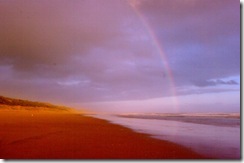
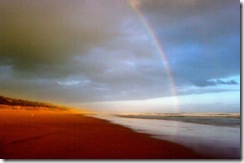
Can you spot the differences in the images below. Both where processed with Picturenaut 3.2, from a set of 5 bracketed exposures and both used the same autoalignment and ghost removal settings. Both were then taken into the Photoreceptor (Reinhard) Tone mapping. They have ben exported as jpeg (8 bit colour) for presentation here. The one on the right uses ,jpeg friles as created in the camera (my Pentax K20D).the one on the left was processed using the RAW images (.pef files). The differences are very subtle!
HDR prepared using jpeg files  HDR prepared using RAW files

Tuesday, August 07, 2012

The Cooperative Kookaburra

cooperative cookaburra
This kookaburra,[Dacelo novaeguineae] sat with us on the balcony, only leaving to chase away some crows to return and sit as we watched the sun set. I could see the the sunset behind making a beautiful picture but knew a photo would give me just a silhouette against a well exposed sky, so I thought I’d chance my arm on using my camera flash (the only light source readily on hand). I had contemplated just being able to get one shot and scaring him away. So I decided to diffuse the light by putting a tissue in front of the flash (it was kind of folded and crumpled a little as it rested on the lens but I hoped it would hold the light back enough to avoid that harsh bleached out flash look). Because I was close I was expecting to find the highlights “clipped” (washed out) in his white chest, but possibly the crumpling diffused the light enough to get the detail in his breast feathers (with a little tweaking in lightroom). He certainly took note of the flash but didn’t fly off in fact he look quiet relaxed as I took a couple more shots. The chance to work with birds close up, is pretty rare little lone being able to experiment with anything other than natural light is probably a once off. So I must give thanks to a very cooperative kookaburra.

Kookaburra Encounter


Today we went for a walk at the inlet and arrived home @ about 5:15
It was a sunny afternoon so I went in to make a cup of tea to enjoy on the deck. I looked through the kitchen window and spotted a kookaburra on the rail of the deck, So I snuck out quietly with my camera. - I needn't have botthered to be so quiet he was completely unfazed by my presence. Soon norm came upstairs and a camera duel began. We couldn't help getting some great shots - the kooka was so obliging, He sat of the rail for at least 20 mins and posed in every position for us - a lovely encounered with nature at Venus Bay.
by Kaye
"Auto-painted" watercolour created with Corel Painter essentials
Duelling Cameras (& IPhones)

Wednesday, August 01, 2012

Uploading photos from a camera phone without a cable (or a computer)?

IMGP5944This is probably the most widely unasked question for new smart phone users. Well smartphone users over maybe 30, those with 20 somethings or teenagers in house possible already know how to upload to facebook or share with the world on twitter. Older folk generally only want to upload their photos so they can make prints and share with just a few family members, not the world. Looking through phone manual (if it hasn’t already been thrown out) often draws a blank look and frustration, perhaps even diverting attention towards some additional accessory cable and software.

Well if you have web access on your phone (via 3G or 4G on the phone or WiFi) you will be able to make use of one of many cloud based webservices to transfer  from your phone to where ever you want. The tricky bit is making sure your privacy is maintained. Most such services are free up to a certain storage limit and you need to read the terms and conditions carefully. The first options, which I have chosen to call the big three, really depend on which computer and software you want to use to store and manage your photo collection.

1. Picasa and Picasa Web Albums, (also known as Google+ photos to google+ users) its been around for a while now an is well tested and stable (ok the google+ apps are still in flux). You will need to download either the Official google+ app (best option if you don’t already have a picasa web album) or one of the picasa “tools” apps around (is you do have a web album). To be honest I removed the google+ app from my phone recently (read why) but picasa is probably the easiest place to start. If you don’t want google+ involved google also offer the Google Drive, a cloud based storage/exchange which is photo aware.

2. Windows Live Photo Gallery & Skydrive, which you may have already if you have investigated hotmail recently. Microsoft just announced today that they are phasing out hotmail to be replaced by outlook.com. Fortunately the skydrive connection, which is a cloud based exchange & storage, is also well integrated into that and with both mobile & PC based apps. This is a very nicely integrated combination and ideal for dedicated windows PC users.


3. IPhone, IPad, ICloud and apple MAC, despite the claims of universal sharing this is a bit of a closed shop for the apple fans. To be honest I’m not a fan and will therefore keep my opinions to myself, if you are apple oriented and have all these devices then ICloud is the way to go. If you just have an IPhone both of the previous choices are still valid, because free IPhone apps are available for those services.

If you want to stay away from the big three, there are still plenty of options. Flickr already has a comprehensive set of ways to upload photos from your phone. If you are using a free account remember you can only see the last 200 photos uploaded and there is a month size limit, but you have a lot of control about privacy and sharing and access to a range of print service via snapfish. Photobucket  also has several ways to directly upload from your phone, and again the free signup doesn’t give you access to all facilities.  Both give you access to on-line editing factilities, so you only need web access not a dedicated computer. Today even the local photo processor or photo kiosk at your local shopping centre can offer an upload service from you phone and remember that they can also write the photos to a CD or a web album, instead of or as well as printing the photos.

So stop worrying about all those photos on your phone, get them moving through the cloud, now!

Google Plus-ness arrives at blogger

imageI suppose it was only a matter of time, but the moment bloggers on blogger were dreading has arrived, and the sky hasn’t fallen in.

I was among many bloogers that were quite apprehensive about blogger being gobbled up into virtual vastness of google+ and the possibility that our normal audience (who may, dread the thought, may not be google+ers) might never see us again. Well the day has arrived and google has integrated google+ into blogger, not gobbled it up. Further that integration is largely unnoticeable. At its simplest you are encouraged to create a google+ page that is associated with the blog and then links back to all blog post will also be automatically created as posts on that blog page. I must admit I have noticed that this link to blog posts is The logo if supposed to look like this!exactly how many others use google+, and I have done it a few times myself. In retrospect it is a very obvious way to invigorate the google+ post stream with some fresh blood.

Monday, July 30, 2012

PhotoFriday :: Luminous in Luminance

interior_pregamma_1_reinhard05_brightness_-011
Single image of the same sceneThe photo project for this week’s photofriday challenge is luminous, and perfect timing to play some more with Luminance HDR. So it occurred to me that good test of getting the tonality “natural” using a HDRi approach would be a strongly light interior (ie very high contrast). The challenge being to get detail in the shadows but not blow out the highlights, and keep the colouring of the backlit flowers looking natural, So I used a RAW bracketed set and Luminace HDR, and Reinhard Tone mapping. I hope you share my conclusion that HDR can be natural and can help in  areas that might be difficult to capture in a single image.
For PhotoFriday topic luminous

Monday, July 23, 2012

Fleeting moments & keeping up with HDR

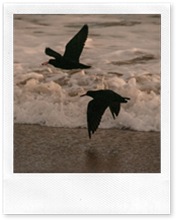
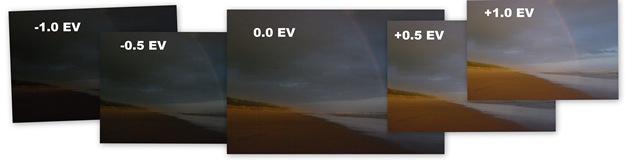
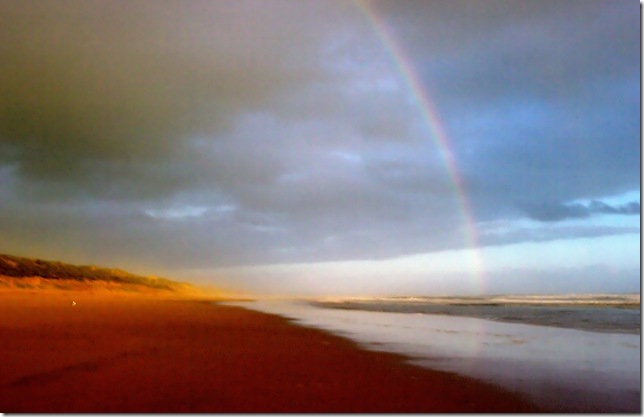
Sometimes there are just fleeting moments in natural light, that can prove hard to capture.Pair of Sooty Oystercatchers It was a drizzly overcast afternoon and I was photographing some dark birds in flight, against the grey sky and choppy ocean, so I had cranked my ISO right up because of the poor light, knowing full well that whilst I might get less blurring of the birds wings I would suffer a lot of digital “noise”. Then the clouds parted and the setting sun lit up the dunes and began to paint a rainbow. I just had time to change my lens move the dial to P (because I leave my program set to take a bracketed set of –1.0EV, –0.5EV, 0 EV, +0.5 EV & +1.0EV), press the shitter & click, click ,click, click, click and then the light faded.I have the Pentax set to save both RAW & JPG format (not really a good idea when trying to photograph birds in flight because in multi-shot mode the extra time to write both the files on the card soon overtakes the memory buffer and slows image capture, but that’s a different story). In this case I ended up with 10 images (5 bracketed RAW and 5 Bracketed .JPG) and a perfect test to look at tweaking the RAW file in Lightroom 4.1 versus some recent software improvements in HDR processing.
beach rainbow
I have been routinely using HDR for some time now, whilst my picturenaut30 adaptive logearly efforts may have emphasized the surreal, I suspect a lot of folk don’t even realize I am using it anymore. (as judged by the lack of negative comments on places like flickr,  HDR images on the web always seem to always draw out a few particularly bitter comments). One reason is I tend to mainly use Picturenaut 3.2 (it work on my portable application USB and thus I always have it on hand) and its defaults are in general natural looking.. Further it does a good job adjusting hand held images and taking it through to Photoreceptor (aka Reinhard) tone mapping is pretty automatic and the software makes good setting selection to get picturenaut32 photoreceptor realistic images (as opposed to luridly coloured surreal effects of some other popular tone mapping approaches).
I find just having my camera set to take a 5 bracket set, and even shooting them handheld is a good strategy when lighting is tricky. Usually one of the set will  be obviously better/best. Then later using picturenaut I can be pretty confident I will get a useful HDR image out as well,. So I have become quiet a fan of using HDR techniques in contrasty or low light, because that’s when I am most likely to take the bracketed set anyway.
LuninanceI also read some time ago that picturenaut could not process RAW files directly, so I decide to download Picturenaut 3.2 and at the same time Luminance HDR (which I had also seen good reviews on). Well they both performed well, but I must admit I still favour picturenaut it is fast and easy, Luminance was pretty slow on aligning the images but did a good job and it has a lot more tone mapping options. I could easily change my mind once I had time to play more fully with the tone mapping options.
I think this image does capture the golden glow of the fleeting sunset and the rainbow, as closely as I remembered. Unfortunately it also enhance the digital noise, inevitable in the high ISO shot in low light and I needed to use Noiseware to filter this out the speckled texture of this noise and in the process lost some detail. However most Importantly I was able to keep the delicacy of the light.
picturenaut32 photoreceptor_filtered-001
Lightroom 4.1 does not have the ability to do the HDRi combining of the bracketed images (as far as I know there are also not any plug-ins, like HDRsoft for Photoshop, either) So I just went ahead and selected what I felt was the best RAW image in the set (the +0.5EV) exposure and did my usual tweaking of the hightlight and white tone sliders, but nothing in the shadows in this case, plus a small “touch” to the right on clarity and a reasonable amount of noise correction, followed by a crop, only a few seconds work, once I have the image I wanted in the develop module. To display this in this blog I did export this Lightroom RAW edit to a .jpeg but otherwise this is not further processed.
IMGP5167-2

Thursday, July 05, 2012

Google+ events, another good idea I don’t really want …

Googel+ events, are another pervasive add-in to push even more photos and stuff at you. (see also my pixable post)  Underneath its another very cool idea. It begins with a calendar event marked in someone's google calendar (and gmail), fancy invites can be created and emailed to all the guests and those invited automatically update the recipient’s calendars and a event album is created to collate a single photo collection of the event. The big difference with other similar sites/services is that if you have a google+ app on your photo your will be able to use the partymode invitation to the event, which then makes it easy to share your photos in real-time into the shared photo collection.

BUT is it private enough?

A significant problem, in my mind, with all this social media sharing is privacy, and this event features is clearly aimed at family events. It was actually pretty hard to assess how good the privacy is, because I decided not to try and set up an event. Instead I waded through the help files. There is a privacy (opt-in) setting that can be controlled by Invitee names, google+ circles, or email addresses, but I assume it will be like google+photo in that the invitee with have to have a gmail or google account. Like most other social privacy systems this can be compromised (albeit innocently) when your guest’s link to and/or comment of the photos in public. Social media privacy is a big complex minefield and I suggested it is just another place not to share personal photos on the web, at least while everyone works out the shortcomings and workarounds.

A hidden benefit of all this is that everyone’s picture can get collated (and archived from) a single photo/video collection. The real time sharing is a bit naffy for those at the event, after all they are there and if only they put their phones down for a minute they could enjoy it. However it could be a great bonus for an aunt or grand parents overseas or just not able to attend.

So I don’t want to discourage you from using it, but I’m not so sure its for me.

Wednesday, July 04, 2012

Spot the birds


Posted by Picasa
Can you spot the two masked lapwing plovers (they are in flight)?

What is the web of images coming to? …15,000 likes!

Pixable, is a great idea, it is a kind of photo inbox. The idea being you can tame that stream of incoming images, from facebook, and other social connections. It does this by organising them into categories and giving you a kind of personal gossip mag, which can give you, recent mobile uploads, most popular photo of the day week or month, based on likes comments etc. there are apps for you phone to keep you instantly connected. Ok that’s the theory & claims BUT sadly it is the personification of why social media is really just so bad for creativity. Pixable is already bloated and loaded down with the same old “me too” celebrity glitter and same over-filtered look alike images, Looking at what offer people are looking at is quickly very banal and so disappointing, everything soon looks the SAME, it is not only pixable that suffers here, relook at pintrest, instagram and even google+ and you will quickly discover what I mean.

Crowd sourced art and images dosen’t bring the creative to the light, they follow very narrow fashions and that fashion is not edgy, it is really really bland.  Andy Warhol recognized this when he when he suggested everyone will have 15 minutes of fame, alas that ephemeral light has now transformed into a modern trend where every iphone and ipads must see a copy of the 15,000 likes of an embarrassing photo of a celebrity, or wannabe copying of someone’s else’s creation.