Showing posts with label phone. Show all posts

Wednesday, January 11, 2017

Enough already with the Notifications

I had planned to use instagram and twitter via my phone during the periods when I was travelling for my Endless Summer project. However leaving data on and getting hundreds of notifications from instagram and less from twitter I quickly discovered that I had used over 60% of my monthly data allowance in just 4 days! Wow, I seemed to be getting notification even though the apps where not running on the phone, The twitter beeps and tweets where the most annoying since they where not related to my posts or even things that would interest me anyway. they were just trying to grab my attention. The deeper worry is that in all this activity I feel like I am just yelling into the wind, not joining a “conversation”. So the solution is simple just log out of Instagram and twitter and turn off data. Silence … …

My cartoon creation Alvin people was actually one of the earliest Australian Twitter accounts, predominantly to link to and later post cartoons. My cartooning is having an extended holiday, but I decide to consult Alvin as he would probably know what to do. He readily admits he hasn't posted in years and after going through the forgotten password dance to resurect his account he managed to set off a cacophony of chimes, beeps, tingings, chirps and other electronic sounds. Clearly he could not find how to turn off the notifications either.alvin notifications

He did find you can unsubscribe from twitter using a link on the bottom of the web site

Thursday, July 02, 2015

A bandwidth comparison as the photo upload race continues …

Data usage on my mobileIts no secret that I am disappointed with google photos and particularly in the crippling of picasa’s wonderful sharing capabilities. However I am trying to be fair in the comparison and thus want to try and follow as much detail of the race between google photos and flickr apps on my phone as I can. So here is a comparison of (mobile) data use for last month including the period I was travelling (the light blue area of the usage graph on the right).

In theory the same photos have been uploaded to both services (in practise there are differences BUT more photos have been uploaded to flickr!). So the observation that google photos has used almost three time as much of my bandwidth for essentially the same task, is another stumble for google photos. The better news is both have used only a fraction of the space taken up by the actual photos, so they are obviously doing good things in terms of compression and effective image size/quality trade off.

Thursday, June 11, 2015

And the race is on

The new apps on my phone are all busy trying to upload every image that I collect, soon after I photograph or collect it.  At the same time drop box, upon which had to began to rely to upload new phone photos whenever I have WiFi access, seems to be falling behind.

The new andoid google photos app seems to have infiltrated several other apps on my phone, including the native android camera and gallery apps.  Despite the fact I had turned off its predecessor desire to upload, it is happily vacuuming up any new graphic images and posting them to google photos whenever a WiFi connection is available (at least it remembered this part of my settings). Otherwise it seems harmless.

The new android flickr app has also taken upon itself to upload photos from a phone.  However it is probably more polite in doing this.  It seems to only upload from a limited number of directories, specifically once used by my camera apps.  Further doesn't rush to upload new photos, I have the feeling it trickles them up.  Only when I am specifically looking at new photos in the flickr app does it upload things.

So in the race to grab all of my images it appears to be a rabbit and tortoise affair.  I like fables and therefore have decided to let the race continue for a month or so, providing I can see its not going to end in tears.  The vast majority of my phone photos are unimportant anyway so I don't want to flood my “social media” presences with such mundan-ity.  So fingers crossed and let's see where this goes.

There is a big difference in what I see on-line of this race to collect everything.  The tortoise may be doing better here.  All the photos are being flooded up into the clouds are private, which is good.  Many are being automatically tagged with the most common subject tags, also good.  They are displayed in my camera roll in date order, importantly with the small padlock icon to indicate that they are private, very good.  It is a relatively simple matter to click on a specific photo and the click on the two arrows icon in the upper right to display the photo page. Then under the heading additional info the first line is viewing this photo and you are able to select from appalled and list from private through family and friends to public, for public photos you will see the padlock icon change to an eye, beside which will be displayed the number of views of the photo.
image
In comparison the rabbit, the google photos web view is a bit more brash. The icon are larger, the layout is still a time line (rather than albums). What is missing is any indication of weather the photos are private or public. In fact I can’t find anywhere in the google photos view that can assure me they are private. Not good enough! I’m pretty sure they are private and will remain so until you share them, but I can not confirm that at the moment So whose the bunny here?
image

Saturday, November 24, 2012

Alternatives to Instagram?

imageI am booked into a Instagram workshop with Misho Baranovic  a being held as part of Monash Gallery of Art, Art in the Park Day. One prerequisite is that you download the instagram app to your phone, which sounded easy enough! However I ran into a catch 22 situation, both my wildfire and my wife’s iphone use older version of software and the new instagram app will not download to either (without upgrading the operating system). Damn because earlier I had down loaded a previous android version for my wildfire, but soon after testing it, I deleted it and my instagram account. So rather than risking grief on the phones I figured I’d just use instagram via the web BUT you can now only register by using the apps on your phone so I’m locked out now. No matter I don’t mind being away from the popular “must have” and “look at me too” crowd and I have found I usually learn much more in the long run by finding my way around such constraints. So what are the alternatives for me to using instagram?

A quick google search of “Alternatives to Instagram” yields a lot options, and a lot are very anti-facebook, or just anti-apple-verse. The article by Adam Dachis of Life Hacker, covers the angst between the ios fan boys, android-ites and the facebook-haters , with some decent alternatives, both for apple and android. This PC World Slideshow gives some sound alternatives for android users. I quickly grew weary of the opinionated outpourings in many of the other articles and was surprised how little investigation or discussion into what makes instagram so popular. My conclusion is instagram just makes it easy to share photos to the web and its photo filters can help make something boring a bit more zanny! Am I selling instagram short?

So what do I really need to prepare for the, probably nothing, because I already have these capabilities on my phone.. One important aspect of a previous misho workshop was the 3 step work flow on cameraphones 1.Shoot, 2.Edit,3. Share message, and instagram does fit this approach. So my best preparation is probably just to make sure I have these steps covered. The final share step is the big one, clearly i can not upload to the instagram site but I have been uploading to shared sites for a while now and flickr is probably the easiest (not that i have been using it a lot) offering a good range of ways to upload from mobile phones. Albeit with just the fancy filters, with iconoc city names. For the edit step I prefer aviary, for my android, and whilst I only use it occasionally it does have some decent filters and editing features. The shoot step is obvious. I’ll find out tomorrow if I am prepared enough!

Wednesday, August 01, 2012

Uploading photos from a camera phone without a cable (or a computer)?

IMGP5944This is probably the most widely unasked question for new smart phone users. Well smartphone users over maybe 30, those with 20 somethings or teenagers in house possible already know how to upload to facebook or share with the world on twitter. Older folk generally only want to upload their photos so they can make prints and share with just a few family members, not the world. Looking through phone manual (if it hasn’t already been thrown out) often draws a blank look and frustration, perhaps even diverting attention towards some additional accessory cable and software.

Well if you have web access on your phone (via 3G or 4G on the phone or WiFi) you will be able to make use of one of many cloud based webservices to transfer  from your phone to where ever you want. The tricky bit is making sure your privacy is maintained. Most such services are free up to a certain storage limit and you need to read the terms and conditions carefully. The first options, which I have chosen to call the big three, really depend on which computer and software you want to use to store and manage your photo collection.

1. Picasa and Picasa Web Albums, (also known as Google+ photos to google+ users) its been around for a while now an is well tested and stable (ok the google+ apps are still in flux). You will need to download either the Official google+ app (best option if you don’t already have a picasa web album) or one of the picasa “tools” apps around (is you do have a web album). To be honest I removed the google+ app from my phone recently (read why) but picasa is probably the easiest place to start. If you don’t want google+ involved google also offer the Google Drive, a cloud based storage/exchange which is photo aware.

2. Windows Live Photo Gallery & Skydrive, which you may have already if you have investigated hotmail recently. Microsoft just announced today that they are phasing out hotmail to be replaced by outlook.com. Fortunately the skydrive connection, which is a cloud based exchange & storage, is also well integrated into that and with both mobile & PC based apps. This is a very nicely integrated combination and ideal for dedicated windows PC users.


3. IPhone, IPad, ICloud and apple MAC, despite the claims of universal sharing this is a bit of a closed shop for the apple fans. To be honest I’m not a fan and will therefore keep my opinions to myself, if you are apple oriented and have all these devices then ICloud is the way to go. If you just have an IPhone both of the previous choices are still valid, because free IPhone apps are available for those services.

If you want to stay away from the big three, there are still plenty of options. Flickr already has a comprehensive set of ways to upload photos from your phone. If you are using a free account remember you can only see the last 200 photos uploaded and there is a month size limit, but you have a lot of control about privacy and sharing and access to a range of print service via snapfish. Photobucket  also has several ways to directly upload from your phone, and again the free signup doesn’t give you access to all facilities.  Both give you access to on-line editing factilities, so you only need web access not a dedicated computer. Today even the local photo processor or photo kiosk at your local shopping centre can offer an upload service from you phone and remember that they can also write the photos to a CD or a web album, instead of or as well as printing the photos.

So stop worrying about all those photos on your phone, get them moving through the cloud, now!

Wednesday, July 20, 2011

Geotagging on the Go

I must admit I still like geotagging with picasa and google earth, it is probably now a  very clunky and old fashioned way to do it. Perhaps its the nostalgia of revisiting places I’ve already been! Anyway a new smartphone, a HTC wildfire, which is a special model for telstra and most importantly available for purchase (reasonably priced) without a contract (prepaid) meant I was now carrying a GPS everywhere I go at less than the cost of an average GPS unit.

imageSo I figured it was time to try out some of the applications that automatically geotag your photos from a GPS wayfile. All roads quickly lead to Geotag Photos, who offer a number of programs and apps, including on-line, desktops apps (for Windows,Apple Mac and Unix) and smartphone apps (for Iphone & Android). They even have Lite (Free) versions which have reduced features on the phone apps. Specifically the Autolog Feature which will automatically log your position at regular intervals. The essence of the application is a merging of a wayfile (that traces your movements) and matches your photos by time and updates the location in your photo’s EXIF metadata..Sounds a bit complex but there are just 4 simple steps

1 2 3 4
Synchronize the time and date on your camera & phone Start recoding location on phone* and taking photos with your camera Upload your trip** (the .gpx wayfile) Geotag all the photos later with the desktop application and your wayfile and photo directory

* I’m using the Lite version so I have to manually record the way points, by pressing the green map pin on the phone at the places I photograph.

** How you upload the file will depend on how you connect your phone to the computer. I found it was easiest to connect the android phone as if it was a USB drive and just copy the file into my photo directory on the PC.

All nice and easy so much so I’m giving the Lite version a really good try out, but already I’m thinking the pro version is a real photographer’s “must have”" tool for geotagging.

Saturday, May 21, 2011

Gotta Share

At the onstage introduction of Twirlr, yet another new social-sharing platform, someone forgets to silence their cell phone. And then ... this happens.

Its by improv everywhere and was spotted on TED
if your looking for the link to twirlr it doesn’t exist

Sunday, July 04, 2010

Photo Connections across the connected world

I must admit I have largely ignored (there are a few isolated posts) the many integrations of photo viewers and managers across the many and rapidly changing mobile phones, iPod/MP3 players and other personal devices. They generally had seriously small screens, For example an iPod Nano that takes movies sound like a great idea  till you realise it only takes movies that are240 by 373 pixel, undersized even for you tube. That is this small. However if you are only wishing so share with your friends also on nanos or simpler phones, even for a blog post, it is probably fine.The actual size of Nano Video images 240 by 373 pixels

I also find I have a deep loathing of iTunes, its a dog of a system once you get a fair bit of stuff and truly uncooperative if that stuff is spread across a few computers. Its saving feature was podcasts, it seemed for a long time the best way I could reliably and automatically get podcasts updates to my iPod. With my smaller and lighter sony walkman MP3 player now always in my camera bag, I’ve been looking at Juice (formerly IPodder) and double Twist as ways to do the podcast thing and listen on the walkman. The simpler but still iTunes-like interface and the addition of a picture library in double Twist took my eye and I thought it was time to reinvestigate portable device interconnection and wow a lot is happening there. double Twist also works with android phones, and proclaims itself “iTunes on steroids”, the cure for iPhone envy. Its is, or at least was, an open source project, double Twist can connect with a wider range of devicesand is in public beta  and free to download. Its real power relates to how easy it is the share media (Photo and movies as well as audio) across a wide range of USB devices and share them with friends (it has a upload to flickr button built in and a web album).

The Nokia Ove suite brings power to connect to their products So then I had a look at nokia’s OVI Suite, yes it has a decent upload, download and management of media files as well, but focused on noika product.

Not to forget picasa, it will read photos from a wide range of inputs including mobile phones and there are nice free Picasa web using IPhone App and Android Apps.

The reach of digital photography is ever widening and making those photos easy to upload and share needs to be the first photography lesson these days.

Saturday, April 10, 2010

Travelling Stuff

To say I travel a lot, is an understatement! I am well over the implied romance of flying and I particularly zone out through the airport ordeal. With security now beefed up it is time to slim down the stuff inside my camera bag, which I always hand carry on flights. I haven’t got enough trust established to let anything breakable go into checked in baggage. I also always hand carry my laptop computer. None of this seems to come under special scrutiny from the Security X-ray team.
IMGP1582
So what to I like to carry?  As little as possible. Extra memory cards, SD cards are getting cheaper and are the best way to give yourself extra capacity. Don’t be afraid to buy extra cards along the way (but they will be overpriced in those duty free shops). Next I have a simple USB memory card reader. I have an SD card reader built into my laptop, but not many cyber cafes do. I can also easily transfer stuff to clients computers via this card reader. This has saved my bacon many times. Next I have my phone and a cable to connect it to my computer, and still use it occasionally as a GPRS modem (this is painfully slow but works reliably). I also have a Next-G modem (not shown, because it lives with my laptop) with which I have a love/hate relationship (its broadband and fast but annoyingly flaky).
The gem in this collection is the USB key. It is loaded with camera friendly Portable Apps, an open source open platform that allows programs to be run from a USB key, without requiring anything in the registry or to be installed on the host computer. Here are a collection of utilities I like to travel with and have used a lot.
  • Autostitch (*), my favorite panorama stitching program.
  • Cornice Portable, is an image viewer has thumbnail previews, full screen modes, rotation, slideshow modes and EXIF support.
  • Exif Reader (*), is a small freeware utility that extracts image information from EXIF/JPG files.
  • JpegView Portable, is still an unsupported test version, is a small and fast on the fly viewer/editor.
  • GIMP Portable, is the popular open source image editor packaged. Has lots of features but comes with a longer learning curve. It has a massive fan base and good on-line Tutorials & Forums.
  • Mosaic Creator (*), this is a wonderful collection of photo mosaic tools. I use this for my photo impressions.
  • Noiseware (*), is a really good digital/heat noise remover.
  • Photormin, a really simple image editor for fast resizing, basic retouching, and cropping. Probably I will replace this with JpegView before long, but still like its speed.
  • Picturenaut (*), if you don't have version 3.0 download it now, this a very easy to use HDRi tool and does a beautiful job without lots of tweaking. 
  • XnViewPortable, to be honest I’d rather used picasa, but in a pinch this is a very competent photo simple editor/ photo  manager/ viewer/ converter that can even be used in a cyber cafes. There is a decent community of  XnView fans out there and the on-line forum is a great place to get assistance.
(*) These are not a specific Portable Apps versions just the freeware/ shareware /demo versions that runs perfectly from the USB key. To install them on the USB Key simple copy the installed software directory into the PortableApps directory on the USB key.

A new acquisition to the kit bagIMGP2825 is a Sony Walkman Series B USB MP3 player. It is the size of a normal USB key but it is primarily an MP3 audio player, but unlike my IPod nano it receives FM radio and it is a one button to press Voice recorder. My Olympus software bundled with my older CX4000 incorporated support for sound commentary on each photo and at the time I though what a waste of space. Now I’m changing my mind, I have found having an easy to use dictaphone that can hang around your neck is very useful when your hands are full of camera. Music & Podcasts sound pretty good on it as well. I also now have all my camera manuals stored on it.  Something indespensiable when you are out the back of nowhere. It is labbelled 2GB but I have found there is only about 1.7GB of usable space left for other things. Still that is plenty of space for all sorts of stuff not only music, and I prefer to keep it only half full incase I have a lot to say. One downside is that Photo Kiosks don’t seem to be able to read it. So I don’t recomend it as your only transfer key or for the PortableApps.
Protected by Copyscape DMCA Takedown Notice Violation Search

Thursday, December 18, 2008

Flickr and low band width

I have been travelling a lot recently and I tend to travel in places that have very low bandwidth connection to the net, and or I’m trying to use my Next G Modem (and the telstra ads only give you half the story, you can use their next-G in more places, that is true, but it will be  ..s  l  o  w,   …v e  r  y   s  l  o  w, …s  o    s   l   o   w   …i  t    w  i   l   l       b   e      u   n  u  s   e  a   b  l   e  )

Flickr problem Flickr seems to becoming particularly fragile when it comes to bandwidth, I’m not sure when this trend started (maybe several months ago), but it has become very susceptible to timing out. You wait ages, nothing happens, then it you are lucky an error message (and the humor of this message has well and truly worn off) or just a browser error or a hung upload process, or just simply nothing! Uploading photos and accessing discussion thread with lots of photos posted in them is virtually impossible with a dial up line or an “over shared” internet connection. Worse such simple issues look as if they might work, with a “jiggle the wires and retry”, but they fail over and over again, having restarted at the beginning each time. The result is hours of frustration.

As far as the uploading photos is concerned you have two good work around. You can email in photos (and email is more reliable on low band width, primarily because it can begin where it left off when a link times out (and the time out on emails may be more tolerant).

The second good trick is to use the flickr mobile portal. http://m.flickr.com/

It is a very stripped down version that is designed for phone access, and has a very clean and tight format, but only offers a limited set of feature. These include seeing recent activity (like comments on your work), upload photos and video (from your phone) and being able to view thumb nails of your photos and contacts. The thing I would like is to be able to access groups via this mobile portal, but that is not available!

Please look at improving these things flickr!

Friday, July 11, 2008

Going (any)Phone friendly

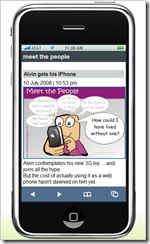
alvin iphone


No I haven't succumbed to all the hype, but I have researched how you make your blog more mobile friendly, one way is to use google reader, but the reader has to do that. A much nicer way for bloggers is to use mofuse, its a kind of mobile friendly wrapping that drops the side bars and other cyber noise and bandwidth consumers. The result is a the basic post with enough navigation via number key shortcuts to make browsing from the phone nice and easy. Best of all the thumbnails of the posted images are nice and legiable. The phone bill will thank you.

PS: In a shameless bit of network cross promotion that show off Alvin wants to bore you with his new IPhone.


Page copy protected against web site content infringement by Copyscape

Sunday, July 06, 2008

QRious'r & QRious'r

qrious site

I am finding all the hype by telstra about "their" QRious codes just a bit hard to stomach. I like the idea of these QR codes and have posted about them last year. Despite what telecom implies they are very late adopters of the technology, not creators of it. You don't even havQrious mobilese to buy a new phone (or sign up for an outrageous contract). Ok these new 3G phones will have QR reader built in, but if your phone has a camera and web access you probably are ready to go. You just need to download some software. If you are with Telstra, and are happy with them  you can type in the tediously long www.mobius.telstra.com.au on your phone's web browser and if your phone model fits there current limitations, it will be delivered to your phone. Alternative there are free sites that provide generic downloadable readers, like i-nigma & Kaywa. [Also Quickmark, see deans collin's comments on this blog, he obviously has an interest in marketing qr codes.]

One final item you should consider is reviewing/including a mobile data plan onto your phone to avoid the outrageously high charge that most service providers charge on adhoc data usage, because the websites ,the QR codes connect you to, might put a heavy dataload onto your phone (eg downloading movie previews etc.)

The world of physical hyperlinks, or hardlinking, could totally reform how you use your phone and the web.

Thanks also to wolfcat, a twitter friend, for the heads up on this issue

Monday, September 03, 2007

Accessing Flickr on low bandwidth

Flickr is often cited as the great example of Web 2.0 social networking and interactivity, but whilst it can be free to use it comes at a price. The price is the bandwidth, that used for displaying photos, large graphic/pixel output is consumed. Uploading photos can be equally frustrating. If you live in the low bandwidth world (especially those using dial up modems and overstretch home networks, as your kids download from YouTube) you might find flickr frustrating slow to use, or maybe it will be straight out unusable. I have a Next-G wireless broadband modem, which is heavily advertised by Telstra as a modern day technology wonder, and whilst good around the city it can be painful using flickr out in the sticks

There are some ways and tools to easy such stress

  1. Upload via email, you can get your own unique email address to email your photos to flickr and they will get posted into your photo stream, and optional additional address can be used to both post your photo on flickr and then post the email text and photo to you blog. You find the setting under your account, personal information, email (This can take a bit of setting up, and testing so do the set up on a higher broadband access)
  2. Use the ability to change the layout of your photostream so that you just use the small images only or small images and sets. This significantly reduces the amount of image related pixels to be downloaded before it is displayed.

  3. Set up a favorites link directly to the your photos page, this will avoid flickrs front door (main page) and all the ads etc. it contains

  4. If you are using your own computer, tick the keep me signed in box, at sign in time. This avoids the log in page next time you log in. BE WARNED you should never use this, remember me, feature at a public computer (eg at school or a library, or a cyber cafe) and the next users will be able to access your account, and possibly do naughty things

    Flickr obviously recognizers that mobile phone access suffers greatly because of band width and screen size so they have a separate portal for mobile access. However there is nothing stopping you using that from a low bandwidth connected computer. OK the photos are small and menu options are very limited but it does work well and most importantly FAST.