Showing posts with label bandwith. Show all posts

Thursday, May 28, 2015

Surviving in the Low Band Width and occasional free WiFi

A pleasant evening in Bandung
Its been almost two decades since I’ve been to this part of Indonesia. Back them I took slides and had to wait till I returned home before I could send then in for development and another week or so till it got back. Now with a digital camera the expectation is to have an image instantly and transmit it globally instantly.  Its not quiet like that what was once a beautiful mountainous area with clean air free from the tropical closeness of the coast is now constantly hazy and the traffic becoming very Jakarta like. Its still a very interesting place BUT internet connections are somewhat hard to fins and the occasional Free WiFi is overcrowded and so slow. Seems eveyone has a smart phone these days in Indonesia, and very few if any have apple logos) , You could also pay exorbitant rate for international roaming but the speed won't be much better.

The solution is simple go back to the old way be patient, dont try and post (or at least wait till you get to the Singapore lounge and good free WiFi.')


This has prompted me to rethink about the fact that some many of the trends in tools for digital photographers are on-line, or as the first step an upload. (Google’s Autobackup and the Flickr’s Uploadr have been going frantic in the low band width. Dropbox has released it should just wait.) I’m quiet happy doing it the old fashion way, but I do carry a laptop that can be my place to upload and edit photos, Trying to access those on-line tools and subsription system are just a real hindrance, I'd rather spend my time wandering around on a pleasant evening.

Friday, December 18, 2009

Small and fast = )

Writing this blog at the airpot via my Next-G modem Digital Photos can be quite large, especially as camera manufacturers are continually upping the megapixel count, often without improving the image quality. If you just want the photos for a website, blog, facebook or to email to relatives, you usually don’t need to send the full image. In fact you can do your bit for more responsible use of band width but optimizing the size of your image. Even if you have a reasonably fast net connection you will probably find that the conversion time is more than rewarded in upload time once you are processing more than one or two photos
Image Optimizer is really neat service (with a free downloadable version, that can do bulk conversions). I have previously posted about windows live & picassa’s ability to export & email smaller version of photos.
Here is a useful table for common sizes, you can click on the size descriptor to see an example of that image size.
Suggested Pixels
Max Width
Max Height
Small Web Photo
640
360
Blog Photo
400
300
Email
800
600
Flickr/Photobucket
800
600
Normal Print
10 by 15cm (4 by 6”)
1200
800
Remember which ever approach you use, keep the original photos and just use the converted files for the upload or email (then delete them)

Wednesday, April 08, 2009

Emailing photos

Digital cameras have advanced in photo resolution at a much greater rate than the average Internet connection capacity (and remember RuddNet is pretty much still a pipe dream). Further many companies and ISPs have limits on attachment size, frequently this is only a couple of megabytes and that might only be enough for half your photo! So here are a couple things you might want to considered and set up before you start emailing lots of photos from your new camera to aunty Flo with her old (and very slow) bigpond dial up internet connection.

Go JPEG

Most camera will allow you to take photos in JPEG format (the file will end in .jpg or .jpeg) or the camera manufacturer will normally bundle software to convert its .RAW format to jpeg. This jpeg format has two very important advantages
  1. Compressable, there is a trade off between image file size and quality but 10:1 compression can normally be achieved with with little perceptible loss in image quality.
  2. (almost) Universally supported for the format by software (especially file & photo viewers, browsers)
Photographing directly in jpeg format will mean you can fit many more photos on your camera card.

Use a photo email feature

Most new digital cameras (and that includes mobile phones with cameras) come bundled with software, to upload, manage and do some editing of photos. Usually there will be an option to email photos and a ability to select the size to email, it may called share rather than email and it may involve reading the dreaded manual, assuming you kept it.
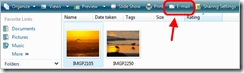
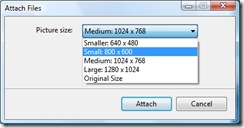
vista emai; Alternatively you can use tools probably already on your computer, for example in vista when you just click on an image in a normal explorer view, you will see the menu bar change to include and email option  If you click on this you will get a submenu to select the capture2photo size for the attachment. Usually the small (800 by 600 pixels) is more than adequate for an emailed photo and the files size is likely to be less that 300kb.
If you are still using XP you can get the same feature by downloading the Windows Live Photo Gallery. The most recent version of which gives you some fairly nifty formatting features inside Windows Live email so that the photo is part of the email, much more aunt or grandma friendly, instead of as an attachment that must be downloaded and/or opened separately.
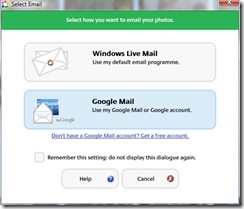
email picasa However I prefer to use the excellent email feature within picasa, which lets you edit and crop the image and just press the email button. You can both select a number of default capture7formats and size or choose between using your default email and gmail on the fly. If you have outlook you can also create a HTML story book (ie photos are embedded in the email rather than as attachments.)
Having shown you all this one thing I definitely don't recommend is resizing your photo directly, because you can so easily accidentally overwrite the original and lose a lot of detail if you ever wanted to get a blow up printed at a later date.

Thursday, December 18, 2008

Flickr and low band width

I have been travelling a lot recently and I tend to travel in places that have very low bandwidth connection to the net, and or I’m trying to use my Next G Modem (and the telstra ads only give you half the story, you can use their next-G in more places, that is true, but it will be  ..s  l  o  w,   …v e  r  y   s  l  o  w, …s  o    s   l   o   w   …i  t    w  i   l   l       b   e      u   n  u  s   e  a   b  l   e  )

Flickr problem Flickr seems to becoming particularly fragile when it comes to bandwidth, I’m not sure when this trend started (maybe several months ago), but it has become very susceptible to timing out. You wait ages, nothing happens, then it you are lucky an error message (and the humor of this message has well and truly worn off) or just a browser error or a hung upload process, or just simply nothing! Uploading photos and accessing discussion thread with lots of photos posted in them is virtually impossible with a dial up line or an “over shared” internet connection. Worse such simple issues look as if they might work, with a “jiggle the wires and retry”, but they fail over and over again, having restarted at the beginning each time. The result is hours of frustration.

As far as the uploading photos is concerned you have two good work around. You can email in photos (and email is more reliable on low band width, primarily because it can begin where it left off when a link times out (and the time out on emails may be more tolerant).

The second good trick is to use the flickr mobile portal. http://m.flickr.com/

It is a very stripped down version that is designed for phone access, and has a very clean and tight format, but only offers a limited set of feature. These include seeing recent activity (like comments on your work), upload photos and video (from your phone) and being able to view thumb nails of your photos and contacts. The thing I would like is to be able to access groups via this mobile portal, but that is not available!

Please look at improving these things flickr!