
In yet another bit of self reference, this is the artists manikin from my body clip, showing that he was photographed by my mobile phone and uploaded automatically to Drop Box, before being posted here.
 For PhotoFriday‘s topic Mobile Phone Photo
For PhotoFriday‘s topic Mobile Phone Photo
For PhotoFriday‘s topic Mobile Phone Photo
I must admit I have largely ignored (there are a few isolated posts) the many integrations of photo viewers and managers across the many and rapidly changing mobile phones, iPod/MP3 players and other personal devices. They generally had seriously small screens, For example an iPod Nano that takes movies sound like a great idea till you realise it only takes movies that are240 by 373 pixel, undersized even for you tube. That is this small. However if you are only wishing so share with your friends also on nanos or simpler phones, even for a blog post, it is probably fine.
I also find I have a deep loathing of iTunes, its a dog of a system once you get a fair bit of stuff and truly uncooperative if that stuff is spread across a few computers. Its saving feature was podcasts, it seemed for a long time the best way I could reliably and automatically get podcasts updates to my iPod. With my smaller and lighter sony walkman MP3 player now always in my camera bag, I’ve been looking at Juice (formerly IPodder) and double Twist as ways to do the podcast thing and listen on the walkman. The simpler but still iTunes-like interface and the addition of a picture library in double Twist took my eye and I thought it was time to reinvestigate portable device interconnection and wow a lot is happening there. double Twist also works with android phones, and proclaims itself “iTunes on steroids”, the cure for iPhone envy. Its is, or at least was, an open source project, 

Not to forget picasa, it will read photos from a wide range of inputs including mobile phones and there are nice free Picasa web using IPhone App and Android Apps.
The reach of digital photography is ever widening and making those photos easy to upload and share needs to be the first photography lesson these days.
I have been travelling a lot recently and I tend to travel in places that have very low bandwidth connection to the net, and or I’m trying to use my Next G Modem (and the telstra ads only give you half the story, you can use their next-G in more places, that is true, but it will be ..s l o w, …v e r y s l o w, …s o s l o w …i t w i l l b e u n u s e a b l e )

As far as the uploading photos is concerned you have two good work around. You can email in photos (and email is more reliable on low band width, primarily because it can begin where it left off when a link times out (and the time out on emails may be more tolerant).
The second good trick is to use the flickr mobile portal. http://m.flickr.com/
It is a very stripped down version that is designed for phone access, and has a very clean and tight format, but only offers a limited set of feature. These include seeing recent activity (like comments on your work), upload photos and video (from your phone) and being able to view thumb nails of your photos and contacts. The thing I would like is to be able to access groups via this mobile portal, but that is not available!
Please look at improving these things flickr!
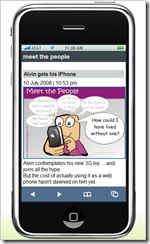
No I haven't succumbed to all the hype, but I have researched how you make your blog more mobile friendly, one way is to use google reader, but the reader has to do that. A much nicer way for bloggers is to use mofuse, its a kind of mobile friendly wrapping that drops the side bars and other cyber noise and bandwidth consumers. The result is a the basic post with enough navigation via number key shortcuts to make browsing from the phone nice and easy. Best of all the thumbnails of the posted images are nice and legiable. The phone bill will thank you.

PS: In a shameless bit of network cross promotion that show off Alvin wants to bore you with his new IPhone.

Flickr is often cited as the great example of Web 2.0 social networking and interactivity, but whilst it can be free to use it comes at a price. The price is the bandwidth, that used for displaying photos, large graphic/pixel output is consumed. Uploading photos can be equally frustrating. If you live in the low bandwidth world (especially those using dial up modems and overstretch home networks, as your kids download from YouTube) you might find flickr frustrating slow to use, or maybe it will be straight out unusable. I have a Next-G wireless broadband modem, which is heavily advertised by Telstra as a modern day technology wonder, and whilst good around the city it can be painful using flickr out in the sticks
There are some ways and tools to easy such stress
 Flickr obviously recognizers that mobile phone access suffers greatly because of band width and screen size so they have a separate portal for mobile access. However there is nothing stopping you using that from a low bandwidth connected computer. OK the photos are small and menu options are very limited but it does work well and most importantly FAST.

