
Color Matters is an excellent site to brush on some of the basics of colour theory

The naming of colours is not as simple as you may think. There is more or less reasonable agreement on the 6 primary colours of the digital colour wheel (Red, Yellow, Green, Cyan, Blue, Magenta). Things get a little out of hand after that for example look at some of the outrageous names of interior paints of the latest fashion colours. You will also be amazed at what are supposed to be common colour names or the so called standard X11 web colour names.
I have found a nice website belonging to Warren Mars who has also adopted the combined GRB and CMY colour spaces and produced a 24 hues wheel (actually based on the HSV (or HSL) cylinder).
His colour wheel is originally and well thought out and a perfect format to adopt, get a copy and place beside your computer monitor or easle. His opening question is “Do you need another colour wheel?”. Really you should read his arguments and discussion rather than just follow me, but I do strongly believe the answer is yes. His run down of his named set of colours, their tints and shades is wonderful and includes real world examples (mainly photographs) or each colour and its tints and shades, the outer two and inner two rings.

As an example and 8-bit coding system, of SRGB, gives each pixel up the 8 bits or 28 = 256 combination. By convention zero (0) is no colour (black for that channel) and 255 is the maximum intensity of colour in that channel. When all the three primary colours are combined there are 28*3 = 16,777,216 different colours definable for any given pixel. This is often described as “true colour”. This is often called the “bits per pixel” (bpp)to describe the sum of all three colour channels and that represents a pixel.
An interesting fact is most human eyes can only perceive around 10 million discreet colours, so displaying any image in more than 24 bpp will go unnoticed.
Most modern camera, will capture images in 8 bit SRGB (24 bpp) and standard .jpeg has this bit depth. Some higher end cameras now offer other colour spaces (Adobe RGB or ProPhoto) and greater bit depth. Remember you probably will not be able to see the difference in terms of enriched colour or image quality. The extra bit depth however can be very handy for post processing and particularly when “stretching” the tonal range of an underexposed RAW file (which can often lead to colour banding in the shadows). Much photo editing and computer graphics software can handle 16bit colour and .tiff formats can be saved up to this bit depth.
The Cambridge in Colour site has a simple tutorial of Bit Depth, including a great visualization of the effect of bit depth. The African Shutha project has a wonder summary of the topic my Graeme Cookson.
The complexity of colour doesn’t stop at RGB versus CMYK or even the traditional colour wheel. Different industries and investigators have established a myriad of others ways to express colour systems. For now it is enough to group them into 5 main groups.
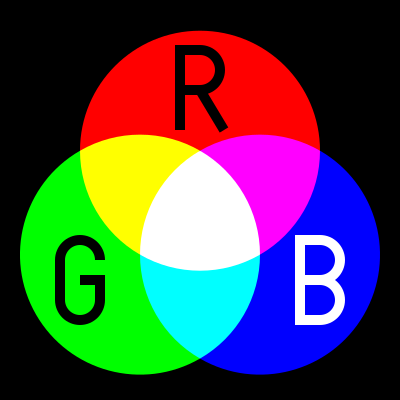 RGB, (Red, Green, Blue) is used in Camera Sensor, LED Computer Screens and Digital TV Screens, they use these three colours from light emitting or sensing technologies to produce any given colours, through Additive Colour Mixing of the light. Its not really a colour space but a colour model.
Unfortunately there are several variants and this is the first place many digital photographers can get caught out. in 1996 HP & Microsoft cooperated on developing a stand 8-bit colour space based on RGB and it was subsequently adopted as standard for monitors, printers and widely internet applications (eg Browser) and is know as sRGB. With the result that most printers, monitors and software can now correctly render this colour space. When in doubt this is the best colour space to use to avoid disappointing changes in colour and tone. In the meantime other colour spaces with greater bit deep have developed such as Adobe RGB and ProPhoto which can in theory render more colours, BUT your monitor or printer may not be able to show them.
 [Public domain], <a href="https://commons.wikimedia.org/wiki/File:SubtractiveColor.svg">via Wikimedia Commons</a>) CMY[K] (Cyan, Magenta Yellow)The CMK model is relative new, as it required intense and transparent synthetic inks & dyes the can mix cleanly. Also the technology of Halftoning (or screen) whereby tiny dots of ink are printed in a pattern small enough for humans to perceive a solid colour, A set of separations for each primary colour was made and overprinted with close attention to properly registering the images.
CMY[K] (Cyan, Magenta Yellow)The CMK model is relative new, as it required intense and transparent synthetic inks & dyes the can mix cleanly. Also the technology of Halftoning (or screen) whereby tiny dots of ink are printed in a pattern small enough for humans to perceive a solid colour, A set of separations for each primary colour was made and overprinted with close attention to properly registering the images.
These days there complex but reliable colour space converters that can take an RGB image and render it in the closest CMYK colours and these are usually built into your printer drivers. This approach forms the fundamentals of ink Jet printer technology., Older printers, including some high end larger format printers may still need conversion (or even tone separation) carried out separately. However most photo services will accept SRGB and do conversion automatically to CMY if required.
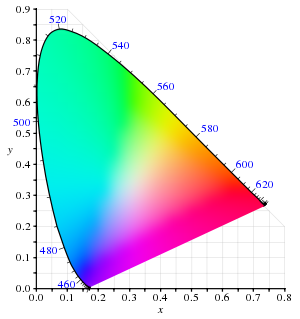 LAB (or CIELAB) is a special colour space in that it includes all perceivable colours. It is extensively used to compare the colour rendering and matching capabilities of a wide range of technologies and devices, particularly the CIE XYZ graph shown on the right. The L is for lightness and the A and B represent Green-Magenta and Blue yellow components but they are non linear mappings with elaborated transformation functions. However the key is the the three axes use real numbers (rather than positive integers, for bit mapped colours) so an infinity number of colours can be represented. The CIE chromaticity diagram, shown on the right, covers all the colours visible to the human eye and the outside of the convex curve enclosing the colour space show the Wave length of light that corresponds with that colour. You are likely to see this diagram when a manufacturer is extolling their virtues, aka wide colour gamut, of their new devices
Adobe’s PhotoShop has a LAB mode to allow device-independent colour.
.
 HSL or HSV, are the cylindrical equivalent of the RGB additive colour model but include the brightness of luminance L (sometime B for brightness), as well as hue H as a radial measure and saturation S as distance from the centre. The system was originally invented in 1938 by George Valensi as a
 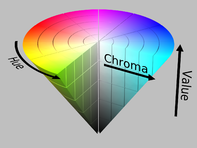 method to add colour to and existing monochrome (L signal) Broadcast (see also below how this might be encoded). The V in HSV stand for value and in the variant of the colour model to top of the cylinder is white and the base if black and may better represent how paints are mixed. It is frequently represented as a cone. This model has been widely accepted and applied in most image editing and computer graphic applications and
 YUV, of Y’ (luma) UV (chrominance) is a technology that was widely used in analogue colour TVs , PAL Digital and some movie formats. Its original begin when B&W analogue TV was being upgraded to colour. The Luma channel is exactly the original Black and White signal. The colour channels U & V utilize the fact that the green sensitivity of the human eye is somewhat overlapped by the red and blue cone receptors and therefore the signals bandwidth could be reduced by not transmitting the green information. The original TV engineers, following VAlensi model, brilliantly worked out that rather than use absolute R (red) and B (blue) they could send the U & V the difference from a reference average and tell the TV to just shift the colour of a specific pixel without altering its brightness. Thus an older B&W TV which could not decode the difference signals would just how the normal B&W picture, thus avoiding making older TVs redundant! When you use the yellow plug, composite video, you will be using some variant of Y’UV. Standard Digital PAL and HDTV also use modern variants of this colour encoding method.
If my very limited description has confused you Cambridge in Colour has a great article of visualizing and comparing colour spaces (well except they use the color spelling)
Now for the really interesting part, many of these colour system describe colours, that we can not see, our cameras (even the expensive ones) cannot differentiate or cannot be reproduced either on our computer monitors phone screens or inkjet printers. In fact most devices have a limited capacity to reproduce colours, and the range of colours they can produce is usually referred to their colour gamut. More on that to come in future posts.

|
||||||||||||||||||||||||||||||||||||||||||||||||||
I started to personally question the colour wheel adopted by adobe ( within lightroom and photoshop) for their omission of some colours in their digital post processing. It only gave me 8 colours, halfway between the convention 6 primary & secondary or the 12 primary secondary & tertiary colors I expected)?
Why have they done that?
So I looked at the ways are colours are handled in the camera, computer screens and then onto printers. Well they are not even in the same colour spaces, or built using the same colour models. Cameras and Computers screens (and any direct transmission of light) follow the RGB (Red Green Blue) colour model. This an called an additive model of how colour works, because different wave lengths of light get added together. This somewhat matches the rods in out eyes which give use colour perception. We can only discern colour because different cones in or retina can detect different wavelength. If you mix projected light of these three colours you get pure white. Ok good but should that be yellow rather than green (green is a secondary colour isn’t it?). Damn if I mix 
Things get even more bizarre when you start looking at printing colour. Traditional three colour printing and many inkjet printers use a different set for their primary colours (CYM) Cyan Yellow and Magenta! This is called a Subtractive colour model because certain wavelengths are removed from the reflected image. What is going on here? When in comes to reflected light and pigments mixing colour is again different, for example to get green you mix your light blue (cyan) and yellow!! If you mix all the three colours you get a dark muddy colour, close to black but not a true black. So many primers (and ink jet manufacturers) also use a per black to create the CYMK (K for black) scheme.
Close to a year ago I was doodling in my sketch book, and realized by combining these two colour schemes I had a new colour model with 6 primary colours. Not surprising, the idea of a RGBCYM[K] colour scheme has occurred to others and is sometimes called the modern or digital colour wheel.
I know I haven’t answered the big question why Adobe and many other photoeditors only give to eight color sliders. I can’t find out why (at the moment). This is a big topic so I will build and develop over several blog post to come.
Other Blog posts in here around the mysteries of Digital Colour Theory
- Building a Digital Colour Wheel
- Just How Many Colour Models/Spaces are there?
- Getting more Colours with Bit Depth
- The Gamut of Colour Spaces
- Chasing the Missing Colours
- Colour Names and the Martian Colour Wheel
- Luminosity and Tints & Shades
- Colour should be Fun
- Colour Calibration :: Before You Panic I
- Colour Calibration :: Before You Panic II


