This was a welcoming little alcove within a mature stand of sheoaks [Casuarina] beside the jells park lake. Because it was a closed-in area it was hard to comtemplate how to show that in a photo. I decided to do a vertorama, which is just a fancy term for a stitched panorama combined as a vertical strip rather than the more conventional wide horizontal format. I also decided to try this in three ways, firstly as a autostitched panel (left hand side), then as a ”joiner” style collage (center panel) even a HDRi version (right hand side).
Friday, March 29, 2013
Vert-o-rama in three versions
This was a welcoming little alcove within a mature stand of sheoaks [Casuarina] beside the jells park lake. Because it was a closed-in area it was hard to comtemplate how to show that in a photo. I decided to do a vertorama, which is just a fancy term for a stitched panorama combined as a vertical strip rather than the more conventional wide horizontal format. I also decided to try this in three ways, firstly as a autostitched panel (left hand side), then as a ”joiner” style collage (center panel) even a HDRi version (right hand side).
Thursday, March 28, 2013
PhotoProject :: Artfully Colourings
Interesting Lighting
interesting lighting, originally uploaded by imageo.
This was an experimenting with flickr's new mobile app in conjunction with the share facility on android, to both post to flickr & blogger at the same time. It certainly uploaded the photo easily, and posted the blog post but I had my phone in landscape orientation and the uploaded photo was rotated 90 degrees to what I actually wanted (on my phone I just rotated it naturalyl so I wasn't aware of this)
A dark sky, a gap in the clouds and strong side lighting does make for very interesting photos, even of a shopping center car park! I unusually didn't have either of my DSLR's handy but HDR Camera+ on my phone did a nice job and let me test out the new flickr app.
Splashing Colour on your Smartphone.
When it comes to colour manipulation on photos of course “there is an app for that”, in fact there are many. Here are a few fun android apps to try. Of these three I liked colour splash FX best, but in the end they where all a bit frustrating to use. The colour splash promotional video below is fun and worth a look.
Color Splash Effect |
If your screen is small, your fingers are too big and your aging eyes growing dim these smartphone apps won't be for you either!
Wednesday, March 27, 2013
PhotoFriday :: Candid
Selective Colour through masking in Photoshop
I actually don’t have photoshop (I do have Photoshop Elements, which i don’t use much) but I though I needed to include reference to using photoshop and layers to achieve a similar colourization to the post yesterday. The basics are very similar, desaturate the image and in this case using masking bring back the selected areas of colour you want.
There are dozen of YouTube videos describing this process but this one is simple and easy to follow. So like yesterday it is time for you to have fun, follow the proces in the video to start but experiment and be creative.
Tuesday, March 26, 2013
PhotoProject :: One Colour at a Time
Those that know me may realize I tend to stay away from the latest trendy filters, those zany pre-sets or must-have, over the top plug-ins. My reasoning is that everyone's fashionably filtered photos then tend to look the same-ish and I’d much rather work out my own post processing style and look a bit different. However there is one technique that a lot of folk ask me about and that is taking an image back to black and white but only highlighting one colour (or maybe a couple) there are actually a number of ways to do this so I though It might make a good series of photoprojects
to follow through a couple of examples. The first and easiest way, is actually to recommend that you look at some presets in Lightroom, onOne offer a number of lightroom, photoshop and aperture plug-ins and presets. Their prefects effect 4, set of lightroom presets are free to download and includes a neat single click set of “hand tinting” functions. See a few of these hand tints below.
This is all extremely easy (and fun) but it is actually pretty easy to make your own colour filers using the HSL,Colour, B&W group on the develop menu in lightroom. In this case I’m using the HSL (Hue, Saturation & Luminace panel) and I have destaturated all but the colours green, yellow,aqua & blue, So these desaturated colours are greyed but the colours I selected remain. Time to have some fun with colour, one colour at a time.
What is the future of Picasa?
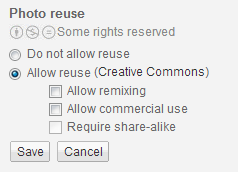
If you hadn’t already noticed (and I can not find any official notification) your picasa web album is being “redirected” to an equivalent Google+ album. The google album layout is different and much “cleaner” but you will loose a few nice features, like number of views counter (not available in google+ photo view), being able to select the way you licence the sharing of your photo (ie full copyright or one of the creative commons licences, are not displayed under the google+ photo view) and the ability to share with someone else by email (this is replaced by sharing to your circles in google+ photo).
At the moment you can review your photos under both the picasa web album format and google+ format, I’m fairly convinced that the photos are in the same location it is just the way you view them that differs. Alternatively if you use chrome, there is still a free picasa chrome app on the google web store that will show your on-line photos in the older picasa web album format. Finally if you view your on-line album via the following link they will also be in the older picasa web album format.
https://picasaweb.google.com/lh/myphotos?noredirect=1
The first downside of the revised google+ approach is that anything you share with others can be tagged by them and further shared. You do get notification of any tagging but not the sharing. Unfortunately this is basic social network behaviour, most other social web services do the same BUT this really negates the idea of being able to confidently share a photo in private, as many celebrities have found out the hard way. So if you are worried about privacy just don’t share your photos using any social networking tools (facebook especially, but twitter & google+ included).
There is one clear upside to working through google+ photos, it will instantly increase your storage capacity, by default it resizes and uploads at a 2048pixel width. For this size and smaller your storage is free.
I’ve had a look at some screen shots of a candidate for an upcoming google+ photos app for chrome (aka Pulsar), Thanks to +Francois Beaufort for the details of how to get it. I did try downloading the code but got lost in the java script errors. So I’ll have to wait. Looking at the screen captures of the interface, its looks very clean and simple but oriented to storing your photos on-line. I am not sure that automatically upload all or “your best” images to the net is what the current picasa users really want. They probably are happy with a desktop application that does a good job of managing their precious photos (privately on their own computer). By the way, you can still (at the time of writing this)download the PC version picasa for free.
Monday, March 25, 2013
PhotoProject :: Colour My Day
Over the past week I have been trying to take a coloured themed photo each day, and it was harder than it might seem. Yet colour is everywhere, pretty much anywhere with light starts to deliver a spectrum of wavelength that we see are colours. The photographic challenge here was to see those situations where one colour dominated.
Sunday, March 24, 2013
Saturday, March 23, 2013
Towards Blue(r) Sky(s)
Friday, March 22, 2013
Not a Flower


Thursday, March 21, 2013
Photographers are busy little bees
Purchasing My Photos
I haven’t filled my PrintedArt Photolab space with lots of images (yet!). However I will start by offering anything from my blog or flickr that you like, for sale through this service, Just email the details and I can set up the photo so you can get it printed at the quality it deserves.
Wednesday, March 20, 2013
Stop ASKing
I’m becoming a bit annoyed at those third party junkware things, that hitch hike on other useful stuff and sneak onto your system. I was looking at some the neat animations on the space weather site, suggested in the previous post, and got warned to update my version of java. Ok that's easy enough! Then horror of horrors, ask.com has weaselled it way onto my standard toolbar and a more prominent toolbars of its own beneath that. The problem is under chrome I can not unclick the enable box
in the chrome extensions for this unwanted toolbar, unlike most after apps I have. This toolbar can only be uninstalled via the control panel, ie Windows Start Menu > Control Panel > Programs (Add/Remove Programs for older versions) > Programs and Features > Select both ask toolbar and Ask updater and click "Uninstall".
Damn you third party sneaks!
Genie, ….in a box & the nightsky
How about this for a remarkably clever little device.
Thanks to +Trey Ratcliff, at google+ for the heads up on this. You can contact the NZ makers at syrp.co.nz
I’ve been out a bit the past few nights just hoping for a glimpse of the aurora austarils, as there have been some extreme magnetic storms occurring, the Australian weather bureau actually have a great space weather forecast site. No luck on that aurora front in Melbourne though, but I have managed some interesting long exposures and was even contemplating how to make a time lapse sequence of the night sky. (Now I realize there might be an easier way, with the help of a little genie, plus the near $1,000 price tag!)