Friday, March 18, 2016

Feedspot you are a disgrace

I apologize to anyone that has received and invite from me to join feedspot (a kind of RSS reader service). My gmail contact list was somehow accessed without my consent. They did seem legit, collecting and aggregating RSS feeds and making it easy to share on social media, running contests and on-line exhibitions BUT they have ruined their reputation unrecoverable by using email my contacts without consulting me.

PLEASE IGNORE ANY FEEDSPOT INVITES

Feedly is a much better service, I can recomend if you like using an RSS reader

Thursday, March 17, 2016

Matilda is everywhere


_MG_1299 copy_MG_1292 copy_MG_1298 copy

I went into town to submit my carbon footprint painting and took some photo for my daily post but everywhere I photographed there was an advert for Matilda. Eventually I reached the theatre, a very grand Victorian ediface and unbelievably on the café strip outside the theatre there where no placards for the show just people enjoying the day and lunch.

_MG_1296-Edit copy

Wednesday, March 16, 2016

Clouds & Big Sky Panos

jp cloud pano big 3jp clouds pano big 2 snpanojp clouds pano big 2

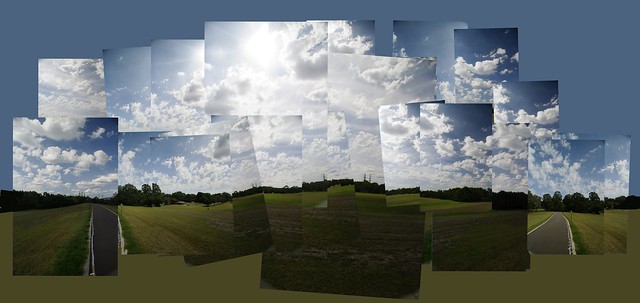
These where powerful panoramas but not so creative so I decided to make a David Hockney Joiner style collage using 22 of the photos, as my daily photo.

20160301_big_sky_collage

What the? ..A disturbance in the force

flickr uploadrYesterday two lots of photos that I had uploaded independently disappeared. I’m pretty sure they are not examples of “old timers” disease because I can see evidence that the flickr uploadr believe the image was already uploaded.

Monday night was beautifully clear after the moon set and I staid up late (despite a heavy working bee during the day) and captured some large night sky photo. I quickly autostitched them and uploaded from my laptop via wifi to a hotspot with my phone (it was probably after midnight). All seemed good.

_MG_1233-Paint_with_soap_bubbles

I drove back up to Melbourne next morning and synched my photo from my laptop to me desktop computer, as I normally do.  My desktop has the Auto Flickr Uploadr monitoring specific directories. No problems obvious.

My grand daughters had left some bubble pipes and shapes and so I bought them with me to experimented with soap bubbles and paint as a way to create another background for my on going carbon foot print series. Don’t try working with bubbles outdoors on a windy day. Working indoors was also not wise as I wasn’t sure how messy it would be. When I uploaded a set of photos to my scratching blog on Tumblr all was well, but when I went over to flickr. My milky way veratrama had disappeared! I though the uploadr was to blame but it also suggested I did already upload the photo. Ok I just uploaded manually (and it definitely worked. Also my photo from yesterday seems ok. Damn now the bubble photos are missing from tumblr. Uploaded them again. All very strange.

By The Way, if you have a free account on Flickr the auto Uploadr will stop working next week (23rd March) but I don’t think these hiccups are associated with that. I’m not a conspiracy theorist so the fact that a blogged about it, is probably just coincidence. C’est La Vie.

Monday, March 14, 2016

A Beautiful Dark Sky

looking south & checking space weatherI was down at Venus Bay, and one long held desire I hold  is to be able to photograph an Aurora (the Aurora Australis) from there. The crescent moon was setting so I guessed we would have wonderful dark skies but checking the space weather indicated any activity was well south. Oh well the sun spot activity is fairly strong I’ll just have to keep waiting.

What I did find was a really beautiful sky full of stars, and a perfect opportunity to go for a really large image covering a lot of the milky way.As stitched pano from Autostitch I only had one camera (my Canon EOS 1100D) with me and my widest length lens was the EPS 18-55mm IS macro (which is a great kit lens but not so good at focusing in the dark). So I cranked up the focal length to 18ml, opened up the aperture to f4 and ISO 6400 but I still needed the full 30 second than the canon allows its maximum exposure time. The Images are fairly noise (a consequence of the high ISO but lightroom’s detail tools bough this under control without blurring the stars (too much). The next challenge was stitching the images which where essentially a two by two grid. Often stitching star panorama challenges most conventional stitching software but Autostitch did an excellent job. I had given it about 40-50% overlap on the images. However it does leave a ragged edge, so I decided to “hide” this not by cropping back tighter instead I added a sloppy edge from OnOne 10 effects borders.


_MG_1231-2  _MG_1230-2_MG_1228-2  _MG_1229-2

20160314_milkyway_vertarama

This is a big view of the sky from the eastern Horizon to straight above. Taken with only an 18mm lens (on a crop sensor style DSLR)

Saturday, March 12, 2016

Inspired by Fred Williams

original photoI have been inspired for a long time to try and find a way with photographs that could do justice in a semi-abstract painterly way to subjects, in a similar way Fred Williams paid homage to landscapes. I had been unsuccessfully trying to photograph a family of very noisy minors in flight. It was late in the day and very overcast and they weren’t cooperating, but I did like the blurred form on one image, The strong shape was both abstract and also characteristic of these birds flight.

Fred’s paintings generally lack a conventional horizon yet that are strongly dimensional, which he seems to often achieve dreamscope filter as groundwith a coloured almost monochromatic ground, with a few gradations then onto this he paints his abstract often calligraphic shapes that echo the subject. For the ground I figured a painterly almost impasto filter from dreamscope would fit the bill and for the subject I took my photo increased the contrast a little and just overlaid it with a normal blend multi-exposure collage filter in picasa. I like the out-come. I’m still not photographing like Fred would have painted but I am understanding better how to develop the idea.
20160312_noisy_minor in flight

PhotoProject :: Best Light for Photographing Art

Like many of my art works, I began this work a while ago but have been slow to finish it. However yesterday’s sunny afternoon gave me the opportunity to photograph the work in a range of lighting. It is my experience getting a good rendering of art work is more dependent on lighting than any other aspect (camera cost, colour calibration workflows etc all that stuff recommended over and over again my well meaning folk on the net)

In Full Sunlight In Shade but Outdoors Indoors with Difuse Indirect Light

Close up of impasto line workThe first photo (on the left) was taken in full sunlight light. the second outside in the shade (middle) and the third (on the right) is taken indoors not in direct light. The two photo on the right are much better representations but it is the third taken indoors in a reasonably lit room but not in direct light, that has the best capture of the rich colours in the background. Thus I feel strongly you don’t need special and cost studio lights, colour calibrated workflows and/or the most expensive high megapixel DLSR. You really need good light, indirect and diffused light. When taking photos to establish provenance it is a good idea to photograph yourself with the work, if not working on it. These type of photo along with perhaps a closeup of the work and a very short description usually generate more interest than just posting the finished work, as well as forming perfect provenance.

Carbon_FootPrint-Beware_False_ProfitThe above photos were taken at a slight angle to the painting so they give a distorted view of the painting. If you are taking a photo for a exhibition application, catalogue or your portfolio it is important to take your photo front on and at right angles to the work. Bring you easel upright or hang the work on a wall. if there is enough light putting your camera on tripod is not essential but it will help eliminate camera shake (if you find that is an issue).

I’m still considering adding a few more marks, perhaps in gold leaf, never finished. Such is life for an artist!

For small works it is better to use a copy frame.

Thursday, March 10, 2016

What to do if you want to keep using Picasa on your PC


The simple answer is NOTHING


There are a few extra things you might consider in the very immediate short term. If you don’t have the very latest version3.9.141 (you can find this on the about item under the help tab) it is probably a good idea to at least download the latest version, which according to the google blog will only be available till the 15th. March. I have downloaded this version and it looks a lot like version 3.9.140 (which I’ve had on my machines for a while). This version shows upload to google photos on the big green button at the bottom of the main picasa screen, and seems to work, but bizarrely when I try view on-line it loads internet explore (whereas chrome as my default browser), but it lands on a page that introduced the google photo apps for android and IOS, but looking around there is a red goto google photos button that first ask me to log in with my google account, then recycles the screen and this time ask me to also put in my passwords and then finally I can see my photo. Not exactly simple, probably best avoided in future (see below).


imageI already know an elegant way to share photos privately with just specific people via an email link, that is just the basic dropbox. Something I’m sure you already have. If you want to automate this a little, get the drop box app for your PC and this sets up a drop box directory under your user account. One of the default directories set up is called photos. Now using the export button all you need to do is the change the directory to that dropbox location. Any new export folder then becomes a separate album and the whole album or selected photos are easily shared, using drop boxes share with tools. This includes setting up collaborator two way sharing. With a two-way share you can also the add folder to picasa and set up the scan always so the picasa view is always up to date.


image One final thing you might consider is making sure google doesn’t keep watching you and/or interfere (albeit unlikely). To do this, find the Options Tab under the tools item on the main menu, and untick the send anonymous usage stats to google item under the general options tab.


There are a few things to do to ensure you can migrant your collection’s organization to other packages but that can wait for another post.

Wednesday, March 09, 2016

Gritting of teeth … bummer flickr

imageIn two week from now if you have a free account with flickr that wonderful little auto uploader will stop working. Yes seriously!

Flickr will be making some changes to their pro account, well continuing to be able to use the auto uploadr is the only difference I can see. There are other benefits to getting a PRO account but they come with an annual subscription. To encourage people to join up as a pro they are offering a 30% discount (I assume just for this year).

I had just reached the conclusion that flickr was the right place to share my personal interest images (as opposed to google photos) and had set up a directory and subdirectories to be matching albums in which I merely had to copy to those directories and by magic they would nicely arrive at flickr a short time later. Nice as this feature is I don't appreciate being “cloud-mailed” into purchasing a pro account.
,, yet another disappointment, but not a deal breaker.

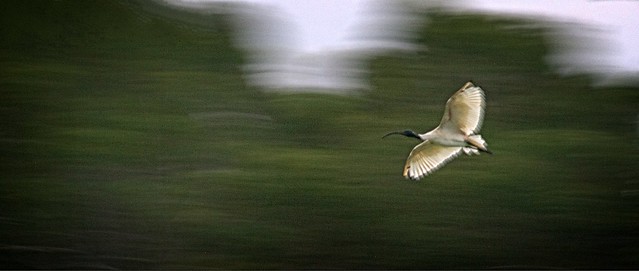
The Ibis swoop in

20160309_IGP1091_ibis_at_dusk

_IGP1120    _IGP1104

Time is running out for Picasa


That 15th March deadline is approaching fast for the cutting off picasa in favour of google photos. I’m choosing to keep picasa running on my computers, as long as I can. It is easy to use and fits in well with the other applications I use (ok there is some tension between my various photo software mistresses) but picasa is very reliable. She definitely handles the reading of my SD cards (via a card reader) faster and more efficiently than any other program I’ve tried and gives me flexibility of which files Picasa's Import Icon(I can select thumbnails) and importantly weather I want to delete upload files or not. Also the organization of subfolders to load into (I prefer a date base format YYYY-MMM-DD so that the sub-directories for each day are in chronological order)
Selections available when import into Picasa

Picasa's Album LogoIt is with family photos (which I almost never post on-line now) that she really still outshines other software. Her face recognition is a cut above the other offerings, there are the occasional misclassification (interestingly often with other family members or their parents as a child). Importantly it is easy to correct misclassifications. This is incredibly useful to find people, and therein lies one of the biggest issues, how to save this organization, if picasa becomes truly obsolete. (I do have a workable solution which I will outline in a future post). The family friendly aspects extend in her easy of use and the creation of albums in addition to the data based upload organization. For all majour family events I also select the better photos and put them straight in an album (the album appears to contains those photos but is just a link back to the original photo (where ever it is stored). It is then very easy to set up a slide show of that event (and perhaps chrome cast it to a TV) or in the past upload and share that album via Picasa web album. (Even if google do provide other a way to access existing web albums, I would be wary of sharing anything on google photos now and definitely can not recommend it).

Some of the edit tools available in picasaI have put together a few workshop on digital photography for artist and have always recommended picasa as the best way for them to get organized on a PC (sorry but I have given up trying to help those in the apple-verse). It was the easy visually select and tagging and/or creating albums that meant that artist could take charge of large reference collects (without having to tediously give metatag every image).  The fact that it is a non-destructive manager & editor is often overlooked, but this help keep collection managable. Those used to illustrator of bit-map graphics ediotors some get overwhelmed with versions. Most photo software now offers similar ease of organization. Whilst not extensive picasa does provide most of what an artist might want in terms of manipulating images to support and provide reference for their art. Typically this might be cropping, adjusting tone and colour and maybe collage. I also show them the way to better composition via colour desaturation (and notan), layers and how powerful the retouch brush (to clone away things) can be (albeit the one process that adjust the original but keeps a copy). If their art is mainly photographical based and they shoot RAW they do probably need extra photo finishing features (like lightroom, photoshop and/or add-ins, browsers like OnOne10) however these can share the photos with picasa. Importantly because picasa was a free download it fits most artist merge budgets (if they even have one or money to spare)

imagePicasa is on all my computers and is the goto application if I want to find a photo. Whilst I am far from an obsessive metadata or keyword tagger, there is enough organization logic build in via face recognition, my albums, the chorological upload order and occasional key wording. I actually have a separate picasa library that is my catalogue to my photo archive. (and have a copied of the picasa install package stored with that archive)

At the moment I expect picasa on my PCs to function as normal (it does work fine under windows 10, despite the website only suggesting windows 7+ compatibility), except for the on-line web album connection. However it is probable that it might not be loadable onto future version of operating systems or hardware (eg it doesn’t work on apple mac or ipad, or on android phones). Thus another set of issues I’m working on and will post about soon is protecting the organization and context of the photo collection. So I will be sticking with picasa, on all my computers even after March 15th. After my hassles with windows 10 I have grown to dread upgrades anyway.

Picasa peut-ĂŞtre morts

Mais Ă  long Picasa en direct


Tuesday, March 08, 2016

A dozen regrets, and reasons I’m not excited about google photo

That 15th March deadline is approaching fast for the cutting off picasa in favour of google photos. Although I know I must keep using google photo for my blog, but it is clearly wanting in many aspects compared with Picasa web albums, connected to Picasa of the desktop

  1. Sharing privately is now very difficult if your family member do not have google accounts. It is possible to send links to selected photos and albums, and whilst you can share publicly to a number of social networks with one click, you need to get a link and then cut and paste to be able to email the link. The URL is not a direct link to the photo anyway but some google address that google needs to translate. All this is tedious and not obvious.
  2. Albums in google photos should be called events or photo sessions as they are rigidly saved as the chronology (of the first uploaded photo). Something you are trying to constantly append to (eg a 365 daily photo or year long photos from one location) disappears into the past If you don’t provide an album organization the photos are grouped by date anyway. One small screen and even standard opens because of the album tile size, anything older than a couple of weeks disappears “below the fold” (ie you have to go scrolling to find it).My wife would pefer not to be poster girl for things
  3. You can no longer choose create common licensing. In fact it would appear you can not copyright images either (at least there is nothing to that effect displayed). The terms of service
  4. The People organization is not as comprehensive as the people (face recognition) in picasa
  5. Classification of Places and Things are even less successful. What’s more disappointing here is there is no way to redress the misclassifications. (eg. my wife does not appreciate being on the tile labelled things)
  6. Why oh Why! was SnapSeed editing removed from google photos? The current edit capabilities are so very limited. Its just sad really.
  7. Why is something as fundamental as resize (eg smaller to email) missing?
  8. Where is the exposure histogram?
  9. This seems to be all the EXIF/metadata data on displayWhat about all the other EXIF & metadata?
  10. What has happened to geotagging (location)? Is it merely being used occasionally in the location organization. Why not have an option to display it in photo details?
  11. I haven’t been successful in getting google photo autobackup to be selective, either from my phone camera or computer, it just behaves like a vacuum cleaner (and miss-behaves a lot as well, so I have removed it). The android google photos app kept updating itself and then crashing requiring yet another download and re-setup I just gave up and deleted it (and enjoyed having a lot of space back on my phone). If my older android version was not compatible wouldn’t it have been better not to have kept trying to update. No matter its gone also.
  12. I’m frequently off the grid (ie no internet access a lot of the time) and I normally load and preview on my laptop computer first (I know I will continue using picasa to do this) THUS the [DEPRECATED] picasa connection makes the cloud based google photos irrelevant to me.

google photo's limited edit facilitiesThe list could go on but my firm opinion now is that google photos is way below my expectations. Ok Google photos can keep storing images for my blog but is not the place I intend to use to share and store my photos on-line anymore. I definitely intend to keep using picasa on my computers locally but the search is on for an on-line service that makes sharing and organizing easy, that will at a pinch do a reasonable job of simple editing, not strip out metadata and clearly display licensing, eg creative commons &/or copyright. Face recognition and auto organization might be nice but that’s not the deal breakers, lack of control is.