Wednesday, December 11, 2013

Gift Ideas for Your Keen Photographer

S

tocking fillers for a photographer can be a challenge, because most of their precious gear costs a lot! I have made this list for a couple of years now, so its going to be hard not to double up

.
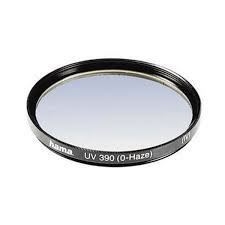
Whilst some photographers don’t like having extra glass in front of their lens I can strongly recommend having a Daylight (UV) filter in front of your expensive lenses. The reason is simple, it is an inexpensive sacrificial form of protection. I have scratched and chipped a few now but my lens glass is still fine. It also means you don’t have to take off and replace your lens caps all the time, when out taking photos and changing lenses. These lens filter don’t have to be the expensive types, I’ve mainly had Hoya brand. They do come in different sizes so you will need to check the size of the lens you wish to protect. Buy one for each lens, rather than share one around.

The straps that come with cameras (to hang them around your neck) and pretty much despised by any serious photographer. They usually hurt your neck and look so touristy! There are moderately expensive Sling-style Straps (eg Joby or Black Rapid) which are very trendy at the moment, These let you hang the camera at your hip but allow quick lift and aim (a bit like a gun slinger). I noticed this nifty little gadget called a camera strap buddy that lets you connect your shoulder strap to the tripod connector. This can also be use to make a very handle portable monopod by tying some string about your height to the connector and then put your foot on the string and pull the camera up tight, you be surprise how much it steadies your grip on the camera

Following on from the simple strap connector, which will probably only appeal to a few of the home-brew geeky types, not that there is anything wrong with that, are the quick release plates which also screw into your camera base but have the profile to snap into many tripods quick release mechanisms. Not all tripods are the same, so check out what they have, but the joby ultraplate fits is a good example of a plate that is compatible with many tripod, monopod, strap and a scree mounted accessories

I know these three sound boring but they are likely to be appreciated gifts

A trendy new area of smartphone apps are remote controls for DSLR Cameras via your phone. This frequently involves a special cable but some systems work on WiFi, and a few even with Infra Red. The features on offer also vary and so does the price. They are all quiet manufacturer and  model specific, so you will have to do some research. So this is one gift I suggest you first seek some advice at your local camera shop rather than buying off the net Canon and Fuji Cameras seems to have the most options and may just require the downloading of a phone app.

Other Christmas gift suggestion list for photographers on the web this year have a lot of camera inspired “blig”. Like keyring torch cameras, cuff links, necklaces, t-shits, cookie cutters (yes for biscuits), faux lens look a like cups and even Christmas decorations. The prices of the ones recommended on the net frighten me a lot, and don’t forget about shipping! The red “to expensive” light is flashing. However if you can find such photo-curios in the $2 shop or amongst the bubble wrapped accessories at the camera shop they certainly will be fun stocking filler.


Nothing is as encouraging as seeing one of your own photos in print or hanging on the wall so a gift Vouchers for Enlargements or a basic Photo Book is something that could bring joy to your aspiring photographer.

I’m going to suggest hanging off recommending software this year because so much in terms of processing power and storage is available free on the net on social web sites, and in free phone apps. In theory a software subscription could make a good gift (like a magazine subscription) BUT I’m less than enthusiastic about adobes creative cloud and feel it needs to prove itself, so maybe next year.

Tablets, IPads, Windows Surface or the Android style, are the most popular gifts this year, but their cost is way above the stocking filler line. They are becoming really popular with photographer as a place to review photos and do a few edits quick edits. If your photographer already has a IPad or other tablet, a stylus could give them some extra ease and precise when doing some touch up work and other intense graphic applications. There are a number of apps like Pixlr for editing photos on tablets, or phones, that will give your photographer most of the edit functions they need and these apps vary from free to reasonably priced. A new group of interesting interesting photogrpahics apps are for the cross device sharing and management, like mosaic and photofeed, they mainly have a subscription style pricing.

Oldies but Goodies

Last year I suggested SD cards and they are still a great gift, The memory card size doesn’t need to be all that big probably what is more appreciated is speed. Lens caps are another good gift, I always keep loosing mine, I must admit they are a hassle and easily mislaid, If you can find a brightly colour one that could help your photographer keep track of his or hers (Make sure you get the right size for their lens)


With special thanks of Jessica Hische of Daily Drop Cap for the wonderful start to this post

Monday, December 09, 2013

Too Trusting, Lightroom in a high Maintenance Mistress

I’m guessing it had to happen. I had indexed a few photos that where temporarily on my stora (a network NAS drive) and inadvertently left lightroom running. Over night my system evidently updated itself (and or the stora or internet router was reset) so that the computer had restarted and the stora had a found itself a new dynamic IP address. Other open programs like excel and the chrome browser had been reopened but lightroom had failed to open, and attempting to reopen it lead to a message that most of the folders in my catalogue could not be found.. As I started to look around many files had the previews obviously messed up and fragmented or the wrong image as the thumbnail preview I was also getting messages that a number of files where possibly damaged (yet in external checks they didn’t appear to be so). I had seen this before, so I was too worried. Then I realised a lot of ranking and most collections were missing. No problem I thought I had seen that backing up catalogue message many times, but in retrospect I had never checked my backup and probably was not backing up often enough, even though I had a number of backups stretching back a long time.

Open-mouthed smileThe Good news is that lightroom doesn’t edit your original files so everything is intact, including the files of the stora.

Sad smileHowever the changes I made in lightroom, ranking and flagging are now largely gone.

Sad smileThe various collections I had created were also just skeleton versions of their former selves.
The backup catalogue did have my recent data so I can’t explain why so much is missing. I do understand that the links to the items on the stora are now broken but the master copy of my photos are on the same external drive and the links seem fine just record of my the previous work is not there. It is possible that something has been unravelling without my noticing it and the overnight restart has just bought it to my attention?

Fortunately a few months ago now while investigating how to exchange my processing in lightroom across computers (not an easy task). Lightroom is selfishly a one user one computer style of gal. I had set lightroom to Automatically write changes to XMP, this save edits, ranking and metadata into an xmp side car file written beside each image. This way any files edited or “managed” on a laptop would get the same edits and ranking when the directories containing them where copied to my master collection and imported into the master lightroom catalogue (or any other lightroom catalogue). Otherwise the outlook is bleak because I just don’t know how much work has been lost and trying to recover it is a task I don’t even want to contemplate
.
Confused smileOne bit of true irony was that as I looked at the restarted computer, Adobe Flash dialogue box was on the top window saying an update was ready to load and with the offer to also load a trial of lightroom 5.2! I certainly hope this crude attempt at bloatware was not what caused my computer to reboot!

I know this probably has nothing to do with my hassles within creative cloud, or the hacking of adobe, but this is adobe’s third strike. I have to admit lightroom has always been a high maintenance mistress within my photo world and despite the good times we may have to work out other less restrictive but reliable ways to manage and process Raw formats.

Sunday, December 08, 2013

PhotoFriday :: Plant Kingdom


Posted by Picasa


For PhotoFriday‘s topic Plant Kingdom

Dark but not part of "Black Day" on flickr


after glow., originally uploaded by imageo.
This was an experiment of an upload directlty from photology into flickr, but on checking in, I was invited to try out the new interface format for the Photo Page in flickr. Ok its very dark, and organized differently but I wasn't too suprised and think I can live with it. However a lot of existing users are not happy and have organised a "Black Day" of protest. So expect to see a lot of black and non-photos in the flickr photostream today. Not that this is such a big deal because that is what you generally see as you wait for the next images to load as you scroll down  (ie lag displaying photos leaves black unfilled boxes for a while) anyway.

The one little problem I found is I can no longer do a Blog This to my defined blogs. Sharing to blogger now just gives a generic html link code to be cut and pasted into blogger, a bit of a retro-grade step. I had to swap back to the old version to post this.

All the other changes are leaving me and many others behind anyway, Why should this change have worried so many?

Thursday, December 05, 2013

Last Days for those Christmas Photo Gifts

I have been bombarded by a lot of email promotions related to personalized Christmas Photo Gifts over the past week. If you look around there are some good discounts (from free postage, which means slow, to half price) on selected items available right now but they may not last into next week. Anyway it is time to act now if you want your creations ready to give at Christmas.  Probably the most common photo gifts are calendars and they are pretty easy to set up these days via on-line services. In simple terms the quality and price are intimately related, spend a bit more and you will get thicker paper, perhaps be able to insert photos in the date cells (eg. to identify family birthdays) or have more control over the layout. Having said that there are a number of good templates around and once you have selected 12 (or 13, one for the cover) decent photos you will probably be able to set up the calendar and order it within 10 to 20 minutes, including uploading time. $20 to $25 seems to be the going price for a monthly per page wall calendar printed on decent card stock and spiral bound. Remember when you order on-line you will have to pay shipping, anything from about $8 for standard (14 days deliver) to $15+ (rush). I can recommend the calendars from Vistaprint (inexpensive), Snapfish and Momento (more expensive but more options) having created calendars will all these services at different times and pleased with the results. Just remember most people only need one wall calendar, and maybe one desk calendar not a dozen (eg. one from each relative with a camera). So it might pay to ask around if others in your family have similar ideas.


This year mobile phone photo cases (providing they are an iPhones or possible a Samsung Galaxy) also appear to be a hot item. However I suspect that mobile phones are such personal items it is worth checking that it will be well received before you create an expensive cover so it doesn’t languish unused in a draw or cupboard. Photo mugs are much more affordable and more likely to be used and appreciated. Mouse mats are disappearing from desk but they are still used by a lot of us.

If you are a much more real world only person (you don’t like ordering things on-line). Head for the photo shop in your local shopping mall (if it still exists), alternatively Big_W, Harvey Norman and Officeworks also offer some photo gifts, especially calendars.

Wednesday, December 04, 2013

PhotoProject :: Dipping a paint brush into a photo

alvin dipping his paint brush into a photo I’m really not sure where I saw it described this way, perhaps it was an advert for a webinar or maybe a Corel or Wacom promotion, but I like the idea of being able to dip my paint brush into a photo and come up with something original. Not yet another corny “art” filter style process that produces a fairly unconvincing and “distressed” faux art/photo image. I’m not totally against these, when used with constraint they can produce some wonderful work, but the reality is they get overused without much thought and specific effects tend to come and go out of fashion quickly. What I have been looking for is something that lets you leave your own marks but at the same time borrows heavily from the colour and perhaps composition of the photo. An interpretation of the essence of the photo’s subject not a slavish representation of all the detail. I have been using corel painter essential with a wacom tablet for a couple of years and like them but for this project I thought I might try out the new Painter Lite from Corel.(you can download a 15 day free trial) I was primarily interested in any new brushes and changes to the colour mixing panel.
Original Photo Using the clone to remove distracting detail Simplified reference photo
After selecting a suitable photo I used the clone tool in Corel Photo Paint, but any software with a clone tool will do, to remove a few unnecessary details (eg all the people other than the guy sailing the yacht). I also extended the canvas, using the sky colour and smeared the edges a little.
Example of the Corel Painter Lite screens
Rather than directly altering the photo I first loaded my photo into the canvas and then created a new custom colour mix panel using the eye dropper on the image and the brush in the mix palette. Note I have taken a range oF colours and tones from the sky, water and sand and a few colours from the sails, boat hull and channel marker buoy. I have also mixed the colours a little. So there is a limit palette of colours mixed on my palette much like any artist might. Next I created a new layer and did a very rough composition sketch with a few key lines. This is just a guide for my painting and I will delete this layer later. Next is the fun bit I created another new layer between my canvas and the sketch layer and  using the gouache and target brushes to infill my sketch lines using the colours from the new mix panel to create a fairly strong underpainting. As you paint on this layer it becomes opaque hiding the photo underneath. I experimented with turning the canvas layer on and off and ended up liking the idea of having the photo open in a separate window as on onscreen reference rather than checking the underlying image on the canvas. Storing the image at this point as a ..riff file will store all the layers and setting. Next I turned off the guide sketch layer, Then I zoomed in blended and refined the image a little using the “wet” watercolour brushes and touched up the detail using a variety of smaller brushes and my custom colour mix, resisting the urge to overwork things too much. I also tried to delete the canvas layer but found I could not.  However if I saved the image as a .jpeg it only saved the layers I had selected as visible.
Preliminary Underpainting LayerFinal Refinements
There are probably many other variants of this approach out there in corel and other packages but I was rather pleased with my results and the simplicity of the method.

Here is quiet a different take on painting onto a photo, again using Painter Lite, but this time the artist Claudia Salguero is using distortion tools rather than “digital” paint or ink.

I’m starting to think that this dipping a brush into a photo has enormous possibilities, with the potential to create good art rather than just another clone faux photo,

Tuesday, December 03, 2013

Melbourne Photo Book Club

We have a badge!The small but growing Melbourne Photo Book Club has made it through their first year. So congratulations all, I’m finding the actual physical aspects being able to hold, flick through and discuss the photography, feel the papers and compare the book formats with others is way more inspiring than isolated research on-line which normally gets drawn in shameless self promotion of basically the same old formats, products and social media sites.

The December meeting had a special arrival. The box of photobooks that had been circulating around other photobook clubs all over the world, had arrived, was opened and poured over by everyone. It was filled with great stuff, The variety of formats, styles and subjects was amazing, It is encouraging to see such creatives are attracted to photobooks and creating things in the physical world. As the On-line World and Social media are jostling to get more images on your screen in an ever-changing photostream (where many of the images are so much the same anyway) it is refreshing to hold a book, contemplate what you see and turn the page rather than gestural swipes on a piece of glass with no tactile response.
Phone Photo of the books being unpacked
Melbourne’s Photo Book club only meets bi-monthly on Tuesdays at the Monash Gallery of Art in the Cafe, watch the mga calendar for details

Monday, December 02, 2013

Spam on the View Counter

I was about to celebrate my 60,000 viewer, and started to investigate why my view rate has increased a fair bit lately and unfortunately its mainly due to two site vampirestats and adsensewatchdog (please don't visit them), they are a new sort of spam. They don't have anything to do with google or adsense. They are apparently just polling our blogs in an attempt for you to link back, but it is hard to see why they are doing this.
  • Are they just gaming google?
  • Are they harmless?
  • Can their views be automatically wound back to restore the integrity of the view counter?
  • Why doesn't google block them on blogger?

Friday, November 29, 2013

A different take on organizing photos

At the moment I suspect there are two diverging school on what organizing your photo mean. The first group, which is the loudest amongst photo “experts” on the social webs, involve specific “workflows and organization and keywording” as you load your photos, into such packages a photshop, elements and lightroom. Whilst they claim to organised your photos, I see them more as filters that will help you find the classification you have diligently coded into your photos as you load them. Ok this is not the reality for most of us. The real world just has larger and larger sets of photos scattered all over the place. The modern equivalent of a shoebox full of snaps shoots only the shoe box is no longer just in one place. In other words most of us have a mess rather than a collection. I was looking around for a more automated way to sort through a large mess, following the example of everpix that was at least showing the way to classify your photos into different groups from the image itself rather than from keywords you have to add. Picture life was my first review, but its slowness left me looking for more.

imageWhen I first downloaded photologhy, I tested it on on about 8,000 photo (picture life has just reached 130 photo scanned) and it was super fast. It creates a thumbnail style view of all your photos, set up as one scrollable collection. However the goodness starts when you use the variety of filters that run down the left hand side of the screen, which can be used to created a search, which is show graphically on the right hand side of the screen. These filters can be combined to narrow down your search. They cover time of day (which I presume comes from the exif details), features (shown below),location (just inside & outside), content (such as sunset, people, beaches …) text (back to search in file name and exif metadata) and color (via a simple colour whee-lish pick list).b It will take no time to get the hang of using it and you can very quickly skrink down what you are looking for. Will you find everything, maybe not but you will very quickly get to the most likely set of images from there it will be easy to review in the scrollable thumbnails.Example of the photology main screen

Simple Edit featuresOnce you find the photo or photos you are after you can click on it and go into the photoscreen, which will let you find the photo’s location by clicking on the little folder icon, You also a tool bar along the bottom, which lets you set up new groups (like albums), export the images to files a web site and flickr and Picasa web (all easy to set up). There is a simple print and post the image as you screen wallpaper and even a limited editing capability. Not to forget a trash bin, which deletes the image from disk not just from photology’s index! (I couldn’t find a remove from index option). All these controls are basic but really cover the main tasks you are likely to undertake when you are browsing through your photos.

Example of on Main Photo Display Window

Well the honeymoon was over when I tried to connect up to my main collection (approx 215,000 photos). The scanning took over the computer and nothing else really got a look in for hours. Then I hit a number of crashes which started about 150.000 photos point. At each crash I was asked me to email the diagnostics which I did and then there was a length rebuilding index step and the program stop. Restart photology would run for a little while before another crash, and so on and so on….  Discouraging to say the least.

The getphotology.com web site is in german and seems more like a blog.even with google translate on. I was not able to find the tutorial section but the layout and controls of the software are pretty simple once you discover that the settings can be assessed under the q at the top right of the screen.

So Photology is only something I can only recommend “as is” and that’s probably just as a glimpse of the concept and its potential, which is promising. However there is a way to go before it can become a useful tool.

Thursday, November 28, 2013

Silky Oaks Golden Crown


Posted by Picasa  The outburst of yellow florets on the silky oak seem earlier this year and perhaps fuller than usual. Normally the golden flush is in the week leading up to Christmas.

Tuesday, November 26, 2013

Bloating the Bandwidth

Crapware is what I call it, and its getting worse. It has been a round for a while piggy backing on items you download from shareware and software distribution sites. Usually you have the opportunity to not downloaded them, but now you have to be diligent and deselect options to avoid then being auto installed or tick the no thanks item in very fine print. There is also a good chance these freeloaders might have a malware payroll. They are just simply to be avoided, a waste of time and are annoying.
crapware 2a    crapware
However now a lot of legitimate software come with similar crapware items you probably don.t want. Like adobe sneaking in McAfee anti virus, Java adding Ask and Google bar to your browser or Internet Explorer changing the default search to Bing. Once it was buyer beware, now it is downloader be very careful.
crapware 1   crapware from java
If any software distributers are listening please stop!
With special thanks again to Jessica Hische of Daily Drop Cap for the wonderful cheese C start to this post.

Saturday, November 23, 2013

Picture Life in the slow lane

Following the demise of everpix, I decided to take a look at alternatives. There are of course some well established on-line photo sharing sites, including but not limited to instagram, flickr, google+ and photobucket, however the emphasis here is on sharing your photo with others and some may have very unfortunate terms of service. What I was looking for was something to mange “my” photos on-line, sometimes privately sometimes publically and whilst these services mentioned can allow privacy, they are really more focused on the sharing aspects. One service that I have seen frequently mentioned as an everypix alternative is Picturelife. This is a cloud based service to store all your photos and video on-line. It promotes that itself by the slogan “You take the pictures. We’ll keep them safe.”

Picturelife screen with "colour swatch" while you wait for a previewAt the features level it is very similar to everypix, just a little more appleverse oriented, there are auto-uploading apps for mobile devices, syncing from Macs &PCs, duplicate detection (“Keep the best, hide the rest”), intelligent photo organization (one claim I’m not able to substantiate), backing up photos from the major social networks and private emails and photostreams for family and friends. It also have Iphoto and Aperture support and the IOS apps support airplay so you could get your photos displayed on Apple TV. There is also a new IOS app called memories, which works a lot like everpix flashbacks. If you want to store everything in one place (and in the cloud) this will probably appeal to you but the pricing could become expensive with a large collection (eg a 500 GB subscription cost $250 per year, whereas a 500GB USB external backpack will probably cost less that $75). The Web App (actually just a browser view) is nice and simple with album, places and a time line view. but it doesn’t load very fast and you get to see a colour swatch as the photos load. I certainly hope the premium accounts are more responsive. It you have your own Amazon S3 bucket you can use that to backup your photos via picturelife.

Picturelife's status windowAt the operational level it is even more remarkably similar to everpix, except when it come to performance. You download a small program (app) that then trawls your computer for nominated folders (eg C:/username/pictures) and Syncs them in background up to your account. I’m not sure if it the fact that I’m trialling a free account but after 2 days I only have 34 photos and one video uploaded (most are the raw version) out of 80 days and approx. 15,000 photos, just a tiny part of the photo collection I now have, but the status window is suggesting its going to take 50 days to sync those! However my free trial account only give me a 5GB limit and those ~15,000 files are closer to 180GB. Now at this trickle slow speed, which will also consume your band width as well, if I had to up load a terra byte of images It could takes years.. I surmise that everpix was much faster because it was only creating a thumbnail/preview on the web. Then I realised picturelife was uploading RAW files (presumable not the matching JPEG). This RAW file support is great if you want you whole photo collection on-line, but RAW files are large and they must be rendered as .jpg for web display anyway. So I’d be just as happy having the jpeg file or a preview on line and the original’s (and RAW files) locally.

So I will keep trying it out picturelife for a little while at least but I’m convinced I would not want to pay a premium to slowly store my photos on-line and I’m perfectly happy using drop box to automatically sync from my cameraphone now while I still maintain my collection myself locally with a external hard drive backup.

Friday, November 22, 2013

More Street Art


Posted by Picasa
Richmond is probably most famous for its hard edge street art (aka graffiti covered in tags), but I found this sculpture wall and reflective space on the very busy corner of Bridge & Punt Rd.

Yet another example of a Smartphone photo taken and synced via dropbox before I even got home (no Instagram involved)