Showing posts with label web album.. Show all posts

Thursday, March 22, 2012

No Picnic

Google are closing Picnik on April 19, 2012 (very soon). If you use Picasa, Photobucket, Facebook or Flickr the chances are you have used and come to love Picnik. Google have in fact used many of the features of picnik in google+ photo creative kit but the users of the other packages might really miss picnic. Flickr has at least indicated they are working on an alternative, but I haven’t noticed an official notification of that yet.

For those looking for an alternative now, have a look at Aviary. It may not be as well integrated as picnik was but it does have a very comprehensive range of photo editing features available as standalone on PCs, web and mobile apps.

If you have photos still in a picnik account you can use the picnik takeout feature to download them to your computer (in a zip file).

Sunday, April 17, 2011

My comfort 3 step travel dance

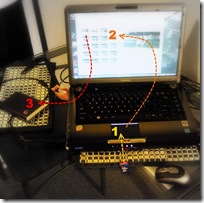
IMGP5723Sad smileI have again been suffering a bit of disobedience from my laptop, refusing to wake up. It has become terminally slow a waking up if it wakes at all. I assume it is a Vista thing. Something I’m not really stressed about, because it means I don’t have to check on email etc. However it does take me outside my comfort zone of taking photos and managing them as I travel. It would seem I have become very confortable with “the Picasa 3 step”, and without my laptop (and thus my version of my Picasa database) that dance is a little difficult.
I must admit I have been a bit skeptical of the elaborate digital photo workflows, generally originating from the USA. I suspect much of their origin lies in the complexity to understand photoshop and apple centric expectations (ie there are way too many mouse clicks man!). If you like those workflows use them but understanding what you want to do and doing that quickly and efficiently is the real aim. Still there is a lot to be said for being so familiar with the flow that it is a habit that lives in you comfort zone and does not feel like a chore.
SmileSo here is my comfort zone Picasa 3 steps, when travelling
1 Import imageinto Picasa. This is simplicity itself, I just slide in my SD card and get Picasa running, and then press the import button up at the top of the screen, or as I prefer the short cut keys <Ctrl><m>.

2 Weed & Star, I like to scan through my photos and look at them for the first time on a bigger screen (my laptop is not a “calibratimageed” screen but I am used to it). I usually star, or use the short cut keys <Ctrl><8>, any really good images as soon as I see them. I also get rid of the “total duds”, the unfocused, overexposed, the accidental photos of my feet, duplicates and the just straight “bad”. The short cut to delete forever is <Ctrl><Del>.There might be one of two marginally blurred or underexposed that I decide to keep but I am learning to more be brutal in the weeding.
I once upon a time used to do my “tagging” at this time but it can be too time consuming and hinders the like/dislike selection process. I also avoid doing a lot of image tweaking (exposure, white balance, colour saturation, red eye, cropping) because this also eats up time and diverts attention away from image selection/ranking and is better done on my larger desktop screen that is calibrated.
A really quick way to see an image full screen is to hover the mouse point over a thumbnail image, then with your other hand press and hold <Ctrl><Alt>. The image will instantly be full screen and releasing the <Ctrl><Alt> keys will restore the normal thumbnail display.
image3. Backup to my backpack disc. Sometimes I use the Picasa backup, it can be found under tools on the drop down menus, which has the advantage of Picasa then knowing what and what has not been backed up, but just copying the latest directories, via drag and drop out in windows, works just as well.
Open-mouthed smileWhilst on things Picasa, there is a pleasant surprise for Picasa Web Album users, Google have rejigged its quotas for free accounts, Photos less than 800x600 pixels and videos less than 15 minutes in duration no longer count towards your 1GB quota. As I deliberately keep my blog images small (It makes the blog display faster and also tiny images are a little less desirable for people to steal) I went from about 60% to 28% of my quota without having to do anything.

Thursday, August 19, 2010

whats new with Picasa 3.8

Google are pushing out Picasa version 3.8, if you don’t have it already you should get it soon (or use this link)

Most of the new features are really in Picasa Web album. This on-line album becoming the quiet giant in the web photoworld. You can do a mirad of things withy your album, from uploading directly from your phone, any camera and computer to sharing your photos with friend and relatives, via email, blogs and the main social networks like facebook and twitter. Ok there are many other competitors but I think the combination of well thought out security (keeping the private, private) and its collaborative features (sharing with other you allow to also upload to your album) and the batch uploads and download will cement its position as the best choice as well as a reliable free service.

image A while ago google bought Picnik, a nice web-based photo editor. I have written about picnik previously and think it shines against the competition being much easier to use. In your picasa web album you will now see a new little edit button which bring up a flash window. It has two tabs. A fairly conventional Edit Tab with all the standard tools. The a Create Tab which provides a wide range of neat, albeit slightly kitschy, tools like fancy frames, filters and strickers. I’m sure these will be very popular with younger photographers. There really are enough functions between these new picnic features and the basic offered by picasa to make fancy photoeditors like Photoshop and lightroom unnecessary for most folk.

image

One nice little gems that google/picasa did not mentions bin their update notes is the swivel view feature that is actually included in the embeddable slide shows for blogs like this (see my example below)

Move your mouse across the image from left to right and you will travel around the chainsaw artist as I did when I took the photos. Not quiet a photosynth but this can be fun all the same and extremely easy to create. It doesn’t even have to be used for the swivel concept, or a walk around, you could have a lot of fun with “interactive movies” where the flow of photos is important (eg sequence from a party, one person growing up). It also still works fine as a slideshow.

Picasa are also plugging the “face movie” idea on Picasa Web Album which now uses the same face-matching technology already in Picasa.  So you can create a movie centered around one person morphing from one image to another centered on their eyes. Again plenty of fun to be had.

Friday, February 06, 2009

Progressive upload as I travel

From new zealand trip
Trying out using Picasa Web Album as a progressive store of my photos as I travel. The convetional photo upload can be a bit tedious and prone to drop outs, where as the web album upload seems to be an ftp that can restart where it last got to (also click on the preserve bandwidth box)