Showing posts sorted by relevance for query picnik. Sort by date Show all posts

Thursday, March 22, 2012

No Picnic

Google are closing Picnik on April 19, 2012 (very soon). If you use Picasa, Photobucket, Facebook or Flickr the chances are you have used and come to love Picnik. Google have in fact used many of the features of picnik in google+ photo creative kit but the users of the other packages might really miss picnic. Flickr has at least indicated they are working on an alternative, but I haven’t noticed an official notification of that yet.

For those looking for an alternative now, have a look at Aviary. It may not be as well integrated as picnik was but it does have a very comprehensive range of photo editing features available as standalone on PCs, web and mobile apps.

If you have photos still in a picnik account you can use the picnik takeout feature to download them to your computer (in a zip file).

Saturday, October 08, 2011

Google+, some extra thoughts

I may have been a little hasty recommending you go exploring Google+ circles looking for photographers. What will probably happen is you will be overwhelmed with glary self promotion and hype (while the look at me celebrities fight it out for most views or +1 likes. I found it just way too much information and distracting. So I’m now going to suggest you approach circles one follow at a time, but start with someone that might have something to say that interests you. My pick in from my first cacophony, of too many too follow, was Trey Ratcliff, who is both an excellent  travel photographer and knows how to discuss his craft in an engaging way (see also his website stuck in customs) as well as posting his current photo projects, his Google+ post range from personal yarns to almost philosophic ponderings and more importantly he runs regular photo hangouts on Google+. I suggest he is a good guide to things photographic on Google+. As you find your way around first follow others that interest you, make comments and perhaps later friend them.

It is the Google+ app (I’ve only tried out the Android version) and specifically the instant photo upload that I think will give Google+ its greatest traction with new users. It works really seamlessly and most importantly doesn’t share your photo with My first Google+ instant uploadthe world (unless you specifically choose to do so). I have my phone set so it only connects to the internet when I am connected to WiFi (so I avoid the high costs of uploading photos incurs on GSM). One missing feature that does surprise me is in editing, There is no option to run Picnik (since Google now own Picnik) or even swap across to Picasa web and run Picnik there?

Perhaps even better might be to have picnic as an add in to Google+ on the phone or as an android app of its own. I’m not the first to notice this by the way.

Wednesday, June 29, 2011

Heads in the clouds

IMGP0727Web Based Photo Editors and Organizers are coming of age. Over the past year it has become truly possibly to upload, fix up and share your photos without first transferring them to a computer.

On-line Photo Editors

The review of these 4 Web apps at Appstorm.net suggest that you might not always need the power of Photoshop, just to crop an image or do some simple adjustments and I whole heartedly agree. All these web based system give you a lot of power to enhance and manipulate photographic images. Either by an upload direct from mobile phones, webcam, photo directly off cameras, even your computer or possibly the URL of you cloud based album. Picnik is very well integrated into Flickr, Box.net and Picasa Web Album and I have used it from time to time. All four Web Apps have free offerings are all impressive, some have phone Apps you can download to your phone.

Web/Clouds based Albums & Storage


These three services have free starter versions and give you a lot for nothing. Further they have the things needed for Photo organization built in. Picasa web is probably the best choice is you also use Picasa on your computer, SkyDrive might be better for those using the Windows Live Photo Gallery, both offer a whopping 20 to 25GB of space free. Box.net a little different it only offers 5GB of free storage (and that’s for the personal account, that’s still a lot of space if you keep you images smallish), it is first and foremost an easy way to share conventional files, documents etc but photos are fine, between you personal devices, but it has nice collaborative sharing of folders, tagging files and preview of images and integrated picture editing via picnik and files can be linked to an embedded in other sites such as blogs facebook etc..

Instagr.am is a major hit on iPhones, It rates its self as fast, beautiful and fun. You just upload you photo, add some cuteness (aka filters) and publish on Facebook, Twitter or Flickr. My opinion is there is a lot of hype, little substance, it is as shallow as it sounds, but certainly enjoy it if that is what you want to do with your phone photos.

I have actually left out a lot of web album services, especially the commercial ones associated with printing your photo. It doesn’t mean these service are not worth using. For example I am warming to snapfish, it is fast and efficient and well integrated into the things I use like Flickr, Picasa and Live Photo Gallery ideal for everyday style prints. I still like the custom labs for blow ups and exhibition quality Prints.

Of course you do still need a computer, netbook, smart phone of iPad to access these services but that can be anywhere, a cyber cafe, library, WiFi hotspot you no longer have to be home and at your desk based computer

Monday, November 30, 2009

On-line Photo Editors

The ability to do things on the web is expanding all the time and on-line photo editors are more or less coming of age now. They may not have all the features of Adobe Photoshop or Corel Paint Shop Pro (or even GIMP) but they probably have most of the things you are likely to want to use, albeit just occasionally. Here are three of the better free ones.

imagePixIr, this is a comprehensive photo editor created in flash. so you need a flash plug-in to use it. Whilst it does cover a range of handy photo manipulation tools it is probably the filters that will appeal to most.

image Picnik, is available to edit photos within Flickr, it is really easy to follow and less like the current range of photo edit software with their incomprehensible toolbars. Picnik has tabs that are more like wizards and pull down pick list (just graphics options). The frames and and stickers (stick on clip art) are probably the most fun. 

image

PiZap, is also easy to use and as it rates itself creativity wacky and the worlds EASIST Free onLine Photo editor. There are not as many features but it definitely for fun.


All these offer easy upload to a number of social networks, like Facebook, Flickr, Photobucket … etc. All have an optional upgrade or pro membership option so you can store your work online and/or get more editing options.

Thursday, August 19, 2010

whats new with Picasa 3.8

Google are pushing out Picasa version 3.8, if you don’t have it already you should get it soon (or use this link)

Most of the new features are really in Picasa Web album. This on-line album becoming the quiet giant in the web photoworld. You can do a mirad of things withy your album, from uploading directly from your phone, any camera and computer to sharing your photos with friend and relatives, via email, blogs and the main social networks like facebook and twitter. Ok there are many other competitors but I think the combination of well thought out security (keeping the private, private) and its collaborative features (sharing with other you allow to also upload to your album) and the batch uploads and download will cement its position as the best choice as well as a reliable free service.

image A while ago google bought Picnik, a nice web-based photo editor. I have written about picnik previously and think it shines against the competition being much easier to use. In your picasa web album you will now see a new little edit button which bring up a flash window. It has two tabs. A fairly conventional Edit Tab with all the standard tools. The a Create Tab which provides a wide range of neat, albeit slightly kitschy, tools like fancy frames, filters and strickers. I’m sure these will be very popular with younger photographers. There really are enough functions between these new picnic features and the basic offered by picasa to make fancy photoeditors like Photoshop and lightroom unnecessary for most folk.

image

One nice little gems that google/picasa did not mentions bin their update notes is the swivel view feature that is actually included in the embeddable slide shows for blogs like this (see my example below)

Move your mouse across the image from left to right and you will travel around the chainsaw artist as I did when I took the photos. Not quiet a photosynth but this can be fun all the same and extremely easy to create. It doesn’t even have to be used for the swivel concept, or a walk around, you could have a lot of fun with “interactive movies” where the flow of photos is important (eg sequence from a party, one person growing up). It also still works fine as a slideshow.

Picasa are also plugging the “face movie” idea on Picasa Web Album which now uses the same face-matching technology already in Picasa.  So you can create a movie centered around one person morphing from one image to another centered on their eyes. Again plenty of fun to be had.

Sunday, December 29, 2013

Picasa 3.9 updating? or sidelining

An invitation to use Auto Backup from PicasaYesterday my Picasa suggested it was ready to be updated. Being a little wary I decided to change to a computer that i didn’t used Picasa as much on and begun the update which is still called Picasa 3.9  but is build 137.69 (136.20 was my previous version). It ran without any problems until I restarted Picasa and was given the option to set up Google+ Auto Backup. I actually went and read the learn more which take you to Google+ help and no mention of Picasa. Anyway I did press the Set up Auto Backup button which prompted me to log into my Google account but then just displayed a blank screen, which eventually timed out and reported I was not on the net but I was, Repeated attempt just produced the blanks screen aft6er I entered my details so I gave up in frustration.

A big blank screen when trying to set up Auto Backup
Ok I couldn’t test Auto Backup, but the Picasa geeks have a good summary of the key issues. I agree Auto Backup is probably not for me. If you do want to use it please understand that it is not really unlimited! (make sure you read the fine print, full size images will count against for Google Drive limit). I see it is more a strategy to collect all of your photos onto the web, specifically onto Google+. This might be fine if you are only generating photos from a mobile phone (and maybe a Tablet or iPad) and it will let you view your full collection from those devices. At least the default is private, but you can easily share through Google+, There is also an update to maximum file size limits for uploads, now they can be up to 50 MB or 100 megapixels.

Something a lot of Picasa users may not have noticed was that “Edit in Creative Kit” was discontinued back in October.without any notification that i was aware of. The creative kit was the Picnik software, one of the early and at the time very popular on-line photo editors, Google had purchased it some time ago but seemed to do little more than change its name. In the 137.69 build the Edit in Creative Kit" key has been removed. You can still edit your photos on line with Edit Photo inside Google+ Photos or let Google do the enhancements for you with Auto Enhance and Auto Awesome.

These three “updates” are essentially about Google+ Photos on-line not Picasa on your PC. So were there any changes for your PC version? Apparently so, there are updates for RAW support to include newer cameras. Also there are  patches to image handling, to fix several issues in RAW, TIFF, and  JPEG handling. The RAW formats I use are already supported and I’m not sure of the circumstances that the new image handling patches will make a difference so these also may not make any difference to me
My verdict is I’m not going to bother with this update on my other computers. This update does little to allay  my fears about the future of Picasa, but it seems mostly harmless.

Tuesday, December 13, 2011

A Bundle of Goodies from Google

Google has its update to Picasa (version 3.9) ready for download, but they are not pushing it out to existing Picasa users just yet. Like a lot of their other recent releases it is very Google+centric. imageOffering easier ways to upload to Google+ (with an oversized green share button on the photo tray) including name tags of your Google+ Circles. The actual details of this name tag sharing is a bit more complex than I need to discuss here, but the essence is you tag your photo in face recognition with someone in your Google+ Circle or even just has an email address associated with them, then they automatically show up in the share box for that photo in Picasa web Album (even though that may be otherwise private). In other words if they are in your photo they will be able to see it (but they are not notified). This is a sensible default in an otherwise very public social network centric places that the web seems to becoming. Read more detail here.

The BIG difference with Picasa 3.8 is the link to Web Albums is now called Google+Photos, and that is exactly what it is, if you are already signed up to Google+. If not you with see an offer to join Google+ but don’t panic you don’t have to join. Sharing via Google+ dialogue screenThe conventional Picasa web album view lives on (it and Google+photo are just different ways to view the same on-line photos) and you still have the 2GB of free space. Actually if you join Google+ you may find your free space climbs again because they then don’t count small images and short videos.

If you have become interested in Picasa on your PC (or MAC) because you have started looking under the bonnet of Google+Photo. You will appreciate this share to Google+ button because it works a lot like the share feature in the Google+ app on your smart phone. Only in this case the photos can be shared “directly” from your computer, with a few option that you may choose to define but most of the information is taken from the image itself. This type of effortless transfer is what “cloud” computing promised long ago, but is only just getting around to deliver.

If your an existing Picasa user don’t worry to much about the changes, they are really just a bit or a “clean up” to the screen real estate and  the user experience with be pretty much as you are used to be. One change that worried me at first was the size of the share button on the photo tray left not enough room for the button I had grow to love.

Before 3.8

photo tray buttons

Now 3.9

picasa buttons Capture

picasa configure Capture Not to worry the configure button tab lets you bring back the “one click” buttons you like. Ok they are not exactly single click button but they do give single click access to wizards that take you through the more common processes  If you haven’t used them take the opportunity to try them out when investigating Picasa 3.9.

Possible you have already seen or heard rumors of the plethora of new editing effects. Don’t get too excited they are mainly “fun” filters (like the fun effects in Picnik or Befunky). When you click on a single photo you still get the same editor dialogue on the left hand side. The difference you will notice is the tabs at the top of this dialogue area, there are now 5 tabs and they have icons rather than text. The first three are as before, the last two are are sub-titled more fun effects and even more fun effect, which is what they are, the fun end of town! Ideal for fun on Facebook, Twitter and other distractions

picasa more fun Capture picasa even more fun Capture

There is one new edit features that I think will appear to the more purist end of the photography spectrum, ok the ones that have been exposed to Photoshop or more particularly Lightroom. Its side by side editing (finally!) It not only lets you have the before and after images side by side, you can also compare different photos and side by side can be swapped to above and below. You access this feature from the little  A A or A B boxes above the image, in a single photo display.

Side by Side View during editing

Download Picasa 3.9 now (remember its free), don’t wait for the roll out, you won’t regret it.

HINT: One final recommendation if you have bought anyone a camera for Christmas, buy them an extra memory card. You can even put the download of the Picasa 3.9 installer on the card (as an added bonus). I’m sure they will find it will be nicer software than is bundle with the camera anyway.

Wednesday, July 29, 2009

Even More Photo Fun

Created with FunPhotoBox.com
There are plenty of web site that now offer on-line photo editing and manipluation, like picnik, and even better ones that offer fun effects, frames, collages, photomontage and faux magazine covers, like FunPhotoBox, Write on it, Mag My Pic, Loonapix & PhotoFunia and not to forget fd's Flickr Toys & Dumpr. Many now prepare the embeddable HTML code for your blog, facebook page etc. So why no go and have some fun with your photos.

Monday, April 28, 2014

What is the Future of Google+?

Some time ago I wondered What is the future of Picasa?, I’m still genuinely concerned that this popular photo manager might be abandon. What I have seen is Google+ Photo take over some of the roles and all the development effort. With the departure from Google of Vic Gundotra, the force behind all things Google+, some commentators are starting to suggest Google+ is about to be walking dead. There have also been persistent rumours that google+ is a ghost town, and this was one of the main reasons I decided to participate in The Patch, a Google+ community based around a themed photography challenge. I have to admit I am still a bit lost at times in the Google+ world which seems to swirl past without adding a lot, but at the more personal level within a community I see many worthwhile things.

So in the short term I don’t think Google will turn off Google+, they haven’t killed Picasa, or Orkut, but they have bought things like Picnik and abandoned them and they have shut their own Google Reader, Google Knol, Google Buzz and Google Wave, while they still showed promised, all that was missing was a really large take up by users.  I see the suggestion that Google+ will become a platform, rather than a social network, as an important hint. This suggests to me that the individual pieces might become stronger as independent single purpose applications (particularly on mobile systems, like smartphones and tablets) while using a specific set of standard architecture for sharing over the internet (cloud) and with other applications. I really doubt things like Google Hangouts and Google+ Photo will be jettisoned, but I do think they might be set free to fly on their own. I would also be surprised if Google didn’t leverage the authentication issue within the shared web-based world using its google account connection and tools. It might just be the name google+ that disappears, while the most useful software tools within it are likely to remain, and it is likely to be your google account that links them.

Wednesday, April 07, 2010

Behind iPad Hype, a photographer’s view

The internet and particularly its blogs and podcasts are  currently full of the buzz of discussions and speculation about the iPad. It has been release now ín the USA (not Australia yet) and the best I can judge is the most common assessment is.  it’s fast. Ok! Is it useful? Will it dominate in some way that makes it the next big thing? Well the next most common comment is that’s it’s a big version of the iPod touch. Ok! That’s good for a lot of people especially those with fading eyesight, but hardly earth shattering.  It’s supposed to be a Kindle killer, What the heck does that mean?

What about the iPad’s usefulness for Photographers?

Already I know the iPad doesn’t have a camera.
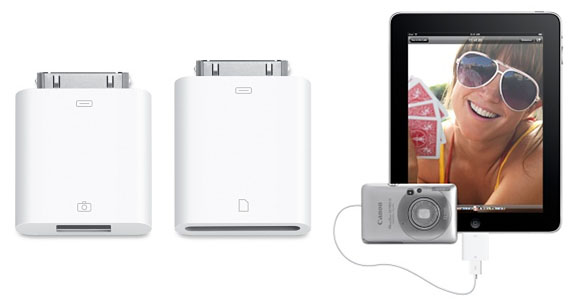
Can you easily transfer photos from your camera to the iPad? Probably not easily, but it should be possible with new cables, yet to  be released adaptors or even the eye.fi card (this won't work see coments). There is an camera connector kit due to be offered by Apple in late April, which will be two little adaptors, a USB connectors (assuming your camera has a USB cable) and a SD Card reader(assuming your camera uses them).
Can you use the iPad to do some post processing in the field? At present you are really limited to iPhone and iTouch applications and the screen on those devices was too small to allow any really sophisticated processing so there is really isn’t anything much (eg Photoshop.com mobile) Maybe with the iPad there may be a version of Photoshop, Picasa or Lightroom cut down to be an iPad app. Perhaps Picnik or Aviary will be the first. This is all very promising but still mostly vapourware. However, there is already an official flickr iPad app in the iTunes store (its free to download). Another good field app might be the  marrying of GPS data such as a wayfile (the iPad doesn’t have a built in GPS either) from perhaps a blue tooth connected GPS and photos using their EXIF time stamp to “automatically” geotag the photos. Stop the vapours are suffocating!
Could you use the iPad as an extended Viewfinder?
This is a neat idea, and is probably technically feasible but may need some extra hardware/cables/bluetooth device? Ok its more vapourware!
Can the iPad be used as a backup device?
It will fit neatly enough into a camera backpack. The first version is 64 GB, which is a fair bit of memory but you would need some of that for your other apps. Again Ok that’s not a lot given the price of an iPad, and maybe not enough given the size of images now captured on some camera. But being realistic 64GB of SD cards will be less that a quarter the cost of an iPad, you just can not look at the photos on the SD cards themselves.
Is the iPad a good presentation device?
This is where it scores really well, It is ideal to run simple presentations (slide shows) and show off gorgeous photographic ebooks. This is a medium I expect to become very popular soon. However remember the presentation and the ebook will probably be generated on separate a computer with more capable software (and a mouse and keyboard)

So my conclusion, don’t necessarily be swayed by the calls of magic and wonderment, it may take a while for the IPad to become an indispensible tool for a photographer.
Protected by Copyscape DMCA Takedown Notice Violation Search

Sunday, April 22, 2012

The Devil in the Detail

2012-04-191

Normally I shy away from using photo manipulation, I’m not a fan of the many over tweaked images (you know the ones with the contrast & saturation sliders moved over fully to the right) that are so popular on social networks now. However I have had some fun with “filter” effects apps of my android camera phone and I was pleasantly surprised by my extreme astronomy to art results. So I was inspired to further investigate some of the new filters in Picasa (there are even more effects (aka most of Picnik’s filters) in the Creative Kit in Google+ Photo, but you have go on-line to use these).

Picasa's advance filter screenI do take a lot of photos of interesting textures in nature, to use in my photoimpression process. Most never get published (a few become screen wallpapers). I took some interesting rocks on the beach early this week and the intricate “carvings” looked ideal to experiment with. Rather than just use the filters as one offs, I like the idea of combined a few approaches so in this case of a ironstone I first used the Neon Filter in picasa, which really enhanced the line work and gave some nice punchy earth colouring. Then I tried out a number of alternatives to reprocess that image, both within picasa and also in paint.net. The image above with the demonic face(s) was simply two images (one the mirror image of the other) put together in the picasa collage/grid tool. So you see the Devil IS in the Detail!

How many faces (within faces) can you see?

Tuesday, April 17, 2012

Not the only one

With all the whoha! about the purchase of instagram by Facebook, you might get the impression that it is the only photo sharing option for mobile phones. That is not true there are plenty other and many of them give you even more features & options. Instagram is however clearly popular, and especially so on iPhones (there is an android version, see grey button here). The beauty of the system is its simplicity, once you have taken your photo you choose and “filters” to modify it (rather than having to learn new editing tools, you scroll across a set of pictures,with strange names, and pick the images that looks like the edit you want to do), you can add a caption and then finally you “share it”, either by email or to one of Twitter, Flickr or Facebook.

Maybe I’m wanting to be too creative but unlike flickr (which still shows heaps of originality and clever use of photographic methods). the instagram site is very much a “me-too” copy copy place where everything looks the same and the fashion for the latest look and filter last just a day or so. I did download Instagram and tested it out but soon removed it to make room for different photo apps on my wildfire, which isn’t over endowed with spare memory.. Obviously a lot of people want to be part of the hottest newest thing, but please don’t stop there. Here are a few more web & phone apps that might just make you mobile phone photos just as nice or even nicer and be equally as simple to use as instagram.

The best place to start , now that there is no longer any place to Picnik. is Aviary. Aviary is well established as a series of web base photo editing tools. Its big power is that Aviary editors are embeddable, and can be added to any website or mobile app with just a few lines of code. Flickr have switched their popular picnic action over to Aviary without a hitch. Its auto Enhance filter is truely amazing and will add punch to almost any mobile phone snap. It also supports facebook uploads and direct edits. The downside is there is currently no instagram like app to download to your phone, but plenty of other apps have aviary editing functionality already, expect more.

Yes i am actually recommending a photoshop application!. This one is free on android phones and is just as easy to use as Instagram, ok it doesn’t have as many filters, but its simple editing tools (crop,,exposure, tint, contrast, saturation & brightness) are really nice finger controlled sliders. There are some fancier features, like soft focus, special “effect” filters and borders. The sharing is just via email Facebook & TwitPic, and the ability to upload to a personal photo library at Photoshop.com.

If you want to play on the more fun and perhaps cheesy side then have a look at these.

Photofunia, is an app from a popular web based service that allows you to do some amazing photo montages, with particular emphasis on the funny face approach, getting your head on a billboard, stamp or art work. It magically finds any face and seamlessly inserts it is many many, templates. This is a FUN app, but it does take time to upload your photo to be processed on-line.

These last couple of apps actually do the special effect “live” so you can see the effect on the screen before you create the final effect when you press the shutter.


Camera Fun Free, there is also Pro version, was probably one early “live” photo phone applications, and I certainly have had a lot of fun with mine. An Alternative is  Cartoon Camera, there is also an ad free Pro version, which is perhaps a little cooler (it describes itself this way) and more cartoonish, drawing and sketching like.