Showing posts with label texture. Show all posts

Sunday, October 14, 2018

Can you find the Kookaburra?


Find the Kookaburra

Taken on the Jells Park Photowalk :: Seeing as the Camera Sees.

This is a good example of my new approach to handling a (big) batches of photos without wasting time and waiting for (slow) software. (ie bringing the fun back into photography). Taken from the camera card with Photo Mechanic (180 images, 90 pairs of jpeg+raw), adding metadata, select and rating the best (under 3 minutes) then pumping 40 raw files out to photolemur 3.0 to see what is possible (another 2 minutes for that to happen, time to make an espresso) Then I sat down (5 minutes later) and choose half a dozen photos to work on.  All I had to do with this one was crop the photolemur output. VoilĂ .

Then I used Photo Mechanic Upload tools to send this cropped image to both flickr and twitter (in less than 2 additional minutes)

For a couple of photos I will go back and take them into On1 Photo RAW and three sets of 5 images each I will take into AuroraHDR 2019. Even though I’m not under any time constraint taking the chore aspect out of culling ranking and caring for my photos before I can even start the fun of enhancing things, give to time to reflect and hopefully lift my creativity

Thursday, July 07, 2016

PhotoProject :: Weaving a Natural Tapestry

_IGP7088-Close up of Lichen on the pathA great thing to do with natural textures is use them to bring added interest to photos particularly the backgrounds. Further I have been encouraged by using my own sketches as filters for dreamscope, So today I am trying out a close up photo of lichen as my template for the filter. I am actually delighted, it brings a natural tapestry feel to my simple bird photos taken meters away from where I photographed the lichen. I’m letting Nature make some of her own marks on my work.

Grey Heron in flight

Double Ducks

Saturday, July 02, 2016

The Patterns of Life

http://myscratchings.tumblr.com/post/146787368215/thinking-about-patterns-in-nature
The Patterns in nature can be interpreted in many ways they can be represented by intricate lines or juxtaposition of positive and negative shape.

There is a tension between the intricate and busy and the calm rhythmic flow. We see this tension as beauty and art.

Friday, June 24, 2016

Artinspired :: from Photo into Mark Making

_IGP6426 Original PhotoI am very inspired by the works of Fred Williams, at the obvious level they are very abstract, yet at the same time they capture both the colours and textures of the Australian Bush. more particularly the bush around here. That's not surprising as Fred used to regularly spend one a day a week in the bush painting and sketching what he saw. Today I am beginning with a “non-bending marco” taken of the truck of a gum tree in jells park. A couple of limbs have “dropped’ and left large gashes where the gum is leaking out. Parts of the bare truck can be seen as well as the corky rough bark normally around the base of the tree. Its a pretty ordinary subject to photograph.

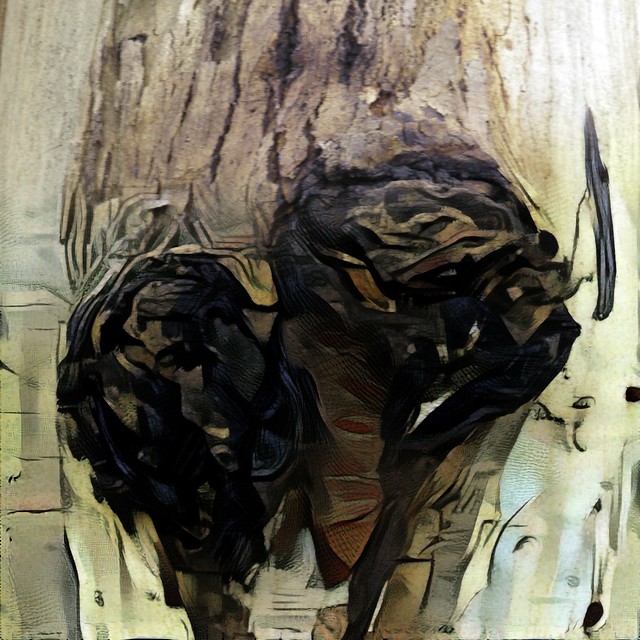
Fred’s work often has two levels a rich colour ground, and then an almost calligraphic decoration of texture, squiggles and lines that are a kind of shorthand to describe the terrain, the trees and other aspects of the landscape. So I have decided to create two separate dreamcope images. One that captures the colours in a rough fashion. I tried a few filets including a couple of my own and ended up using two stacked filters, one after the other. First a watercolour then a sketch filter. There are not conventional parametric filters that adjust a given slider like exposure of saturation. The deep dream process takes the image and builds a neural network like matrix and iterate through looking for parts of the image that have the same characteristics as the filer. In this case I was looking to enhance the colours, and colour harmony (ie not just pumping up vibrance of saturations) Then I created a separate layer that focuses on the lines and textures, for this I used the money filter, which I have used before and it definitely searches out the strong design elements, shapes and textures.

coloured background Line work

The final step is to combine them, and I must admit I liked the way you could still see the three layers, fully exposed in different parts of the image on my previous art inspired piece, the autumn leaves on the ground. In this case I used OnOne 10 layers again but used soft light blend mode for all layers, to let each layer bleed through but I also used simple gradational filter to start with the original photo at the top that fades into the strong line work and with the background coming through and dominating the bottom.

Gum Bark Texture II

Reality transforms to abstract.

Wednesday, June 15, 2016

ArtInspired :: Autumn Leaves HDR to Dreamscope

2016-06-15_16-11-03_HDR  Dreamscope "jewelled" Dreamscope "watercoloured"
I’ve been concentrating of the possibilities around taking macro photos out in the wilds. Its a bit more challenging than say photographing something like a toy or texture in a brick wall, because the patterns go on and on and blend into other patterns. Nature has a habit of packing lots of things into the available space, whereas mankind has the opposite habit of stripping out everything away and replacing it with very little ot single functionality,
Patterns Inspired by fallen autumn leaves
This began as a HDR Camera+ photo on my android phone, of the autumn leaves on a pathway. I like the texture. So I began with OnOne’s Dynamic Contrast and Fall Enhancer. to give me the image on the upper left. Then I tried two dreamscope filters “jewelled” and “watercoloured”. These use the methodology described by Google’s Deep Dream explanation of neural networks analysis photographic images. Finally I used OnOne’s layers capabilities to blend the three images together. Letting reality merge into art.

Sunday, June 12, 2016

PhotoProject :: Non-Bending Macro

My sigma telephoto macro lens

Cracking and bruising some ribs a couple of weeks ago has slowed me down a lot. Especially in terms of getting out specifically to take photos.

This week I was planning to do some more on macro/closeups and just focusing on textures. Unfortunately that typically means a lot of bending, not something I want to do at the moment. However my favourite telephoto (a old sigma 70-300 DL Macro Super, no idea what the super stands for) has a macro setting, that basically lets you focus in close when using the longest focal lengths.

 Lime Blossumazaleapotatoe creeperOn a ceramic duck's backTree fern frondToadstoll

Focusing close in this case is however 0.5 to 2 meters, not inches, away. This is perfect because I can stand and just focus at around ground level, ie no bending required. So I was able to get out in the garden (between rain showers) and have some close up fun.

Detail of stag horn fern leaf IDetail of stag horn fern leaf II

Wednesday, February 03, 2016

Under Foot

Having had some fun with the eye theme using modified photos (in that case using dreamscope filters) I got inspired to return to the Fred Williams stylistic approach. This time I want a simple subject (in the landscape) without an horizon and detail that comes form and is characteristic of the landscape itself but is perhaps somewhat abstract. Sounds easy?

GroundCover-001GroundCover-002GroundCover-003

The Main Dreamscope screenThe lack of a strong horizon made me think of looking down. Most people don’t take much notice of what’s under their feet, so it got me inspired  that “under foot” might be a perfect theme for the next few daily photos. The subject is then obvious also, my feet.


Hope you like such images inspired by art, but created photographically. Watch this space for more.

Moss Covered Granite Feet?

Thursday, July 09, 2015

Taking the time to really look

There is a slight optical trick here, go to flickr and make this image full screen then look at it from close up. Your eye will be fascinated with the pattern and texture of the bark, and that will dominate what you see, Then stand and move back a few place and you will start to see the beach where this tree grows.
Really looking
Working on the inspiration of Fred William's paintings of the essence of the Australian Landscape.

Tuesday, February 18, 2014

ThePatch :: An idea with a mind of its own

I am late as usual photographing my theme of the week, ok theme of last week, Togetherness/Love for the Patch. Rather than get to obvious I wanted this one to be more appealing Original Photos after a couple of tweaks in lightroomat an emotional level, which to any artist suggests colour and specifically pink or red, That's easy enough, but I also know that texture can have a big connection physically for a lot of viewing. An interesting texture often enlists a longer viewing. It was the subject matter that I was a bit slow to decide on, especial after most of my initial ideas, such as of shadow silhouettes, hands, wedding rings and heart shaped bokeh etc where already used and well applied. Then I though of the lovers knot, which occurs in slightly different forms across many cultures, essentially it is a simple continuous looping interconnecting knot. Sometimes the knot is based on an infinity loop, sometimes it is two strange looped together.
The text love used as a custom brushIt was easy to make a simple one with an old shoe lace and my wife helped out with my camera in shutter delay mode and on a tripod and a single overhead light. We held the lovers knot. It wasn’t hard to get the basic composition I was after. A little tweak Detail of my wife's fingers & ringon clarity and a slight vignette in lightroom and things were looking up. However the only red background I could find was the back of some pastel sketch, boringly matte and flat no exciting  texture here, albeit with some unwanted smudges of pastel. I had hoped to find a rich red lace to go with it (ok that would require extra time and the dead-line was now!) I remembered I have had great fun with texture in corel painter and corel paint, so I looked out a very old plug-in for paint called alchemy which allows you to use a brush of your own design and then control how this samples and paints an image. I quickly made up a small brush  (above left, its like a photoshop mask, black lets nothing though, white everything and greys between adjust the opacity accordingly) that used the word Love for the highlights, then I set the controls to vary the colour, size and angle of the brush depending on the hue and tone of the original photo (see detail above right). The brush they repeatedly samples the photo and the overlapping strokes create a new image. The results was definitely close to what I was after. So with a few tweaks of the alchemy settings to include some extra variation of the colour saturation, which helped enhance he texture in the background and voilĂ IMGP5244-with-love (and texture)

Saturday, October 27, 2012

Water Under the Bridge

leaching under the bridgeI’m positive this is all natural straining, but can you see the semi-stylized horse image? Somewhat reminiscent the animals in the Spanish Cave Paintings, it is developing on the wall under the Tooway Creek Bridge, at Moffat’s Beach. Water on the bridges is obviously leaching out calcium, salt and some iron but the black oxide straining is very typical of all the exposed rocks along the coast here and I suspect it maybe manganese and possibly has an algal or bacterial component. Whatever the staining is it is it is creating a pretty remarkable piece of art.
Can you see the horse?

Wednesday, October 03, 2012

Sunday, September 23, 2012

Sunday, April 22, 2012

The Devil in the Detail

2012-04-191

Normally I shy away from using photo manipulation, I’m not a fan of the many over tweaked images (you know the ones with the contrast & saturation sliders moved over fully to the right) that are so popular on social networks now. However I have had some fun with “filter” effects apps of my android camera phone and I was pleasantly surprised by my extreme astronomy to art results. So I was inspired to further investigate some of the new filters in Picasa (there are even more effects (aka most of Picnik’s filters) in the Creative Kit in Google+ Photo, but you have go on-line to use these).

Picasa's advance filter screenI do take a lot of photos of interesting textures in nature, to use in my photoimpression process. Most never get published (a few become screen wallpapers). I took some interesting rocks on the beach early this week and the intricate “carvings” looked ideal to experiment with. Rather than just use the filters as one offs, I like the idea of combined a few approaches so in this case of a ironstone I first used the Neon Filter in picasa, which really enhanced the line work and gave some nice punchy earth colouring. Then I tried out a number of alternatives to reprocess that image, both within picasa and also in paint.net. The image above with the demonic face(s) was simply two images (one the mirror image of the other) put together in the picasa collage/grid tool. So you see the Devil IS in the Detail!

How many faces (within faces) can you see?

Saturday, July 02, 2011

PhotoFriday :: Flaming Sharp Focus

IMGP4691This set of amazing ripple patterns in the shallows behind a sand bar reminds me of flames, frozen in time in their best and most intricate detail.

Normally photographing a very monochrome and evenly lit subjects, like a pattern in beach sand is very difficult to focus, even manually, and would normally send my camera’s autofocus tracking back and forth in a rather futile effort to find a sharp image. Being winter the sun was low enough to throw a shadow and it was just a case moving around  to get the direction that had the shadows maximised and darkest. Thus giving some good contrast in the area on which I was focusing.

For PhotoFriday‘s Topic Sharp Focus

Monday, February 26, 2007

Textural Collage

 
Photomosaic collage of ripple marks in wet sand.

for PhotoFriday's topic Textured
Posted by Picasa