Showing posts with label photoproject. Show all posts

Sunday, March 10, 2019

Revisiting & Extending my Photographic Punctuation Marks

Its been a while since I wrote about the idea of including pictorial punctuation marks in my camera’s photostream. It much handier (pun intended) than taking notes or trusting memory. As I’m taking more and more group image sets this is a very easy way to find and group like images just in the thumbnail view (eg PhotoMechanic as I load the photos where I can colour code them accordingly or in OnOne Photo RAW where I like to group Stitched Panoramas, HDR and Focus Stacked sets in their own sub–directories). This avoids a lot of wasted time churning thorough a mountain of similar images, and keeps things a little better organised.

Think of these first the hand signals as visual brackets


Panoramic Sequence, and direction of shooting. I still don’t use this all the time, because a panoramic series is usually pretty self explanatory. When I have used this I will add this marker photo before the panoramic sequence is shot. I further identify the stitched panorama series with a Green Colour Class


 HDR Bracketed Sequence, I use this to indicate I am taking 3 or 5 a photo sequence. This is another punctuation marker that I normally use to precede a sequence. I usually don’t bother put this in front of every HDR set in a continuous series (such as combined HDR and Stitch Panorama because it is relatively easy to find the groupings). I then use the Yellow Colour Class to easily identify the HDR sequences.


Focus Staking. or other multi-bracket techniques. This is a new marker because it can be very difficult to discern the beginning and/or end of focus bracketed sequences when more that two or three shots are involved. I have therefore adopted the approach of adding this at the end of each sequence. I use the Blue Colour Class to identify this type of bracketing.


I like to think of the next hand sigalns as simple punctuation marks  ; (=battery) . (=end)  ? (=cut)  ! (=good)

Battery Change, still my way of recording when I changes my battery, looking back through your photos and finding the previous battery change photo, then just subtracting the new photo number from the previous gives you the battery life in terms of number of shot per battery charge. On the Pentax DSLRs this can be weeks to months worth of shooting but on the mirrorless Olympus this is generally days to a week. Doing this let me work out I get around 750 photos from a single battery charge from my new Olympus OMD EM10iii, which is about double the claimed 330 shots.


Full Stop, End is a marker to end one series or starts another. I used this often for a variety of breaks or just simple visual markers to aid looking through a large collection.


Cut, not something I use much, but I have used this simple bit of sign language to remind myself that the previous photos should be deleted. I never just flag photos to be deleted I immediately delete them as soon as they are loaded onto my computer, I also delete this marker.


Good, another new punctuation mark just to remind me that close to this marker is a photo I liked at the time, maybe good light, composition or just that perfect moment.

Whilst I normally take both Jpeg & RAW, I usually delete the larger RAW version of any punctuation photos, as I never intend to post process them.

Thursday, November 08, 2018

PhotoProject :: LIVE TIME .vs. LIVE COMP for Lightning

imageI took the opportunity of the storm last night to test out two features LIVE COMP and LIVE TIME of my new camera. The Little Olympus, OMD EM10iii Mirrorless Camera. LIVE TIME lets you see a long exposure building up the image on the LCD screen (in 2 second updates so the lightning just lit up the whole sky (looked like sheet lightning, which it wasn’t)

Wimagehereas LIVE COMP (the image above) takes a back ground image and then only add things that are stronger light,  (again I'd set this to 2 second intervals), its like I am doing highlight blend mode across several images (say 50 to 100). That’s how I got this photo with the forks of lightning and strong frozen backlighting of the tree. Yes I have cropped in a bit.

Wednesday, November 07, 2018

PhotoProject :: Capturing Rain

I have tried many times to find a nice ay to capture rain. Basically it falls to fast to nicely capture drops in detail and its usually dark anyway.

PB060012PB060014PB060015

It was raining heavily yesterday and I saw an opportunity to photographs the drops backlit against dark foliage. Then I took photos at three different shutter speeds

  • 1/500th. second (ie fast enough to freeze a bird in flight)
  • 1/50th. second (a comfortable hand-held speed that should avoid blurring my shaky hands)
  • 1/15th. second (very slow, I have to rely on the in body stabilisation (IBS) of the  camera)

The result is obvious the best photo telling the story of raining is the slow exposure because it has elongated blurs hat captured the motion of the water droplets. Sound obvious in retrospect. Slow shutter speed to blur the motion and hold the camera steady (and/or IBS)

Monday, October 29, 2018

PhotoProject :: My #HandDrawnPhoto approach to #AIart

The success of the Belemy portrait auction, has encouraged me to compare Obvious’s DAG approach to my use of Google Deep Dream algorithm. Deep dream uses a convolutional (foreword chaining) neural network to find and/or enhance patterns in an image. This can be applied in two ways Style & Inception (google’s terms). The inception process tries to find the characteristics of a given object/pattern within a photo and tends to produce surreal images. Style on the other hand  seeks to put characteristic patterns back into a photo based on features the trained neural network has recognized. This is the technique I have become very interested in as a way to put my characteristic marks (and sometimes colours) back into a photo. Hence the name Hand Drawn Photos for my approach. The method does have superficial similarities to Onvious’s DAG Approach.

the pine treesPA280054Here I am using my sketch for inktober as the image to be processed and a photo of the same trees as my training image used to build the neural network (AI). The Photo here is acting like the discriminator in Obvious’s approach. The result (below) is tonally similar to the photo and kind of a messy squiggly version of something I might sketch.  But…

the pines 1

PA280054the pine treesIn this, my preferred approach, I am using the photo as the image to be modified and my sketch as the image to train the neural network and letting the system modify the photo to “find” my characteristic mark making (aka style) and modify the photo. In this case I am taking the colours from the photograph, but that is not essential.

the pines 2

I feel this second result is much cleaner and fresher, closer to something creative and artistic, Although I am strongly guiding the outcome by using my own sketches (as opposed to an automated algorithm). So the big question is “Do you consider this #HandDrawnPhoto to be legitimate AI art? I’m warming to answering yes.

If you are interested here is the link to my profile and public images on Google Deep Dream website. (Its free to join and use)

Love to hear your views,  please leave your comments here.

Monday, September 10, 2018

PhotoProject :: Building a “Hand Drawn Photo” in 3 layers

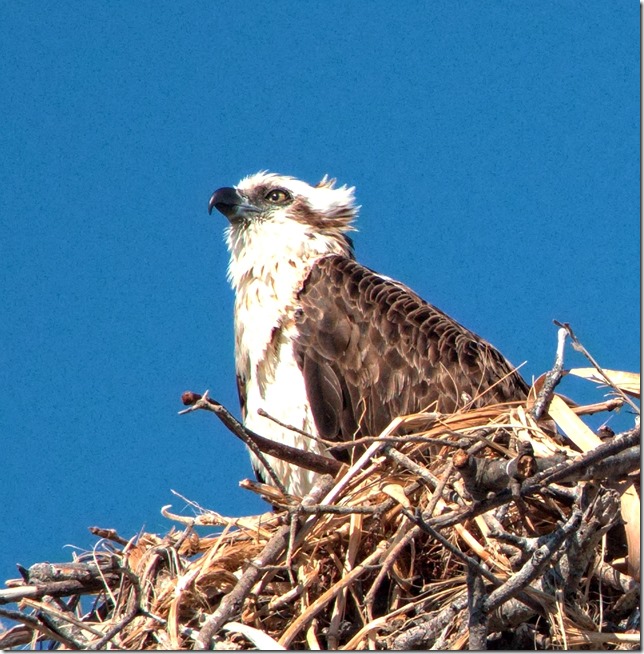
I felt it was time to do something creative for this blog (and instagram). I had selected this photo of the young Osprey on the nest on the Mooloolaba spit to make a painting or perhaps a pastel drawing. However I felt it also need to be reinterpreted as a “hand draw photo” using a combination of rendering approaches.

Originl photo of the Osprey NestAI rendering of the photo using Abstract Nature trained filterClone painting made with an impressionist cloning brush

First I loaded the original photo into Google Deep Dream Generator and used the Abstract Nature trained AI filter. This created a darker rendering but I loved the strong blue colouring of the sky. Next I took this new version into Corel Painter as the work to base a clone painting using the artist impressionist clone brush and a linen surface texture and also emphasised warm colours or the plumage and nest.

"Hand Drawn Photo" of the Young Osprey on its Nest
For the Final Work (above) I used On1 Photo RAW and load the original photo as the base layer and the Clone painting as the second layer. Then I used soft light blending mode and used a semi-opacity masking, a lot like a homemade luminosity mask to bring out some of the original photo (eg almost 100% masking over the eye and beak, but variable 75% or lower on selected parts of the nest and feathers). I also lifted the vibrancy of the blue and yellow/oranges a fraction to give me a strong complimentary colour feel. Finally I cropped in a little to add a bit more drama to the composition.

Friday, August 31, 2018

Finishing My This Week in Litter Project

I’ve decided to finish my TWIL project (This Week in Litter) not because highlighting litter is not an import reminder of how us humans treat the natural world but that I have learnt a lot making the photos and have probably reached the point where I can confidently shot from the hip using the back screen on my new olympus camera, without interrupting my walk, by more than a pace or two.
P9030060 

As I started this project I would stop, nicely frame the rubbish in the view finders and take the photo bending over. Worked fine, but people tend to give you strange looks if you are photography rubbish on the ground. I soon figured out I needed to be more discreet. Just facing the camera down at hip level and using the back screen to compose worked better. The only other obstacles were getting focus and exposure right (because both are hard to gauge off the back screen at the best of times, harder when this screen is essentially arms length away). Well I just needed to trust the camera, put it in P mode and used the Autofocus. A couple of early photos showed camera blur, but I took hundreds of photos and the muscle memory soon kicked in. Stop switch the camera on, move the camera to frame the rubbish, press the 2X button if necessary, half press the shutter, wait a fraction of a second and then roll to fully press the shutter (all in a second or so).

The results where very suitable. The photos not the rubbish

Friday, August 24, 2018

PhotoProjectr :: TWIL7 Sunshine Coast & Brisbane

example of a "homeless sleepover"

This is a composite This Week in Litter project was was on the Sunshine Coast part of the time and in Brisbane later. I saw a lot more litter, surprisingly more. The biggest sock was the amount of litter aggregated by the homeless sleeping rough on the streets and parks around Brisbane

This week in Litter Week 7

P8250183The other obvious thing was that Brisbane has lots of smokers and they throw their butts around indiscriminately, pretty much everywhere and hundreds if not thousands.

Sunday, August 19, 2018

PhotoProject :: The Ospreys :: World Photography Day

Today is apparently World Photography Day. If you have been following my @normhansonphoto instagram feed you will have notice a couple of photos of an Osprey nest high on a pillar of the Mooloolabar spit, taken at different times of the day and under different lighting.Osprey Chicks on their Nest Unfortunately the Osprey where largely in silhouette. So today I decide to get up early and walk to the spit (a little over 3km away). Hoping I could get close but on the eastern side in the morning light to get a lot of detail on the Osprey, and hopefully well lit eyes.


The walk was pleasant, and the big Sunshine Coast Marathon was finishing so the road blocks where being removed. However when I arrived at the nest only the chicks where home. After a short wait I could here one parent squeals and suddenly they where on the nest. I missed then flying in (and out). Still I had my long lens (zoomed out to 300mm) on and switched to S (shutter speed mode) and high speed burst mode. At 200 ISO and 1/400th second  f8 to f11 giving a good exposure, all good. The parent had returned without food so there was a bit of complaining and they where scanning the skies for their partner. I moved around to the eastern side to get the best morning light on the birds and got many shots, even though they are stationary on the nest their heads where turning constantly so the burst mode helped get the best head position. Still I had a lot of almost duplicate images and ended up deleting approx. 30%. Then as quickly as they came the parent dove from the next and disappeared. I wasn’t quick enough to capture them in flight. Still I was happy with my efforts.

Osprey on the lookout

OLYMPUS DIGITAL CAMERA out of camera jpeg         Continuing my comparison of the “out of camera” Jpegs (without enhancements) from the Olympus, shown on right, with post processed RAW (.orf) file (above). The out of camera shots continue to look good (the biggest difference here is the post process cropping and a tiny amount of tonal tweaking).  I had used the 2x button to get the extra zoom, but it actually only works on the jpeg, but there is plenty of detail in the RAw image for heavy cropping to work well.

Friday, August 10, 2018

PhotoProject :: Twil 5 en Nouvelle Caledonie

twil5-003

I had to stop photographing cigarette butts, because there would have been many hundreds.

Friday, August 03, 2018

PhotoProject : This Week In Litter 4

Camera Roll

Again less litter as I only had a couple of walks. Wow so many cigarette butts thrown onto pine needles, lucky its been wet! Third week of my  #TWIL project

Friday, July 27, 2018

PhotoProject :: This Week In Litter 3

Twil3
Not quite as much litter, because I was out walking less. Still mainly plastics. Third week of my #twil Project.

Friday, July 20, 2018

PhotoProject :: This Week In Litter 2

Collages

Just discarded items I noticed (and photographed) as I was walking around, this week. Second week of my #twil project

Friday, July 13, 2018

PhotoProject :: This week in litter

Litter this week, 33% biodegradeable 67% not!
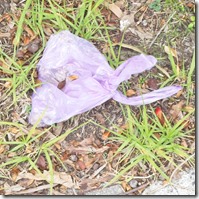
Wheelers hill WalkPhotographing rubbish might seem strange thing to do with a camera,and it probably is. However there has been much in the news recently about our two largest supermarkets here in Victoria no longer giving customers single use plastic bags. The dominant reasons given is these bags are disposed of carelessly, clogging out water ways and damaging marine environments. I walk around such places often, usually with a camera and although I often see plastic in the litter I don’t see such bags. So I though I’d start a photographic straw pole and record any litter on my walks. I actually did find such a supermarkets bag full of rubbish (that's how most bags seem to get used) But throw into a vacant block!
Jells Park WalkJells Park WalkWheelers hill Walk
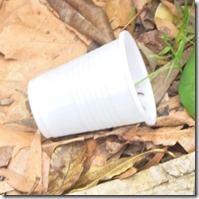
I was actually expecting to mainly see plastic bottles (mainly water bottles, Styrofoam cups and takeaway coffee cups and mainly their lids. i did photograph several of these. However a couple of items surprised me. Firslyt burst ballons (found at three separate locations?
Jells Park WalkWheelers Hill WalkJells Park Walk
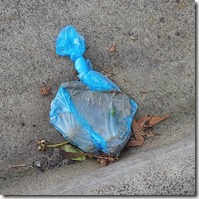
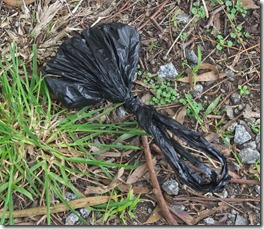
the other item that at first puzzled me was little plastic bags part filled and tied up, but discarded in people’s front yards or beside paths? Then I realized what they contained. Hardly the spirit of their creations!
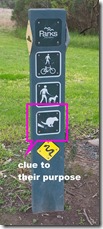
Wheelers hill WalkJells Park WalkHere is clue to their purpose
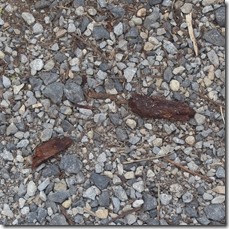
Jells Park WalkA clue to how these bags are usedYes its doggy do, and someone has stepped in this.

Sunday, June 04, 2017

PhotoProject :: Seeing more with your photos

I have become convinced that there are two opposing objectives when you are collecting photographic reference material for creating art works. Firstly the documentary aspects, the objective recording of important visual details, form, shape, lighting etc. An aide-memorie. Such tasks are really performed well with a digital camera or smart phone. However there is a second subjective/expressive side of how you feel about the scene, the atmosphere or your connection to the place. Single photographs will seldom capture these things. Whereas a sketch or small plein-air painting probably will.

I suspect ignoring the second component when painting from a single photo is why they so often look bland and lifeless.

I had already come to recommend to artist wishing to collect photographic reference that they should make at least an tonal/compositional sketch in the fields and take at least 5 photos to support it. Actually it’s better to take 10. By coincidence this ties in nicely with capturing both the objective and subjective aspects. A great metaphor is to use your hands to remember what to photograph.

Documentary

1-IMG_20170602_164305_processedTaking an Objective View (Detailed left Brain Stuff)

  1. Take the obvious snap shot.
  2. What is the main subject, get as much detail as possible.
  3. Take a wider view.
  4. Evaluated the tonal balance.
  5. Textures and surfaces

Its quiet normal to pick a snapshot type view of any new vista, It might actually be what you are going to paint to take the shot, get it out of the way. It could also be the scene you sketch, that’s fine you’ve already got a photo to copy. However now you need to look for a bit more detail of the scene. In particular detail of the main subject could really help future drawing or painting back in the studio. Therefore zoom in on the important subject details, or walk up and take some closer photos. Similarly it is wise to take a wider view, zoom out or walk back, or use a wide angle lens. Even take a few over lapping images to stitch or cut an past together. This will help you understand what part of the scene makes the best framing and composition. The last two items have a lot to do with the quality of the light. The tonal aspect are a very important in realistic art as they help the eyes more that any other visual features understand the three dimensionally of what we see. This is a bigger topic than I can even begin to cover here in a single blog post but you want to avoid just have one photo with a bleached out sky (or other highlights) and solid black shadows. It might be best to take one exposure of the sky and another of the shadows (or use HDR style exposure bracketing) or even take one photo without and with a flash providing fill light of any close subject. Perhaps you might look at using black & white to better understand the tones. The eye is also interested in edges, texture and the small detail of surfaces that help our brain identify an object, However it often ignores other information once its has found itself a satisfactory explanation. so it is a wise option to get some documentation of the dominant textures usually requires very close up detailed photo(s).

Expressive

Finding a Subjective View (big picture right brain stuff)1-expressive hand

  1. Include a photo your plein air work
  2. What interests you most in the scene.
  3. Look for main abstract shapes .
  4. Main colours and mood
  5. Atmosphere

If you have not made a sketch you won’t be able to photograph it. However a photo of your work in position with the scene in the background can be a great help in putting your sketch and colours in context, this cross reference will be a big help back in the studio. It is also a wonderful way to establish provenance, works in progress posted on social media are a better way to promote your work than yet another selfie. The next two items to attempt to photography are similar to items 2 & 3 in the documentary set but know you need to focus on what interested you the most. It may not the the old house but the path disappearing behind it. To the tree but the show it cast across the path beside it. Take you time to understand what attract your view don’t just assume it was the subject you first choose in the snapshot. Next you should look for the larger abstract shapes , They are probably defined tonally and the small composition sketch many art make are perfect here, another well established trick is to squint. However a camera can be a great help here. Deliberately put your camera out of focus. The main shapes of dark and light design will jump out at you. The final items are also related to the quality of the light but you need to consider how they affect you and what mood they invoke. Despite all the colour matching and calibration technology perception of colour can be a very personal thing and strongly connected to emotions. This is a bigger issue is not just white balance and colour temperature, but extends to colour harmony and compliments (classic colour theory). Another important aspect to remember is few experienced master painter fill there creations with endless detail a lot of the images was left with a suggestive colour, tone, texture and our eyes filling in what it thought it saw, where as way to many photographer's are obsessed with tack sharp focus and copying such photos doesn’t excite our eyes and brains so take a few photos of the distant mist, the heat haze or sun glare.