Showing posts with label multi-image. Show all posts

Sunday, November 27, 2016

Thinking Outside the Frame

#330 Am I Spending Too Much Time On Instagram
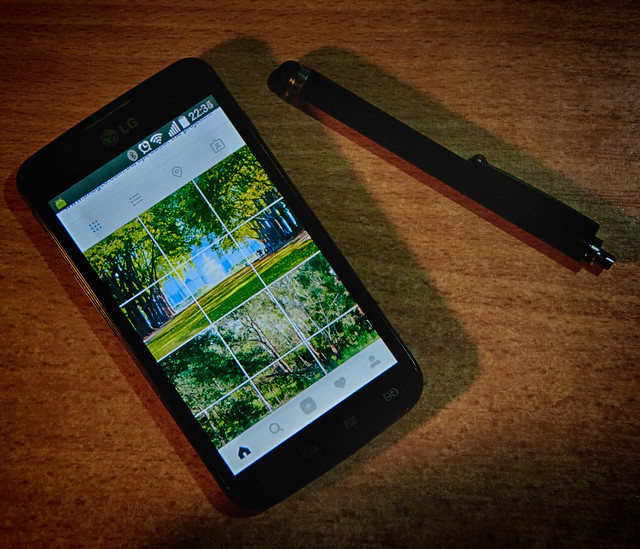
This photo was almost an after-though, since I hadn’t taken a daily photo to post on flickr. I did take a couple of others but came back to this one as it summarized where I had “misspent” by photographic energy. You see I’ve become a little hooked on the idea of making the 3 column grid view in Instagram work as a secret place to display bigger images. In a strange twist this humble image made it onto explorer and there have been 1000s views over night. The real hero is actually over on Instagram @oz_endless_summer, and is meant to be promoting my photo project next year.

I first got the idea looking at making a photo of water lilies into a more painterly image. I knew Monet created a few large painting that needed to be displayed together. So it was not a big step to split my panoramic view up into 3 square images. I probably really confused my followers but slowly I can see they are starting to look at my grid view.

I have since found that there are a few others doing similar multi-panel posts and even found a tool called Instagrid that will do the splitting. However its a bit tedious to use because Instagram doesn't let 3rd party apps upload images so the individual panes still have to be manually uploaded via an official Instagram supplied app. Anyway I’m having a bit of creative fun

Monday, October 31, 2016

Playing with the Frames in Instagram

My main photo screen in Instragram

Instagram is VERY simple, which may explain its appeal. Whilst I don’t mind the square format it can be restrictive AND I like to side step or find my way around such restriction. Since “there be where creativity lies”.

I am quite used to making multi-image paintings, so it occurred to me (after I’d downloaded the windows 10 Instagram app) why now move out of a single frame!

Saturday, September 17, 2016

PhotoProject :: Surreally into the Night

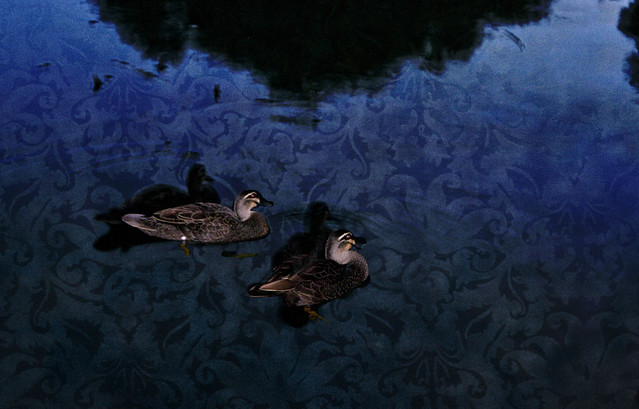
I have been interested for sometime in multi-exposure and superimposing subjects across time. This image is not a multi-exposure in camera instead it combined two photos taken only a short interval apart. It was just on dusk and there two ducks where lazily swimming by. I already had though of the idea of using flash and non-flash for the multiple images so I grabbed my camera and two a couple of photos, trying to keep the ducks in the center of the frame.

IMGP3596IMGP3597

Back home I put the two images together but it was quiet boring because light water in the normal exposure cancelled the dark water  in the flash photo (it a boring blue/grey)and the ducks where cut in half because they did overlap. So I had the idea of using a luminosity mask in OnOne 10. First I used a dark brocade textures layer and replaced the lighter values in the photo (the water) and kept the darks (the ducks and shadows). Next I overlayed the flash image and using an inverted luminosity mask let the blend bring the modified original photo and texture into the dark background. A slight crop, leaving the illuminated duck swimming on a surreal surface, with their available light selves becoming living shadows,

#261 IMGP3597 Surreally into the night

Thursday, February 18, 2016

Look Up

Looking upPower lines vertaramagum tree vertarama

Sometimes the best thing to photograph requires looking up. Using a multi-stitch approach can nicely ground your subject, often at the cost of distorted perspective, This type of image and has been given the constructed name of a Vertarama. As seen on keep my tracks gps doodle walk

Monday, July 28, 2014

ThePatch :: Celebration/Musical Instrument

Queue the samba drums, Timbalada, Daniela Mercury and/or Olodum, that’s my idea of celebration music. Well a good excuse to get out the bongle drums and another party shirt. It was a dull day and the light fading but It did let me experiment with a few options to try and capture the rhythm of the carnival.
Composite image using Perfect Photo Multi-Exposure using Picasa Collage Talk about Stop motion
Ok none of these get close to the atmosphere of the real thing, but I’m not in Brazil I’m in Oz. AND Hopefully the light will be better tomorrow when I can work on finding a better composition. in the meantime …

I know this clip is a little on the long side but if you enjoy drum music it is worthwhile (and you will recognise that Paul Simon used them and their rhythms in his obvious child.)

imageSo the new plan too many hands!is to try the composite motion again by perhaps more front on and playing the bongos in the more conventional sitting position, so more hand action can be captured. So I found a sunny spot, turned up the burst mode to max and only captured jpeg, Set up the tripod and delay, then pressed the shutter, quickly in position. Now I have 355 images pretty much the same from which to find half a dozen hand positions and learn how to do multiple masking bug techniques in Perfect Layers, ok I have bitten off more than I can chew, So I’ve settled on using just a few hands, less is more,  in my final submission.

Monday, March 10, 2014

PhotoProject :: Take Five

I’m still in a bit of a multi-frame multi-image theme and I haven’t made a take five series in ages. The idea is very simple just capture a panorama or series of a subject in motion, in just five photos and mount them side by side to make a bigger picture. Very simple and can be a fun way of  at telling a simple story. As I panned on the young driver, the pier in the background has naturally moved higher in the image. Aligning the edge of the pier, strengthens the composition of the whole.  (Yes the girls were impressed)

IMGP6141 IMGP6142 IMGP6143 IMGP6144 IMGP6145-001

Thursday, February 20, 2014

ThePatch :: Is Loneliness a natural part of the Creativity?

The Patch theme this week is Loneliness/Togetherness, which at first looks like an Oxymoron. How can someone be lonely when they are part of togetherness? Yet deep in the creative process there is often that point where you are totally alone in yourself, trying something new, different, original … it is often the point at which the inspiration arises sometimes from deep within, sometimes as a chance observation. Once conceived other aspects of yourself need to kick in, the skill to design, the talent to make your marks and the wisdom to evaluate your creation. This is a perfect scenario for a little “multi-exposed” story of an artist sitting around a table. Now how to do that?
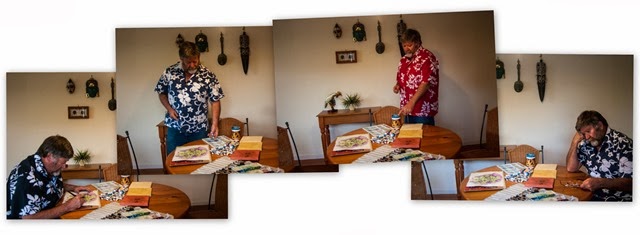
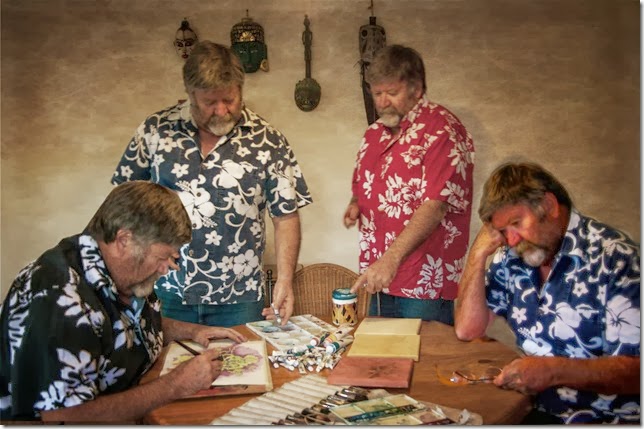
loneliness-002First I took a series of photos of myself in the individual poses, to tell the story. That bit was easy. The camera was on a tripod and you can see the remote control in my hand in the third shot, the one with the red shirt. Next I was keen to have a play with perfect effect 8’s layers capabilities. Alas it can only work on layers within one image, it doesn’t let you stack the layers from a number of images. So first I had to do that in corel photo paint. I little further tweak of the tone and clarity in lightroom, then back into perfect effects. You have to save a copy as a psd (photoshop format) to get the ability to use layer in perfect effects. This time I set up three different layers. The first a texturizer layer, there are dozens but I liked the Rice Paper Vignette, which I set to around 80% opacity. Next I had to set up setting up a mask around the fourth “lonely” me on the right. I used the “perfect brush” to paint in the mask and it did a very good job of stopping at the change of contrast. However it was a bit “laggy” as I used the brush so it was a bit fiddly to use (compared with the same task in corel photo paint). I then copied the mask (a really excellent feature) and pasted that onto my next layer which was a colour saturation control, called not surprisingly color reducer and here I went into the filter options and adjusted then saturation slider back to the left about -20%, rather than use the opacity of the filter. Finally I created another layer and this time using the portrait enhancer and the strong version. I paste the same mask again but this time I selected it in inverse, so what was painted out of the filters in the layers underneath was now painted in on this layer. I did experiment with incorporating another option inside this filter to give cooler colours but I felt the strong colouring suited the now darker image. These steps might sound a bit complex but it was actually relatively simple, not frightening at all! IMGP5295 collage 2 copyOne disappointment was I don’t think I set the feather large enough, because the perfect brush masking was a bit more precise than I expected. Unfortunately once you to commit to save and close the edits in perfect effect you loose the layering and the mask itself. I now know that you can get around this by saving your work as a new preset before you exit. That way you can reload your original, apply your saved preset and have access to all the layers, filters and masks.
Saturday, June 30, 2012

Under the Moreton Bay Fig

"Joiner" style collage made in Picasa Autostitch panorama Moreton Bay Figs [Ficus macrophylla] can grow into massive trees, and it is quiet difficult in a single photo to convey that all embracing size, especially when you are enjoying the dappled shade well underneath the tree’s embrace. My simple solution is to take lots fo images. These two starkly different collages where prepared from the same series of photos, which followed up the mighty branches to the patterns in the foliage above me.

Thursday, September 22, 2011

Not Drowning Waving

not standing waving

Strong offshore winds and late afternoon light adds a lot of drama into the progress of a wave to the shore.

Sunday, August 21, 2011

The Full 360

Before proceeding I should warn that getting a full 360 degree panorama without a tripod and a fair bit of exposure calculation right is very difficult. Very, very difficult! The main trouble is that during the day the light is quiet variable according to the direction you are shooting. Hence the very old rule to shoot with the sun over your shoulder. In this direction, everything with well lit and their will be some detail in the shadows. in the opposite direct there tends to be very high contrast, the sky will be washed out and the foreground will be just a silhouetted with little or no detail in the shadows. Having set my excuses here is a bit of fun I had…

Using the 360 Android App

20-08-2011 01.03.42

360 - Android Market - Windows Internet Explorer 21082011 52604 AMI had just downloaded the free version of the 360 app, and haven’t bothered to sign up to the web-site upload or community. I just wanted to try it out. I did patiently follow the instructions trying to keep te progress meter green at all times, but alas my phone keep jumping into the red, despite the slowest progress. So I was not surprised to get a result like this. Further attempts gave less satisfactory results and frustration. Ok it was fun for a while but I’m not convinced it is easy enough to use (perhaps without a lot of experiment and practice)

DSLR Multi-image Autostitched Panorama

grote markt pano big-1

I have made hand held 360 with my normal Pentax DSLR before, and I have found it best to let the camera choose the exposure between each shoot (it takes time, it not difficult) with enough overlap (20-30%) to let autostitch do its magic. This sequence is actually 48 photos in two bands (the upper skyline and the lower cobble stones). That is why there are so many truncated people.

If I really want to get a full 360 of the Grote Markt, I will need to do in the early morning or late afternoon, to get those golden hours of even lighting and with a tripod (with a panorama head). Maybe that’s not going to happen.

 Winking smile

Tuesday, August 09, 2011

Sometimes the mistakes look good too

seijer abstract pano

speijer domeThis is an attempt at a autostitch multi-image panorama, made up of 52 individual photos that attempted to capture a full 360 view. My photos where taken hand held and not exactly in rotational order. So I’m not all that surprised that autostitch had a hard time with the matchups. I’m not sure how some of these images where used upside down but the resulting incorrect stitching has a certain abstract charm.

the more correct stitching is shown below (I have to eliminate some of my photos) and turn off auto straightening in autostitch to get this image. You can still see the shade banding due to unmatched exposures between images.

speijer pano small 360

Friday, August 05, 2011

A Wonderful View

pano-1

This panorama looking over Lake Constance to Austria & Germany, is based on just 3 photos.

Tuesday, May 31, 2011

Fractured Threads Exhibition

an extension of the still photograph
RAMP GALLERY pano
Rob Birze & Sandy Birze and myself are having an exhibition of our Photography in The Ramp Gallery of The Monash Gallery of Art. We are three local photographers who came together through the VIC/TAS thread of the Australian Photographers Group in Flickr. We are all active on the photographic social webs, sharing interests in some common themes, multi exposure, multi-image works and fresh ways to look at still photography. Our techniques are very individual and authentically photographic. Using both film and digital photography they bring together multilayers of details and glimpses in time to create very strong impressions of the subjects they photograph.
Exhibition runs from May 31 to June 19
Gallery Opening Hours: Tues to Fri 10am–5pm
Sat & Sun 12noon-4pm

Tuesday, February 10, 2009

View from the top

IMGP5782 The Christchurch Gondola takes you high up onto the crater rim of an extinct and largely submerged volcanco.The 360 degree vista of the Banks peninsula, Christchurch and Canterbury plain is spectacular. In this series I took 136 photos (not many been used here) to create these multi image panoramas using my old favorite autostitch.

gondola pano 03gondola pano 05gondola pano 07gondola pano 08 gondola pano 13 gondola pano 17

I then did throw the full 136 photos at autostitch, just to see what might happen, and the result were fine (ok in detail there are some funny artifacts and duplications)

full 360 degree panorama