Showing posts with label ferns. Show all posts

Thursday, March 02, 2017

HDR on the forest floor

HDR on the Forest floor

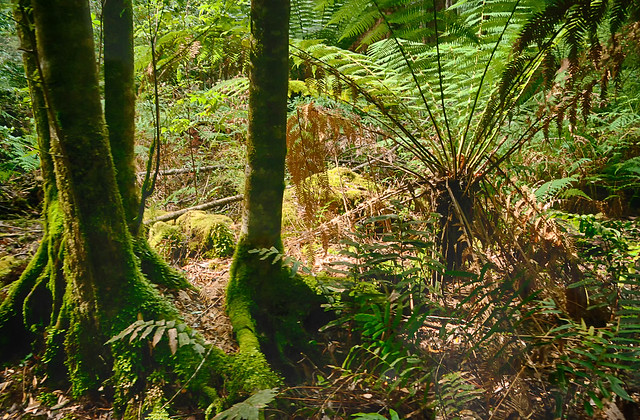
I visited the Tahune Air Walk and forest on a largely bright (summer) sunny day, but rainforests are typically dark (shaded) places on the forest floor. Shouldn’t a sunny day be a better time to photograph?

The answer is NO! The dynamic range of light (the range in strength of illumination, from darkest to brightest) on a sunny day is significantly higher on the sunny day, The bright splashes of foliage where shafts of full sun light is reflected many times brighter than the nearby glom of full shadow, yet there is detail there also. Whilst our eyes can handle this situation a camera and the dynamic range it can capture will probably be a lot less than required.  Typically you will your photo will have correctly exposed (or maybe slightly overexposed foliage behind dark silhouettes of tree truck of overhanging vegetation. On an over cast day this difference is much narrower, and you are much more likely to get a decent picture.

imageSo it seemed logical that this is a perfect opportunity for getting better images with a set of bracketed images (using EV steps, see screen capture on the right) and HDR post processing these images. Here I am using lightroom and the NIK software add in which has worked fine. The resulting HDR image does manage to get the shadow detail and preserve (not over expose) the colour of the foliage. I is much closer to what I remember seeing (and feeling). There is a lot that can be done at the post processing stage and this is usually referred to a tone mapping, how the extra illumination and colour detail is mapped back into the colour image and this is where HDR can get its bad name because you you can push the colour, local contrast and other aspects into very surreal and painterly abstractness. I am becoming a fan of NIK HDR Efex and their realistic presets (either balanced of deep) because they stay closed to my expectations.

I have returned to using lightroom to mamage photos on my HP Spectre and definite use two organization tools, Colour (eg. I flag bracketedimage sets with yellow) and then I stack the original images together. Thus reducing the clutter or many images that are the same.

I also have gone one step further in this image and used OnOne 10’s enhance and magic eraser to reduced the impact of a dead fern frond in the upper right and also detail filter to reduce overall digital noise, but keep as much detail as possible.

Thursday, November 06, 2014

Tree Fern Verta-rama

Tree Fern Verta-rama
For #thesecretlifeoftrees series.

These tree ferns towered above me and I had to use a stitched panorama approach (using Autostich) but in a vertical sequence. The resulting perspective however leaves the trees curving in on you towards the top of the image, so I used the zPerspector plug in for After shot to straighten things out a little. Original: imageo.withknown.com/2014/tree-fern-verta-rama

Friday, July 03, 2009

Sun Showers

 
My tree ferns looked totally dead back in February, now they are enjoying the sun showers. Taken with my telephoto lens to allow me to restrict the depth of field, and blur the background.
Posted by Picasa

Tuesday, February 17, 2009

click, click, click

TOO CONTRASTY :: Automatic ExposureTOO GREEN :: HDRi adaptive mapping with computed gamma 
Today was bright and sunny, so attempting to photograph the dappled light in the beech forest, on the Kepler track, gave a very contrasty result. The strong light is appealing but the shadows are dark and featureless and the spots of light burnt out. So I set my camera to bracketting, for two reason. Firstly it might give me a better ideas of the right EV adjustment (but judging this by comparing small images on the LCD screen outside is not really a reliable approach), Secondly it gave me the opportunity to post process the set of photos as a HDRi image (using the three exposures to get detail into the murky darks and/or washed out whites). I had plenty of card capacity (doing the three clicks at every photo soon eats up storage space if you are not careful) so most of my photographing in the forest was bracketted
manual adjustment To keep everything simple while I travel I just have picturenaut on a memory stick, so I have been relying on its fairly automatic tone mapping selection. However they were in my opinion changing the “greenness”. Ok, I know some parts of Lord of the Rings was filmed nearby but the green was just not what I had seen. The remedy lay in the gamma adjustment settings, I change that from computed gamma to none. Suddenly my forest photos was beautifully lit again without the artificial green glow.
JUST RIGHT :: HDRi adaptive tone mapping without computed gamma adjustment

Monday, August 11, 2008

from above

 
There are several interesting nature walks in changai airport. This is a multi-image autostitched panorama of the fern forest from above (and just using available light and no tripod, so some bits are inevitably blurred!) The most interesting part really is the free wifi everywhere here, but you need a mobile phone to get the password to get started, still it works wonderfully
Posted by Picasa

Thursday, August 23, 2007

lyrebird walk


lyrebird walk, originally uploaded by imageo.

Multiphoto panoramas can be constructed for close subjects. In fact the modified perspective view they give can be charming. This is the photo of a straight section of creek passing under the log I am standing on, to take the photo, yet in the image the creek cuts a sweeping curve. The main difficulties in close up panorama sticking relates to parallax problems (see the broken stump on the left hand side of this image, the image merge has had trouble because adjacent photos can see behind it)

late winter forest floor


Wednesday, June 13, 2007

pure

mossan gorge
Yet another two panel autostiched image. Taken in Mossman Gorge during heavy rain.

For PhotoFriday, topic purity.

Using stitched images is perfect for work deep in a rainforest where you actually want a super wide angle to take in all the detail, but not end up with a fish eye distortion. I just took one photo one above the other then used autostitch. There is plenty of natural lines and surfaces to help the software do perfect image matching. The results is a very natural wide view, without the disturbing perspective. It was dark and raining at the time so the aperture is wide and most things are in good focus.