

 I have been seriously looking at how much I really need to “stretch” the dynamic range in my “big landscapes”.In wide panoramic views there are actually a few different issues at play. In simple terms the dynamic range describes the ratio between the maximum and minimum measurable light intensities (white and black, respectively). This is actually different for the overall illumination of the scene being photographed, and then the capabilities of how well the camera and screen or printer can reproduce that range. Some scenes like the one used here, that have quiet a range of incident and reflected light from a bright sky to a deep shadow, such a range is intrinsically difficult for the cameras light meter to correctly expose. However the human eye tends to allow for such a high dynamic range better and we often see photos taken in such light as flat or dull.
 | HDRi (Picturenaut – 5 photos) | hdRaw (single RAW file) | Lightroom (tonal development) |
 |  |  |
 |  |  |

 I visited Cardina Dam yesterday, and have never seen it so full. So I was a little surprise to hear on the radio this morning that the Wonthaggi Desalination Plant will begin pumping “high quality” water (their term) into the dam from today. However I would estimate there is less that 2m of freeboard available until the dam start naturally emptying itself via its spillway, which seems to contradict the claim that its website claim that it is only at 79.9% of its capacity. Just in time or not needed?
 The panorama above was constructed from 22 images, using autostitch. I was trying out a new gadget, the little green cube on my camera, which is a multi-level slide into the flash hot shoe and it worked a treat. No matter how you position the camera on the tripod (portrait or landscape orientation), there are two bubble levels that help you ensure good horizontal and vertical alignment.

 I have been working on a new photo impression series of wildlife, and have been working on ways to bring the process closer to the way and artist might create the image. In particular I wanted to achieve a characteristic Australian colour scheme, but at the same time keep the colours to a harmonious scheme an artist might choose.
 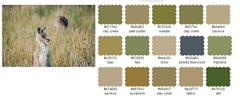 I began using an old favourite utility from big huge labs, called colour palette generator. This take a photo, analyses the colours and produces a harmonious set of colours based on that photograph. I did this for all the images I am contemplation turning to mosaics and discovered that all the images shared 5 shades of grey, a mid grey, a light grey, a blue grey, a warm grey & and olive grey.
  I then used another favourite software tools called Just Color Picker, Which allows you to point to any group of pixels in an image on screen and displays its code in a variety of formats: HTML, RGB, HEX, HSB/HSV and
  HSL. It was the RGB codes that I would use later. At this point I made notes of the contrasting and complimentary colours which are displayed in the lower panel of just color picker. Just to make sure the colours worked I then made a series of watercolour & pen compositional sketches, to give myself more confidence that these automated colour tools where not leading me astray, and that the 5 shades of gray where in fact a good foundation for the colour scheme of my photo mosaicing process.My next task was to generate my palette of tiles that both followed this colour scheme
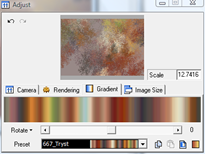 and also complimented the texture within my photos. I was again using Apophysis, a free fractal flame generator project, which has the facility to control both the flames shapes, and thus texture and also the tonal gradient, and colour scheme. I made up 75 fractal flamed coloured tiles using 5 sets using backgrounds based the 5 shades of grey with 5 rotations of the patterns using 3 tonal gradients that used complimentary
 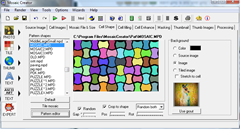 colour schemes.The final step was to use mosaic creator, which is a very powerful mosaicing tools, that can create a mosaic based on a source photos using a palette of other images (my file library shown below). For this series I choose to use a random grout (a visible gap between tiles) based on a colour enhanced version of the source photo.
 I need to begin this discussion by making a strongly held point, that most people intrinsically know good composition and will probably do better than say “the rule of thirds” or similar composition “rules”, just using their eye. However I must admit I have been having a bit of fun trying figure out why the Fibonacci Spiral (its called the Golden Spiral in Lightroom) might be a composition aid? The ratio behind the fibonacci series is roughly 1.618, so it doesn’t neatly cut a shape into one third two thirds but it is close. so I have heard this gold number referred to as the rule of thirds on steroids. More importantly it has been known to artists as the Divine Proportion since the renaissance, and often used unwittingly by artists and architect before that.


The two packages picasa and lightroom are my definitely favorites because they are both non-destructive editing systems. They leave the original untouched, and instead of adjusting the pixels in the image itself, they store the process that is used to edit the photo and can reproduce the exact same result again whenever the photo is viewed or printed.. Picasa is great in its easy of loading new photos and scanning through load of photos its fast and has nice basic editing tools (cropping,straightening and “light” exposure controls. Windows Live Photo gallery is also fast but it not transparent in how it edits photos and where it puts the originals, it is 
So am I going to settle down and just choose one system, one workflow and ignore the rest. I doubt it, vive la différence.


 |  | My old Noika did not actually take this image but it was very much part of the original self-portrait |
 |  | My Android Wildfire was then used to take a photo of the Nokia, with the original self-portrait displayed |
 |  | A borrowed IPhone was then used to photograph the Wildfire with the photo it had just taken. I must admit I had immense troubles getting the iPhone to focus |
 |  | All I I had to do to finish was use my Pentax to photograph the iPhone. Simple really. |


