These long exposure photos where taken at the Monash Gallery of Art after a Talk And workshop about the project Syzygy/Shadows of Heaven (work-in-progress). Which was an interesting idea, where photographic plates are contact printed under other photographic “templates” (other photographic plates, including original startfield photoplates from Mount Stromlo ) used as negatives under just start light. The plates where laid out on tarpaline on Lake Tyrrell in the mallee, on nights that had no moon or no significant planet light, so it was just start light exposing the film. The resulting images are beautifully detailed.
Tuesday, June 30, 2009
Wednesday, June 24, 2009
Tuesday, June 23, 2009
Fox on the Run
Trying to capture this fox running into deep shadow had the camera deciding to move down to ISO 3200, nice and sensitive in low light, but this has introduced a lot of “heat” noise. This occurs as coloured speckles, usually most noticeable in flat single tone areas. The noise is primarily caused by the sensor (CCD or CMOS) itself which needs to be charged to record the intensity of light falling on it. When the illumination is low and the exposure long one pixel’s charge can trick the adjacent pixels on the sensor to thinking it has received more light, leading to the little speckles.
So what can be done about it? there are many despeckling filters, often they will be supplied with the software you got with your camera. These generally look for out of place coloured specks and average (blur) them using the tones of adjacent pixels, trouble is this smart blurring often gets a bit over enthusiastic. Luckily I have found the Noiseware’'s Community Edition program very useful in “filtering” out this noise, but avoiding the over blurred look.
Remember Higher ISO,Low Light and Long Exposures will increase noise in your digital photos.
Sunday, June 21, 2009
A very early dusk
I know tomorrow is out shortest day (the winter equinox in the southern hemisphere) but the sky started turning pink very early today. This photo was take at 3:10Pm. almost 2 hours before the actual sunset! Even the sheep seem to be a bit apprehensive.
Friday, June 19, 2009
no bending required
I have a 70-300mm DL macro super Sigma lens, primarily bought as a "zoom" telephoto for photographimg birds. However5 I am stirting to love its marco capabilities. I can take beautifil close ups of things under my feet without bending over. :)
Monday, June 15, 2009
Extended Dynamic Range
My new camera body, a Pentax 20D, has a feature called Expanded Dynamic Range, which apparently "expands" the light levels expressed by the CMOS Sensor pixles, making it difficult for bright areas to occur in the image. Difficult yes, impossible no, but it has done a good job with strongly backlight pale subjects like these artifical flowers.
Thursday, June 11, 2009
SPAM in comments
It seems I am the current the favourite target of some chinese spamers, so here is the warning guys, I will treat you the same.
评论与垃圾邮件的链接将被删除
Sunday, May 24, 2009
The fruit bowl that became a set of mosaics
I have been testing out my new camera body, a Pentax 20D, it has a remote controlled shutter release and an “expanded” dynamic range. I figure a strongly lit “still life” would let me test both. I also put on my long lens set it in macro and took a sequence for muti-image stitching later.
The photos where beautiful but I ended up having some fun afterwards transforming the set into some wonderful mosaics.
Friday, May 22, 2009
RAWing or not?
I am often asked why I don't take all my photos in RAW format. I do take a few, usually experimental shots in RAW format often enough but generally I just take JPEG. Originally the main reasons were the vastly bigger file size and the limited number of programs I used that could read the early propriety formats (different for each camera manufacturer and often even different camera models by the same camera manufacturer) and the fact that the conversion and tweaks took time (actually it was tedious wasted time when trying to review a large set of shots). Further a lot of "part time" photo enthusiast just got scared off trying to even understand what RAW was and how to use it.
Fundamentally RAW is a little deeper than a digital negative, the analogy adobe are using to sell their "proposed standard" DNA RAW file format. RAW files are in my view more like the undeveloped image, a full dump of exactly what the camera image sensor read. It is like an undeveloped film waiting for you to process it. Because there are a number of different sensors used in today's digital (CCD and CMOS) and many different configurations of these it is no surprise that the dumps of the data read from the sensors are different. The DNA format does require a little conversion processing but no where near as much as a JPEG (or TIFF) file.
Having access to the "pre-developed" image does give powerful software, like Photoshop CS or Lightroom, the ability to "fix" existing shots by reprocessing them. However I suspect most new digital cameras users will not see these improvements or even know how to do such post processing. To them RAW files are still just way bigger, require special conversion and/or processing, compare with the compact, quick and easy to use jpeg format that is compatible with most software, website, photo processors.
Shooting in RAW format is likely to remain the domain of the perfectionists and those that loved working in the darkroom, for a little while to come. Those with less time to fiddle will lag back in JPEGland.
The one area that might just force DNA's popularity is in the long term archiving. Future generations may greatly appreciate that they can easily enhance your old photos using a fancy new piece of software or service. The problem being that will so many different formats around, will yours still be processable in the future? (probably not!) So converting now to a "standard" RAW format could be desirable. Adobe have recognized this and provided a free format converter(Windows, Mac) Their logic being if you camera doesn't itself support the DNA format you can easily convert to this format now and possibly "future proof" your digital photos.
Monday, April 27, 2009
More on geotagging
David Crandall, of Cornell University has analysed the 35 million geotagged photos already uploaded to Flickr and produced a gallery of photos organised into maps, created accurate global and city maps and identified popular snapping sites.
I have been geotagging a selection my photos since back in 2005 and was an early member of the flickr geotagging group/community. This is probably the best place still to find out how to tag your photos and what's new. Even if you don't use flickr other sites like picas web albums and photobucket let you make your own maps.
Saturday, April 25, 2009
Sunday, April 19, 2009
Cropping & Rule of Thirds
I was scanning some older photos, colour prints, taken on film on a Cannon compact camera. Whilst this one was a fraction ”misty” I saw it had potential but falls down, as so many holiday snaps do, compositionally.
“Good composition gets the viewer to look into the picture, not scan across it”
….quote from my upcoming workshop
Cropping is one of the easiest ways to improve the composition of a photo, and typically that means identifying the areas of interest, and placing then is a good place for the eye to settle. The rule of thirds is often quotes a the gospel for photographers, but it is just a simplification of the golden ratio used by artist for centuries. The idea is to put the most important compositional elements, like the shore of the lake , the villa and the silhouetted trees, onto or straddling the imaginary lines dividing the image into thirds. Some digital cameras now even come with a mode to display these lines on the LCD “viewfinder”.
Yes I used the picasa retouch (cloning tool) to hide the date stamp.
Friday, April 17, 2009
developing my rock art
I finally got around to joining YouTube not that I have gone over to the dark side, like replacing my SLR with a movie camera, no I just wanted to start showing a slideshow/documentary style thing of the creation on one of my rok art pieces, it was all made in picasa movie option. It tells the story from a future geological perspective, after the sea level rise
Friday, April 10, 2009
What does “internet friendly” mean?
It was time for a family member to get a new camera, and there are so many around. It just had to be a camera and take nice pictures (and be easy to use and see the pictures), which narrowed the range down to a few hundred compact cameras! There is a pretty good range available now and most are not so expensive. After looking around for a camera that used SD cards (a card standard I like), used standard batteries and had a decent screen that was readable in sunlight, I was leaning towards the Pentax E60. So we choose the Fujifilm Finepix Z30, reason: it comes in a hot pink colour!
What got my attention first was the sticker that announced it was internet friendly. What the heck does that mean? I scoured the manual (which is in PDF format on one of the two CDs supplied). The interent is mentioned only 8 times and as shown below it warns you, you will have to pay for internet, actually it is very legal about it “the user bears all applicable fees”. Like most other compact cameras it comes with a USB cable that connects it to a computer, and presumably then onto net friendliness.
It did give me an excuse to revisit an old theme of the self referencing screen wallpaper.
The little pink camera is already well loved, takes great photos (and movies)
Wednesday, April 08, 2009
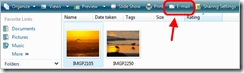
Emailing photos
Go JPEG
Most camera will allow you to take photos in JPEG format (the file will end in .jpg or .jpeg) or the camera manufacturer will normally bundle software to convert its .RAW format to jpeg. This jpeg format has two very important advantages- Compressable, there is a trade off between image file size and quality but 10:1 compression can normally be achieved with with little perceptible loss in image quality.
- (almost) Universally supported for the format by software (especially file & photo viewers, browsers)
Use a photo email feature
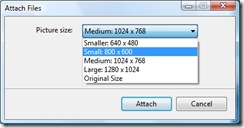
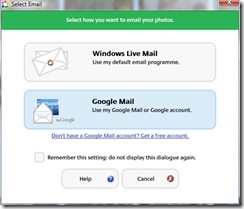
Most new digital cameras (and that includes mobile phones with cameras) come bundled with software, to upload, manage and do some editing of photos. Usually there will be an option to email photos and a ability to select the size to email, it may called share rather than email and it may involve reading the dreaded manual, assuming you kept it.If you are still using XP you can get the same feature by downloading the Windows Live Photo Gallery. The most recent version of which gives you some fairly nifty formatting features inside Windows Live email so that the photo is part of the email, much more aunt or grandma friendly, instead of as an attachment that must be downloaded and/or opened separately.
Having shown you all this one thing I definitely don't recommend is resizing your photo directly, because you can so easily accidentally overwrite the original and lose a lot of detail if you ever wanted to get a blow up printed at a later date.
Tuesday, April 07, 2009
pearl beach multi-image panorama
Wednesday, April 01, 2009
Not good
Is it sadder that I have just worn out my third pentax body in 30 years, or that I still have the other two?
My much loved K100D gave out last week when I was taking some shots for the virtual gallery try-out. One moment I took the card out and loaded the photos onto my computer (via picasa import as usual), I put the card back and turned on the camera and a momentary flash of the familiar then nothing, and nothing is what has been happening ever since. The real problem is I can not longer find a place around here to get it fixed (the typical camera shop says, “Is it under warrantee?” “ No” “Ok, it will be cheaper to buy a new one”. The K100D is just three years old, the others lasted better (ok the second film body is still officially working, if I keep the rubber band around it to stop the back opening unexpectedly). I would so dearly like to get it fixed at a reasonable cost
well not exactly free anymore
At first I thought the email from kodak may have been an april fool’s day joke, or maybe a phishing scam, sadly it was neither. I have stopped uploading to easy share long ago, but I did get a few photos printed and was happy enough with the services, Now the Free service isn’t quiet as free anymore, from now on if you don’t make a purchase to won’t have free one line storage. Once upon a time the brilliance of Kodak easy share was sharing your family and special occasion snaps with your friends & family in such a way they could also order prints, not anymore!
Special Note to Members: In order to maintain free storage of your images on the Site, you need to make purchases totaling at least $4.99 or $19.99, depending upon your storage usage, at least once every 12 months.
extract from the fine print in kodak’s easy share gallery terms
There is no need to panic there are plenty of other “free” on-line galleries, try picasa web album, flickr, photobucket, they also allow security for relatives and friends, download photo and purchase prints
Monday, March 30, 2009
an insight into my art
There is a bigger perspective to my art, than what you might just see in here. This Xmind mind map will let you get started (and keep track of things I am interested in and doing).
Thursday, March 26, 2009
DestoryFlickr
I have really been having my problems with flickr of late, actually just using it via Telstra's Next-G (more on that below), but this isn't a hate campaign its a new application. DestroyFlickr, by DestoryToday, is an alternate way to view and share flickr content, based on Adobe AIR so it will work on Windows, Mac & Linux. It is slick, displaying photos on a dark background, offers drag & drop uploads and downloads and seems fast, but to be honest it does not offer anywhere near the functionality of Flickr.com, but it is worth a look.
So what are my problems with Telstra Next-G? I am a moderator for the VIC/TAS thread of the Australian Photographers!!! group and each fortnight I need to access the competition thread and tally the scores. Sound easy enough BUT it is virtually impossible if I am trying to access flickr via my Next-G wireless modem. It just times out, disconnects, hangs half way through displaying the page or other frustrating misbehaviour, and all this frustration is expensive. Whilst flickr may not be bandwidth efficient I do suspect the issue is a simple technical issue in Next_G, because so many other web applications work beautifully. But how do I get anyone to listen when the problem is not on telstra's support scripts? Well I given up ringing telstra support anymore I just don't have hours of my time to waste and pay even more in phone bills. It seems I'm not the only one seeing these problems. Telstra Business actually has its own photostream on flickr showing happy customers logging in, ok its just three of them and I'm not one of them. So I'm sure they must have noticed the issues by now!