Tuesday, March 28, 2023

What is happening to creativity?

I'm seeing more of the same coming out of generative AI on social media. It is often nicely rendered but devoid of meaning, usually not quite right but puzzling rather than thought-provoking.

prompt: "More of the Same AI Social Media"

The Utopian view of social media is it will allow everyone to show and sell their wares and share ideas with anyone world wide. The reality is a lot different the limited number of places are clogged with wanna bee celebrities, their followers, copycats and a lot of anti-social behaviour. Anything originally creative that is good is swapped in copies and quickly becomes impossible to find. It is only the social media giants making ridiculous amounts of money from the "content" supplied (mostly for free). The change of ideas soon becomes closed in a self-fulfilling bubble that simply feed others in the group with what they want to hear (seldom the truth). It's all very sad.

I now see similar rhetoric being promoted for a utopian world we will be all using AI tools instead of employing or paying others. Already I can see a rush with everyone is trying to cash in, chasing money for nothing, from the likes of chatGPT in just seconds! The Net is filling with lots of sameness that is largely vaporware and again not quite right (full of bias, oversights and untruths). Bit sad really.

However, I just hope that the hype just dies away and the artist, creatives and makers get time to quietly try out the new tools. Mainly to get more productive and build a social place where they own the creative content (not just copying someone else style using a short prompt) but truly making something.

I like Danny Gregory’s weekly essays and this week was aimed at those who refuse to be creative.

Good timely advice. 

Tuesday, March 21, 2023

Composition - Cropping and Framing


The next photowalk is coming up this weekend. Seeing in Detail, and will include some surprise discussion of Composition and Framing, which can be carried out in the field, but Cropping, an underutilized photo editing tool, can also help in seeing more detail, but after the fact in post-processing.

In a photowalk a couple of years ago we tried out hand-held viewfinders to select the best composition before we took our photos. John Noble had made some wonderful adjustable viewfinders from matte board that could be adjusted to some common aspect ratios.

These aspect ratios become very important when it comes to composition because it is the frame that naturally constrains our vision and brain. It is seldom discussed in photographic compositional rules yet it is the most fundamental aspect of how the composition is perceived. These four boundary lines (I'm assuming for now the frame isn't oval or circular, and that introduces different compositional considerations) change the width and height as the aspect ratio is changed, Each proportion affects the dynamics of what is happening inside that frame.

 ratio common applications
 1:1  Square eg Instagram 
 1:2 Panoramic
 2:3 most Digital Cameras & some phones
 3:4 Micro Four Thirds Cameras
 4:5 Once favoured for Portraits eg 10" by 8"
 9:16 Wide Screen TV, phones
 10:16 Newer Wide Screen Monitors & TVs

As an exercise, mainly to convince yourself that the frame is the most important compositional aspect (and the cropping tool is one of the best ways to improve your photo). Find a photo you have taken, and then create a series of sub-photos from it but cropping to a few if not all the common ratios shown in the table above.

Sunday, March 19, 2023

The Shape of Things to Come?

I’ve left to last, writing about aspects that I believe Ai techniques should be applied for photo editing and management in the future. The movement to apply different Ai based refinements into existing tools (eg masking, blending etc) will definitely continue. What I would love is to be able to train my own AI with my style of processing images and being able to supervise a more automatic “workflow” to suit both the photograph's content and my objectives.

Ted Forbes of the YouTube channel “The Art of Photography” has reviewed a new AI based photo editing offering called Imagen AI


This does sound a lot like something I have been looking for, a service that will automatically create edits for you using your styles (or generic “talent profiles”). At present, it appears very much aimed at bulk usage cases like event and wedding photographers and specifically from Lightroom. I hope the methods can be taken further, expanded to be more general and interfaced with other software/starting points.

So this is interesting, but not immediately helpful for me (whilst I do have an old version of Lightroom still but never use it) and I’m not holding my breath that it might become the next big thing.

Google have now also released its own text-to-image service also called Imagen, It's a competator for other similar AIart and whilst appropriate prompting can elicite photo-realistic images it's unlikey to be interest to or useful for most photographers.


Thursday, March 16, 2023

Portrait AI Helps Out

It is my belief that Portrait AI features in photo editing software can help photographers enhance their portraits and avoid a lot of tedium. I don’t regularly take portraits (other than family, which I very rarely post online). The software I have, ON1 Photo RAW and Luminar Neo both offer powerful AI-powered portrait features that speed up post-processing and also achieve great results. By automating the tedious task of skin retouching and facial feature adjustments, like teeth and eye whitening.

My current favourite is ON1 Photo RAW which includes AI-powered features like face detection and skin retouching. With AI-powered face detection, the software will automatically detect the faces in your photos, making it easier to apply targeted edits that are in line with your style. The skin retouching feature allows you to quickly and easily smooth out blemishes, wrinkles, and other imperfections in your subject's skin and identify and work on key facial features.

Luminar Neo also offers powerful portrait AI features, including AI Skin Enhancer and AI Portrait Enhancer. The AI Skin Enhancer feature allows you to quickly and easily smooth out skin imperfections, while the AI Portrait Enhancer can help you adjust your subject's face shape, eye size, and other facial features, the face-thinning and eye-widening are a little over the top but have been fun to play with.

Portrait AI features are now widely available in photo editing software, but have not been heavily promoted or hyped as much as sky replacement AI, however it does offer photographers powerful tools to enhance their portraits with ease. Many of the alterations are very subtle but that's good. I'd be interested to find out if professional portrait and wedding photographers are taking advantage of these tools and what their clients think?

Ps I’ve given Chatgpt a second chance, to edit my text for this post. I’ve still had tone it back down a little but it hasn’t introduce half truth or outrageous claims this time.

Monday, March 13, 2023

Some more thoughts and experience with deep learning of neural networks

This was initially a postscript to the previous article about Luminar. I’m a classic dyslexic, and struggle to write still, even using a computer my typing text is a bit of a struggle and has red underlined words on most lines, punctuation is missing and I might waffle on a bit. So I have been looking at getting GhatGPT to edit my words. I submitted yesterday's draft post with the prompt rewrite for a blog post. And rewrite it did

“Luminar, the popular photo editing software, has come a long way since its inception. ….. They were the original developers of Nik Collection and Snapseed, two of the most popular post-processing tools in the apple market.”

“Nevertheless, Skylum's commitment to innovation is admirable, and it will be interesting to see what new AI iterations of Luminar will come out in the future.”

There was quite a bit of positive promotion of the wonders of Luminar and how thrilled I was with it elsewhere in the text returned. If you read my post I wasn’t exactly thrilled. although I do use the software regularly. Its enthusiasm was really stretching the truth, and I only used the ChatGPT output as a guide for my post in a few places. This really bought home that you must be sceptical of this AI and fact-checking its output is super important. 

  1. There is an obvious conspiracy theory that big companies are already paying OpenAI for good reviews whenever specific brands, company names or keywords are used. I do doubt this is the case yet (and sorry I even mentioned it). 
  2. A more likely explanation is the blogging world, and specifically “influencers” have filled the space with very favourable reviews and self-promotions.  And stuffed the “content” with relevant #hashtags. These have totally overwhelmed honest reviews or news and as a result the deep learning has been trained on a very positively biased data set. Ok that is exactly what the net is like these days so why am I surprised? 

Just be careful what you believe coming from AI, if you even know it was AI generated.

I’ll also be careful not to ask ChatGPT to rewrite in the future.

Sunday, March 12, 2023

Luminar :: A perspective of Skylum's AI Journey

The Luminar journey started with Macphun, a company that developed photo editing tools solely for Apple Macintosh computers. They were the original developers of Nik Collection and Snapseed, two of the more popular post-processing tools in the apple market (Mac and IPhone) at the time.

Later, Macphun shifted its focus to the Windows environment as well and started testing new simpler user interfaces. This approach eventually led to the birth of the Luminar suite. The initial versions of Luminar were standalone software that had a photo browser underneath and ran modules similar to the specific style of add-ins they had previously supplied. The software was less expensive and simpler to use, and it was popular with photography enthusiasts rather than professionals.

Macphun, became Skylum, and upgraded the software at an incredible rate compared to Adobe. Some of the upgrades introduced new approaches, which were mainly loved, but incompatibilities across updates were poorly received. The cost and frequency of upgrades meant that owning and maintaining an up-to-date version was becoming expensive. During this time, Macphun/Skylum also developed Aurora HDR in association with Trey Radcliff and included a number of AI-based techniques, specifically being able to recognize different parts of an image, such as the sky, people, buildings, and lakes.

The introduction of Luminar 4 was a significant rethink of the way photo editing was undertaken. Unfortunately, it had several incompatibilities with previous Luminar versions, and some previous tools were missing, so a lot of the previous non-destructive edits could not be reproduced. User were generally not impressed.

Not long after the Luminar 4 fiasco, Skylum released Luminar AI, which was again a new and somewhat incompatible rewrite. It still provided a comprehensive photo editing package but was based on the use of AI-trained tools exclusively to perform most functions. While it was nice to use, it wasn’t easy to figure out what was happening in the edits, and how it might be used as a start further photo enhancements. Some of these issues were quickly resolved with updates. However, some users felt that Skylum was gouging money out of their supporters by releasing new stuff that made upgrading a daunting repurchasing and relearning exercise.

Soon after Luminar AI was released, Luminar Neo was promoted as a totally new way to post-process. However, it was not really compatible with previous iterations of Luminar. While the single enhance slider was pretty amazing, the great list of "edit" tools on the right-hand side of the edit panel showed several of the same sliders, and not always getting the same result depending on which item they were run within. The tools were also grouped into similar tools, favourite, Essentials, Creativem portrait & professionals, which helps negotiate such a long list of edit tools. The fact that there was no attractive price for updating from Luminar AI also got a lot of bad press.

Despite some reservations, many users, including me, still like Luminar Neo and use it a lot. However, it is definitely not as fast on my older hardware, and the solution of buying a new faster computer and having to pay for the extensions does not appeal to me. The extensions, which are a return to the add-in single effect style of tool, can be purchased as bundles (including not yet released features) or individually, plus numerous discount offers, making pricing complex and hides the true cost of getting a full function editor. 

I've chosen to process an "ordinary" photo without surreal colour changes or adding drama (the dark side of AI tools), since it can give a better view of Luminar as a regular photo editing tool.

In conclusion, Skylum's journey with Luminar for me has been a roller coaster ride, with its ups and downs. While some users love the new AI-based approach, others are still nostalgic for the simpler, less expensive earlier versions of NIK Collection the earlier Luminars. Nevertheless, Skylum's commitment to innovation is admirable, and it will be interesting to see what new AI iterations of Luminar will come out in the future.

Thursday, March 09, 2023

Sky Replacement Wars

 I consider this a relatively small digression in the Ai developments in photography. With the introduction of layers and masking in Adobe Photoshop, the ability to replace anything with something else, for example, a new sky has been possible. Albeit tedious. If the horizon was flat and only a few simple shapes against the sky made this easy. However bare deciduous trees, open foliage or fly-away hair and anything with a complex edge made this very time-consuming, especially when using the masking brush. This ability became an art form and photoshopping became a verb to describe this type of image manipulation.

I think it was Skylum's Luminar AI (a predecessor to Luminar Neo) that first added AI tools to make the sky masking fairly automatic and let you choose different skies from a library of beautiful skies. Further, it was heavily promoted, was popular and there was a lot of hype in the photo YouTube and podcast communities.

Other software developers quickly followed, some in a few weeks, with a variety of outcomes. So sky replacement became a very big issue comparing software offerings. How well the sky matched into the rest of the photo became important, as did being able to build and organize your own cloud image library.


The complexity of fiddly edges in the masking was helped as masking AI improvements where made. Also the methods applied to blend other aspects of the photo such as the reflection of the sky on water or wet surface or adding matching atmosphere effects.

In the illustrations here I have used simple “one-click” sky comparisons on two complex situations, the complex interconnecting lines of power cables and electricity transmission towers, and the bare tree branch silhouette. Comparing such sky replacement in current versions of Luminar Neo and On1 Photo RAW 2022, The results are good but not perfect. Both packages do offer other tools such as refining the mask edges and better colour balance etc.


The hype has faded but pretty well all the dominant software editing suites now offer AI assisted sky replacement.


Wednesday, March 08, 2023

From an Also Ran to a Thoughbred


I first started using Onone perfect Effects products as add-ins to lightroom, so long ago that I can’t reliably remember. They were great little tools that did simple things but with beautiful results. However, they suffered from the round trip of exporting from lightroom and then re-importing the result. There were all those temporary files. Still, they brought magic to the art of post-processing and Lightroom and Onone made a great team.

OnOne Effects were improved in several steps and started to offer a lot of advanced tools/effect that made it progressively more competitive with Photoshop, including some masking and layer features. They were still add-ins to Lightroom.

Sometime later Onone rebranded to On1. In the shape of things to come On1 Effects was released as a standalone photo editor. Not long afterwards On1 bought out a RAW rendering feature and then the ability to browse that meant it no longer needed lightroom. So it had become a standalone photo editing suite, with the ability for advanced photo editing features and particularly layers. People soon realized it was not only a competitor to lightroom, but also to the lightroom/photoshop combination. The biggest difference was that  On1 Photo RAW was a lot simpler to learn and use than the adobe products without the need to do a round trip, saving time. I stopped using Lightroom around this time.

At each upgrade various AI functions were introduced, starting with context-sensitive retouching, refinements to Masking, and especially a number of Portrait AI tools (which could find and differentiate eyes, lips, teeth, hair & skin etc). it all seemed very magical.

Next came the sky replacement wars. On1 may not have been the first but its AI-driven features made it a standout choice. I’m not sure why there was so much hype around this feature. It was easy and fun to use but I haven’t used it much. This is the time that AI tools became important additions to any serious photo editing and management package (Adobe have been doing a fair bit of catch-up) and there was significant improvement being added with each upgrade (but the upgrades were also becoming more expensive!

The latest version of On1 Photoraw 2023.1 is now out (I haven’t pushed the upgraded button just yet) and it really appears loaded with the sort of feature I have been looking for around better segmenting photos and refining masks. Even an adaptive preset feature knows what segments can be altered in different photos.


Monday, March 06, 2023

The Elusive One-Click Instant Fix

From the very earliest days of digital photo editing software, developers have been trying to create the ultimate instant fix button. Whether it's labelled “quick fix”. “auto-correct” or “auto-balance”, google had “I’m feeling lucky” and later “auto-awesome”, the goal has always been the same: to make photo editing as simple and effortless as possible. However, despite numerous attempts, none of these one-click fixes have truly lived up to their promise.

The trouble is, while digital cameras have improved significantly over the years, they still can't cover every situation. And even when they do capture a great shot, there are often still some focus and exposure issues that need to be addressed. This is where photo editing software comes in, but finding the perfect balance between automated fixes and manual editing can be a challenge and all too often very tedious.

Over time, I started to warm up to auto-fix tools and even created my own preset for Lightroom called SDR+. However, I didn't use it much, as I found it was often quicker and more trustworthy to just fiddle with the exposure sliders manually.

It wasn't until I started experimenting with Macphun's Aurora HDR that I really began to see the potential of what AI (Artificial Intelligence, in the form of Neural Networks) could do. This software used the networks to segment the image into different areas, such as the sky, foreground, background, buildings, and foliage, and potentially correct those areas separately. However, this information wasn't shown to the user. It would have been nicer to have access to it through prebuilt masks. Just be patient that feature would eventually come.

However, the developers' approach was somewhat arrogantly more focused on "we’ll do it better than you" and releasing regular updates for users and expecting them to sit back and enthusiastically pay for what they were being fed.

Skylum’s Photo Lemur showed great promise when I was invited to beta test it. Having previously tested Nic's Collection and Snapseed when they were still Macphun, and also looking at a pre-release Windows version of Luminar, I could see that the big difference with Photo Lemur was its simplicity and ability to batch process many files in a reasonable amount of time. It did a good job, although not outstanding, especially for social media where post-processing excellence would go unnoticed. It's biggest appeal that you don’t have to do anything was also its biggest weakness, you really can not control anything. Still I bought it straight away and still occasionally use it.

Macphun became Skylum and their software creations Aurora HDR and Photo Lemur were great examples of how AI can enhance the editing experience and made it easier and more efficient for photographers to create beautiful images.

Looking back AI within photo editing was still in its early stages, slowly making small incremental steps usually with room for improvement. The really rapid expansion of the tasks AI could perform and the rate of improvement were about to explode

Sunday, March 05, 2023

What about AI in Photography

Artificial intelligence (AI) has been making its way into various industries, including photography, for some time now. While I've previously written about generative AI art, I haven't given much attention to the role of AI in photography. So in this next series of blog posts, I'd like to explore how AI has been used in photography and how it has impacted the industry.


Firstly, it's important to note that AI in photography is not a new concept. In fact, AI has been used to assist with photo post-processing tasks for the past decade. Most photo editing and management software nowadays utilize some form of AI-based tasks to automate more tedious tasks. For instance, programs like Adobe Lightroom use AI to automatically adjust exposure, colour temperature, and contrast.

AI has also been added to computational photography, mainly limited to higher-end smartphones and some mirrorless cameras. With the help of AI, smartphones can produce images with shallow depth of field, low light performance, and enhanced HDR. These AI-based features allow users to take high-quality photos without the need for expensive camera equipment or extensive post-processing.

As someone who enjoys photography, I've been using AI-based tools to enhance my photos for some time now. My favourite AI tools at the moment are ON1 Photo RAW and Skylum’s Neo. They utilize machine learning to automate many of the tedious post-processing tasks. Both have a similar range of features, including sky replacement, portrait retouching, and object removal, which can significantly speed up my post-processing without compromising quality.

In conclusion, AI has already established itself in the world of photography, and it's likely that you're already using some form of AI-based tool without even realizing it. The role of AI in photography is only set to grow in the coming years, as more and more innovative solutions emerge. While AI-based tools may not appeal to those who enjoy tweaking individual images and playing with sliders, they can certainly make the process of photo editing more efficient and accessible for everyone.

Wednesday, March 01, 2023

Exploring the Capabilities of Diffusion-Based AIart: OUTpainting

This will be the last post in my AIart series for now. I have been investigating the use of artificial intelligence (AI) to create stunning works of art. In particular, diffusion-based AI art has been gaining traction due to its ability to create realistic and artistic images.

Two additional features have became available under the diffusion process, INpainting and OUTpainting. INpainting involves removing a section of an image and replacing it with something that blends into the space. It is similar to context-sensitive replacement, as used in Adobe's software. On the other hand, OUTpainting involves adding extra areas outside the reference image in such a way that they seamlessly blend onto the image.

OUTpainting is particularly appealing to me here as it allows for the expansion of tightly cropped reference images. Expanding the image to a more classic still-life composition, playing with shadows and lighting to create a more realistic image. For instance, adding two full shadows, to give the image more depth and dimension.
I used Dall.E 2, at the openai website, as it is the most up-to-date version, which can add in extra objects to the image, such as a vase of flowers or a bowl of fruit etc, while still maintaining the original image's aesthetic.  Futher, Dall.E produces more photo-realistic images than some of the other diffusion-based AIart.

So my conclusion, text-to-image and particularly diffusion-based AIart is opening up new possibilities as a great tool/media for artists and enthusiasts alike. It's not a magic one-click to a masterpiece. It might be a shiny new toy for the wanna-bee celebrity artist, NFT worshippers or even those just wanting more likes on Instagram, The shine will soon wear off. By understanding and utilizing INpainting and OUTpainting features, we will all be able to create stunning and realistic images that were previously very difficult if not impossible to achieve. With technology continuing to advance, it will be interesting to see what other features will become available under the diffusion process or next AI advancement, and how they will be utilized in the world of art. I don't think the sky is falling in.

Tuesday, February 28, 2023

Using a reference image within AIart IV

I’m returning to google’s Deep Dream Generator again and this time using the same Lilly photo as my reference and using their Text 2 Dream tab and the prompt “Watercolour painting in the style of John Singer Sargent.”


This one really hums.  The layout/composition has been altered a little, and the flowers are more Roses than Lillies BUT I can see it has added some butchered signatures, All is not perfect, YET!

My next post will return to Dall.E and investigate the feature of Outpainting.

Monday, February 27, 2023

Using a reference image within AIart III

The world of image-to-text systems has been revolutionized by a new technique called Diffusion. Originally described as a Latent Diffusion Model, Diffusion has been widely adopted for its ability to encode training images into an encoded noise latent space, from which the system can then correctly decode the resultant images.

Night Café is offering a few techniques that take this a step further. These techniques have a diffusion-like ability, to begin with, a reference image with limited noise added, rather than starting with random noise. Night Café offers two diffusion approaches that start with a style image: Coherent and Stable Diffusion.

To understand the significance of this development, let's take a closer look at how Diffusion works. The core idea behind Diffusion is to train a neural network to predict the next pixel in an image, given the previous pixels. This process continues until the entire image has been generated. But unlike other image generation techniques, Diffusion is not limited to a specific set of images. Instead, it can generate an infinite number of images by starting with a random noise vector and decoding it into an image.

This is where Night Café's Coherent and Stable Diffusion techniques come in. These techniques allow the system to start with a style image, rather than random noise, and generate images that are coherent with that style.

Coherent Diffusion works by blending the style image with random noise and gradually removing the noise until the final image is generated. The result is an image that shares the same style as the reference image.
Not quite what I expected! Then I realize Norman Lindsay did paint a lot of scantily clad sirens!

Stable Diffusion, on the other hand, works by gradually adding noise to the style image until the final image is generated. This technique is particularly useful for generating images that are similar to the style image, but with slight variations.
In conclusion, Night Café's Coherent and Stable Diffusion techniques are a major breakthrough in the field of image-to-text systems. By allowing the system to start with a reference image, these techniques offer a new level of control and precision in image generation. The possibilities for creative applications are endless, and we can expect to see even more exciting developments in this field in the future. My next post will return to google's deep dream generator and its newest feature Text-2-Dream.
With thanks to Chat GPT which was able to translate my techno babble into easier-to-follow plain English (but I did have to correct it in a few place, so generative text AI is not perfect yet either). I left in its enthusiasm in the last paragraph even though I still have some reervations.

Saturday, February 25, 2023

Using a reference image within AIart II

In the previous examples, I could see that the very basic style where being found but the Lillies had a wonderful colouring and I wanted to include that. So it was over to Google Image search looking for “pink flowers” “painting” and “Still life”. There were hundreds to search through but I soon found a link to a great watercolour demo by Barbara Fox. Not only do I have the "right colours" I also have the pigments used and a step-through of Barbara's painting processing. 
How would the Style Transfer AIart do?


Well wow, not bad. This is really generating a rich feeling for the subject, looking somewhat reminiscent of Norah Heysen's work.

My next post will look at a slightly different approach usually called Diffusion, that involves developing a latent third network.


Friday, February 24, 2023

Using a reference image within AIart I

Artificial intelligence (AI) has been making great strides in recent years, and one of its most fascinating applications is in the field of art. (AIart) With the help of generative adversarial networks (GANs), we are able to create art that is completely unique and unlike anything that has been seen before.

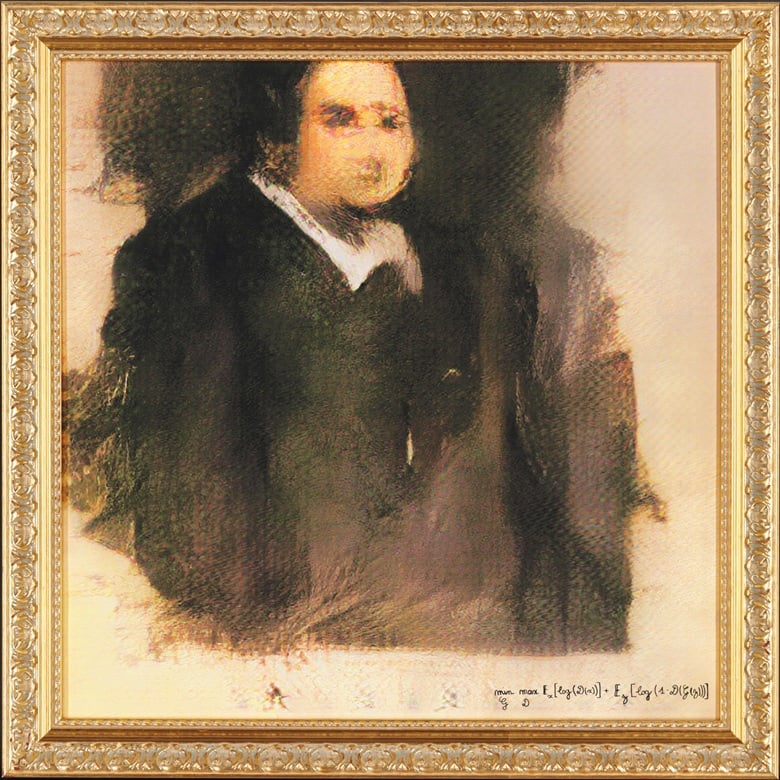
Most earlier neural networks used a general approach of starting with random noise. Early attempts, such as Portrait of Edmond de Belamy (2018), fetched a whopping US$ 350,000 at auction. However, these early attempts were crude and took numerous iterations. This approach uses two networks: the first is trained on images, called the generator, and the second scores how plausible the result of the iteration is, known as the discriminator. This approach is usually referred to as GAN (Generative Adversarial).

 The generator's job is to create images from random noise that look as if they could have been real. The discriminator's job is to differentiate between the generated images and the real ones. The two networks are trained together in a feedback loop, with the generator trying to improve its results and the discriminator trying to get better at identifying the generated images.

A slightly simpler approach to creating art with neural networks is to build a smaller network based on a single image or a small number of images from a specific artist. This approach is simpler than starting with random noise and can produce stunning results.

Back in 2015, German researchers from the University of Tubingen discovered that the earlier nodes of neural networks trained on images looked mainly at basic picture elements such as line types, shapes, directions, tones, and colour. These elements collectively made a good representation of "style". This means that by training a smaller neural network on a specific artist's style, we can use an existing image as the starting point to generate new artwork in the style of the artist works use.

Google's Deep Dream Generator was an early adopter of this approach and offered a Deep Style tab to perform this. Many other systems now exist that promise to interpret images, like your selfie, in the style of famous artists, for example.

In this example, I’m using a simple black and white pen sketch of my own, to control the line work but samples the original image colour. Its about what I expected and not exciting, I did however like the unexpected suggestion of a face showing up in the flower on the left.

Created with Google Deep Dream Generator

Style Transfer is available at Night Café, and in these example I used it for two different style reference images. The first, I'm starting with a different flower photo and again using my tree sketch, only this I'm using the option to make a short movie of the iteration involved in "finding" the resulting image.


In my last example I'm using a lesser-known Vincent Van Gogh's still life (why do so many start with Vincent’s work in  their exploration of AIart?)  

This time the results are stronger and closer to something that might be considered good more spontaneous art. But still not really impressive. 

In my next post I will look at trying to get a better colour likeness in the result.

Thursday, February 23, 2023

Delving Deeper into the Worlds of AIart

 As the world around us changes rapidly, it's important to keep up with the latest technologies and trends. That's why I decided to delve deeper into the world of AIart, exploring the various offers and services available. Specifically, I've been experimenting with three of the current top AIart tools: Google Deep Dream Generator, Dall.E 2, and Stable Diffusion.

To test out these tools, I've been working with a local group of artists who meet fortnightly on Zoom to paint from a photo. Jeannine Desailly, a co-founder of our little Wednesday Wanderers painting group, kindly supplied a set of photos to paint. I will base my experiment on them.


My first step was to send a suitable prompt “pink lilly still life” to Dall.E 2. While the result was superficially impressive, there were a few things not quite right about the output. The image was overcropped and a little too zoomed in, it lacked the esthetics and composition of a still life subject.

But I'm not giving up on these AIart tools just yet. In my nextpost, I'll be exploring ways to "assist" these tools using these reference images. Stay tuned!

Monday, February 20, 2023

Photowalking on Sunday

Next Photowalk seeing in Detail

The first photowalk has come to an end, with only a few participants showing up. Thanks to those that came But don't worry, we'll make sure to notify you of the next one well in advance. In fact, it's already scheduled on the MGA events calendar!

During this Photowalk, we explored the concept of seeing by chance, inspired by Freeman Patterson's idea of thinking sideways. I’ve provided a short PDF (optimized for phone or iPad) that outlined the tasks for the day. seeing by chance. Firstly, we asked participants to capture three different themes or hashtags. Secondly, we encouraged them to periodically throw a dice and either choose the number of subjects in a photo or the direction they must photograph.

Our objective was to challenge participants to move beyond taking a simple snapshot. With modern cameras and phones, it's easy to obtain well-focused and well-exposed photos. Instead, our random tasks were designed to distract the photowalkers and encourage them to look for different things. By taking numerous photos, participants had the opportunity to review their work later, to see what they captured and saw and how they managed to capture it.

Here are some of my results

#Tranguil, #shadows


#flowers #curve


Six Dots on the Dice

Five Dots


Straight Ahead

Small aside, I forgot to pick up my dice when I took this, but later I was  able to retrace where I took this shot from this photo and there was my dice on the ground!


#sculpture #sky

Start planning for the next photowalk, hope to see you there 

Friday, February 03, 2023

There is always time to find your Zoe & your Magic Marker


Wednesday, January 18, 2023

Can AIart be considered an artistic tool?

Despite the overwhelming impression you might get from just reading the latest social media post that there are two sides to the current #AIart cognitive dissonance.  The artist Luddites, who are claiming their creativityis being stolen versus the non-artistic utopians who think that text to image prompts lets them make great art in seconds. However, there is a lot of ground between the two camps.

I have worked with and spoken to other artists who have been very interested in what this new text to image tools, like Dall-E or Stable Diffusion can do. Many have been investigating these techniques as legitimate ways to create expressions of their unique creativity. In other words, is there life in these approaches as a tool. In my opinion it's not a simple yes/no answer but there is promise.


I have actually been interested and evaluating AI for a long time. I was even very early using the hashtag #AIart. In particular I have experimented with the idea of using such machine learning to capture the essence of my style of mark-making and “find” that within photos I have taken. This is one of the areas of what I have investigating under the “hand drawn photo”project. This method definitely has merit. Below is an example I created at nighcafe using their style transfer method. 


I starred with a handrawn image of an eagle's head I drew for Inktober. This was then used to “train” a simple neural net. I also supplied a photo, a self-portrait, which I had used as inspiration for myrevised profile on instagram. The training of the personalised network has to be scheduled on to suitable computer somewhere about on the internet and does take a while so the resulting image is not returned immediately. It is worth waiting for because now I have a black and white rendering. In my style of inkwork is closely follows the tones and shapes of the photo. I printed it on a laser printer and then hand-coloured it with my earth-coloured Ecoline Brush pens. I would consider this a work of my own art, but I have used some aspects of #Aiart in its creation.


Saturday, January 14, 2023

The makeshift Incremental Backup

 My revised archive system is bedding done nicely.

As a gentleman of leisure now, I don’t produce as much data as I used to and thus the automated incremental backups (such as having a NAS system constantly) are no longer urgent and the number of files is considerably smaller. The old NAS has stopped working and the priority of setting up such a system has almost disappeared.

However, in setting up the three-tiered archive system (Son-Father-Grandfather) and re-arranging my back-pack portable harddrives, I ended up with one older 1.5GB that was slightly bulkier than the rest. Significantly it didn’t fit the small zip-up disk wallets I was using to store the archive sets.

I thought it would give me the opportunity to store incremental backups, so I put it through a few chkdsk/fix sessions and all was well. I just kept it on my desk (but not connected) and then at least each week or more often if I doing a lot of stuff (eg larger photo session). All that is required is setting up an INC Backup folder and setting up 5 folders below that for each week in the month, which will ensure I have fewer files to look through should I need to recover anything. I just plug it in and copy anything I’ve been recently working onto the drive.

I’m doing this manually but it is not a big task anymore other than remembering what to copy. Maybe I should set up an automatic file synch system. Hopefully, that can wait.

Monday, January 02, 2023

If a picture is worth 1000 words…

What value will a picture have if it's based on 10, or maybe 100 words?

I’m a chronic dyslexic and words don’t flow easily for me. However, I had decided it was about time to update my Instagram profile picture (it still had me behind a COVID Mask). So why not try and find what Stable Diffusion (a leading text-to-image AI system) had to offer.

Prompt: "Profile artwork for instagram, using watercolour markers"  7 words

Plus a starter image, a head and shoulders photo of me. Hmmm, I’m not a girl and my eyes are roughly the same size. So it didn’t really take much notice of my picture perhaps I need to tell it I have grey hair and a beard

Prompt: "Portrait artist, gray hair goatee beard Profile artwork for instagram, using watercolour markers head and shoulders" 16 words

I add a few negatives  with a -0.3 weight to discourage the process going there

"ugly, scary, poorly drawn face, out of frame, cut off" 10 more words, 26 in total

A mighty improvement and without a starter photo this time BUT how are these an artist and blue rinse in my hair? Seriously?

The last image set was choosen with the same starter but used the additional modifiers (artistic portrait preset image). It added a lot of words some for a positive match some negative, for a total of 88 words

Prompt: "Portrait artist, gray hair goatee beard Profile artwork for instagram, using watercolour markers head and shoulders portrait, 8k resolution concept art portrait by Greg Rutkowski, Artgerm, WLOP, Alphonse Mucha dynamic lighting hyperdetailed intricately detailed Splash art trending on Artstation triadic colors Unreal Engine 5 volumetric lighting” 56words

"ugly, tiling, poorly drawn hands, poorly drawn feet, poorly drawn face, out of frame, extra limbs, disfigured, deformed, body out of frame, blurry, bad anatomy, blurred, watermark, grainy, signature, cut off, draft" 32 negative words

Well it’s a lot more realistically rendered, but still poorly cropped (head chopped up and at best a single shoulder, etc… etc and... Why is this an artist? So do I need to craft a longer more descriptive prompt, or just run a lot more prompts?

The images above have been created on Nightcafe using Stable Diffusion interface

It actually took less time to have a play with my ecoline watercolour brush pens and a pitt pen than to assemble the above.


So my new Instagram profile picture is handdrawn, I trust you understand why.


PS I must humbly apologise to @Greg Rutkowski (I hadn't noticed he was mentioned in the final prompt, hmm the problems with presets) and I do understand why he is not happy.

Sunday, January 01, 2023

Why I'm not too concerned about the current #AIart


I don't consider these overhyped bitmaps to be magic or even that intelligent. When we see the results of these text to image services, we are looking at a fairly straightforward machine learning neural network application, albeit on a massively large training data set scale.

The data sets are so large and were scrapped together so quickly, without curation or even human review that they contain a lot of straight rubbish and often the darkest side of human behaviour. Whilst this is unpleasant it will be difficult to fix without starting again but there is a taint of not quite right. Importantly, a lot of the material used in the training was copyrighted but that was ignored as it was scrapped and fed into the neural nets. This is legally questionable, but the big money potential may spend this small problem away.

I think it is the lack of ethics in not attributing or even asking artists if they wish to contribute, that could be the undoing of the magic. If the majority of those consuming the images on the net don`t care or have already scrolled over the issue in their cosy little social media bubble, nothing will happen. However, if those looking also see the discussion of unhappy artists and appreciate the widespread collection and indiscriminant use of existing art renderings (style and colour, not cut and paste copies). Perhaps they might investigate and get a whiff of what is so on the nose. Let’s hope so.