I have been told on a number of occasions, generally by IT experts, that you can not reliably recover files from camera memory cards. Well I beg to differ, because I have done it a few times now and here are a few of my observations
- Photos can be very precious, once lost they can be impossible to replace. So make it a habit to upload them and back them up.
- If the content is important get it done by the professionals, if you are trying to recover kylie's only wedding photos, go and find one of the many services that specialise in recovering files (and perhaps get some one local, ie use the yellow pages not the net), some camera shops now also offer this service.
- Beware of "Blackmail"ware, When you type file recovery in google these days you get a multitude of programs that offer free download but when you have downloaded the 20plusMB and installed it and go to actually use them. they say yes there are recoverable files on the media but you now have to sent BIG Dollars to unlock the recover feature. I don't like programs like this and suggest you keep and eye out and don't even download them if you suspect it is likely to be "blackmail".
- Use freeware by all means, but remember it will probably contain a "NO LIABILITY" clause.
- Never install anything on the media you want to recover files from. It will most probably overwrite on the files you are trying to recover
- Always recover the files to a different media, like a removable USB memory stick, or a suitable temporary location on your hard disk.
I had a 4GB SD card that had been accidentally wiped, which contained a couple of videos and about 50 photos. The last time I did this was a long time ago, so I pointed google to "SD card recovery freeware" and choose two that looked promising.
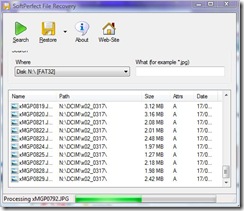
The first program I tried was
SoftPerfect's File Recovery. It doesn't required conventional installing so it is ideal to have on a USB toolkit of useful stuff and doesn't hog resources on your computer with unnecessary stuff at start up. Running it is really straight forward you just specify where the recovery is to take place and optionally a filename wildcard to example recover a particular type of file (eg. *.jpg). the software they starts looking for any file it might be able to recover. When this is finished select (highlight) all the files you would like to recover. The Restore icon then becomes active and press it. In the next dialogue
it is strong recommended that you recover the files to a different destination. Everything was quick and easy but two of the files. both .jpegs were truncated (ie could not be fully recovered. The two movies were fine. I would give this a 4 out of five start recommendation.
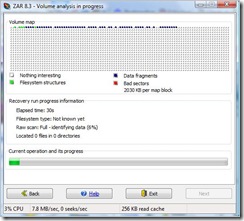
The second program was
Zero Assumption Recovery, and it was upfront that it was a trial version. It does need to be installed and is also very easy to use. Just indicate the media to be scanned and a semi-graphic of the media surface is displayed showing the status of what the median contains (as colour coded file types and what may be recovered), because it scans the entire disk it take longer.
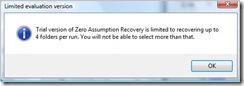
At this point it did warm me that the demo version had limitations (which didn't apply in this case), But still I don't like programs like this so I have now removed it from my computer (after letting it recover the files of course). This recovered exactly the same files as the first program and exactly the same fragments of the two .jpeg files not recovered first time. So basically there was no difference in the results.
Most importantly my work has not modified anything on the memory card, so I would still be able to take it to a professional for file recovery if I needed to. If you have been recovering files of a damaged (flaky) card, it is probably a good idea to reformat that card before you use it again (which will mark bad areas not to be used)

 So I decided to run a disk recovery utility but it had been a long time since I had had to used such a utility and it was nowhere to be found on my computer or useful photo tools USB key. Also I had forgotten the name (which is recuva, remember that name) so I had to do a little search back into my blog and then check on-line, recuva still has a free downloadable version. Just 4mb, so I had it downloaded and recovered the files in just a few minutes. The two things that are important to note are. Firstly recover the files to a different disk (not the SD card). Second Recuva will not see the RAW files if you just ask to recover photos (it will however recover the .jpeg files). So it is important to recover all files. So I will make sure I keep an up to date copy of recuva on my useful photo utility toolkit


