Showing posts with label postprocessing. Show all posts

Saturday, December 10, 2022

What can Relight AI do?

It was just a snapshot to show our Christmas tree and decorations to the family, and very ordinary. To dark overall, the dark to light to dark depth confused the autoexposure and the depth of field was a big challenge even for the small aperture used ... etc 

Ok it did the job for the family what's app group but not worthy of sharing outside that.

So I started thinking could Lunimar Neo's new-ish RelightAI tool help out? It has sliders for adding brightness near or far and/or warming to cooling again near or far. Whilst the result is definitely not yet spectacular but it is a definite improvement.

I couldn't help noticing a couple of items lower in the creative block was the Sunrays tool and I just couldn't help myself!


Who said post processing couldn't be fun?

Wednesday, April 06, 2016

Three Flowers, Three Processing options

_IGP1528_9_HDR_Hibiscus #96_IGP3389-Orchids_by_night

I’m not a fan of the idea of a rigid workflow. I understand this is a good way to train new folk in complex process, software. However in a traditional artist workshop (and I’m willing to bet in early darkrooms). You did an “apprenticeship”, where you used all the tools and techniques under the wise watchful eyes of a mentor. You mixed the colours or chemicals prepared the canvas or plates and did countless copies, sketches, contact prints… You basically learnt how the all the media and tools worked. After much practice you could branch out on your own, confidently knowing how things worked. This is not the case today, especially with digital photography.


So here are a few of my experiments with different software and approaches. The red hibiscus is a straight HDR, with really restrained tone mapping straight from the RAW using Aftershot Pro2, The second, sunny yellow hibiscus, was a great JPEG, but I took the RAW file into lightroom and reduced the luminance of the blue channel (darkening the the sky) very minor tonal tweaks and into OnOne to get a big softy vignette. The Third was badly under-exposed and taken under incandescent light to horribly yellow colour cast, but it was the photo I choose as the daily photo, so I had to try and repair it. I like the White Balance tools for RAW files in lightroom (although I seldom use them) but that was my first stop, with a lens calibration as well and a little lift to the exposure and corresponding balancing of detail and noise I had a reasonable image, which I took over into OnOne enhance to remove some extraneous leaves and complexity on the edge, then Into OnOne Effects to blur some of the background flowers and stems some more, this requires masking and layers, a very light sunshine glow filter, and this time a blenched out margin vignette. Perhaps still a fussy image but way improved. Changes I would not have been able to pull off working on the underexposed and colour cast jpeg, especially if I had a fixed workflow formula and had not experiments with all these tools before.

Be brave don’t always follow that workflow

Saturday, January 30, 2016

Finding creativity by using different tools

I’ve never been a big fan of set work flows and always using presets, I think that approach stifles creativity. However I constantly use a range of different software. So how do I manage to get a consistent style. Well in actual fact I don’t bother, I choose what seems to suit the image, each tools has it strengths and limitations. It was grey and close to dusk so he was flapping his wings to dry them, the movement combined with a telephoto shot low f-stop and low light, my set of photos thus have soft-ish focus and digital noise due to higher ISO. C'est la vie.
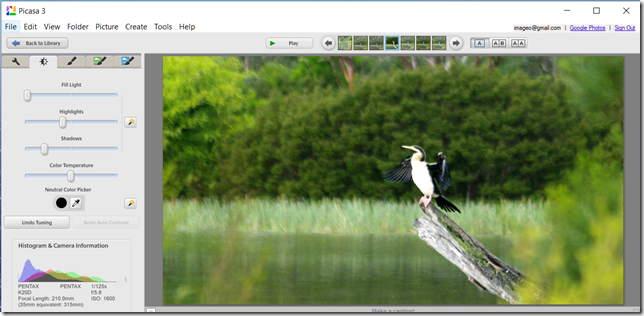
Capture of Picasa's (Tonal) Tuning ScreenFirst cab off the rank was Picasa, which I normal just use to upload my photos and allows me to quickly review and cull the photoset and perhaps rank the top photos. I tend not to use it to enhance my images, unless i really want something to post on the web or email straight away. It’s jpeg rendering is fine but google’s, “I feel luck approach” often makes the RAW files look dull and perhaps overexposed. I like more tonal range. Here I am editing the JPEG version and using the tuning tab but just clicking on the magic wand to let Picasa set the tonal sliders. I’ve also used the straighten and cropping tools.
Capture of Affect Effects Main ScreenI have been using Aftershot Pro as my preferred first look at RAW files on my laptop and have a fairly standard approach of clicking on the perfectly clear filter, then tweaking the details slider and for this photo a little extra raw noise correction. In this case I have toned down the vegetation a little via the Colour Equalizer Plug-in to help highlight the darter. I’ve also used a desaturate vignette along with cropping & straightening.
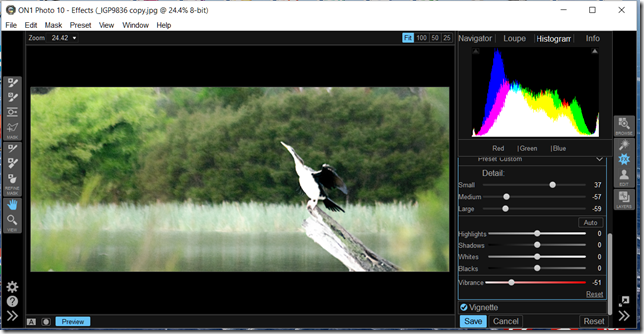
Capture of an On One Effects ScreenThe RAW photo I am processing with OnOne Photo 10 Suite doesn’t have the detail in the darter, which limits its success somewhat. However I used by very favourite Dynamic Contrast filter to manipulate the tones, opting to enhance the small scale contrast rather that larger scale (which help subdue the trees & reeds in the background) while backing off vibrance and lift the darter. I also used my very favourite vignette the Big Softy.
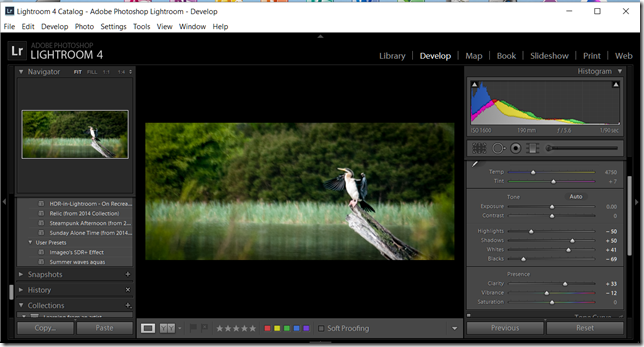
Capture of a Lightroom Develop Screen
I ended up breaking my own rule here, using a SDR+ preset I made myself some time ago to stretch the dynamic range in a single RAW photo. To which I tweaked clarity (local tonal contrast) to the right and dropped down the vibrancy a little, Similar crop and straighten to the other photo and finished with a subtle post crop vignette.

The photos are different, not unlike using different media (oils vs acrylic) and have subtly different appeal. Despite the approach to post processing being largely similar. I think the exercise of doing this help become familiar with the tools and what can be achieve. It is a more creative approach than following a rigorous workflow within a single software package. Vive la difference.