Showing posts with label cables. Show all posts

Saturday, August 23, 2025

Don't Forget Your Digital Lifelines: A Traveler's Guide to Tech Accessories

Travelling with multiple devices means juggling way more than just your laptop and phone. Between my smartphone, Garmin watch, camera, and laptop, I've learned the hard way that forgetting the right cable or connector can add unnecessary stress to your trip.

The real challenge isn't the obvious stuff like chargers - it's all those little connectors and adapters that keep everything talking to each other. I've streamlined my setup into three essential kits that pack flat and won't eat up precious backpack space.

First up is my "USB Octopus" - a clever bundle of standard cables wrapped together with spiral cable wrap that folds into a neat circle. It handles all my older devices that still need dedicated connectors.


Next, I keep the modern adapters in a homemade green cloth wallet (thanks to my wife's sewing skills!) with sewn pockets and velcro closure. This holds my USB-C to HDMI adapter, USB-C hub, and other current-generation connectors. Don't forget an SD card reader if you're shooting photos!

Finally, there's my trusty external hard drive - an old 1TB unit that serves double duty as backup storage and entertainment centre. It keeps my work and photos safe while carrying a few movies and music for downtime.

The key is thinking beyond just power - you need connectivity, storage, and backup solutions all working together. Once you've got your system down, travelling with tech becomes much less stressful.

Proof reading and summary assisted by Claude Sonnet 4 (AI)

Thursday, March 21, 2024

What is with the cable octopus?


Trying to clean up my desk inevitably runs into the USB cable tangle. Whilst USB A is pretty universal the number and variety of devices it can ad-hoc connect to a computer is amazingly diverse. Sometimes it’s used for charging, most often t will be to transfer data or connect a different peripheral temporarily.  

The downside is many use different or non-interchangeable plugs at the other end. Whilst they are all obey the USB standards,  the plugs vary to suit the devices they being connected to. I currently have 5 different device end styles. That’s quiet a tangle on my desk. So I used a spiral cord minder to group the cables together at the USB-A end. A bit of magic using a split tube, lets me keep the cable close to the computer but neatly away from my work area.

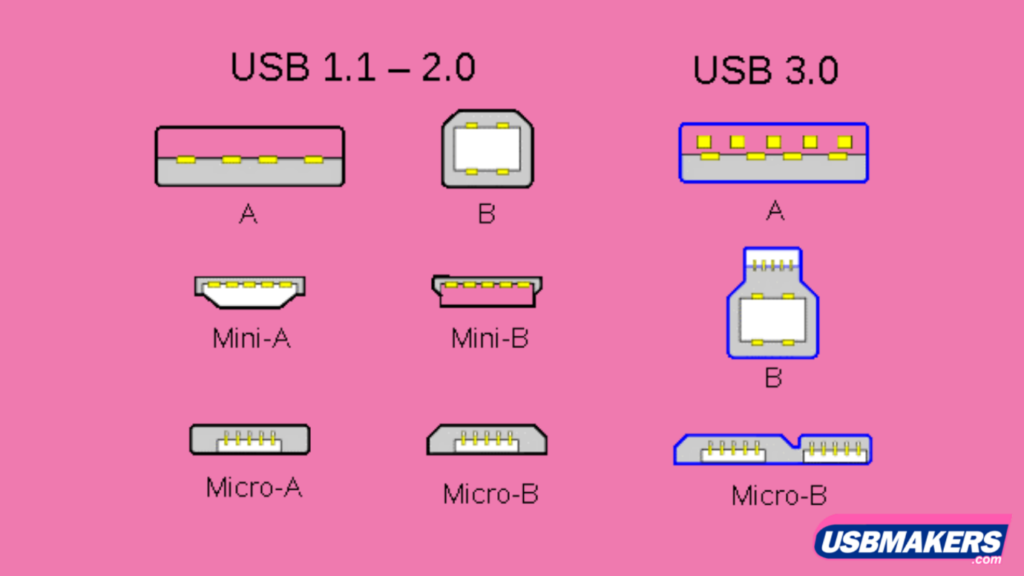
This little diagram gives an idea of many of the current plug types, but there are many more including USB-C and a range of proprietary connectors for specific devices eg. cameras, phones and watches.

Iuse pairs of recycled bread-bag ties, that I colour coded to help keep track of which of the ends match up. It nice, simple and neat. Better still no time wasting searching for the right cable.

Wednesday, August 23, 2023

Taming the Cable Chaos: A Creative Solution

If you're anything like me, you've probably experienced the frustration of dealing with a growing mess of cables and chargers around your computers. It's a common struggle in our increasingly connected world, with USB cables and their various iterations being the primary culprits. The sight of tangled wires behind the desk and in drawers is enough to induce a headache. The real challenge arises when you need to reconnect a long-forgotten device or simply ensure that a cable is still functional.

The first step was to prepare these clips for their new purpose. I decided to paint them with fluorescent acrylic paint, opting for different colours based on their designated usage or storage location. My simple colour-coding system instantly gave each cable its own identity.

With the multitude of places where computers are stationed and cables are used, I knew I needed a solution to keep things organized. That's when the idea struck me – why not tag each cable for its specific purpose/place? And so began my journey to conquer the cable chaos.

In the quest for an innovative yet accessible solution, I found an unlikely hero – the plastic clips that come with bread bags and many other grocery items. Instead of letting them go to waste, I started collecting these clips. They had the perfect shape for attaching to cables and were ripe for customization.

USB cables and power cords received their own distinct tags. Even the smaller chargers that always seemed to vanish into the abyss of drawers were not spared. I extended this tagging system to cables I frequently used during travel or those required for specific tasks. This sometimes led to a cable sporting multiple tags, each representing a different context in which it played a role.

No longer did I have to play the guessing game when searching for a particular cable or charger. The colour-coded tags eliminated the frustration of untangling a web of wires. Reconnecting devices I hadn't used in a while became a breeze, and the reassurance of a cable's functionality was just a glance away.

In the end, what started as a simple quest to tackle cable clutter turned into a creative endeavor. Those humble bread bag clips, transformed by a coat of paint, became the guardians of order in my tech realm. So, if you find yourself in a similar cable conundrum, consider giving this colourful solution a try. You might just find yourself appreciating the organized aesthetics as much as the functional benefits.

Thursday, September 15, 2016

A nifty way to store cables

The USB interface has revolutionised the way and number of devices you can connect to your computer (and android phones, cameras and widows computer, Simple Cable Box for under $2the apple-verse is catching up but they have an even more complex range of cables to manage). The downside is all those cables, lots of similar ones.  Storing them often lead to jumbled mess of cables and it often took time to find the end you needed.


Whilst buying some hardware supplies I chance upon some cheap plastic storage boxes (under $2 each), with removable sliders. I originally visualised them storing longer screws and or bolts. However, when I put it on the side table beside the cables the electric globe of inspiration came on. Now I have my cables back in my desk draw but now I can quickly find the cable I need and don’t have to untangle anything. Also I have an extra SD card reader in the box as well as another one in my camera bag.

Tuesday, April 09, 2013

Taming the Tangle

One issue that has bugged me for a long while is the tangle of cables and cords, in my computer Common styles of USB connectorsand camera bags. Preparing the photo to illustrate my previous blog post highlighted just how many USB cables I depend on, and that doesn't include power transformers and battery chargers! So here are few interim suggestions.


Reducing the number of cables

This is a lot easier said than done. However there are only limited number of styles of USB cables. Instead of carrying three or four that are identical, you should carry only one (or two). Also carry the shortest version when there are multiple cables. When it comes to battery charger and power packs they are probably all different My three camera battery chargers can share just one short power leadsize and not interchangeable, but the power cords to them may be shareable. They are unlikely to all be needed at the same time. Typically in Australia they are either 2 or 3 pins and one cable might connect to several. Between my wife and I we need to carry three different battery charges when travelling but they fortunately they all share the same two pin power connection so I only need to carry one extra short power cable.

Where a device can be charged via a USB connection, you will save having to carry yet another transformer, and either charge it off your computer of carry a small USB charging adaptor.

Some duplication may be desirable. There is nothing worse than not being able to charge your phone or connect your camera because the cable is playing up. I found a great universal USB cable set, which was inexpensive and has several "heads" that fit an longer USB extension cable. I pack this in my luggage rather than take up space in my camera bag. I also carry a second inexpensive USB charging plug here.


Staying tangle free

Having your cable in a scrunched up mess is courting disaster, not to mention a lot of time spent untangling. Whilst there are a number of clever cable windup gadgets around, I have found, from bitter experience, that the smaller spring loaded ones are more likely to damage the cable or make its performance flaky. My cables are stored in a mesh zip bag and cloth pocketsThis is because most data cables now are complex in their inner design with fine web shielding etc, small or tight kinks will cause stretched connections or broken strands. It is the end connectors that at particularly venerable to coming loose or breaking off when cable is tightly bent at the junction.

I find winding the cables as open loops  that suit their natural flexure, thinner cables can be kept in smaller loops. Then storing these in cloth pockets or mesh zip bags (as in my photo) really helps keep things organized as well as avoiding damage.