Friday, July 05, 2024

Supporting My Art: Why Buy Me a Coffee?


In light of recent developments regarding social media ethics and content usage, I've decided to make some changes to how I share my artwork online.

Why These Changes?

I'm concerned about:
- Unauthorized use of my content
- AI systems scraping my artwork
- Maintaining control over my creative output

What's Changing:

- Reducing posts on social media platforms
- Limiting the publication of large versions of finished works
- Focusing on sharing here through my personal blog and website


How You Can Help

To support my continued work and the maintenance of my independent platforms, I've implemented a "Buy Me a Coffee" system. This allows you to:

- Make one-time contributions
- Show your appreciation without ongoing commitments
- Help offset the costs of hosting and creating content

Your support, even for just one virtual coffee, is greatly appreciated and helps fuel my artistic journey.


Buy Me A Coffee

Thank you for your understanding and continued support!

Tuesday, July 02, 2024

Protecting Creative Work in the Age of AI Scraping

As creatives in the digital age, we're facing a new challenge: how to protect our work from indiscriminate scraping by AI companies. While tools like Creative Commons licensing have been a go-to solution, their effectiveness against AI data collection is questionable.

Creative Commons: A False Sense of Security?

I've long relied on Creative Commons to share my work while maintaining some control. My license specifies attribution, non-commercial use, and (previously) share-alike terms. However, I'm beginning to question whether this offers real protection against AI scraping.

The Reality of AI Data Collection

Many companies, often hiding behind research organizations, are scraping vast amounts of online data to train AI models. This process often ignores licensing terms and lacks proper attribution or curation.


Changing Tactics

In response, I've updated my blog's license from "share-alike" to "no derivatives," hoping to prevent AI from copying my style. However, the legal landscape around this issue remains unclear, especially in Europe.

New Technological Defences

A promising development is the creation of tools that embed changes in image files. These alterations are invisible to humans but can disrupt AI training, potentially "poisoning" the dataset. Glaze and Nightshade are two such tools, though they're still in development and can be resource-intensive to use.

The Path Forward

Despite these efforts, I'm still uncertain about how to confidently share my work with those who behave ethically while protecting it from misuse. As creatives, we need to stay informed about these issues and continue seeking effective solutions to protect our work in the AI era.

What are your thoughts on protecting creative work in the age of AI? Have you found any effective strategies?


I've prepared this blog post with some good advice and a little rewording from Claude.AI

Wednesday, June 26, 2024

Have you checked your TOS lately

It would appear that most of the Social Networks and big Internet juggernauts have decided to change their terms of service (TOS). Interestingly most indicated the changes started on the 24th of June! I have no idea why this date matches up. Also the changes all pretty much incorporate similar terms, although written in obscure wording.

To paraphrase the essence is those services offering the ability to upload any information, store it or process it now let it be known that they are allowed to use this to suit their own purposes. Often they will add such as to improve their service. Similar conditions and wording have been in many TOS agreements for such services so they can handle our data, but their "clarifications" have muddied the water. A lot of users are starting to worry that this also means they can use your data in any way they like such as to train AI, modify and republish as they wish.

Needless to say, this has worried several people, particularly artists using such services as Adobe. Supposedly scores of users have tried to abandon Adobe subscriptions, then only to find it is very difficult, for some almost impossible, to leave without incurring significant fees. Similar problems and perceptions are affecting artists on Instagram so I’m not sure of the exact numbers but it seems a great rush that has apparently left Instagram for an alternative, Cara.

I actually do read the terms of service and must admit the changes are a bit hard to follow. However, I do agree they leave the way open for the services to claim ownership of anything you post on their particular offerings. In a few places, they do still say that you own copyright but I assume their lawyers just haven’t seen that clause yet.

Most of these services actually rely on us to supply the content that they then package up and use to convince advertisers to pay them money (often very big money). The problem is they “believe” we are happy having free access to their service, with the public exposure the world wide web can offer and not being paid for our content. Yes, these juggernauts have costs but their profits are larger, massive, even unimaginably disgustingly exorbitant!

So I decided some time ago not to share anything I intended to sell (like finished art work or photos) in a ready copyable form anywhere on the internet. I have still been publishing on the likes of Flickr, Blogger, Instagram and my own website, those things I’m working on, progress updates and just stuff I find interesting. This works for me because I’m not relying on the Internet to sell things my works.


Where does that leave us creatives and what can we do about it? 


I’m probably gonna leave social media to the bots for now and see what happens. Maybe play around a little in Cara.

Monday, June 24, 2024

The Wild West Side of AI

It seems as if a world wide web is adopting the ways of the Wild West, no laws so if you can see something worthwhile you take it, You don’t have to even use gunpoint these days you can just silently scrape it, make a copy which is ever so easy for digital information. Despite the fact that there are actually laws in place that should stop people doing this. The problem is copyright is complex and varies under different jurisdictions, whereas is the web goes everywhere. I think the fact that a lot of these services consider themselves platforms and not publishers is a very weak cop-out even if it may be a little bit legal it’s probably not moral. I cannot believe for instance that X and specifically Elon Musk supposedly champions free speech, letting very dubious characters pedalling hate speech, straight-out lies like spreadsing politically motivated fake news and fanciful log discredited conspiracy theories, and then at the same time fighting a government trying to take down the filming of a teenage terrorist stabbing a priest in the face while the teen posted his actions live online. I believe the Australian government's request to have it taken down was quite morally legitimate. Have they no shame, I guess not.

So don’t expect the big guys on the internet, or many others without a moral compass, to respect your work or loyal support. They will take what they can. Then throw you under the bus. However, I like the idea of sharing what I know and what I have created I just don’t want it reused without reference to me or straight out stolen. 

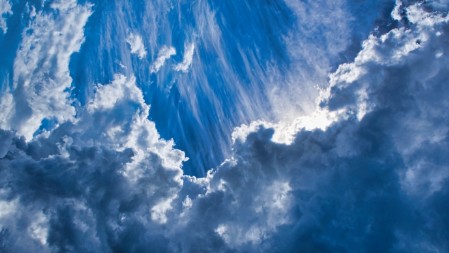
PS: Can you see the sunglass-wearing laughing face? Is it an example of the Intelligence of generative AI or just another example of when it hallucinates (aka gets it wrong)? Or is it our intelligence to recognise patterns and shapes (eg faces in clouds or bandanas)?

Tuesday, June 18, 2024

Enjoying the Warmth

When making a stitched panorama, into the sun it is important to keep the exposure constant, to avoid dramatic colour changes in a clear blue sky. I've left in the lens flare artefacts, they add to the "sparkle"

Wednesday, June 12, 2024

What is the buzz about Cara?


A little while ago I noticed a fair few YouTubers, posting about being time to leave Instagram and most are heading for Cara. I totally understood why they wanted to leave, it wasn’t just the threats of AI  “scraping” up their creations, it also had it origins in changes to the algorithm and move to the more tik tok-ish aspects like short distracting video and capturing attention so the viewer stays on the platform but moves on to the next distraction, then the next. As their attention span gets less they move on down the rabbit hole. Good for Instagram to sell the eyeball time but terrible for a creative trying to find traction, if you don’t make it in the first few minutes and/or the first few viewers, your work will disappear from even your friends, fans or collectors. Ok, good hashtags might let a few interested folk find you, but don’t hold your breath.

The result, you just hear crickets perhaps only a few of your closest friends or colleagues ever get to see your posts now. Worse the posts that you like, the ones that show great accomplishment in your art or photography don’t rate, Whereas an embarrassing photo or unfortunate typos might get shared around. Fun and incentives to post has ebbed away.

The perception that Meta was going to start training their AI systems on user data (hate to tell you but I suspect they already do) set off the alarms in many of the Instagram community. Particularly the original creatives, a sub population I aspire to belong to. Like me I think they are looking for something like Instagram was in the days before it was taken over by Meta.

So what is Cara? Its another platform to post your images (artwork & photos) promoting itself as “by artist for artist”. At the moment is a privately run service that doesn’t incorporate any artificial intelligence images and includes access to Glaze. Which claims to poison the use for neural network training on unauthorized “scraped” images by incorporating hidden codes within the digital version of the image that scramble how the image is represented. I’m still to be convinced this is a good long term solution.

So it is time to have a look, a slow and pondering wander around. I’m sure its going to have a few growing pains.

Sunday, June 09, 2024

Unlocking Creativity or Daydreaming


 “I’ve been planning a large painting of flamingos for awhile. We artists are mocked for daydreaming but so much of painting is, as I like to call it “internal visualisation” of a finished piece. A large proportion of the planning is not physical work on paper or canvas but turning it over in your mind. Unseen. Definitely not daydreaming.”

from Catherine Ingleby’s article in the upcoming July copy of The Artist magazine

Her article really connects with what I have been absorbed about how creativity strikes. She highlights three things that help her. They start with planning and preparatory work organising everything, which she believes will eventually bring a freshness to your paintings. Secondly, she suggests converting photos of your work into monochrome black or white, if the painting doesn’t work in black and white it’s unlikely to be successful in colour. I fully concur with this observation. Thirdly but quiet important she says try doing your own colour charts just using two or three of your favourite pigments, she suggests you might be very surprised how much you learn.


In the article she also limits herself to only really three tonal ranges light midtone and dark but bounded by black and white. She also limits her palette to two or three colours and things they can mix. I think three or four would still be fine.

Monday, June 03, 2024

Developing a New Self-Portrait for my Website


It was time to change my profile pic on my website my website. Not so much my profile self-portrait that’s the first image you see on my landing page. It’s traditionally been a self-portrait. The previous one was about my eye operation, an abandoned attempt to paint it and photograph the bandages.At the time, I was also slightly overwhelmed by the apparent significant progress in generative AI. Neural network learning applied to graphics and large language models, training on massive data sets scraped from the internet. In the end, I had combined a photo with my style of painting, using my own technique following what is usually called style AI.

My eye is on the mend and it’s time to update my portrait profile picture. Back in the beginning of the Covid lockdowns, I did a short month-long project painting various self-portraits in a variety of formats & styles. It was a lot of fun. One of the self portaits saw me holding up a small square canvas with a stylized version of my face in front of my face as I was photographed. The motivation was thinking about what we can believe as truthful on social media. It was a genuine photograph not photo-manipulated at all. Already people were suspicious that a lot of photos on social media claiming they were “photoshopped”.

Moving ahead a few years, we commonly have generative AI and deep fakes. In most cases, someone familiar with photography or art will still be able to spot inconsistencies usually to do with the lighting on the subject versus the background or perspective. But that’s another story. I was interested in revisiting the issue of what is real on the Internet and this time. I was definitely wanting to use AI, but style AI where I am using my own mark-making to modify my own photo. Just making the photo into line worked quite well. Perhaps disguising the impression of holding up something in front of my face so I simply added a semi-transparent square. 

To be honest the result hasn’t excited me but I have achieved what I was looking to do. I want to show I understand the potential of AI to make something original and creative, but not doing it in a copycat / "likeme" way.

PS: Should have taken my time before I uploaded the new photo. Did not really show what i wanted to say, so I went back to my original self portrait.

Saturday, May 18, 2024

You are invited

 I’ve given myself a little challenge for my paint out next Tuesday. Everyone is welcome to come along and especially those who want to do a bit of plein-air painting. It’s scheduled to take place from 10am to 3pm on the 21st of May in Parliament Gardens, in the city. It’s that little triangular piece of gardens opposite the Northern End of Parliament Station at the intersection of Albert Rd and Nicholson St. It is primarily aimed at creating interest for the “Luminous: A Festival of Watercolour” Exhibition at the Victorian ArtistSociety just up the road in Albert Street. Anyone who wants to paint is welcome, more than welcome.

I’ve been experimenting with my own dot charts set up on DVDs as very simple portable palettes for plein air painting. For those familiar with painting outdoors 10am to 3pm or 5 hours is a very long time. The light will change dramatically over that time frame, especially this time of year. Therefore I plan to do say 3 or 4 paintings/sketches and I also thought it would be a good idea if I made them using different artists colour palettes. 

So I’ve made up two new dot chart colour wheels on DVDs. The first is based on Andy Evansen’s palette which is a fairly conventional traditional English style watercolour setup although he’s American. He recomends starting with a painted value study and I’ll try to follow this recommendation. He also looks to join as many shapes as possible with his first midtone wash another idea I really like.


My second palette also on  a DVD is based on Vincent Van Gogh’s later palettes, which were of course for oils, not watercolours. I had previously researched the colours through his letters to his brother Theo. He had recognised he was having trouble with fugitive colours like emerald green and his red carmine and lake colours,  also he worried about using alizarin crimson. These days there are more permanent versions of these colours available. I did research into Vincent’s colours for a project last December where I was asked by Royal Talons to be their Instagram artist of the month and they kindly supplied some art materials. It was fun. 


Depending on the lighting I’d like to tackle something that Turner might do. I’m certain he  would be looking for a dramatic sky or foreboding shadows. If nothing else there’s the waterfall, sure to produce some interesting fluid shapes. A few years ago I made up palette a turner inspired palette following the recommendations of Tony Smibert, a real expert on JWM Turner. I plan to focus on warm versus cool colours and look for a moody emotional connection.

Finally I’ve got my current palette based on six families of hues, red, yellow, green, cyan blue, and magenta. I trust it will afford me the best opportunity to mix stronger intense colours, higher chroma in artist jargon of colour pigments.

Even though the garden’s pretty small there’s plenty to see and paint. Alternatively just come along to see me paint and also visit the exhibition.

Sunday, May 05, 2024

Mastering the Rainbow - What is Colour?

Welcome to "Mastering the Rainbow" - a captivating exploration of the enigmatic world of colour. This serialized journey, spanning blog posts here and on my website, YouTube videos, and occasional social media posts, is a progress report of my decade-long quest to unravel the mysteries of colour and its elusive nature.

As a geologist and retired part-time lecturer, I've long been fascinated by the scientific method and its ability to shed light on the intricate workings of our world. However, as I delved deeper into the question "What is colour?", I found myself venturing down a rabbit hole that grew increasingly complex and paradoxical. Contrary to our everyday experience, I've come to realize that colour, as we know it, is not a tangible entity but a highly personal illusion. Colour is not a real thing.

In this series, we'll embark on a historical odyssey, revisiting the groundbreaking discoveries of those who came before us, many of which I unwittingly rediscovered myself – a testament to the cyclical nature of scientific inquiry.

We'll dive into the various representations and models of colour, navigating through the controversies and debates that have shaped our understanding. Brace yourselves, for nothing is more contentious than the application of colour wheels. Fear not, for I shall embrace these geometric shapes as tools to unify disparate ideas and shed light on the counterintuitive aspects of what we call colour theory.

Through practical examples and hands-on fun, you'll have the opportunity to convince yourself of the profound insights that await. Whether you're an artist, a photographer, or simply a curious soul, this series promises to broaden your perspective on the kaleidoscopic world that surrounds us.

The vibrant realm of colour is a wondrous canvas upon which we create and experience art. Join me on this journey, and together, we'll unlock the secrets of the rainbow,


Tuesday, April 30, 2024

OneDrive and the Rug Pulled from Underneath Me


As someone who has set up many new computers over the years, I've gotten used to the tedious process of loading software from discs and installers. However, I was pleasantly surprised at how streamlined Microsoft has made the setup experience on my latest PC. Getting Windows and Office installed was a breeze compared to the olden days of swapping floppy disks and CD-ROMs. 

However, this simplicity came with a devious dark underbelly that left me incredibly frustrated - the aggressive integration and default setting of OneDrive for storage. At every turn, Microsoft seemed to be steering me towards using its cloud service whether I wanted to or not. Most insidiously, it had automatically set my Documents, Photos and my Desktop Folders to be synced and stored in OneDrive. 

I already have a personal OneDrive account that I seldom use. But when I did a quick test of uploading some photos, not many from my camera, I quickly maxed out the free storage, most of which was being consumed by weird files on my desktop area. Suddenly, I was being pestered to pay for more OneDrive space that I never asked to use in the first place. Where was the option to opt-out of this default OneDrive setting during setup? It felt like the rug was pulled out from underneath me.

Instead of spending a couple days getting a new PC ready like I used to, I've now wasted that same time trying to unravel and opt-out of most of the undesired OneDrive integration that Microsoft shoved in my face. What initially looked like a fresh, streamlined setup experience left a sour taste thanks to this aggressive cloud storage agenda. 

Dear Microsoft, please make OneDrive an explicit choice again, not a default imposition!!!

Sunday, April 28, 2024

Tales of Woe, and hopefully meeting a new friend

 After many trials and tribulations, so many, I had given up blogging about them. I’ve had a whole series of older computers from my business die off one by one over a few years. The majority have suffered death by upgrade, so i'm starting to fear those massive windows updates that never really worked. I guess one of the big problems was I had older hardware and it was stuck in Windows 10 land and not upgradeable.

I had replaced an old favourite PC in my studio with a slimed-down Lenovo box. It had a small ssd drive, supported by two hard drives, adequate memory, it was an i5 and it ran Windows 11, I love it. It did have problems running a large-screen TV when using the second screen/monitor or projector. But I do love the fact that I can have a large screen TV on the wall, perfect to paint from. Most of the computer gear sits on a narrow shelf and I have a couple of keyboards, one waterproof on my art table and a second wireless., that can be used anywhere. The table is set up such that I can draw and paint on it or I can also use with one of two easels standing up. I’ve also recovered an old sound bar so I can have good quality music as I’m painting. Its also set up for running Zoom meetings and making You tube videos (if I have the time!)

I still use an older Windows 10 HP Pavilion desktop in my office as the master for my network and main computer. It’s also got a small ssd drive but has 2 internal and 3 USB hard drives hanging off it. It is currently doubling as my master media storage, (eg photos videos and music). Unfortunately, it is misbehaving a bit, Finally I do miss my NAS storage, which no longer works on my upgraded LAN (windows 11 is implicated) , I really wish I knew why.

Quite a while ago the battery died in my beloved little HP Spectre. The little two-in-one that I took travelling, sitting on the couch or in fact all over the place. It was getting quite old and only had a small 11” screen but I still loved it and missed it dearly. The ordeal and potential expense associated with trying to get the battery replaced meant it is lying dormant.

I had a corneal graft last year and struggled a lot when one of my two monitors on my main computer decided to go dark, very dark, too dark to read easily. Taking the monitor off the computer and plugging it into something else showed it was fine so I assume it’s the graphics card on the computer, or a graphics driver upgrade issue, just another frustration with the Windows world. I’ve really had a lot of trouble getting used to what now appear contrasty monitors and smaller text (OK it’s the same size text just harder to see without an update to my glasses prescription after the corneal graft]. I can only get about one hour at the screen before my eyes feel strained. Usually not enough time when I’m playing with photos,

So I’ve been looking seriously at different screen technologies and decided I like TVs with OLED screens. I used to like the Apple iPhone style IPS format screens on my phone and Spectre, and was with LCD monitors. So I had begun investigating screen type and size, by actually looking at them in stores. When I noticed an advert on TV about the Lenovo Yoga Range, two-in-one style computers, checking the web there was a model based on an Intel EVO i7 processor with a 14inch  OLED screen. I was at Office Works on a different matter and so I checked it out. It was very easy to read at a standard viewing distance. I didn’t take long to decide it was time to get an upgrade.


So welcome Slaty, so named because it’s very thin, layered and a dark grey. I look forward to you becoming a great friend.

Thursday, April 25, 2024

Keeping it Simple for Plein Air Painting


Nothing kills the joy of plein air painting faster than battling the elements and lugging around excessive gear. As a passionate outdoor painter, I've learned some tricks to streamline my setup and focus on the act of creating.

The biggest hassle is managing the paper, the surface to paint on. Wind is the natural enemy of a damp painting, and rain can smudge your masterpiece in seconds if you're not prepared. Over the years, I've realized that less is more when it comes to plein air essentials.


My humble blue canvas bag has become an invaluable ally. It comfortably fits pads and blocks up to roughly A3 size - plenty of room for field studies done in the open air's changeable conditions. I typically pack A4 or A5 pads or blocks of watercolor paper, sometimes supplemented with  inexpensive cartridge paper for simple sketches and pen drawings


A couple of drawing boards with tripod attachments also slip into the bag nicely. Their firm surfaces help keep the pads in place, and a few bulldog clips allow me to secure paintings-in-progress between the boards if I need to pack up quickly due to unexpected showers.

By the way, painting outdoors is great I love it

Tuesday, April 23, 2024

The Beauty of Minimalist Plein Air Sketching

Sometimes the most memorable artistic moments happen spontaneously without an elaborate setup. A case in point - I was out enjoying the late afternoon on the forshore at Cowes, intending to stay to paint the sunset. However, as I awaited the warm light a ship standing by and people milling about on the beach provided the perfect scene for a quick sketch.

That's when the beauty of a minimalist sketching kit came into play. I didn't need much more than a small sketch pad, a couple of water brushes, and my trusty little dot chart colour wheel. 

There's something immensely satisfying about working with just the bare essentials out in the field. You become hyper-focused on transcribing the essence of the moment through swift brushstrokes. No fiddling with complex setups or hauling cumbersome gear - just you, the scene, and a sparse collection of tools.

Speaking of those essential tools, one item that continues to prove invaluable is my homemade dot chart colour wheel. Not only is it highly portable, but crafting your own allows you to arrange pigment scales exactly how your artistic brain understands colour relationships best.


Thursday, April 04, 2024

Are LLM amazing or simply stupid?

I watched a very relevant TED talk by Yejin Chai “Why Ai isincredibly smart and shockingly stupid”, which opens with the quote “Common sense is not so common” which comes from Voltaire around 3  centuries ago. I totally agree that the current large language models {LLM}, which many call AI (but I call Artifically Intelligent), lack common sense. This should be very obvious if you he ever used them.

Still I am finding LLMs helpful. They're sometimes amazing for cleaning up typos, especially for folks like me who struggle with dyslexia.  They're also good for fixing the weird stuff that happens when you dictate and/or use predictive text.

I've been trying out a few of the most popular ones.  To compare them, I created an informal scorecard system that tracks how well they handle different aspects of text, like key ideas and paragraph sentiments.  Here's how it works:

  • OK: This means I can use the text without any changes.
  • Reword: Sometimes the wording needs a little tweaking, to sound less know-it-all.
  • Fact Check: often some points get over-embellished
  • Wrong: clearly made up or simply wrong
  • Missing: important information left out (ignored)

So I recently was asked to speak and I outlined some ideas but in a rehersal it took 20 minutes. I recorded and timed it by dictating into a Word document (<windows key> and H) roughly 6 pages of rabbling text, lots of good stuff but… … So I asked each of ChatGPT, Claude.AI and Google’s Gemini (previously Bard)  each to summarize it into a single page.

Their score cards were not so good

I feel that it is the Dunning-Kruger effect that AI suffer most!  These AI Bots display a smug self-confidence that they know everything but show no common sense to realise how little human norms and values they actually understand.

Saturday, March 30, 2024

Finding the Ideal Surface for My 9X5 Artworks on Wooden Panels

The quest to find the ideal surfaces for my 9X5 inchartwork for the 2024 VAS Exhibition continues! I'm planning to create two pieces, one in watercolour and the other in soft pastels. To test out different surface preparations, I made three variations for each medium on some scrap plywood.

 Let's start with the watercolour surfaces:


  • W1: Just plain white acrylic, which behaved a lot like Yupo paper.
  • W2: White acrylic topped with a thin coat of regular gesso. This improved colour intensity and gave sharper hard edges compared to the acrylic-only surface.
  • W3: White acrylic with a 50/50 mix of transparent gesso and regular gesso. This surface had the most texture, but the paint went on nicely with great intensity, and it was easy to lift off.

Both W2 and W3 seem promising, except that the watercolour washes picked up brush marks on all the surfaces. For the next trial, I'll need to apply the gessos with a foam roller.

Now, onto the pastel surfaces:

  • P1: Just an old layer of Derivan background paint (China Red). This added a nice tooth to the surface, and the coloured ground made the pastel colours sing.
  • P2: White acrylic with standard gesso on top. The least successful option.
  • P3: White acrylic with the 50/50 transparent and regular gesso mix. Good coverage with a light pastel touch, but the colours looked pale.

 I tested various pastel marks, from very soft to hard, and even Conte pencils. Getting details on such small panels is going to be a challenge, and I need to experiment further with different "background" paints and "watercolour ground".

Stay tuned for more experimental fun on the road to the perfect 9X5 surfaces!

Saturday, March 23, 2024

Spambots be gone


Has anyone else discovered a sudden massive increase in the number of views being recorded on Blogger (this site)?  I was rather pleased with myself struggling to over half a million views over the past 20 years. Yes I have been using Blogger for 20 years! However, in the past month the pageviews have risen by over 100,000. Over the past week the recorded pageviews are between 2,000 & 3,500   per day. but actual pageviews, even most recent posts, seldom exceed 10 views per day.


I do suspect bad actors, possible spambots, content scrapers or maybe a hacking attempt gone wrong. I really can not see what might be achieved by such an activity, perhaps other than wasting bandwidth (which I can not see evidence of). Is it part of giving a legitimate address for a phishing scam to fool validity checks?

Ok now I have noticed. Do I try to inform Google?  Yes, but I have gotten nowhere again. Have you ever tried to contact good with a problem? y=You will know what I'm talking about. Is is another massive "I don't care" / #FAIL google!


So what can I find out about these extra views (which I might just call an attack). Well it must be automated to reach that number. Its seems to be totally originating from Hong Kong, using apple MacIntosh and Chrome, the refereeing URL being reported as other by Google Analytics. The biggest puzzle is my blogger site is recording these extra views but my actual page view seem to be remaining normally low. Are these numbers even real? Should I be concerned, given the location these pageviews seem to be originating?


Thursday, March 21, 2024

What is with the cable octopus?


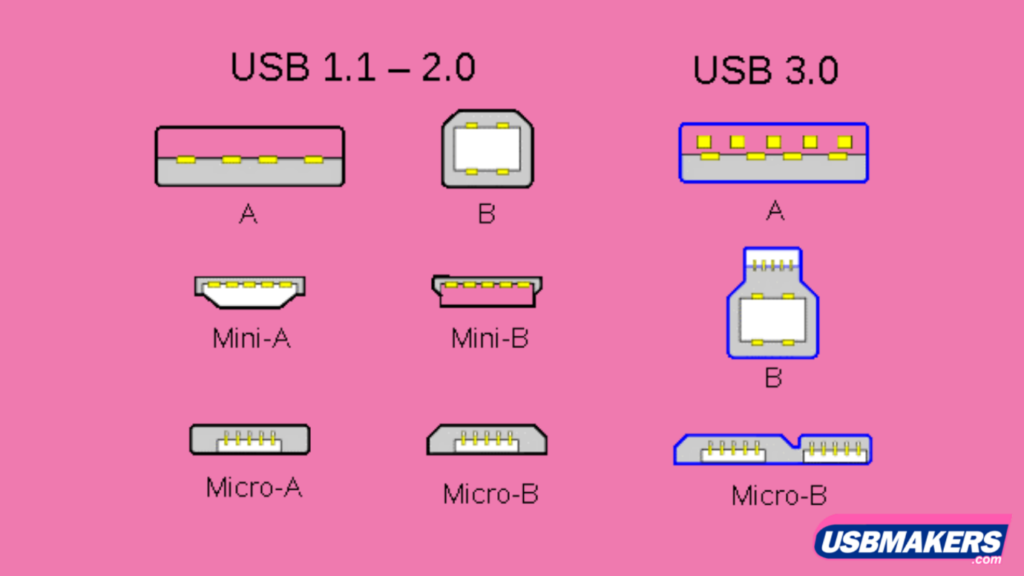
Trying to clean up my desk inevitably runs into the USB cable tangle. Whilst USB A is pretty universal the number and variety of devices it can ad-hoc connect to a computer is amazingly diverse. Sometimes it’s used for charging, most often t will be to transfer data or connect a different peripheral temporarily.  

The downside is many use different or non-interchangeable plugs at the other end. Whilst they are all obey the USB standards,  the plugs vary to suit the devices they being connected to. I currently have 5 different device end styles. That’s quiet a tangle on my desk. So I used a spiral cord minder to group the cables together at the USB-A end. A bit of magic using a split tube, lets me keep the cable close to the computer but neatly away from my work area.

This little diagram gives an idea of many of the current plug types, but there are many more including USB-C and a range of proprietary connectors for specific devices eg. cameras, phones and watches.

Iuse pairs of recycled bread-bag ties, that I colour coded to help keep track of which of the ends match up. It nice, simple and neat. Better still no time wasting searching for the right cable.

Friday, February 23, 2024

Luminar Neo's GenAI Tools Need More Time in the Oven

Luminar Neo recently added three new generative AI tools called GenErase, GenExpand, and GenSwap, all supposedly based on generative AI technology. I’d seen a bit of hype about them and they just turned up for a 30 day trial, so I just need to play and try these new features. I have to say they clearly needed more time in development before being released to the public.

The tools are only available through Neo's subscription service presumably because they utilize cloud computing power. This means they will likely never be available to run locally on a desktop.


I was most interested in testing out GenExpand, which is supposed to let you extend the edges of an image. I do like Neo’s Panorama stitching extension but I often get bulbous, untrimmed images when stitching together handheld panoramas in Neo, so I thought GenExpand could help with that. Unfortunately, my first attempt to expand a massive 588MB panorama got stuck taking forever and then just produced blackness over the area I’d selected. Oh well, back to the drawing board.

 A smaller test image did successfully expand, but the new edge addition was blurry and grayscale. On closer inspection the horizon matched byt clouds and waves didn’t matchup well to the original.


Hoping for better luck, I tried GenSwap to insert a kangaroo into a photo. The AI clearly wasn't trained on enough Aussie animals, its a bizarre creature but “thats not a real kangaroo”. At this point, my enthusiasm was waning.


Finally, I tested GenErase to remove objects from photos. It performed decently but didn't seem much better than the standard erase tool already in Luminar Neo. Trying to erase a larger object again resulted in the tool freezing up.


In the end, while the ideas behind these new GenAI tools are intriguing, I feel they simply aren't ready for practical use. Too many bugs, glitches, and failures to finish make them more frustrating than functional. Luminar Neo would have been better served by traditional beta testing before releasing them. For now, I don't trust these tools, or for that matter many other developers' generative AI tools to deliver satisfactory results, or are my expectations too high? Maybe someday the technology will mature into something more reliable, but for now GenAI feels more like a breakable flashy toy and “trying to keep up with the Jones”.

Tuesday, February 20, 2024

Happy Birthday Flickr

Today marks the eve of Flickr's 20th anniversary, a milestone that brings back memories of its inception in 2004.  They have a nice article about their significant moments and time-line on their blog

Reflecting on my journey with Flickr, I recall how I initially turned to it as a platform to upload and share photos for this blog, which started out as "things they forgot to tell you about digital photography". It was a time when the concept of cloud storage and HTML image links felt groundbreaking. Moreover, Flickr's community features, such as groups and commenting, added depth to the experience, fostering connections among photographers worldwide. Introducing their "interestingness" algorithm brought exposure to countless talented individuals, while Flickr’s commitment to Creative Commons licensing set a standard that others struggled to match.


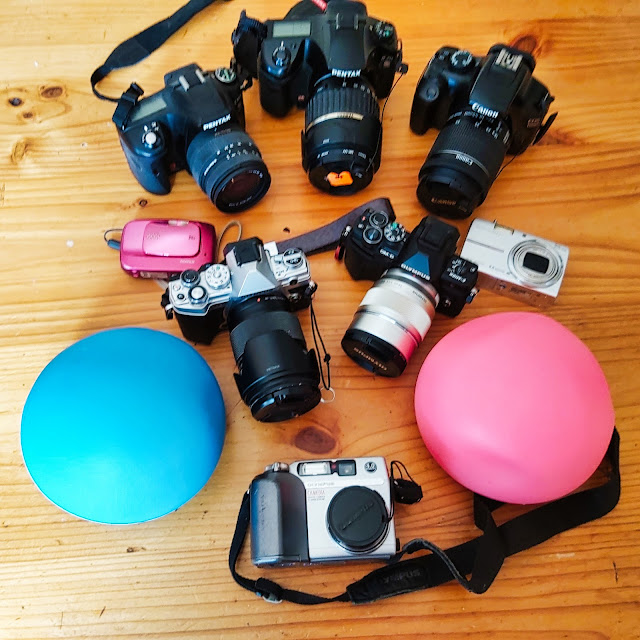
For me, Flickr and digital photography have been intertwined since I acquired my first privately owned digital camera in 2003. Over the past two decades, I've amassed a collection of cameras, each holding its own story. It's been a little embarrassing laying out the number of cameras and estimating the money spent! While I no longer use most of them, I cherish the memories and photographs those cameras enabled. Most are still operational, though finding the right memory card for my original Olympus Camedia or a battery charger for an early rechargeable, may prove challenging.

As a consulting geologist, I purchased a Canon Rebel DSLR for video capabilities which has served me well for filming professional videos over the years. I still use that Canon today with a tethered setup to photograph my art on a copy stand. Over time I had invested in two Pentax digital SLRs as megapixels increased into the 12-16MP range, though I seldom use those models now., there were and still are great cameras just a bit heavy.

The two sleek Olympus mirrorless cameras have re-ignited the joy, fun and passion for capturing moments. Despite the evolution of technology, these cameras continue to serve me well, each with its unique capabilities and charm.

As we celebrate Flickr's anniversary, I can't help but acknowledge how my own photography journey has evolved alongside it. While changes of ownership, lockdowns and changes to Flickr's account limitations have impacted my activity, I remain loyal to the platform, eagerly anticipating events like the upcoming worldwide photo walk in Jells Park.

To Flickr, I extend my heartfelt gratitude for two decades of inspiration and community. Here's to many more years of creativity and connection in the digital realm. Cheers from down under


Tuesday, February 13, 2024

Photography without a camera

On Saturday I attended an artist talk at the Museum of Australian Photography focused on three exhibits around “photography without a camera”. One project that really interested me was by Kate Robinson, who created images using generative AI and then made physical prints using the traditional cyanotype process. She ran a workshop on the process in the afternoon

I've been fascinated by optical illusions, like Rubin's vase which can be seen as two faces or a vase. I tried generating the illusion image through text prompts to DALL-E 2 but it didn't work, their AI evidently didn't know about the famous illusion, I just got nice vases. So I experimented with Stable Diffusion instead, knowing I could add a noisy starter image with the same prompt “photo-realistic version of Rubin vase”, this generated something closer to what I needed.


I then gave Stable Diffusion a detailed text prompt asking for “Male & Female Heads in profile facing each other, Professional photography, bokeh, natural lighting” I used the latest SDXL 1.0 model which generates very realistic images. This produced some great portraits which had sharp focus on the faces and soft, blurred backgrounds, while maintaining the illusion styling.

1. Stable Diffusion Starter
2. Stable Diffusion generated images
3. Selected image upscaled
4. Greyscale & Inverted for transparency


I picked one of the four generated AI images with good tonal range, upscaled it, and inverted it to make a negative. Then printed this negative image onto a transparency. Kate had already prepared some watercolour paper with the light-sensitive cyanotype chemicals. I sandwiched the sensitized paper with the transparency under a piece of perspex and exposed it to sunlight for about 25 minutes.

When the transparency was removed the image had magically appeared on the paper! Somewhat faded. Just like seeing that first print develop in the darkroom, under the red light. I rinsed the paper first in water and then briefly in vinegar to set the blue cyanotype tones. In only about 40 minutes, I had gone from an AI concept to a one-of-a-kind cyanotype print, all without ever using a camera!


This project showed me the creative potential in blending digital and analogue photographic methods. I'm re-excited to experiment more with generated AI images and bringing them into the real world through alternative printing processes.


Wednesday, February 07, 2024

Where Do We Go From Here?

Testing Out New AI Tools for Writing - The Good 👍and The Bad 👎


I've been experimenting with some of the new large language AI models like ChatGPT Bard and Claude to help summarize and clean up my dyslexic writing. At first, it seemed amazing - I could just dictate my random thoughts and the AI would turn it into clear, readable text. I even had it generate content like blog posts, YouTube scripts, and Instagram captions.

However, I started noticing some issues:
  • The AI can be overenthusiastic, especially when mentioning product names. It reads like advertising copy. I have had to rewrite these sections to keep them factual.
  • Outrageous claims and incorrect facts. About 40% of the time, the AI includes claims or "facts" that are just plain wrong. I end up removing entire paragraphs.
  • About 30% of the time, the content is good as is. The other 30% needs some reworking to tone down the language.
Clearly there's an issue here with misinformation. My current theory is that these large language models are trained on in-discriminant internet data containing conspiracy theories, misinformation, and bias. Garbage in, garbage out. 

I'm finding Anthropic's Claude model more reliable with fewer glaring errors. I have used it on this post, but I still have to carefully review any AI-generated text before publishing. 

As AI becomes more ubiquitous, it's crucial that we understand how these models are trained and what biases they may contain. We have to establish checks and balances, verifying information and not blindly trusting AI outputs.

I'll keep experimenting with AI writing assistants, AI in photography and digital Graphics (generative AI images such as the one abouve), but always maintain oversight. Stay tuned for more on responsible use of generative AI.

Sunday, February 04, 2024

Back in Nature - End of Summer Photowalk

To celebrate their 20th Birthday, Flickr are reviving their worldwide photowalks. I'm going to revisit the first walk I led as part of the worldwide photowalk project back in 2016. We'll walk through what was then the conservation area behind Jells Park Lake to capture the natural world thriving amidst suburbia. The conservation area is now opened-up but some trails are blocked off, nature is still happily doing its thing. 


This year has been a milder summer and vegetation is thriving, though some weeds are a bit overwhelming. Insect and bird life are literally hopping and buzzing. I've scheduled the walk later to take advantage of the low angle summer light. Precious moments as we only get about half an hour of golden light at this time of year at the end of summer. 

The walk winds through the trees and shrubs behind the lake. There's a quiet beauty in the lengthening shadows and soft evening light. All varieties of birds can be spotted flitting through the branches or foraging on the ground. The constant hum of cicadas and other insects fills the air. Underfoot, wildflowers and grasses sway in the breeze. It's a glimpse into the natural rhythm at summer's close.

If you'd like to stay until 8:30pm and the weather is kind, you'll have a great opportunity to watch the full moon rise over the Dandenongs or be reflected in the lake's still waters. The interplay of light on the landscape creates unique photographic possibilities.

Like the original walk, this photowalk is limited to 20 participants and is free. I hope you can join me to capture the magic of nature at summer's end! Let me know if you have any other questions.

Registration via Eventbrite

Tuesday, November 28, 2023

Next Photowalk this Sunday

 Seeing from Both Sides Now

Sunday 3rd December 2023
1:00-2:30pm
Meet at Madeline's Cafe, Jells Park


“Albert Einstein put it best: “The intuitive mind is a sacred gift, and the rational mind is a faithful servant. We have created a society that honours the servant and has forgotten the gift.”  


Betty Edwards, Drawing on the Right Side of the Brain. This Photowalk will introduce the ideas of Betty Edwards, on right and left brain thinking, and how they can be applied to significantly improve how you “see” what you are photographing. We will use our cameras and our perceptions to consider the questions “Who am I?” and “What do I want?”

$7.50 - $10 Bookings Essential  Register via MAPh events page

Tuesday, November 21, 2023

Simplifying My Backup Strategy:

It's been a while since I posted here. Today I wanted to share some changes I've made to my backup and archiving strategies. Back in my consulting days, I relied on a NAS storage system, specifically a Netgear Stora. It had some fantastic automatic backup features, making it easy to keep duplicates of anything sent to it. It also allowed me to sync folders from each computer, ensuring only recent files were sent to the NAS. It was simple and reliable.

Fast forward to today, and retirement has brought about a shift in my storage needs. I no longer need to hold on to large amounts of client data. Also thanks to the relentless upgrades in Windows that unfortunately led to the demise of my previous backup Stora software, I can no longer use that NAS.

Rather than buy a New NAS system, I realised the bulk of my long-term storage is dedicated to my photography and art projects, totalling around 6 gigabytes. After spending a month decluttering duplicates and obvious duds, I repurposed older USB external drives no longer needed for client data for my photo archive. In addition to the current “originals on spinning discs connected to my main computer, and available across my LAN, I've organized them into three sets: one as a master archive in my office, and two duplicate sets rotated, with one stored off-site for added security. The rotation has been roughly monthly

Without a functioning NAS, I've reverted to a more manual approach, reminiscent of the magnetic tape days. I've set up a small, manually triggered incremental backup stream onto my locally held external archive sets.

Here's the breakdown of my new system:

  1. I've allocated five folders with appropriate week names.
  2. I manually perform the incremental backup at the end of each week.
  3. At the end of the first week, I store all files that have changed since the beginning of the month in the respective weekly folder.
  4. At the end of the second week, I copy all files changed since the beginning of the month, extending my increments back to the start of the month. I don't worry about overlapping days between months; those files go into the appropriate week's data set.
  5. In months with only four weeks, I also copy the entire increment into week five, ensuring it contains the full month of new and changed files.
  6. At the beginning of the next month, I clear out the first four weekly folders but keep week five, which now holds the backup of the previous month.
This system gives me a two-month window to recover files. While it might not be perfect, it's easy to manage and ensures the job gets done. Although I'm not backed up to the minute, the simplicity and ease of execution make it a viable solution for my needs. Plus, for anything super important, I can always make an additional copy to the current increment folder. Easy and quick!

I used ChatGPT to help proofread my typos etc, and simplify the text, most of which it did well BUT it clearly didn't understand my process and made up some stuff, so I've used the good bits, and corrected or deleted the rubbish