
I have no idea!


Or maybe the grass is actually greener on the other side.
 The first program I tried was SoftPerfect's File Recovery. It doesn't required conventional installing so it is ideal to have on a USB toolkit of useful stuff and doesn't hog resources on your computer with unnecessary stuff at start up. Running it is really straight forward you just specify where the recovery is to take place and optionally a filename wildcard to example recover a particular type of file (eg. *.jpg). the software they starts looking for any file it might be able to recover. When this is finished select (highlight) all the files you would like to recover. The Restore icon then becomes active and press it. In the next dialogue it is strong recommended that you recover the files to a different destination. Everything was quick and easy but two of the files. both .jpegs were truncated (ie could not be fully recovered. The two movies were fine. I would give this a 4 out of five start recommendation.
 The second program was Zero Assumption Recovery, and it was upfront that it was a trial version. It does need to be installed and is also very easy to use. Just indicate the media to be scanned and a semi-graphic of the media surface is displayed showing the status of what the median contains (as colour coded file types and what may be recovered), because it scans the entire disk it take longer.
 At this point it did warm me that the demo version had limitations (which didn't apply in this case), But still I don't like programs like this so I have now removed it from my computer (after letting it recover the files of course). This recovered exactly the same files as the first program and exactly the same fragments of the two .jpeg files not recovered first time. So basically there was no difference in the results.


This wild yellow crested cockatoo [Cacatua sulphurea], at the Grants Picnic Ground at Kalista in the Dandenong ranges east of Melbourne, brazenly stole this packet of seed from a visitor. The best part is how deftly he held it in his paw, as he skilfully snacked on the seeds. However is fellow cockatoos soon gathered, trying to get him to share but he wouldn't and it all ended in tears. The poor guy lost his one paw hold and the packet of seed dropped into the forest below, several cockatoos in pursuit.


 One of the best and easiest to use tools for digital photos is the cropping tools, which cuts a desired section out of an image, trimming off unwanted parts (at the edges). Using Picasa, cropping is easy. In the editing view, click Crop. There are three default sizes(in cm 10 x 15, 13 x 18, and 20 x 25). The fourth option, Manual, is the one I use most, it allow you to click a point in the shot and the drag the mouse pointer to selection the portion that you want to crop. The rest of the photo will go grey.
 Click Preview to see the crop. If you like it, click Apply; otherwise click Reset and try again.
Why a cropping tool is so good? It allows you to improve the composition of your photo. Most digital cameras now do a wonderful job of exposure and focus, but none as yet include a magic button to make your image interesting. That is in my opinion now the biggest difference between a mediocre photographer and a great one. There is plenty of advice on the web on the basics of good composition. Sometimes you do need to use your judgement and not follow the rules blindly, for example I left the horizon in the middle of my final crop, because there were enough shapes and lines to draw the viewers eye into the image.


Most Photo software, including the software bundled with your camera, and even photo kiosks will have a cropping tool. Many cameras now have built in cropping tool. So go now and try cropping that photo you liked but where disappointed with when it was printed.


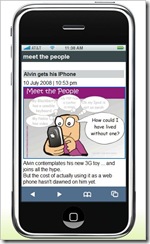
No I haven't succumbed to all the hype, but I have researched how you make your blog more mobile friendly, one way is to use google reader, but the reader has to do that. A much nicer way for bloggers is to use mofuse, its a kind of mobile friendly wrapping that drops the side bars and other cyber noise and bandwidth consumers. The result is a the basic post with enough navigation via number key shortcuts to make browsing from the phone nice and easy. Best of all the thumbnails of the posted images are nice and legiable. The phone bill will thank you.

PS: In a shameless bit of network cross promotion that show off Alvin wants to bore you with his new IPhone.
 I'm sure, like me, if you are on-line and in Australia you will have been the unwilling recipient of an avalanche of hype, (ie expensive spam) about the release of the 3G iphone here . And if you can't wait till friday, apparently optus will start selling phones on midnight thursday (ok it is technically friday but much earlier).

The technology of QRcodes is being hyped for advertising and marketing , (and making money for telstra). Yet it has wide application, there is a Mobile Barcode Add On for firefox, that lets you get a QRcode on the fly on your screen from any website you visit. Also google has a neat QR code generator, part of google chart api, that lets a developer generate the code from within the HTML on a webpage. There are also plenty of standalone applets such as barshow. The use of the codes are definitely not limited to the web. Infact it is better if they are on physical objects, not just billboard. They can even be merged with photos and still work (as above).
You don't even have to use them for connection to a web, they could just be a copyright notice that you embedded in your photos as a graphic watermark. You might need to experiment with this because the code will need to be large enough to be readable, but small enough to not be obtrusive.
 If japan is anything to go on the biggest applications might be for self promotion, of blogs and as a trendy but very personnel fashion statement. There are a any number of free web sites that can help you create your own codes. My favourite, at the moment, is Nokia (by default it creates a datamatrix code, so you will need to change the code to QR code towards the bottom on the leftside of the screen). Here a few of the better ones Nigma, Kaywa(has options for generating different sized codes), Lunaqr (which includes Vcards), Viooli (which can generates coloured codes), Moji-Q (really neat coloured codes as gif image with a translucent background), Winksite, Snapmaze (has the added bonus of being able to automatically generate your code on a custom t-shirt from zazzle), neoreader (which can reader a variety of codes, but the site only generate datamatrix codes) and finally billed as the cutest generator on the net xns.co.js which uses and army of little "code bots" to build the code while you watch (instructions are in Japanese but I'm sure you can work it out)
 Two photos joined with the windows live gallery panorama tool. Yes they don't line up but I like that.
For photofriday's topic spiral

I am finding all the hype by telstra about "their" QRious codes just a bit hard to stomach. I like the idea of these QR codes and have posted about them last year. Despite what telecom implies they are very late adopters of the technology, not creators of it. You don't even hav e to buy a new phone (or sign up for an outrageous contract). Ok these new 3G phones will have QR reader built in, but if your phone has a camera and web access you probably are ready to go. You just need to download some software. If you are with Telstra, and are happy with them you can type in the tediously long www.mobius.telstra.com.au on your phone's web browser and if your phone model fits there current limitations, it will be delivered to your phone. Alternative there are free sites that provide generic downloadable readers, like i-nigma & Kaywa. [Also Quickmark, see deans collin's comments on this blog, he obviously has an interest in marketing qr codes.]
One final item you should consider is reviewing/including a mobile data plan onto your phone to avoid the outrageously high charge that most service providers charge on adhoc data usage, because the websites ,the QR codes connect you to, might put a heavy dataload onto your phone (eg downloading movie previews etc.)
The world of physical hyperlinks, or hardlinking, could totally reform how you use your phone and the web.
Thanks also to wolfcat, a twitter friend, for the heads up on this issue

Don't be surprised if you have been disappointed capturing specific colours with your camera. The truth is that cameras do have different colour sensitivity. Most digital camera use a bayer filter to separate the colours into pixels and this has twice as many green sensors as red and blue sensor in an attempt to mimic the human eyes greater sensitivity to colour and especially greens.
Worse the colour sensitivity changes with the intensity of the light and that is before you even start to worry about the colour temperature of the light source. The set below were taken with 1.50EV braketting of the same subject but in indirect light.


The light meter can also be biassed by the background colour which further complicates the colour sensitivity.


So don't be discouraged check in the viewfinder, change the exposure (or even used bracketing) and try changing the background if you can.


