Thursday, August 28, 2008

Demarcation Dispute

 
This feisty little eurasian coot (Fulica atra, or more commonly water fowl) was giving it to the larger pair of mallard ducks to get out of his/her territory.

Taken during the photographing of several overlapping panoramas for my next photosynth project, if you look carefully you can see the battle progress in the synth.
Posted by Picasa

Friday, August 22, 2008

Photosynth'ing

Microsoft's Live Labs have released a new free photo service called photosynth. It is a photo splicing service with a difference, its uses lots of images with lots of overlap to create a convincing 3D view that you can zoom in and out "smoothly" around pan around the scene. Such facilities are not new to the web many real estate site now use walkthroughs, but this is pretty impressive and you can create your own, without much effort. there are two technologies involved the first is the ability to reconstruct the scene or object from a bunch of flat photographs, and the second independent technology, called seadragon, that allows seamless scrolling through 100 of MB over the Internet.

upload to synth There are two parts to creating your own synths. You must first register at the service, (for which you need a windows live ID) then download a small uploaded application, that not only help you prepare the images and upload them but monitors the splicing process.


There are a few crucial limitations. All syths become public (ie can be viewed by anyone via the internet) but you do have the option of setting the licensing (full copyright or a creative commons) during the upload process. Results can only be viewed on PCs running XP or Vista, which must run the direct-X photosynth add-in for Internet explorer. The 20GB of space seems generous, but you will use this up fast.

upload to synth 2

One downside is the bandwidth required, I have downloaded it, set it up and uploaded my first project using free wifi at an airline lounge that dropped out a few times so I had to be very very patient!

Low bandwidth travel

IMGP5917 Whilst more and more of the world is getting wired to the broadest-band width, the places I often find myself seem to be less connected at slower rates. So here a few more tips and revisions about trying to travel and upload photos & blog.

1) Turn off automatic updates (found under control panel). This avoids a really long delay before you can even get connected.

2) Resize your photos, for blogs and to emails others, your photos only need a lower resolution and considerably smaller file size (eg 600 by 800 pixels is generally plenty) see earlier resizing post

3) Use the no frills methods, the normal flickr web portal for your web browsers is a bandwidth nightmare (I just had a week of hell trying to use flickr in indonesia, usually  waiting 10 minutes plus just to load the log in page! Other times I get a flickr is taking to long to respond message or it crashing out my net connection. You can also access flickr via the mobile portal (http://m.flickr.com/) from any computer and this is a very stripped down version. The biggest trouble for me is this portal does not have access into flickr groups. I also find that the standalone flickr uploader doesn't work on low bandwidth or from internet cafes. If it does work it takes for ever, so I end up using the http://www.flickr.com/photos/upload/ old fashion web page uploader, and patiently waiting.

4) Use offline set up and editing, there are many tools that let you set up blog posts using an off-line editor. I am using Windows Live Writer now to edit this post. Picasa lets you set up local albums of photos n your notebook and then upload them to you web album when you get a good net connection

5) Use email to upload photos. Most services. like Flickr, Photobucket and Blogger all offer email upload facilities. Some do take a while (several hours) before the updates are posted.

Finally another warning about mobile phones and global roaming. Whilst global roaming is handy for phone calls and you can get yahoo mail, gmail and even flickr tools on your mobile phone and these will be able to roam with you but check the cost before you start using them overseas (data roaming charges are normally just straight up daylight robbery).

Page copy protected against web site content infringement by Copyscape

Jakarata Dawn

Posted by Picasa

Wednesday, August 20, 2008

Reflecting Progress

Construction reflected in new building, Sudirman Central Jakrata

Friday, August 15, 2008

Autofocus Problems

An attempt with autofocus

These beautifully camouflaged crabs where all over the beach this morning, and I though they would be easy to photograph with my telephoto lens (with macro feature). Well not exactly easy, because the translucent crab on sand gives little contrast for the autofocus to fix on and the camera was whirring away shifting the lens back and forth aimlessly. It was not until the crab crossed into my footprint that the camera had enough shadow contrast to focus properly.

better focus on footprint

Thursday, August 14, 2008

Tuesday, August 12, 2008

welcome to the heat, humidity and smog

 
This balinesse inspired "gateway" is on the main toll road into Jakarta from the airport. Photographing from a moving car is always a challenge, and I have missed this gate before so I had my camera set on burst (multishoot) mode and managed to get a few reasonable shots but I really wanted things to be a bit sunnier, so maybe another day!
Posted by Picasa

Up close

The orchid garden inside the changai airport terminal singapore

Still in transit at changai, and still on the nature trail, this time at the orchid garden. Most of these are available light, but there is just enough of it (providing I breath out as I press the shutter and have anti-shake turned on). Now it is time to get up close and personal (and switch to macro mode)

available light available light

available light  Had to use the flash for this one

Monday, August 11, 2008

from above

 
There are several interesting nature walks in changai airport. This is a multi-image autostitched panorama of the fern forest from above (and just using available light and no tripod, so some bits are inevitably blurred!) The most interesting part really is the free wifi everywhere here, but you need a mobile phone to get the password to get started, still it works wonderfully
Posted by Picasa

extra wide

 
This wide, (not so brown) land. A 180 degree panorama created with autostitch, & wonderful natural lighting.
Posted by Picasa

Sunday, August 10, 2008

Giving a rainbow the google street view treatment

If you haven't tried it out yet check out google streets within google maps. Unfortunately only a few countries are covered at the moment but (for a change) australia is one with great coverage. But how is it done, whell its a whole lot of photos, several at each location taken simultaneously from a special camera mounted on the roof of a car, which also includes a gps unit to loate the photos. if you look into the link that you can obtain when inside street view you will see the keyword geocode followed by the latitude and longitude, in decimal format and to 6 decimal places.


I'm not sure just how many photos where required for the 360 degree panorama. I have just used a few taken with my mobile phone and stitched them together with autotstitch. I wonder if google streets has captured a rainbow yet?
Of course the challenge is now on to find the "noteworthy" (aka most notorious) street view images, well there vis a good start of things to look for in the google street view gallery.

Saturday, August 02, 2008

Sitemeter problem


This blog suddeny started crashing today, co-incidentally, by the way, just after I sent details of my blog's copy & paste plagiarist as a DCMA notice. However many other bloggers also struck the same problem and it turns out the problem is related to using the free sitemeter counter. On my site I got the error message above followed by a the bare blue on white "Internet Explorer cannot display webpage" error message, but I gather some others have experienced their browser crashing. I have temporarily removed the offending sitemeter code and set up the simpler easy counter version, just to keep tabs (until the site meter issue is fixed). Bizarely I figured out this problem after I recieved my weekly notice from sitemeter summarizing traffic and tried their site and recievd tha same error. So they may be sending out reports unaware of the havoc going on in the blogsphere.

Sorry to any regular readers that may have been distressed by their browser crashing.

Page copy protected against web site content infringement by Copyscape

LATE NEWS :: Sitemeter is back online (3rd. August)

Thursday, July 31, 2008

Big landscapes


Both images of Jell's Park lake are multi-photo panoramics stiched together with autostich. Note the exposure "banding" because I had the camera on automatic (which meant the light meter re-choose the exposure for each photo). I haven't figured out a simple way to post process this out. Setting the camera to use the same exposure across all the photos in the set is of course the preferred approach. However sometimes you are more intent on framing and just pressing the button, I'm sure you know what I mean!
Posted by Picasa

Wednesday, July 30, 2008

A good online read

There are lots of digital "community" sites all over the net, too many to mention, little lone review. However I reckon the PhotographyBB  site may be worth a visit. Whilst they are Canadian based this month downloadable online magazine features some great images of the Australian Outback. The magazines alone are worth investigating and there is plenty of other stuff with of course ads as well (someone needs to support all the work). Unlike many other digital camera review sites they openly provide links in their news sections to manufacturers and distributors press releases, they do not cut & paste this advertorial copy and pretend it is their own.


Thanks to scuba_margie a fellow Australian Photographer!!! on flickr for this link.

Tuesday, July 29, 2008

A lesson in Theft versus Sharing

You may have, or may not have, notice the little CC logo on the right hand side bar, it is a creative common "license" and it has very specific conditions (you can click on the logo below to see the conditions). I have choosen to use the creative commons approach because I believe that grown up people should share ideas and not get bogged down in legalistic conditions that end up only benefiting the managers & agents, not the artists. The internet and its various sites and communities are a wonderful way to display your work and share your knowledge for the greater good. But the interweb utopia is being spoilt.

I think those that blindly cut and paste blog posts (even with a link back to my site, to fullfil the attribution aspect of CC) and use that as content to draw users and get "click through" revenue are just being lazy. It is plagarism pure and simple. At best they are not contributing anything, just wasting bandwidth and everyone's time, at worst they are yet another examples of the rot that is setting in as people try to monetize Web 2.0 (I am starting to translate that particular phrase into sucking the blood out of the true content providers). If you realized you have arrive here after seeing my work in such a site, please understand that you should stop viewing that website and definetly remove any RSS subscription to it.

To find copy & paste plagiarist is not that hard you can type in a characteristic phrase from your blog (especially one that may have contained an unfortunate spelling mistake or typo) to your favourite search engine, or use a service like copyscape (is free)

Page copy protected against web site content infringement by Copyscape
PS:: Mr Daniel Mendes (with the made up address and probably name as well). CEASE & DESIST :: YOU ARE SPECIFICALLY FORBIDDEN FROM EVER COPYING ANY OF MY WORK AGAIN.


Creative Commons License

Wandering in the Light by
Norm Hanson is licensed under a
Creative Commons Attribution-Noncommercial-No Derivative Works 2.5 Australia License.

The really dissapointing part of all this is in the fine print, and how much support google are going to provide. Oh that's right they are paying the plagiarists for doing it!

Monday, July 28, 2008

You can't help it

It is just natural that when you are photographing something to set the subject slap-bang in the middle of the picture. The problem is that this will make for a bland, dull, predictable results, the same sort of snap everyone else takes. I have eluded to the importance of composition as the big differentiator of interestingness in photographs. So here are a couple of  "tricks" that can help make your photos look professional.

Offset the Center of Interest
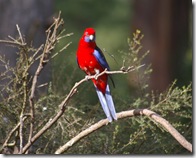
 Standard ShotMore Dynamic Composition?

This should produce a more dynamic composition instantly. Placing the horizon in a landscape can be a classic example of this. Having the horizon close to the centre divides the image into two balanced parts, albeit a bit static.
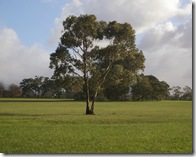
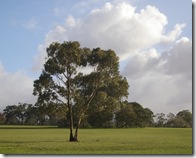
Standard`Shotlower horizon lifts interest?

The Rule of Thirds

This rule is often presented as gospel and trotted out as the main composition guide in many beginners guide to photography. All you need to do is imagine that the photo is divided into 9 equal panels, by division into thirds horizontally and vertically. Then Placing the subject at the intersections of one of the vertical and horizontal lines.
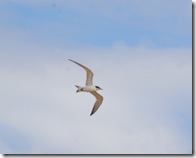
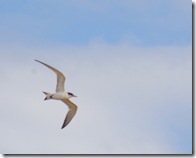
Standard ShotApplying the rule of thirds & cropping

Don't stress this a good guide but not a rigid rule!

Move in closer
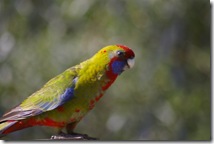
Standard ShotZoomed in closer & cropped

Filling the frame, even at the expense of trimming off some parts of the subject, is a simple way to generate more impact. Sometimes this may mean moving closer, zooming or swapping to a telephoto lens. But be careful in close ups you must remember about depth of field (focus) can be very limited.

So next time as well as taking your standard shots be brave a n experiment with the composition in the view finder, you will be surprised how it will bring variety and interest to your photos.


Page copy protected against web site content infringement by Copyscape

Sunday, July 27, 2008

The blue eyed Kookaburra

I was to say the least surprised by the strong blue eye colour of this IMGP4426Kookabuarra. It only shows in some photos so I assume it is a retinal reflection in a particular direction (like some dogs eye reflect green or yellow in certain lights). Maybe there will eventually be a market for blue eye removal/reduction filters for bird photographers.

IMGP4419IMGP4438