Some recent growth in my cretaceous garden
For PhotoFriday topic: growth


Small Warning: Zooming and panning satellite photos can involves serious amounts of data downloading, so check your phone contract before you start and get too enthusiastic, to make sure it is not too expensive!


 One of the very best "enhancement" technique for a new digital photopgrapher(and experienced ones, and film photographer as well) is the simple method of trimming out unnecessary parts of the image, a technique know as cropping.
 Finally a work of warning, remember the size pou want to print, and crop to this size. Good software these days will autoresize your selection box to match that aspect ratio. If there are strong artistic/composition reasons, to go to other sizes remember you will probably have to it print larger and use the scissors on the print
 ell it is really easy on a PC running microsoft XP, and I expect as easy using Vista. Just plug your memory card into a card reader or plug in the USB connector and you will see an autoplay dialog box spring into view.
 I like to scroll down a bit and use the open in explorer option, its the little open folder icon. This the opens the access to you card as if it where a folder on your hard drive. Normally you will see a DCIM Folder (which stands for Digital Camera IMages), I also label my cards with a "read.me" file. When you click on this folder it will open to show a second folder with an abbreviated name of your camera name model. Clicking on this will take you down into a folder view of your images.
 As soon as you select one of more of the images you will see the File and Folder Task menu on left hand panel. From here you can do a lot, but I prefer to move the images to a special "new camera downloads" folder I have made under the standard My Pictures folde XP creates. I have even change the icon on the folder to a camera. I like to stored my images by date so each new day I create a new folder as I do the upload. WARNING: some folk recommend you only copy images from your card, because cards can occasionally malfunction, and then only when you have them safely backed up, or printed, should you delete them from the card. Myself I think moving them is fine and its cleans the card in one step

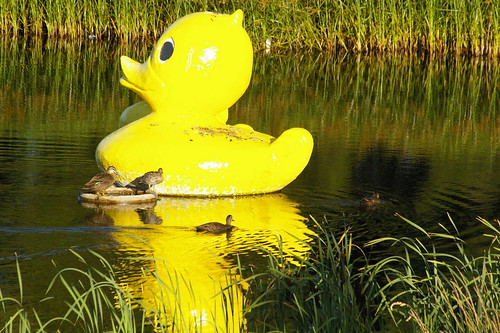
Not sure why I overlooked posting this photo when I took it. Its one of those warn fuzzy feeling photos. The big yellow duck is actually a public sculpture on show for the monash gallery of art. What I liked is the juxapositon with the real ducks, which don't seem very overwhelmed by their over sized cousin.
The panorama gives you a better view of the gallery and lake, a great setting for public art.