This shot of a Crimson Rosella [Platycercus elegans] was used for my one of my PhotoImpressions of Parrots on Redbubble
For PhotoFriday's topic Crimson


These are also available as screen wallpapers, from my free to download flickr screen wallpaper set.
 With all the whoha! about the purchase of instagram by Facebook, you might get the impression that it is the only photo sharing option for mobile phones. That is not true there are plenty other and many of them give you even more features & options. Instagram is however clearly popular, and especially so on iPhones (there is an android version, see grey
 button here). The beauty of the system is its simplicity, once you have taken your photo you choose and “filters” to modify it (rather than having to learn new editing tools, you scroll across a set of pictures,with strange names, and pick the images that looks like the edit you want to do), you can add a caption and then finally you “share it”, either by email or to one of Twitter, Flickr or Facebook.
Maybe I’m wanting to be too creative but unlike flickr (which still shows heaps of originality and clever use of photographic methods). the instagram site is very much a “me-too” copy copy place where everything looks the same and the fashion for the latest look and filter last just a day or so. I did download Instagram and tested it out but soon removed it to make room for different photo apps on my wildfire, which isn’t over endowed with spare memory.. Obviously a lot of people want to be part of the hottest newest thing, but please don’t stop there. Here are a few more web & phone apps that might just make you mobile phone photos just as nice or even nicer and be equally as simple to use as instagram.
 The best place to start , now that there is no longer any place to Picnik. is Aviary. Aviary is well established as a series of web base photo editing tools. Its big power is that Aviary editors are embeddable, and can be added to any website or mobile app with just a few lines of code. Flickr have switched their popular picnic action over to Aviary without a hitch. Its auto Enhance filter is truely amazing and will add punch to almost any mobile phone snap. It also supports facebook uploads and direct edits. The downside is there is currently no instagram like app to download to your phone, but plenty of other apps have aviary editing functionality already, expect more.

If you want to play on the more fun and perhaps cheesy side then have a look at these.

These last couple of apps actually do the special effect “live” so you can see the effect on the screen before you create the final effect when you press the shutter.


This is actually a photo taken looking directly into harsh very contrasty light at the entrance to this cave. BUT it does look like lovely filtered soft light.For PhotoFriday :: Topic soft light

 Google are closing Picnik on April 19, 2012 (very soon). If you use Picasa, Photobucket, Facebook or Flickr the chances are you have used and come to love Picnik. Google have in fact used many of the features of picnik in google+ photo creative kit but the users of the other packages might really miss picnic.
 Flickr has at least indicated they are working on an alternative, but I haven’t noticed an official notification of that yet.
For those looking for an alternative now, have a look at Aviary. It may not be as well integrated as picnik was but it does have a very comprehensive range of photo editing features available as standalone on PCs, web and mobile apps.
If you have photos still in a picnik account you can use the picnik takeout feature to download them to your computer (in a zip file).
 I must admit I have only just had a look at the on-line Windows 8 Consumer Review, but the one feature that did strike me as something they have finally got right is the integration of Skydrive. Right now you need to get to SkyDrive via Windows Live Gallery (if you don’t have it it can be downloaded for free from here) or use the Web based access via Hotmail/Windows Live Messenger. The windows Live Gallery is fine for photos and give you a web Album, but you have to remember and manage the two locations. The integration in Windows 8 appears to make the issue of weather you have the file on your computer or in the cloud irrelevant, their slogan is your windows, everywhere.
 The other area that may be of most interest to photographers will be what apps are available, I expect there to be a great rush of Photocentric apps developed by third party, probably a lot more or the same as those currently available for the android or Iphone/Ipad. So do you really want to want to run something that runs on your phone on your PC as well? Probably yes because you really need more screen real estate to get the most out of most photo applications. Also a few apps might give you all the photo processing you want and needed and this will be much cheaper than a blotted photo/image software package that costs the earth and takes for ever to learn how to use.
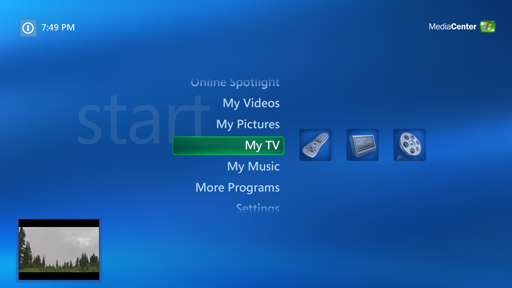 The interface, based on the Metro design language, looks a lot more tablet or touchscreen oriented than I expected and yet disturbingly familiar! Then I realised I had seen it before, its exactly like the XP version of Windows Media Center, which I actually still like and use because I can work it from the couch via a remote. I have an older PC connect to my wide flat screen TV and it is perfect to show family and friends Slide shows and home movie.
 The problem is acknowledgement and linking back to the original Intellectual Property creator/owner, Creative Commons is a nice framework to handle this on the internet but so few social network tools (including google+) even display the creative common licence or the linking tools provide the name/URL of the source (flickr is the one exception I can think of at the moment). I don’t mind is my work if reposted by other I just want some acknowledgement and I don’t want them to make a direct profit by selling my work so I mainly use the CC BY ND licence. However it is beginning to looking a bit depressing.The current reality is, if you post on a social network, you must expect your work to be taken. Sigh!
The net is a wide open place these days and there are millions on millions of places to look. So just keeping your eyes open when you surf the net may yield very little success. The better strategy at the moment is to use a reverse image search tools. Luckily there are already two decent free and easy to use ones available. I didn’t bother to investigate the expanding number “ransomware” applications, (ie ones that promise the world, charge you a lot and probably just secretly use one of the options below).If Google Images is a hand grenade, TinEye is a sniper rifle.
 Google Images, has been offering a reverse image search since June last year. Not too many folk realised this. All you have to do is drag an image onto the google image search box or paste the URL of a location you have posted your image and the search works exactly as you expected it present you with a matrix of near matching images. Unfortunately they may not be very exact matches and you might still have to do a fair bit of manual looking around but it is a great start.
 TinEye is another free service that specifically addresses finding like images, using its own pixel based fingerprinting techniques to scan through its own databases (which are extensive and growing but way short of complete) of fingerprints obtained by crawling the web for images. This doesn’t guarantee your searches will find dark corners of the web or even well lit (popular) ones but it will find close matches and slightly modified versions (including adding text and overwriting visible watermarks). You can help TinEye to keep a watch on your images by submitting an application (its a XML sitemap of images, so a fair bit of Web tech savvy is required) for TinEye’s robots to crawl your site, but priority is given to legitimate stock photo collections and images carrying a clear creative commons licence.
As the wired post suggests these service are also very useful to locate the original source of an image so it can be correctly reposted with acknowledgement. Thus potentially avoiding a litigious band of lawyers trying to sue the pants off you, sending you nasty and threatening letters when a polite cease and desist was all that was necessary.I must admit I was a little shocked that one of my images was being used by a hacker’s collective. However they did remove my image when I asked nicely. Another of my images appears in over 300 locations, most that I checked not acknowledging I was the creator. Sigh!
Several long strings of Ibis flew in at sunset and settled noisily in a set of Monterey Pines. Its been a few years since I have witness the Ibis in such numbers, perhaps they know El Nina is about to fade away.
I would like to explain to them, they would be much easier to photograph if the flew in about 20 minutes earlier.


 One of the hotter social network topics at the moment is Lytro, which is a camera that takes in a lot more information than what we now call a photo. I like the concept and think there is enormous potential in the approach and the technology but I do share trey ratcliff’s google+ opinion post that the user click to focus feature is just a little banal and twee.

 If you want to play with the click to focus feature have a look at the light field picture of the spider above some autumn leaves, on the Lytro photo gallery. Just click on the part of the picture you want to see in focus. It is pretty amazing.