Friday, April 30, 2010

Back in the Aviary

I have been using the toucan colour editor in aviary lately, to help select harmonious colour schemes in my photo impressions. It have a variety of nice features that I assume are primarily there at the request of web developers. However what I want to write about here is the rapid expansion of capabilties and connections aviary now offers. If you have broadband connection (I would not recommend using it, or any other graphic heavy application on a slow or flacky connection) you may find to can get a photo filtered, cropped and published to the web quickly and easily, probably in less time that it takes Photoshop or Corel Draw to open on your PC. It seems particular popular with those using Facebook & Flickr, being able to read and edit images on those services as well as publishing to them. It also offers a number of ways to share and publish images in the web and a good selection of social networks. You can use your existing twitter, facebook, google or Yahoo accounts to login if you don’t wish to join. Best part its still free.

image

Their byline says it all -

Aviary is a free, powerful suite of browser-based design tools for people who love to create.

The best way to keep up with their developments is to have a look around their blog.

Tuesday, April 27, 2010

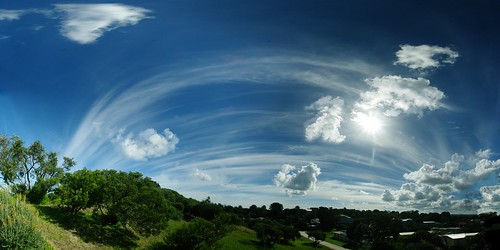
Extreme Sunshine Pano

Extreme Sunshine Panorama

For Photo Friday's topic sunshine

This is a preety extreeme multi-photo autostitched panorama. Covering a view from south to north (looking west) and the horizon to straight above.

Monday, April 26, 2010

Wednesday, April 21, 2010

My Photo Impression Methodology

I have been creating a type of Photo mosaic, I call them Photo Impression, for several years now yet I find it is the thing I end up re-explaining most. I’m not trying to keep the method a secret or mystify it but it is considerable more complex than “using photoshop with a background texture”. In fact I like the way collage, mosaic and Photomontage can extend a subject, there is a lot more that digital photography can offer than just photoshop trickery. Quiet a few notable artists like Dali, Chuck Close, Andy Warhol & David Hockney have been investigating parts of this process before me.

image 

There are three main steps I undertake. They map nicely into painting steps and terms. The initial tonal map is like a sketch where I am investigating the tone, balance and composition. I prefer to work monochrome here. Next is the paint stage, where I analyse the colour in the original image looking at colour contrasts, compliments and harmonies. I like to restrict the number of colours, much like the impressionist painters, as it gives a more powerful results with potentially a stronger emotional connection for the viewer. At this stage I select existing photos or make computer generated patterns or even take new photo to build a small library or images that form my palette of tile. Next I get to choose the brushes to make my marks, only these are the patterns and shapes of the small sub-tiles which make up the final image.The shape, size and type of pattern repeated in the images develop the texture that allow me to bring a delicious additional depth into the works.

I do use computer software, mosaic creator, to build the final image and this can take several hours, frequently requiring over night runs. The preliminary stages are sometimes done on the computer sometimes manually and usually take weeks to months of contemplation. 

Friday, April 16, 2010

Green Glow in the West

IMGP2851Tonight was overcast with a little drizzle at Venus Bay but around 8:25pm there was a strange phenomenon . An eerie green glow started in the west. It grew brighter till about 8:30pm, then gradually faded till around 9:00pm. The moon had set at sunset so I can’t easily explain the source of the light.

IMGP2853

Tuesday, April 13, 2010

Retracing Darwin

My Exhibition of Photos, Painting and Rock Art is coming up this weekend.


Opening 2:00PM
Sunday April 18th
Gecko Studio Gallery
15 Falls Road, Fish Creek
South Gippsland

To commemorate the 150th anniversary of the publication of Charles Darwin’s The Origin Of Species, Norm Hanson followed the trip Darwin undertook in 1836 from Sydney to Bathurst through the Blue Mountains. This exhibition of Photography, Paintings and Rock Art is inspired by what Darwin saw.

The Exhibition runs from April 18th to May 15th, 2010.

Sunday, April 11, 2010

An Overcast Panorama


I have been experimenting with Microsoft's ICE image stitcher and in particular its projection feature. The perspective mode does give a convincing 3D panprama effect, albeit with a very distorted image edge.

For PhotoFriday topic overcast
Posted by Picasa

Saturday, April 10, 2010

Travelling Stuff

To say I travel a lot, is an understatement! I am well over the implied romance of flying and I particularly zone out through the airport ordeal. With security now beefed up it is time to slim down the stuff inside my camera bag, which I always hand carry on flights. I haven’t got enough trust established to let anything breakable go into checked in baggage. I also always hand carry my laptop computer. None of this seems to come under special scrutiny from the Security X-ray team.
IMGP1582
So what to I like to carry?  As little as possible. Extra memory cards, SD cards are getting cheaper and are the best way to give yourself extra capacity. Don’t be afraid to buy extra cards along the way (but they will be overpriced in those duty free shops). Next I have a simple USB memory card reader. I have an SD card reader built into my laptop, but not many cyber cafes do. I can also easily transfer stuff to clients computers via this card reader. This has saved my bacon many times. Next I have my phone and a cable to connect it to my computer, and still use it occasionally as a GPRS modem (this is painfully slow but works reliably). I also have a Next-G modem (not shown, because it lives with my laptop) with which I have a love/hate relationship (its broadband and fast but annoyingly flaky).
The gem in this collection is the USB key. It is loaded with camera friendly Portable Apps, an open source open platform that allows programs to be run from a USB key, without requiring anything in the registry or to be installed on the host computer. Here are a collection of utilities I like to travel with and have used a lot.
  • Autostitch (*), my favorite panorama stitching program.
  • Cornice Portable, is an image viewer has thumbnail previews, full screen modes, rotation, slideshow modes and EXIF support.
  • Exif Reader (*), is a small freeware utility that extracts image information from EXIF/JPG files.
  • JpegView Portable, is still an unsupported test version, is a small and fast on the fly viewer/editor.
  • GIMP Portable, is the popular open source image editor packaged. Has lots of features but comes with a longer learning curve. It has a massive fan base and good on-line Tutorials & Forums.
  • Mosaic Creator (*), this is a wonderful collection of photo mosaic tools. I use this for my photo impressions.
  • Noiseware (*), is a really good digital/heat noise remover.
  • Photormin, a really simple image editor for fast resizing, basic retouching, and cropping. Probably I will replace this with JpegView before long, but still like its speed.
  • Picturenaut (*), if you don't have version 3.0 download it now, this a very easy to use HDRi tool and does a beautiful job without lots of tweaking. 
  • XnViewPortable, to be honest I’d rather used picasa, but in a pinch this is a very competent photo simple editor/ photo  manager/ viewer/ converter that can even be used in a cyber cafes. There is a decent community of  XnView fans out there and the on-line forum is a great place to get assistance.
(*) These are not a specific Portable Apps versions just the freeware/ shareware /demo versions that runs perfectly from the USB key. To install them on the USB Key simple copy the installed software directory into the PortableApps directory on the USB key.

A new acquisition to the kit bagIMGP2825 is a Sony Walkman Series B USB MP3 player. It is the size of a normal USB key but it is primarily an MP3 audio player, but unlike my IPod nano it receives FM radio and it is a one button to press Voice recorder. My Olympus software bundled with my older CX4000 incorporated support for sound commentary on each photo and at the time I though what a waste of space. Now I’m changing my mind, I have found having an easy to use dictaphone that can hang around your neck is very useful when your hands are full of camera. Music & Podcasts sound pretty good on it as well. I also now have all my camera manuals stored on it.  Something indespensiable when you are out the back of nowhere. It is labbelled 2GB but I have found there is only about 1.7GB of usable space left for other things. Still that is plenty of space for all sorts of stuff not only music, and I prefer to keep it only half full incase I have a lot to say. One downside is that Photo Kiosks don’t seem to be able to read it. So I don’t recomend it as your only transfer key or for the PortableApps.
Protected by Copyscape DMCA Takedown Notice Violation Search

Wednesday, April 07, 2010

Behind iPad Hype, a photographer’s view

The internet and particularly its blogs and podcasts are  currently full of the buzz of discussions and speculation about the iPad. It has been release now ín the USA (not Australia yet) and the best I can judge is the most common assessment is.  it’s fast. Ok! Is it useful? Will it dominate in some way that makes it the next big thing? Well the next most common comment is that’s it’s a big version of the iPod touch. Ok! That’s good for a lot of people especially those with fading eyesight, but hardly earth shattering.  It’s supposed to be a Kindle killer, What the heck does that mean?

What about the iPad’s usefulness for Photographers?

Already I know the iPad doesn’t have a camera.
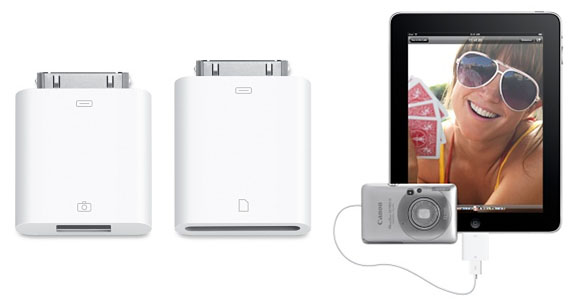
Can you easily transfer photos from your camera to the iPad? Probably not easily, but it should be possible with new cables, yet to  be released adaptors or even the eye.fi card (this won't work see coments). There is an camera connector kit due to be offered by Apple in late April, which will be two little adaptors, a USB connectors (assuming your camera has a USB cable) and a SD Card reader(assuming your camera uses them).
Can you use the iPad to do some post processing in the field? At present you are really limited to iPhone and iTouch applications and the screen on those devices was too small to allow any really sophisticated processing so there is really isn’t anything much (eg Photoshop.com mobile) Maybe with the iPad there may be a version of Photoshop, Picasa or Lightroom cut down to be an iPad app. Perhaps Picnik or Aviary will be the first. This is all very promising but still mostly vapourware. However, there is already an official flickr iPad app in the iTunes store (its free to download). Another good field app might be the  marrying of GPS data such as a wayfile (the iPad doesn’t have a built in GPS either) from perhaps a blue tooth connected GPS and photos using their EXIF time stamp to “automatically” geotag the photos. Stop the vapours are suffocating!
Could you use the iPad as an extended Viewfinder?
This is a neat idea, and is probably technically feasible but may need some extra hardware/cables/bluetooth device? Ok its more vapourware!
Can the iPad be used as a backup device?
It will fit neatly enough into a camera backpack. The first version is 64 GB, which is a fair bit of memory but you would need some of that for your other apps. Again Ok that’s not a lot given the price of an iPad, and maybe not enough given the size of images now captured on some camera. But being realistic 64GB of SD cards will be less that a quarter the cost of an iPad, you just can not look at the photos on the SD cards themselves.
Is the iPad a good presentation device?
This is where it scores really well, It is ideal to run simple presentations (slide shows) and show off gorgeous photographic ebooks. This is a medium I expect to become very popular soon. However remember the presentation and the ebook will probably be generated on separate a computer with more capable software (and a mouse and keyboard)

So my conclusion, don’t necessarily be swayed by the calls of magic and wonderment, it may take a while for the IPad to become an indispensible tool for a photographer.
Protected by Copyscape DMCA Takedown Notice Violation Search

Sunday, April 04, 2010

Seal enclosure

 
Viewers in the new seal enclosure at the Melbourne Zoo. Who is behind the glass?
Posted by Picasa

Thursday, April 01, 2010

Darwin In Australia according to Robin Williams

Last night our PM waffled on about offence at Robin William’s comment that Australians are basically English Red Necks, and failed in an attempt at humour himself suggesting Robin should visit Alabama. All Americans know all to well about red necks, no visit to Alabama is required. What probably annoyed our PM was a reference later in the interview, I’ll let you find that yourself. In the context of the interview with David Letterman Robin’'s comments were actually funny (see full interview You Tube video below) although so many of the notations are just wrong (flying snakes, scrums in aussie rules etc). The more interesting part is Robin’s take on Australian Animals and Darwin (it starts at the 4:10 minute mark)

Well Charles Darwin did actually visit Australia. If only Robin knew that it was on the exact same day he helped shoot a platypus and watched a conical sand trap created by an ant on a sunny river bank. He noted these strange animals were so different to English fauna yet they behaved and filled a familiar ecological niche.  He wrote in his notebook -

"Two distinct Creators must have been at work; their object, however, has been the same, and certainly the end in each case is complete."

Several scholars believe this is the first time he commits to paper his growing beliefs that are moving away from belief in a single creator (strict biblical interpretation) and the Immutability of species (the jargon of the day for all species where created at the same time and are permanently the same).

I know all this because I have been researching and have retraced Darwin trip from Sydney Bathurst in 1836. I am having an exhibition of photographs and painting at the Gecko Gallery in Fish Creek from April 18th to 15th May, inspired by what Darwin saw.

Wednesday, March 31, 2010

Nice ICE, but is it nice enough

I heard Paul Thurrott, in his Windows Weekly podcast, recommend Microsoft Research’s ICE Image Composite Editor. Sounded like I should try it out again.

image ICE is very easy to use. There is only one main item on the pull down menu, File. With all its sub-function functions having their own little dialogues also displayed under the photo workspace as well. It just as simple one two three working your way across the bottom

My first attemptsimage created a curved horizon. This happens in many panorama stichers when you don’t have the rotation horizontal and centered on the horizon as well. There are some neat projection settings and adjustments, including a great perspective projection. I do have a couple of worries. The Automatic Exposureimage Blend doesn’t seem to always work (see example) and I was left with a number of poor stitch offsets lines, and some unfortunate ghosting in some areas of overlap. This set of photos was take handheld in a strong wind (not on a tripod) and it was on automatic (so camera was changing the exposure was each photo). Even with those limits compare the ICE results with those obtained with Autimageostitch. ICE will only stitch a single sweep of photos. However it does let you create massive files (with all the detail available.  So My conclusion is it is great for really larger single sweep panoramas but you must use a tripod and constant exposure settings.

Having being a bit harsh up till now, I think the Photosythn export is pretty amazing and should get a lot of folks excited. It is slow but the results are worth it. See for yourself below

You will probably need to upgrade your photosythn and install HD view browser addons to get the full benefit of ICE. Both are free to download. Again MAC users look away, nothing for you here.

Tuesday, March 30, 2010

White Balance

White balance is one of those items well down in the setup menu and in an even more obscure corner of the manual. Few digital photographers have probably even given the setting a second thought.

In simple terms white balance is an adjustment to the colour of an image so that white objects appear white. In older cameras there where a few setting option

  • Shade, when subject mainly in shade , it reduces bluish tones of the photo
  • Cloudy, for cloudy days
  • Fluorescent Light
  • Artificial Light, (Tungsten light)

More recently cameras will have -

  • Flash, when using the built in flash
  • Daylight, for taking photos in strong direct daylight
  • AWB (Auto White balance), the camera tries to automatically adjust the white balance. This is the softest default setting to leave your camera on

Higher end cameras may even have setting like -

  • Manual
  • Fine Tuning, the basic settings like shade
  • K (colour temperature)

But don’t panic about always getting imagethe perfect setting. The colour temperature of your photo can always be adjusted as a post process. The Tuning tab in Picasa has a neutral Colour picker, which lets you select a neutral gray or white part of your photo to remove any colour cast. Alternatively the little light blub beside this is a one click  fix for colour. Most advanced packages will have a similar tool.

Sunday, March 28, 2010

Good advice from the wildlife experts


Those who have followed the random wanderings of this blog should have noticed by now that I have found birds in flight a great subject for my photography. Early on I was told it was too hard for digital photography but I think that just made more determined to work out how to do it. Working it out yourself, about panning, setting focus & exposure manually before hand and whole raft of strategies to capture the fleeting moment, and the dozens of not so magic images, can be fun and informative, albeit tedious as well. So being able to get expert advice is also a sound way to expand your photographic techniques. The BBC’s wildlife magazine has published a series of materclasses in wildlife photography on the net, (for free download). Even one with great advice on getting outstanding photos of birds in flight.

Thursday, March 25, 2010

Head in the clouds

HDRi Cloud Series-1

picturenaut 01picturenaut 02I have still been playing around with HDRi and tone mapping as a way to extended the dynamic range that can be captured very realistic photos, without the process verging on the surreal. I have also recently been using my updated Picturenaut 3 and using 5 photos in ±1 EV Steps. This time I was investigating what could be achieved with interesting cloud effects. Individual photos just didn’t capture the full “depth” of the whips of clouds in the intense afternoon deep blue sky. Rather that trying to force the tone mapping into over the top visual effects, i just wanted to retain the underlying colour of the sky and fluff up the whiteness of the cloud but reserving detail. I was pleased with the result, and like any good clouds I can see many interesting things hiding with the shapes, a superhero, a monster or is it a phoenix?clouds hdri

Monday, March 22, 2010

Sometimes the Photoshop Crop Tool is all you need?

You’ve probably already seen this photo photo with the caption "no, I did not photoshop this" but gizmodo, the bible for those with the must have shiny toys, give proof that it was photoshoped. Which brings me to the point that the easiest way to improve your digital photos is via cropping and you don’t need expensive photo editing software, like photoshop, to be able to achieve that.

Picasa from google is free to download, and works on both windows & apple mac, has an easy to use and nicely visual crop tools. So does Windows Live Photogallery and  gimp. So no need to fork out a small fortune to start improving your photos.

There are also now many on-line photo editors,like Picnik, which is available to edit within flickr & facebook. A new kid on the block is Aviary, which is written in flash and thus a little slower. The cropping is part of the Phoenix image editor. However it is an amazing full featured suite for a free on-line tool. So go get creative.